1. Вовед
This manual provides essential information for the safe and efficient operation of your GIGABYTE AORUS FO48U 48" 4K OLED Gaming Monitor. Please read this manual thoroughly before using the product and retain it for future reference. The AORUS FO48U is designed to deliver a high-performance visual experience with its 4K OLED display, fast refresh rate, and advanced features.
2. Информации за безбедност
Следете ги следниве безбедносни мерки за да спречите оштетување на мониторот и да ја обезбедите безбедноста на корисникот:
- Не го изложувајте мониторот на дожд или влага за да избегнете опасност од пожар или струен удар.
- Не го отворајте мониторот casing. Внатре нема делови што може да ги сервисира корисникот. За секое сервисирање обратете се кај квалификуван персонал.
- Поставете го мониторот на стабилна, рамна површина за да спречите паѓање.
- Обезбедете соодветна вентилација околу мониторот. Не ги блокирајте отворите за вентилација.
- Use only the power adapter and cables provided or specified by the manufacturer.
- Исклучете го мониторот од штекерот за време на грмотевици или кога не се користи подолг период.
- Избегнувајте допирање на екранот со остри предмети за да спречите оштетување.
3. Содржина на пакетот
Проверете дали сите артикли наведени подолу се вклучени во вашиот пакет:
- GIGABYTE AORUS FO48U 48" 4K OLED Gaming Monitor
- Кабел за напојување
- HDMI 2.1 кабел
- DP 1.4 кабел
- USB 3.0 B to A cable
- Водич за брз почеток (QSG)
- Гарантна картичка
- AORUS Remote Control
4. Поставување
4.1 Физичко поставување
The monitor can be set up using its included stand or a VESA-compatible wall mount.
Собрание на штанд:
Follow the instructions in the Quick Start Guide to securely attach the stand to the monitor base. Ensure all screws are tightened.
VESA инсталација на ѕиден држач:
The AORUS FO48U supports VESA wall mounts with a 300 x 300mm pattern. Remove the stand if already attached. Use appropriate screws and a VESA-compatible bracket (not included) to mount the monitor. Refer to your wall mount's instructions for specific installation steps.

Слика: Заден дел view of the AORUS FO48U monitor, highlighting the VESA 300x300mm mounting points for wall installation.
4.2 Кабли за поврзување
Connect the necessary cables to the monitor's I/O ports. Ensure the monitor is powered off before connecting or disconnecting cables.

Image: Detailed side view of the monitor's I/O ports, including USB 3.0, USB Upstream, USB Type-C (KVM), DisplayPort 1.4, HDMI 2.1, Headphone Jack, and Audio Line-Out.
- Поврзување за напојување: Поврзете го кабелот за напојување со приклучокот за напојување на мониторот, а потоа со штекерот.
- Видео влез: Connect your PC or gaming console using either the provided HDMI 2.1 cable or DisplayPort 1.4 cable. The monitor features two HDMI 2.1 ports and one DisplayPort 1.4.
- USB конекции: Connect the USB 3.0 B to A cable from your PC to the monitor's USB Upstream port to enable the monitor's USB 3.0 ports and KVM functionality.
- USB Type-C (KVM): For KVM functionality, connect a USB Type-C cable (10Gbps Type-C cable required, not always included) from your device to the monitor's USB Type-C port. This allows control of multiple devices with a single keyboard and mouse connected to the monitor.
- Аудио излез: Use the Headphone Jack or Audio Line-Out for external audio devices.
4.3 Почетно вклучување
After connecting all necessary cables, press the power button on the monitor to turn it on. The monitor will automatically detect the active input source. If no signal is detected, ensure your source device is powered on and correctly connected.
5. Упатства за работа
5.1 Навигација на екранот (OSD)
The monitor's settings can be adjusted using the OSD menu, typically accessed via a joystick or buttons on the monitor's rear or bottom edge, or with the included AORUS Remote Control.
- Use the joystick/buttons or remote to navigate through menu options.
- Press to select an option or enter a sub-menu.
- Move left/right or up/down to adjust values or select different settings.
- Press the back button or move the joystick in a specific direction (as indicated on-screen) to exit menus.
5.2 Клучни карактеристики
The AORUS FO48U offers several features for an enhanced viewискуство со играње и играње:
- 4K UHD резолуција (3840x2160): Provides crisp, detailed visuals.
- Стапка на освежување 120Hz: Обезбедува непречено движење за игри и содржина со брзо темпо.
- 1ms (GTG) Време на одговор: Ги минимизира привидните облици и замаглувањето при движење.
- FreeSync Premium Support: Ја синхронизира стапката на освежување на мониторот со вашата графичка картичка за играње без прекини.
- 10-bit Color / 98% DCI-P3 / 130% sRGB: Delivers accurate and vibrant color reproduction.

Image: Visual comparison demonstrating the difference between 1ms response time at 120Hz refresh rate and 5ms response time at 60Hz, illustrating smoother motion with higher specifications.
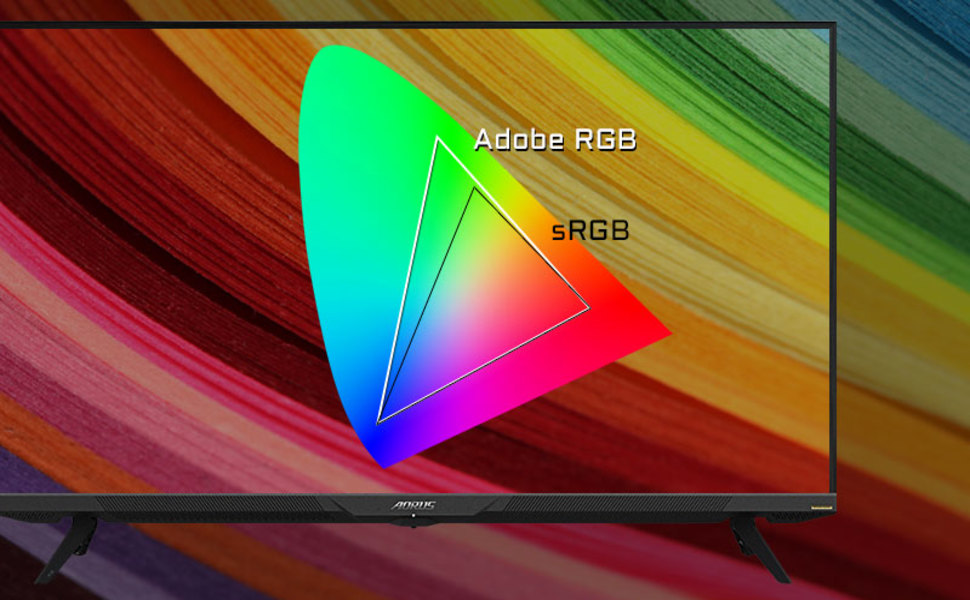
Image: A visual representation of color gamut, comparing Adobe RGB and sRGB color spaces, indicating the monitor's wide color coverage.
5.3 Посебни карактеристики
The monitor includes several advanced features accessible via the OSD or OSD Sidekick software:
- OSD Sidekick: A software utility that allows you to control OSD settings directly from your desktop.
- Picture-in-Picture (PiP) / Picture-by-Picture (PbP): Прикажете содржина од повеќе извори истовремено на екранот.
- Контролна табла: Real-time hardware information display (e.g., CPU/GPU temperature, fan speed).
- Црн еквилајзер: Enhances visibility in dark areas without overexposing bright areas.
- Помош за игра: Provides in-game enhancements like crosshairs, timers, and refresh rate counters.
- Space Audio: Offers 5 modes of audio experiences for immersive sound.
- KVM Feature: Allows you to control multiple devices (e.g., two PCs) connected to the monitor using a single keyboard and mouse. Connect devices via USB Type-C and USB 3.0 Upstream ports.

Image: A diagram showing how the Type-C KVM feature allows switching between a desktop PC and a laptop connected to the monitor using one keyboard and mouse.
6. Одржување
6.1 Чистење на мониторот
To clean the monitor, first unplug the power cord. Use a soft, lint-free cloth lightly dampened with water or a mild, non-abrasive screen cleaner. Do not spray cleaner directly onto the screen. Avoid using alcohol, ammonia, or abrasive cleaners, as they can damage the screen surface.
6.2 OLED Care and Burn-in Prevention
OLED displays are susceptible to image retention (burn-in) if static images are displayed for extended periods. To prolong the life of your OLED panel:
- Avoid displaying static images (e.g., desktop icons, taskbars, logos) for long durations.
- Utilize screen savers or dynamic wallpapers.
- Enable the monitor's built-in OLED care features (e.g., pixel shift, pixel refresh, logo luminance adjustment) through the OSD menu.
- Намалете ја осветленоста на екранот кога не е потребно.
- Power off the monitor when not in use.
7 Смена на проблеми
Доколку наидете на проблеми со вашиот монитор, погледнете ги следните вообичаени проблеми и решенија:
| Проблем | Можна причина | Решение |
|---|---|---|
| Нема слика на екранот | Power cable disconnected; Video cable disconnected or loose; Incorrect input source selected; Source device off. | Check power and video cable connections; Ensure source device is on; Select correct input source via OSD. |
| Сликата е заматена или искривена | Incorrect resolution; Video cable quality; Graphics card driver issues. | Set display resolution to 3840x2160; Use high-quality HDMI 2.1 or DP 1.4 cables; Update graphics drivers. |
| Screen randomly turns off/on | Loose video cable; Power supply issue; Monitor firmware issue; Source device instability. | Ensure video cables are securely connected; Try a different power outlet; Check for and install the latest monitor firmware updates from GIGABYTE's website; Test with a different source device. |
| Нема звук | Volume too low or muted; Incorrect audio output selected; Audio cable disconnected. | Adjust monitor volume; Select correct audio output in PC settings; Ensure external speakers/headphones are connected. |
| KVM feature not working | Incorrect USB cable; USB Upstream cable not connected; Devices not properly configured. | Ensure a 10Gbps USB Type-C cable is used for Type-C connection; Connect the USB 3.0 B to A cable to your primary PC; Refer to the OSD Sidekick software for KVM setup. |
8. Спецификации
Key technical specifications for the GIGABYTE AORUS FO48U monitor:
| Карактеристика | Детал |
|---|---|
| Големина на екранот | 48 инчи |
| Тип на панел | OLED |
| Резолуција | 3840 x 2160 (4K UHD) |
| Стапка на освежување | 120 Hz |
| Време на одговор | 1 ms (GTG) |
| Гама на бои | 98% DCI-P3 / 130% sRGB |
| Длабочина на боја | 10-битни |
| Viewинголен агол | 178°(В)/178°(В) |
| Поврзување | 2x HDMI 2.1, 1x DisplayPort 1.4, 1x USB Type-C (KVM), 2x USB 3.0, 1x USB 3.0 Upstream, Earphone Jack, Audio Line-Out |
| Звучници | 2x 15W, 1x 20W (Space Audio) |
| Планината ВЕСА | 300 x 300 mm |
| Димензии (ШxВxД) | 26.58 x 42.07 x 9.89 инчи (со држач) |
| Тежина | 39.8 фунти (со држач) |
9. Гаранција и поддршка
For detailed warranty information, please refer to the warranty card included in your product package or visit the official GIGABYTE website. For technical support, driver downloads, and further assistance, please visit the GIGABYTE support page or contact their customer service.
Официјален претставник на GIGABYTE Webсајт: www.gigabyte.com


