Вовед
This manual provides essential information for the setup, operation, maintenance, and troubleshooting of your Ematic PBS Kids Playtime Pad+ tablet. Please read this manual thoroughly before using the device to ensure proper function and safety.
The Ematic PBS Kids Playtime Pad+ (Model: PBSKD7200) is a 2nd Generation kid-safe Android tablet designed for educational and entertainment purposes. It features a 7-inch HD screen, a quad-core processor, and comes pre-loaded with PBS Kids apps.
Што има во кутијата
- Ematic PBS Kids Playtime Pad+ Tablet
- Кабел за полнење (USB)
- Адаптер за напојување
- Водич за брз почеток (не е вклучен во ова упатство)
Поставување
1. Почетна наплата
Before first use, fully charge the tablet. Connect the charging cable to the tablet's charging port and the power adapter to a wall outlet. The charging indicator will show when the tablet is charging.
2. Вклучување/исклучување
To power on, press and hold the power button located on the side of the tablet until the screen lights up. To power off, press and hold the power button, then select "Power off" from the options that appear on the screen.
3. Поврзување преку Wi-Fi
За да се поврзете на Wi-Fi:
- Одете на Поставки.
- Изберете Мрежа и Интернет or Wi-Fi.
- Вклучете Wi-Fi и изберете ја саканата мрежа од листата.
- Внесете ја лозинката ако се побара и допрете Поврзете се.
4. Parental Controls Setup
The tablet features robust parental controls to manage content and screen time. Access these settings through the "Grownups" section on the main screen. You can create a PIN code and select approved apps for your child's profile.

Image: Parental control interface showing PIN creation and app selection.
Ракување со таблетот
1. Навигација низ интерфејсот
The tablet's home screen provides access to pre-loaded PBS Kids apps like "My Apps" and "Live TV". Swipe left or right to view additional screens or access the app drawer.

Image: The main screen of the tablet showing the "My Apps" and "Live TV" sections, along with character icons.
2. Using Pre-loaded Apps
- PBS KIDS Games: Access a variety of educational games.
- PBS KIDS Video: Stream thousands of video clips and full episodes.
- Play & Learn Science: Engage with science-focused educational content.
- ТВ во живо: Watch 24/7 live PBS Kids programming.
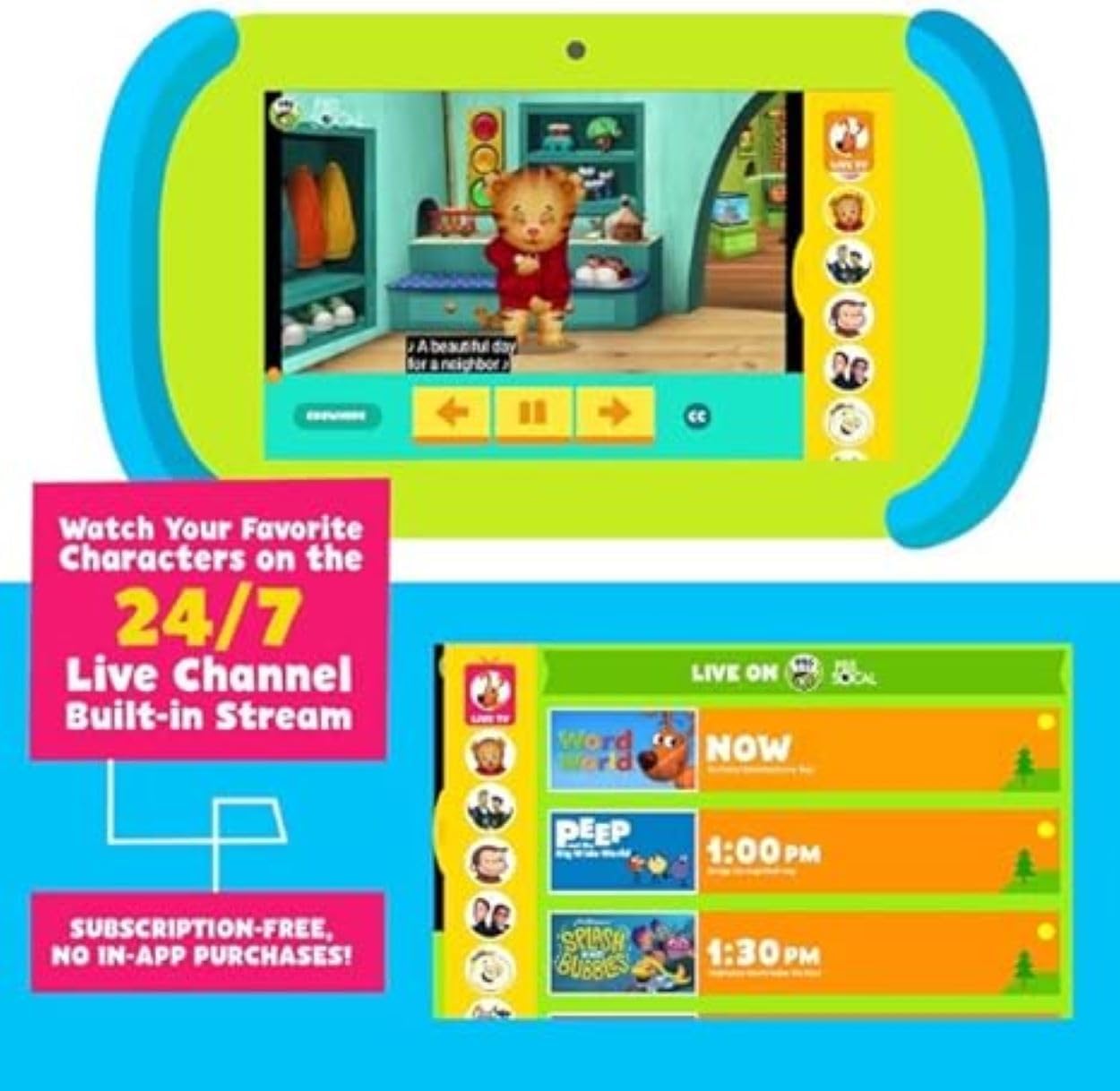
Image: The tablet displaying a PBS Kids video and a guide for the 24/7 Live TV channel.
3. Продавница на Google Play
The tablet supports Google Play, allowing access to over 1 million additional apps, games, movies, and books. Ensure Wi-Fi is connected to download content.
4. Функционалност на камерата
The tablet is equipped with both front and back cameras. Open the camera application to take photos or record videos.

Image: Illustration showing the locations of the front and back cameras on the tablet.
Одржување
1. Чистење на таблетот
Use a soft, lint-free cloth to clean the screen and body of the tablet. Do not use abrasive cleaners or solvents. Avoid getting moisture into openings.
2. Нега на батерии
To prolong battery life, avoid extreme temperatures. Charge the tablet regularly and avoid letting the battery completely drain for extended periods.
3. Софтверски ажурирања
Periodically check for software updates in the tablet's settings to ensure optimal performance and access to the latest features and security patches. Connect to Wi-Fi for updates.
Решавање проблеми
| Проблем | Можна причина | Решение |
|---|---|---|
| Таблетот не се вклучува. | Слаба батерија; пад на системот. | Charge the tablet for at least 30 minutes. Perform a hard reset by holding the power button for 10-15 seconds. |
| Екранот не реагира. | Привремен софтверски дефект. | Restart the tablet. If unresponsive, perform a hard reset. |
| Не може да се поврзе на Wi-Fi. | Неточна лозинка; проблем со рутерот; надвор од опсег. | Потврдете ја лозинката за Wi-Fi. Рестартирајте го рутерот. Уверете се дека таблетот е во опсег на Wi-Fi. |
| Apps are running slowly. | Премногу апликации се отворени; мал простор за складирање; застарен софтвер. | Close unused apps. Clear cache. Check for and install system updates. Free up storage space. |
| Батеријата брзо се троши. | High screen brightness; background apps; old battery. | Reduce screen brightness. Close background apps. Limit usage of power-intensive apps. |
Спецификации
| Карактеристика | Детал |
|---|---|
| Број на модел | PBSKD7200 |
| Големина на екранот | 7 инчи |
| Резолуција на екранот | 1024x600 HD |
| Процесор | 1.5 GHz Quad-Core (Allwinner) |
| RAM меморија | 2 GB |
| Големина на флеш меморија | 16 GB (formatted capacity will be less) |
| Оперативен систем | Андроид |
| Камери | Front and Back (Rear Webcam Resolution: 0.3 MP) |
| Безжичен тип | 802.11g Wi-Fi |
| Bluetooth | Да |
| Тежина на ставката | 1.49 фунти |
| Димензии на производот | 10.5 x 3 x 6 инчи |
| Боја | Зелена, сина |
Гаранција и поддршка
For warranty information and technical support, please refer to the documentation included with your purchase or visit the official Ematic support webстраница. Зачувајте го доказот за купување за гаранциски побарувања.
For further assistance, you may contact Ematic customer service. Contact details are typically found on the manufacturer's webлокацијата или во пакувањето на производот.


