Вовед
This manual provides detailed instructions for the installation, operation, maintenance, and troubleshooting of your GIGABYTE GeForce RTX 3080 Vision OC 10G graphics card. This high-performance graphics card is designed for demanding visual tasks, powered by NVIDIA's Ampere architecture, featuring 2nd Generation RT Cores, 3rd Generation Tensor Cores, and 10GB GDDR6X memory. It incorporates the WINDFORCE 3X Cooling System for efficient thermal management and RGB Fusion 2.0 for customizable lighting.
Поставување и инсталација
1. Системски барања
- Матична плоча компатибилна со PCI Express со еден графички слот x16 со двојна ширина.
- Minimum 750W power supply with two 8-pin PCIe power connectors.
- Microsoft Windows 10 64-bit or Linux 64-bit operating system.
- 32GB system memory recommended for optimal performance.
- Интернет конекција за преземање на драјвери.
2. Содржина на пакетот
- GIGABYTE GeForce RTX 3080 Vision OC 10G Graphics Card
- Упатство за употреба (овој документ)
3. Физичка инсталација
- Подгответе го вашиот систем: Исклучете го компјутерот и исклучете ги сите кабли. Отворете го куќиштето на компјутерот.
- Лоцирајте го PCIe слотот: Идентификувајте достапен PCI Express x16 слот на вашата матична плоча.
- Отстранете ги капаците на слотови: Remove the necessary expansion slot covers from the back of your computer case to accommodate the graphics card.
- Вметнете ја графичката картичка: Внимателно порамнете ја графичката картичка со PCIe слотот и цврсто притиснете ја додека не се смести безбедно. Осигурајте се дека клипот за држење на PCIe слотот е заклучен на своето место.

Слика: напред view of the GIGABYTE GeForce RTX 3080 Vision OC 10G Graphics Card, showcasing the triple WINDFORCE fans and the white/silver shroud design.
- Обезбедете ја картичката: Fasten the graphics card to the computer case using screws.
- Поврзете кабли за напојување: Connect the two 8-pin PCIe power connectors from your power supply to the corresponding ports on the graphics card. Ensure a firm connection.
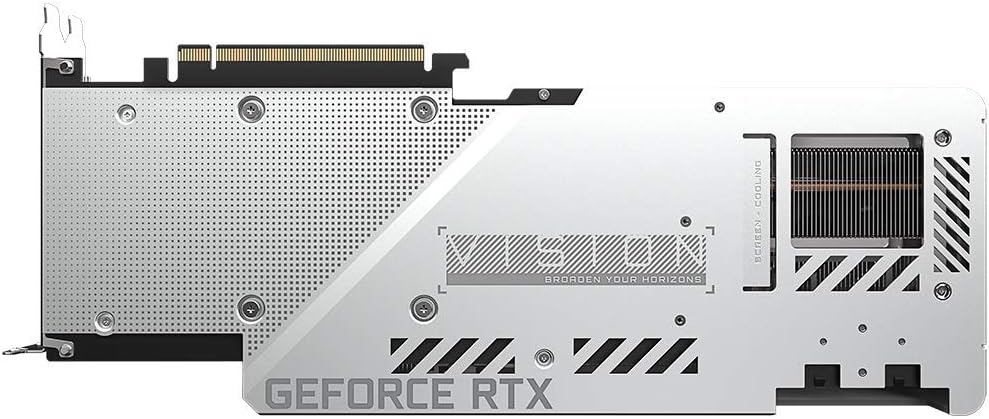
Слика: Заден дел view of the GIGABYTE GeForce RTX 3080 Vision OC 10G Graphics Card, highlighting the protective metal backplate with ventilation cutouts and the GeForce RTX branding.
- Затвори го случајот: Replace the computer case cover and reconnect all cables.
- Connect display: Поврзете го мониторот со еден од излезите за прикажување (HDMI или DisplayPort) на графичката картичка.
Упатства за работа
1. Инсталација на драјвери
- Вклучување: Turn on your computer. The system may boot into a lower resolution or use a generic display driver.
- Преземете драјвери: Посетете ја официјалната страница на GIGABYTE webсајт (www.gigabyte.com) или официјалниот претставник на NVIDIA webсајт (www.nvidia.com/drivers).
- Select product: Navigate to the support section and locate the drivers for the GeForce RTX 3080 series.
- Инсталирајте драјвери: Download the latest recommended drivers and follow the on-screen instructions to complete the installation. A system restart may be required.
2. Конфигурација на софтвер
- GIGABYTE Control Center / AORUS Engine: For advanced control over your graphics card, including fan speed adjustment, overclocking profiles, and RGB Fusion 2.0 lighting customization, download and install the GIGABYTE Control Center or AORUS Engine software from the GIGABYTE webсајт.
- Искуство со NVIDIA GeForce: Install NVIDIA GeForce Experience for optimal game settings, driver updates, and access to features like ShadowPlay.
Одржување
- Отстранување прашина: Regularly clean dust from the graphics card fans and heatsink using compressed air. Ensure the system is powered off and unplugged before cleaning.
- Инспекција на вентилаторот: Periodically check the fans for any obstructions or unusual noises.
- Ажурирања на возачот: Keep your graphics drivers updated to ensure optimal performance and stability.
Решавање проблеми
Нема излез на екранот
- Проверете дали кабелот за мониторот е безбедно поврзан со графичката картичка и мониторот.
- Проверете дали графичката картичка е целосно сместена во PCIe слотот.
- Check that all required PCIe power connectors are securely attached to the graphics card.
- Тестирајте со друг кабел за прикажување или монитор, доколку е можно.
Нестабилност на системот или падови
- Осигурајте се дека вашето напојување ги исполнува минималните ватиtage requirement (750W).
- Ажурирајте ги драјверите за графичка картичка на најновата верзија.
- Monitor GPU temperatures using software like GIGABYTE Control Center to check for overheating.
- Check for conflicts with other installed drivers or software.
Слаби перформанси
- Осигурајте се дека драјверите се правилно инсталирани и ажурирани.
- Verify that the graphics card is running at its intended clock speeds (can be checked with monitoring software).
- Check background applications that might be consuming system resources.
- Ensure your system's BIOS/UEFI is updated.
Спецификации
| Единица за обработка на графика | NVIDIA GeForce RTX 3080 |
| Видео меморија | 10 GB GDDR6X |
| Мемориски интерфејс | 320-битни |
| Зголемете го часовникот | 1800 MHz |
| Брзина на меморија | 19000 MHz |
| Излезни порти | DisplayPort, HDMI |
| Максимална дигитална резолуција | 7680x4320 (via DisplayPort 1.4a) |
| мулти-view | 4 |
| Димензии на картичката (ДxШxВ) | 12.6 x 4.96 x 2.17 инчи (320 x 126 x 55 мм) |
| Препорачана PSU | 750 W |
| Конектори за напојување | 2x 8-пински |
| PCI Express | 4.0 x16 |
| Број на модел | GV-N3080VISION OC-10GD 2.0 |
Информации за гаранцијата
GIGABYTE products are covered by a limited warranty. The specific terms and duration of the warranty may vary by region and product. Please refer to the official GIGABYTE website or your product's packaging for detailed warranty information and registration procedures. Keep your proof of purchase for warranty claims.
Техничка поддршка
За техничка помош, преземање драјвери, најчесто поставувани прашања и дополнителна поддршка, посетете ја официјалната страница за поддршка на GIGABYTE. webсајт:
Можете исто така да контактирате со корисничката служба на GIGABYTE преку контакт информациите наведени на нивната webстраница за вашиот специфичен регион.


