1. Вовед
The IMOU Ranger 2 is an indoor 1080P Full HD Wi-Fi security camera designed to provide comprehensive surveillance for your home or office. Featuring pan and tilt capabilities, it offers a wide field of view and automatic tracking of moving objects. The camera supports H.265 video compression for efficient storage and includes two-way audio, abnormal sound detection, and multiple storage options.
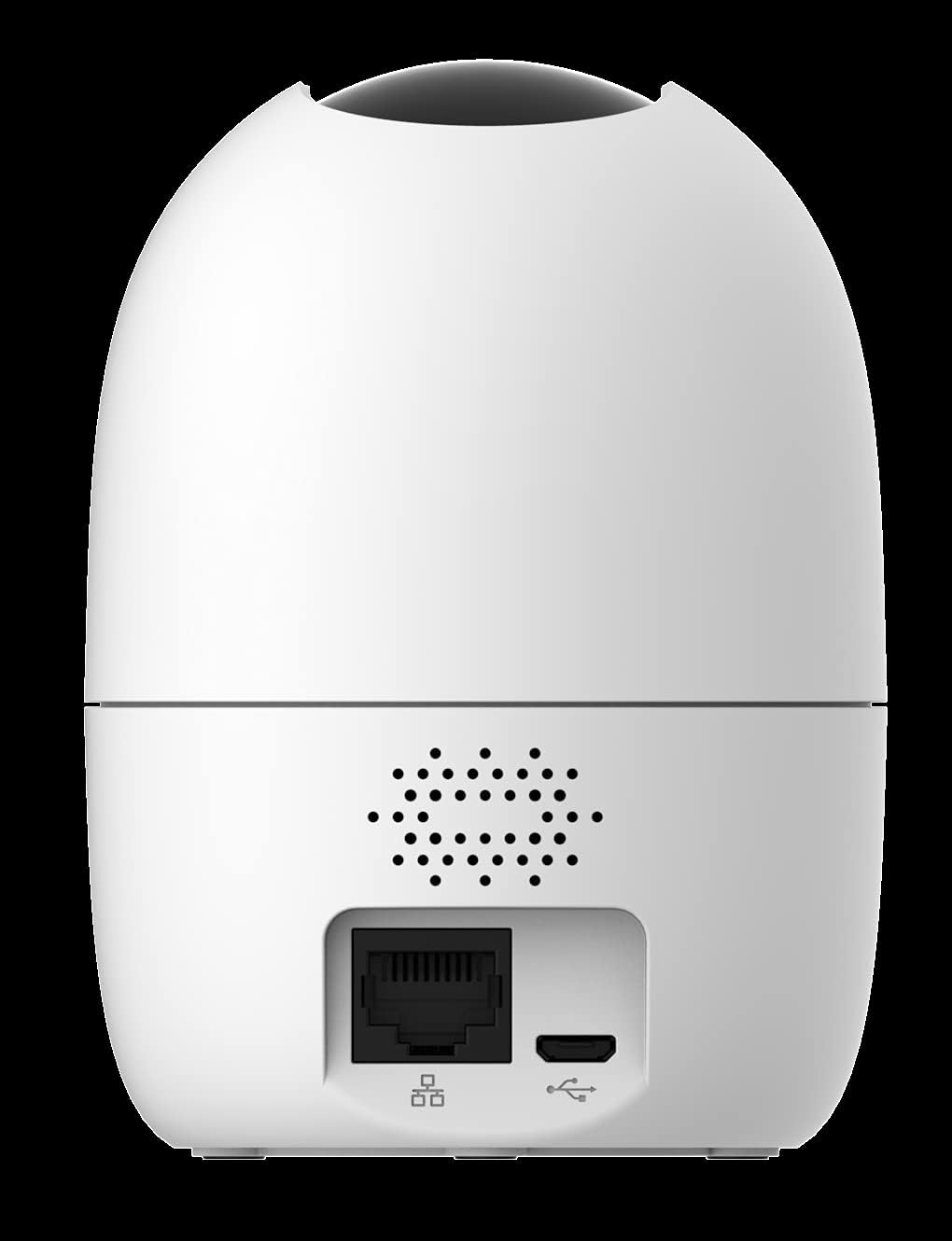
Image 1.1: The IMOU Ranger 2 camera, showcasing its compact and modern dome design.
2. Содржина на пакетот
Ве молиме проверете го пакувањето за следните ставки:
- IMOU Ranger 2 Camera
- Адаптер за напојување
- USB кабел
- Плоча за монтирање
- Завртки за монтирање
- Водич за брз почеток
3. Уредот завршиview
Запознајте се со компонентите на фотоапаратот:
- Објектив: Снима видео.
- Светло за индикатор за статус: Shows camera status (e.g., solid green for connected, flashing red for network error).
- Микрофон: For audio input and two-way talk.
- Говорник: For audio output and two-way talk.
- Слот за микро SD картичка: Поддржува до 256 GB за локално складирање.
- Копче за ресетирање: Се користи за ресетирање на камерата на фабрички поставки.
- Приклучок за напојување (микро USB): Се поврзува со адаптерот за напојување.
- Етернет порта (RJ45): За жична мрежна конекција (опционално).
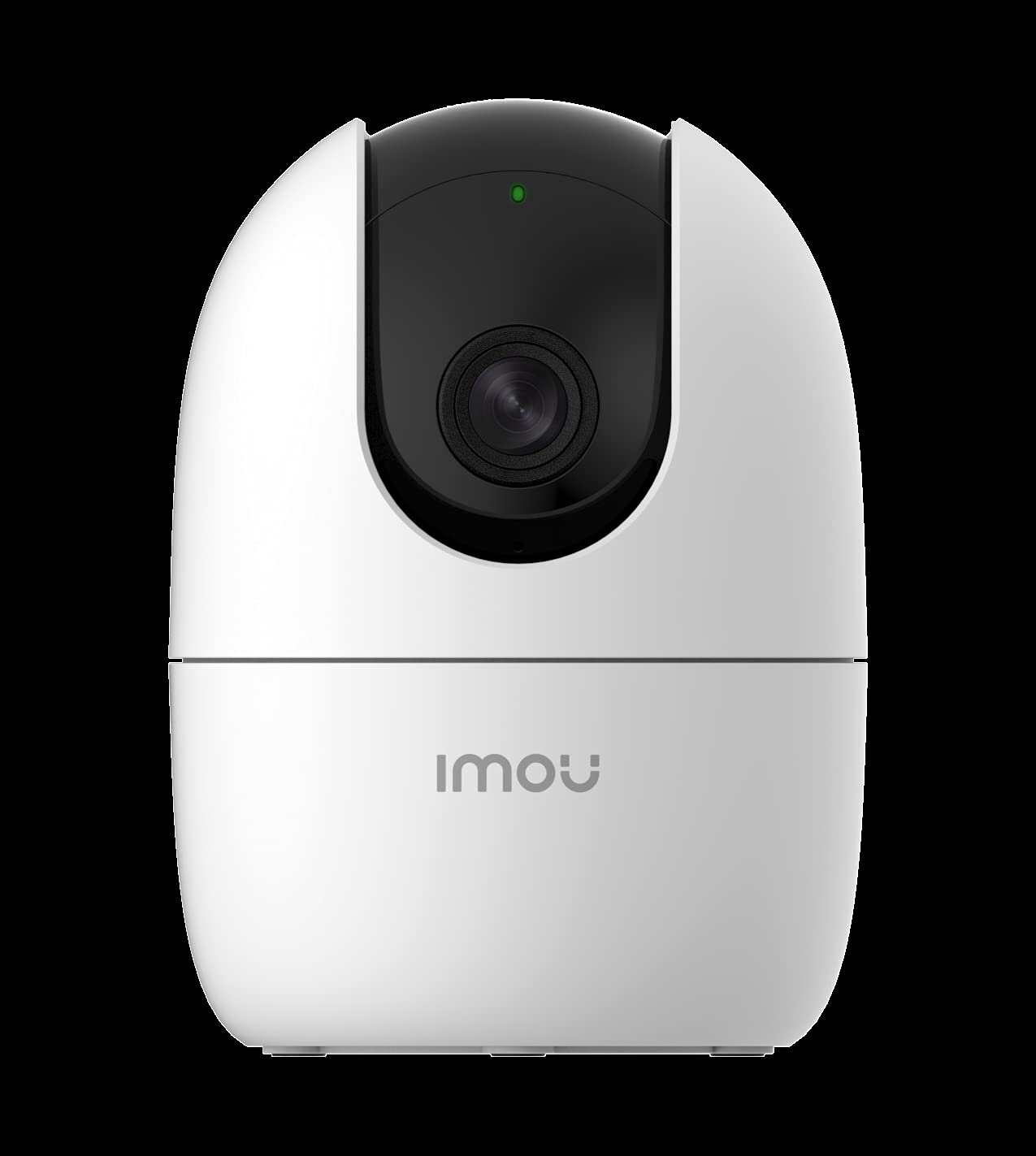
Слика 3.1: Задна страна view of the IMOU Ranger 2, highlighting the connectivity ports and speaker.
4. Поставување
4.1 Вклучување
- Connect the USB cable to the camera's Micro USB port.
- Поврзете го другиот крај на USB-кабелот со адаптерот за напојување.
- Plug the power adapter into a power outlet. The camera will power on, and the status indicator light will flash green.
4.2 Installing the IMOU Life App
Download and install the "IMOU Life" app from your smartphone's app store (available for Android and iOS devices). Create an account and log in.
4.3 Додавање на камерата во апликацијата
- Open the IMOU Life app and tap the "+" icon to add a new device.
- Scan the QR code located on the bottom of the camera or on its packaging.
- Follow the on-screen instructions to connect the camera to your Wi-Fi network. Ensure your Wi-Fi network is 2.4GHz.
- Once connected, the status indicator light will turn solid green.
4.4 Инсталација на микро SD картичка (опционално)
To enable local video storage, insert a Micro SD card (up to 256GB) into the designated slot. Ensure the camera is powered off before inserting or removing the card.
4.5 Монтирање на камерата
The IMOU Ranger 2 is designed for surface mounting. Choose a suitable indoor location with a clear view of the area you wish to monitor. Use the provided mounting plate and screws to secure the camera to a wall or ceiling, or simply place it on a flat surface.
5. Ракување со камерата
5.1 Во живо View и контрола на панорамирање/навалување
From the IMOU Life app, select your camera to access the live view. You can control the camera's pan (horizontal) and tilt (vertical) movements directly from the app interface to adjust the viewing angle. The camera offers a 0-355° pan range and a -5° to 80° tilt range.

Image 5.1: Pan and tilt functionality controlled via the IMOU Life app.
5.2 Снимање и складирање
The camera supports continuous recording or event-triggered recording. Video footage can be stored in several ways:
- Микро SD картичка: Local storage up to 256GB.
- Складирање во облак: Subscription-based cloud service for remote access to recordings.
- Мрежен видео рекордер (NVR): Integration with compatible NVR systems.
5.3 Motion Detection and Automatic Tracking
The IMOU Ranger 2 can detect moving objects within its field of view. When motion is detected, the camera can automatically track the object, ensuring it remains in the frame. Alerts can be sent to your smartphone.

Image 5.2: Motion detection and alert feature in action.
5.4 Abnormal Sound Detection
The camera is equipped with an abnormal sound detection feature. If unusual sounds (e.g., a baby crying, glass breaking) are detected, the camera will send an alert to your smartphone.

Image 5.3: Abnormal sound detection sending an alert to a smartphone.
5.5 Двонасочно аудио
Utilize the built-in microphone and speaker for two-way communication. You can listen to the environment around the camera and speak through the camera using the IMOU Life app.
5.6 Ноќно гледање
The camera automatically switches to night vision mode in low-light conditions, providing clear black and white video footage.
6. Одржување
- Чистење: Gently wipe the camera lens with a soft, dry cloth to ensure clear image quality. Avoid using harsh chemicals.
- Ажурирања на фирмверот: Regularly check for and install firmware updates via the IMOU Life app to ensure optimal performance and security.
- Управување со податоци: Доколку користите Micro SD картичка, периодично повторувајте јаview and back up important recordings. Format the SD card through the app as needed to maintain performance.
7 Смена на проблеми
- Камера офлајн: Ensure the camera is powered on and connected to a stable 2.4GHz Wi-Fi network. Check your router's internet connection. Try restarting the camera and your router.
- Не може да се поврзе на Wi-Fi: Verify your Wi-Fi password. Ensure the camera is within range of your Wi-Fi router. If issues persist, try resetting the camera using the reset button and re-adding it to the app.
- Нема снимање: Check if a Micro SD card is properly inserted and formatted, or if your cloud storage subscription is active. Ensure recording settings are configured correctly in the app.
- Лош квалитет на сликата: Clean the camera lens. Ensure there is adequate lighting. For night vision, ensure no obstructions are blocking the infrared lights.
- Abnormal Sound/Motion Alerts Not Received: Check notification settings in the IMOU Life app and on your smartphone. Ensure the camera's detection sensitivity is set appropriately.
8. Спецификации
| Карактеристика | Детал |
|---|---|
| Број на модел | IPC-A22EN |
| Резолуција за снимање видео | 1080p (Full HD) |
| Технологија за поврзување | Безжичен (Wi-Fi) |
| Форма фактор | Купола |
| Потрошувачка на енергија | 6 вати |
| Ниво на отпорност на вода | Not Water-Resistant (Indoor Use Only) |
| Внатрешна/надворешна употреба | Затворен |
| Извор на енергија | Електричен со кабел |
| Тип на контролер | Android (via IMOU Life App) |
| Тип на монтирање | Површинска монтажа |
| Димензии | 18.5 x 10.3 x 9.5 cm |
| Тежина | 390 грама |
9. Гаранција и поддршка
For detailed warranty information, please refer to the warranty card included with your purchase or visit the official IMOU website. For technical support, frequently asked questions, and additional resources, please visit the IMOU support page or contact their customer service directly.
Official IMOU Webсајт: www.imoulife.com


