
1. Вовед
This manual provides essential information for the safe and effective use of your Accutime iTIME Kids Smart Watch, Model ITK2005AZ. Please read these instructions thoroughly before initial use and retain them for future reference.
The iTIME Kids Smart Watch is designed for children, offering various features such as a camera, learning games, and activity tracking, without requiring internet connectivity, Wi-Fi, or Bluetooth for core functions, ensuring a secure experience.
2. Информации за безбедност
- Опасност од гушење: This device contains small parts. Keep out of reach of very young children.
- Безбедност на батеријата: The watch contains a built-in rechargeable lithium-ion battery. Do not attempt to replace the battery yourself. Do not expose the watch to extreme temperatures or dispose of it in fire.
- Отпорност на вода: This watch is not waterproof. Avoid submersion in water or exposure to heavy rain.
- Нега на екранот: The touchscreen display is fragile. Avoid dropping the watch or subjecting it to strong impacts to prevent screen damage.
- Чистење: Користете мека, сува крпа за чистење. Не користете груби хемикалии или абразивни материјали.
- Надзор: Се препорачува надзор од возрасни за време на употребата, особено за помлади деца.
3. Содржина на пакетот
Проверете дали сите артикли се присутни во пакувањето:
- Accutime iTIME Kids Smart Watch (Model: ITK2005AZ)
- USB кабел за полнење
- Упатство за употреба


Left: Packaging box for the iTIME Kids Smart Watch. Right: Included USB charging cable.
4. Поставување
4.1. Почетно полнење
Before first use, fully charge the watch for at least two hours to ensure optimal battery performance. Subsequent charges should be at least one hour.
- Connect the small end of the USB charging cable to the charging port on the side of the watch.
- Поврзете го поголемиот крај од USB кабелот со стандарден USB адаптер за напојување (не е вклучен) или USB порт на компјутерот.
- The watch display will indicate that it is charging.
4.2. Вклучување/исклучување
- За вклучување: Притиснете и држете го копчето за вклучување (обично се наоѓа на страната од часовникот) додека екранот не светне.
- За исклучување: Press and hold the power button until a power-off option appears on the screen, then tap to confirm. Alternatively, hold the button longer until the screen turns off.
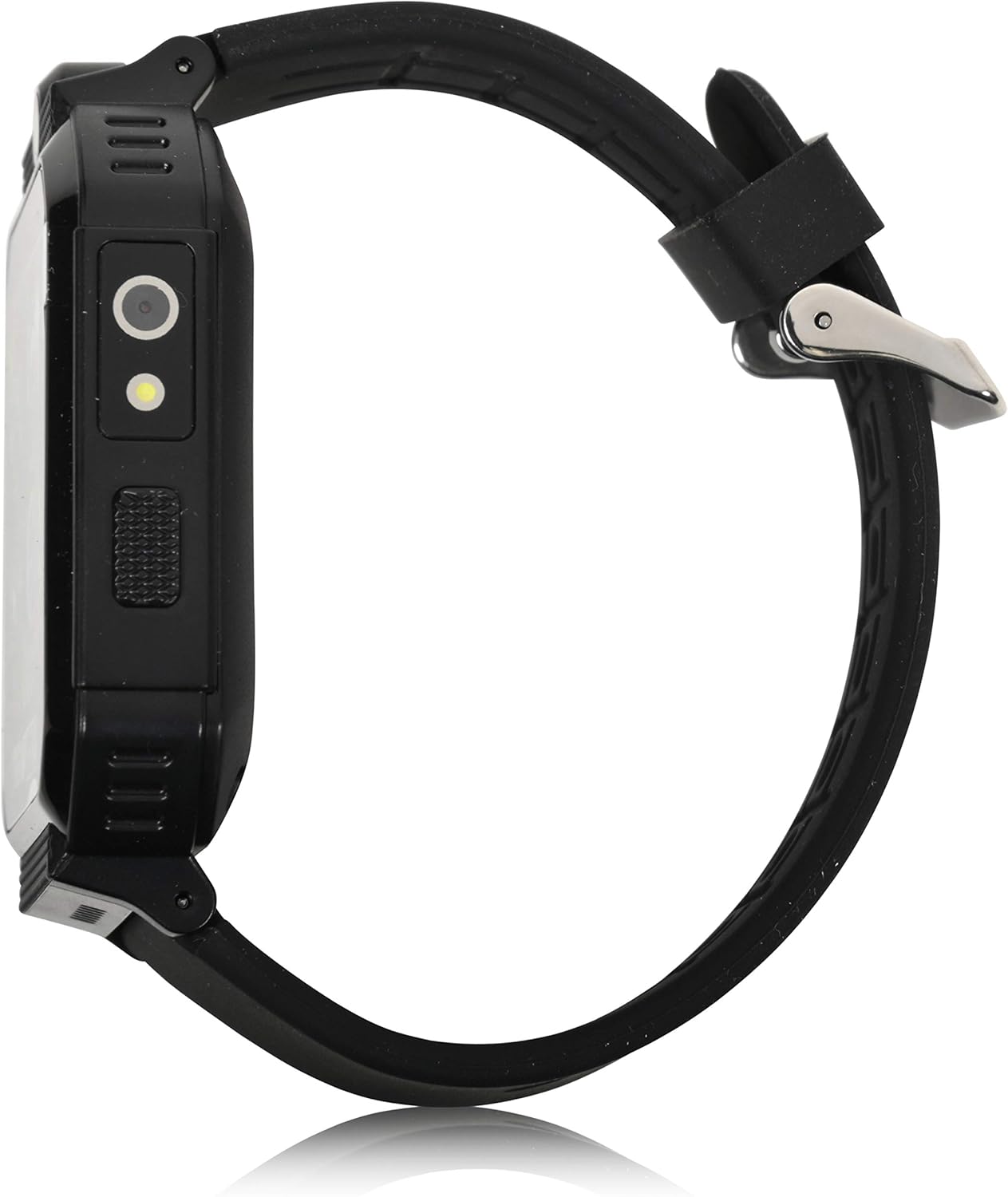
Страна view of the smartwatch, highlighting the power button and charging port.
5. Упатства за работа
The iTIME Kids Smart Watch features a touchscreen interface for navigation. Swipe left or right to browse through applications and tap an icon to select.
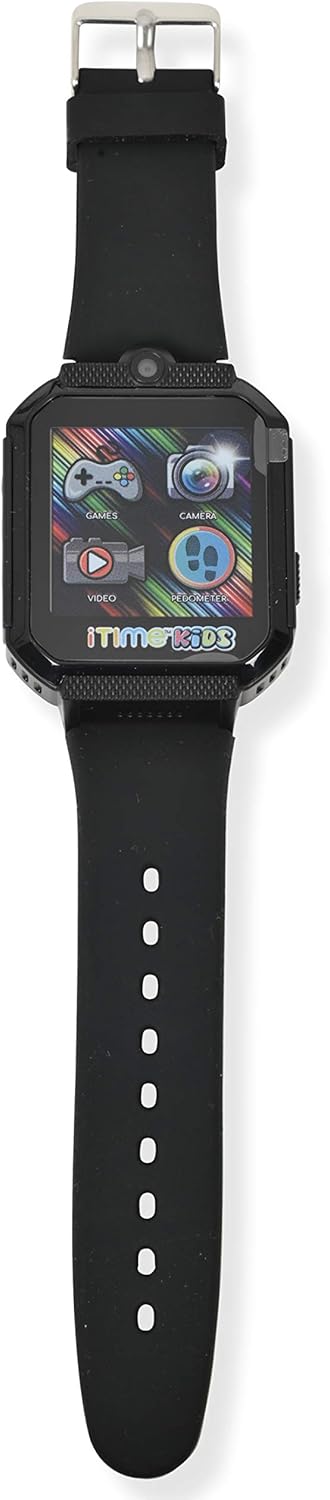
Предна страна view of the smartwatch display, showing various application icons.
5.1. Приказ на време и екрани на часовникот
- The home screen displays the current time.
- To change watch faces, tap and hold on the home screen, then swipe to select a different design.
5.2. Camera and Photo Album
- Допрете го Камера icon to open the selfie camera.
- Допрете го екранот за да фотографирате.
- Допрете го Фото албум икона до view снимени слики.
5.3. Игри
- Допрете го Игри icon to access the preloaded games.
- Select a game from the list and follow the on-screen instructions to play.
5.4. Pedometer and Activity Tracking
- Допрете го Педометар икона до view вашиот број на чекори.
- The watch automatically tracks steps, distance, and estimated calories burned.
5.5. Други карактеристики
- Видео плеер: Допрете го Видео icon to play recorded videos.
- Снимач на глас: Допрете го Снимач на глас icon to record and playback audio.
- Калкулатор: Access basic arithmetic functions.
- Аларм: Поставете аларми за потсетници.
- Фенерче: Активирајте го вграденото фенерче.
- Стоперка Користете за активности за мерење на времето.
- Сензор за телесна температура: Access the sensor to view real-time body temperature readings.
6. Карактеристики завршиview
The Accutime iTIME Kids Smart Watch ITK2005AZ includes the following functionalities:
- Екран на допир
- Selfie Camera for photos and videos
- Фото албум Viewer
- Видео плеер
- Снимач на глас
- Калкулатор
- Будилник
- Чекор бројач на чекори
- Бројач на калории
- Бројач на далечина
- 26 Preloaded Playable Games
- Changeable Watch Faces
- Фенерче
- Штоперица
- Real-time Body Temperature Sensor
- Вградена батерија на полнење
7. Одржување
7.1. Чистење
Wipe the watch and strap with a soft, dry, lint-free cloth. Do not use liquid cleaners or sprays directly on the watch.
7.2. Складирање
When not in use for extended periods, store the watch in a cool, dry place away from direct sunlight and extreme temperatures. Ensure the battery has some charge before storing to prevent deep discharge.
8 Смена на проблеми
- Watch does not power on: Ensure the watch is fully charged. Connect it to the charger for at least 30 minutes before attempting to power on again.
- Screen is unresponsive or frozen: Try restarting the watch by pressing and holding the power button until it powers off, then power it back on.
- Battery life is short: Ensure the watch is charged for the recommended duration (at least 1 hour for regular use, 2 hours for initial use). Reduce screen brightness or frequency of game use to conserve battery.
- Проблеми со звукот: Check the volume settings within the watch's menu. If games have separate volume controls, adjust them accordingly.
- Проблеми со полнењето: Verify that the USB cable is securely connected to both the watch and the power source. Try a different USB port or power adapter.
9. Спецификации
| Бренд | Акутима |
| Модел | ITK2005AZ |
| Тип на дисплеј | LCD екран |
| Големина на екранот | 40 милиметри |
| Влез со човечки интерфејс | Екран на допир |
| Тип на батерија | Литиум јон (се полни) |
| Време на полнење | 1-2 часа |
| Посебни карактеристики | Alarm Clock, Audio Recording, Camera, Pedometer, Time Display, Body Temperature Sensor |
| Технологија за поврзување | USB (за полнење) |
| Стандард за безжична комуникација | Bluetooth (Note: Product description states no Bluetooth for safety, but specifications list it. For core functions, it does not connect to internet/Wi-Fi/Bluetooth. Bluetooth may be for internal components or specific accessories not advertised for general use.) |

Назад view of the smartwatch, displaying model information.
10. Гаранција и поддршка
10.1. Информации за гаранцијата
This Accutime iTIME Kids Smart Watch comes with a една година гаранција from Accutime Watch Corp. Please retain your proof of purchase for warranty claims.
10.2. Поддршка за корисници
For further assistance, technical support, or warranty inquiries, please contact Accutime Watch Corp. customer service. Refer to the packaging or Accutime's official webсајт за детали за контакт.