1. Вовед
This manual provides essential information for the safe and effective use of your Amazon Echo Dot (5th Gen) smart speaker. Please read these instructions thoroughly before operating the device and retain them for future reference.

Image: Amazon Echo Dot (5th Gen) in Glacier White on a wooden surface, highlighting its compact size and capabilities.
2. Што има во кутијата
Проверете дали сите предмети се присутни во пакувањето:
- Echo Dot (5th Gen) Device
- Glacier White Power Adapter (15W)
- Водич за брз почеток
3. Производот завршиview
The Amazon Echo Dot (5th Gen) is a compact smart speaker designed to deliver an enhanced audio experience and integrate seamlessly with your smart home ecosystem. It features a spherical design with a fabric finish and an LED light ring at the base.

Image: Amazon Echo Dot (5th Gen) in Glacier White, front view with glowing light ring.
Клучни карактеристики:
- Improved Audio: Features a 1.73” (44 mm) front-firing speaker for clearer vocals, deeper bass, and vibrant sound.
- Гласовен асистент на Алекса: Provides hands-free control for music, information, timers, and smart home devices.
- Контроли за приватност: Includes a microphone off button and the ability to view и избришете гласовни записи.
- Паметен домашен центар: Supports WiFi, Bluetooth Low Energy Mesh, and Matter for compatible smart home device control.
- Сензор за температура: Built-in sensor for triggering smart home routines.
- Контроли на допир: Tap the top of the device to snooze alarms or pause music.
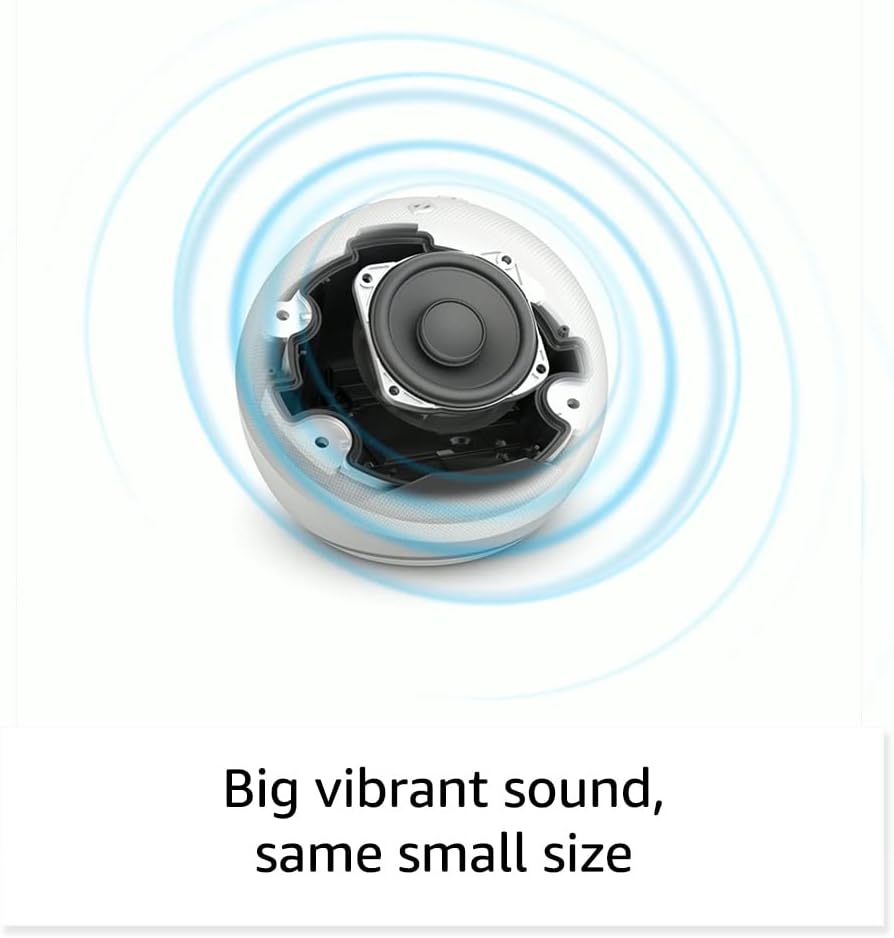
Слика: Внатрешна view of the Amazon Echo Dot (5th Gen) speaker components, illustrating its audio design.
4. Поставување
Следете ги овие чекори за да го поставите вашиот Echo Dot (5-та генерација):
- Вклучете го вашиот Echo Dot: Connect the included power adapter to your Echo Dot and then to a power outlet. The light ring will turn blue, then orange, indicating it's ready for setup.
- Преземете ја апликацијата Alexa: On your mobile device, download and install the Amazon Alexa app from your device's app store (compatible with Fire OS, Android, and iOS devices).
- Додајте го вашиот уред: Open the Alexa app. If prompted, sign in with your Amazon account. Tap the 'Devices' icon at the bottom, then the '+' icon in the top right corner. Select 'Add Device', then 'Amazon Echo', and choose 'Echo Dot'.
- Следете ги упатствата на екранот: The app will guide you through connecting your Echo Dot to your Wi-Fi network. Ensure your Wi-Fi network supports 802.11a/b/g/n/ac (2.4 and 5 GHz). Ad-hoc networks are not supported.
- Поставување: Place your Echo Dot in a central location within your room, away from walls or other objects that might obstruct sound.
5. Управување со вашата Echo Dot
Voice Commands with Alexa:
To interact with your Echo Dot, simply say the wake word "Alexa," followed by your command or question. The light ring will turn blue to indicate Alexa is listening.
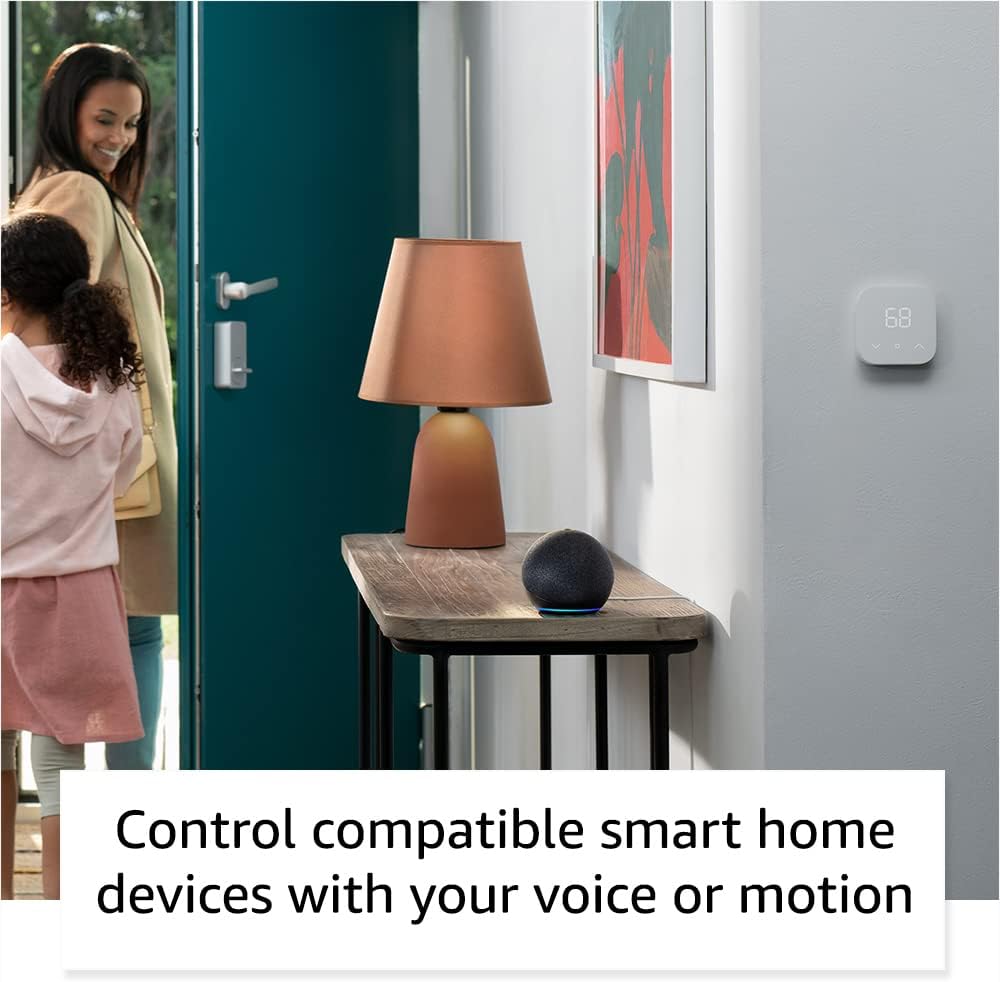
Image: Amazon Echo Dot (5th Gen) in Deep Sea Blue on a kitchen counter, demonstrating a user asking Alexa for the weather.
Заеднички команди:
- „Алекса, пушти музика.“
- „Алекса, какво е времето?“
- „Алекса, постави тајмер на 10 минути.“
- „Алекса, раскажи ми виц.“
- „Алекса, зголемете ја јачината на звукот.“
Контроли на допир:
The top surface of your Echo Dot is touch-sensitive for quick actions:
- Tap to Snooze: When an alarm sounds, tap the top of the device to snooze it.
- Tap to Pause/Resume: Tap to pause or resume music playback.

Image: A hand tapping the top of the Amazon Echo Dot (5th Gen) in Glacier White, demonstrating the tap-to-snooze or pause music function.
6. Интеграција со паметен дом
Your Echo Dot can control compatible smart home devices using voice commands or routines. It supports WiFi, Bluetooth Low Energy Mesh, and Matter protocols.
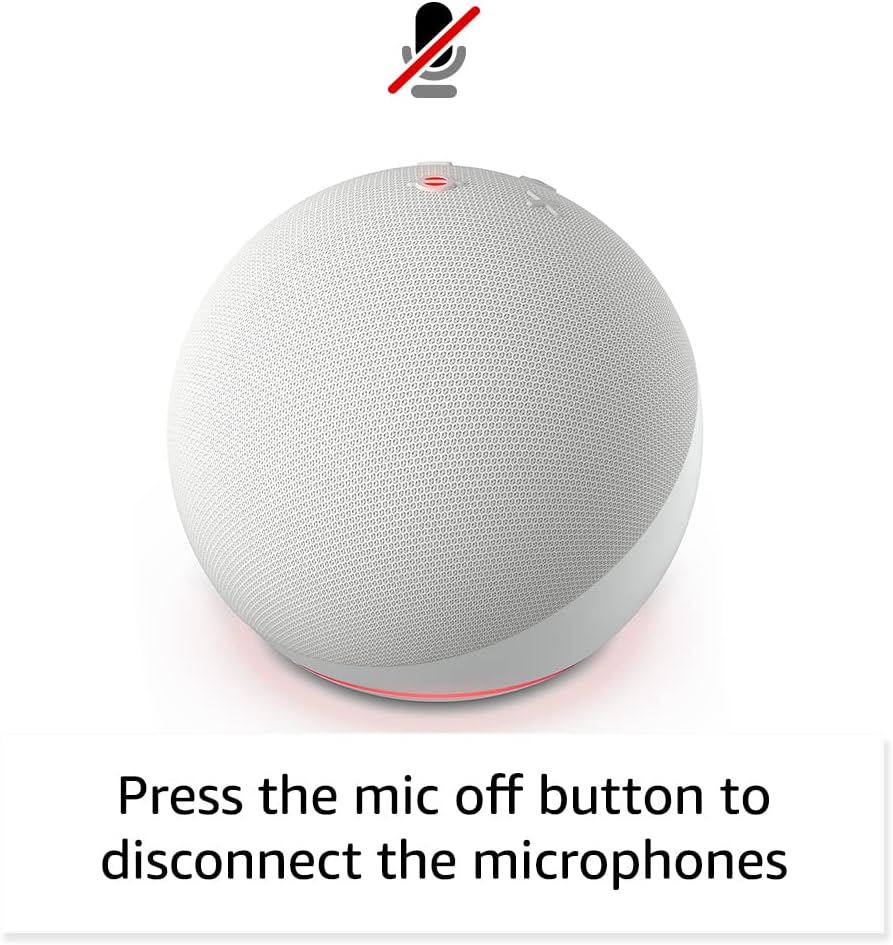
Image: Amazon Echo Dot (5th Gen) in a living space, illustrating its use for controlling compatible smart home devices.
Using the Temperature Sensor:
The built-in temperature sensor allows you to create routines in the Alexa app. For example, you can set a routine to automatically turn on a fan if the room temperature exceeds a specified comfort zone.
Амазонски тротоар:
Amazon Sidewalk uses Echo and Ring devices to securely keep other devices connected and help find lost items. It can enable supported devices to remain connected even when Wi-Fi is lost or they are outside the range of their home Wi-Fi. Sidewalk uses a small portion of your internet bandwidth. You can manage Sidewalk settings in the Alexa app.
Вградено eero:
If you have a compatible eero router, your Echo Dot can extend Wi-Fi coverage. This feature requires linking your eero and Amazon accounts and managing it through the eero mobile application. eero Built-in compatible Echo devices support up to 1,000 sq. ft. of additional coverage, speeds up to 100 Mbps, and 10 or fewer connected devices in the 5 GHz band.
7. Функции за приватност
Amazon Echo devices are designed with multiple layers of privacy controls:
- Копче за исклучување на микрофонот: Press the microphone off button on the top of your Echo Dot to electronically disconnect the microphones. The light ring will turn red to indicate the microphones are off.
- Voice Recordings: Имате способност да view, listen to, and delete your voice recordings through the Alexa app or your Amazon account settings.
- Технологија на Wake Word: The device only begins recording and sending audio to the cloud after it detects the wake word (e.g., "Alexa").
Image: Amazon Echo Dot (5th Gen) with a red light indicating the microphone is off, showing the privacy control feature.
8. Карактеристики за пристапност
The Alexa app provides various accessibility features to personalize your experience. Access these settings by navigating to 'Settings' → 'Accessibility' in the Alexa App.
- Адаптивно слушање: Овозможува повеќе време за завршување на зборувањето пред Алекса да одговори.
- Преферирана стапка на говорење: Control how fast or slow Alexa speaks by saying "Alexa, speak slower" or "Alexa, speak faster."
- Барање за звук: Plays an audible tone in addition to the visual indicator when you speak to Alexa. Enable by saying "Alexa, turn on Start of Request Sound."
- Читај на глас од Kindle: Алекса може да ги чита вашите книги од Kindle на глас.
- Извести ме кога сум во близина: Пушта звуци за известување кога ќе бидете откриени во близина на вашиот Echo уред.
9. Одржување
To ensure the longevity and optimal performance of your Echo Dot:
- Чистење: Use a soft, dry, lint-free cloth to clean the device. Do not use abrasive cleaners or sprays.
- Поставување: Избегнувајте поставување на уредот на директна сончева светлина, во близина на извори на топлина или во претерано влажни средини.
- Ажурирања на софтверот: Your Echo Dot automatically receives software security updates. Ensure it remains connected to Wi-Fi for these updates.
10 Смена на проблеми
Заеднички прашања и решенија:
- Уредот не реагира:
- Ensure the microphone is not muted (red light ring indicates mute).
- Check if the device is plugged in and powered on.
- Restart the device by unplugging it from the power outlet for 30 seconds and then plugging it back in.
- Не може да се поврзе на Wi-Fi:
- Проверете дали лозинката за Wi-Fi е точна.
- Ensure your router is working and other devices can connect.
- Move the Echo Dot closer to your Wi-Fi router.
- Рестартирајте го вашиот рутер и модем.
- Лош аудио квалитет:
- Adjust the volume using voice commands or the Alexa app.
- Ensure the device is not placed in an enclosed space that might muffle sound.
- Проверете дали има физички пречки околу звучникот.
- Алекса не ги разбира командите:
- Speak clearly and at a normal pace.
- Намалете го фоновиот шум.
- Ensure you are within hearing range of the device.
11. Спецификации
| Карактеристика | Детал |
|---|---|
| Големина | 3.9” x 3.9” x 3.5” (100mm x 100mm x 89 mm) |
| Тежина | 10.7 oz (304g) |
| Аудио | 1.73” (44 mm) преден звучник, Lossless High Definition |
| Wi-Fi поврзување | Двоопсежниот Wi-Fi поддржува мрежи 802.11a/b/g/n/ac (2.4 и 5 GHz). Не поддржува ad-hoc мрежи. |
| Bluetooth поврзување | A2DP поддршка за аудио стриминг, AVRCP за гласовна контрола на поврзаните мобилни уреди. Bluetooth звучниците што бараат PIN кодови не се поддржани. |
| Smart Home Device Compatibility | WiFi, Bluetooth Low Energy Mesh, and Matter |
| Системски барања | Апликацијата Alexa е компатибилна со Fire OS, Android и iOS уреди. Web browser access also available. |
| Генерација | Echo Dot (5-та генерација) - издание во 2022 година |
| Јазик | Алекса зборува англиски и шпански јазик |
12. Гаранција и поддршка
Информации за гаранцијата:
Your Echo Dot (5th Gen) comes with a 90-day limited warranty and service. Optional 1-year, 2-year, and 3-year extended warranties are available for U.S. customers and are sold separately. Use of the Echo Dot is subject to specific terms and conditions.
Ажурирања за безбедност на софтверот:
This device is guaranteed to receive software security updates for at least four years after it is last available for purchase as a new unit on Amazon websites. For more information on software security updates or to manage your device, visit the Amazon webсајт.
Поддршка за корисници:
For further assistance, please refer to the Amazon Alexa app or visit the Amazon support website. You can also find information specific to your device by visiting 'Manage Your Content and Devices' on Amazon.


