1. Производот завршиview
The ZdalaMit BN59-01330C is a replacement remote control designed for various Samsung Smart TV models. It features voice control functionality, allowing for convenient operation of your television.
This remote requires 2 x AA size alkaline batteries (not included) for operation.
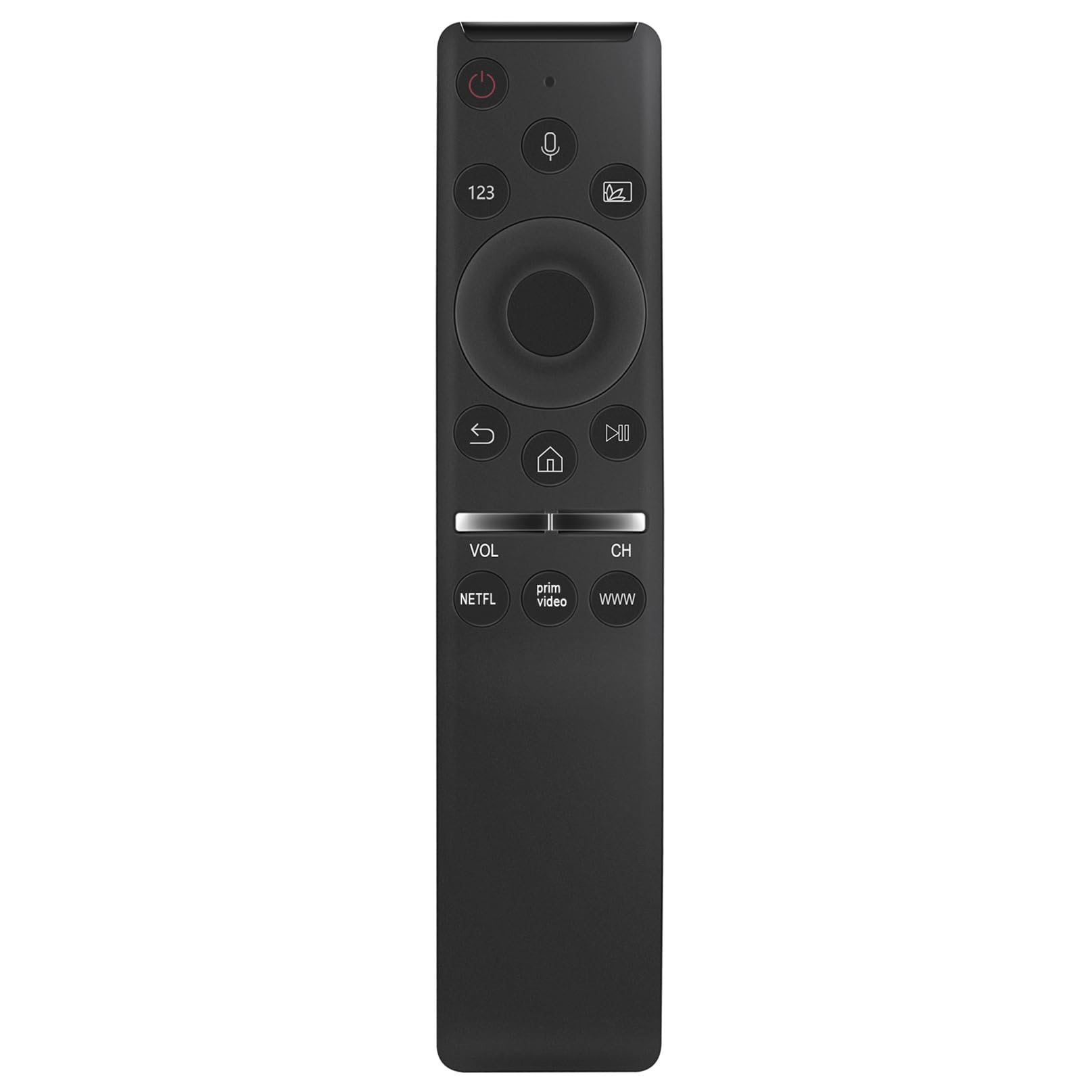
Слика 1.1: напред view of the ZdalaMit BN59-01330C remote control.
Компатибилни модели на Samsung телевизори:
- QA50Q65T, QA43Q60T, QA49Q80T, QA43Q65T, QA75Q70T, QA50Q60T, QA55Q80T, QA55Q60T, QA55Q65T, QA85Q80T, QA65Q65T, QA58Q60T, QA65Q60T, QA75Q60T, QA55Q70T, QA65Q70T, QA65Q80T, QA75Q80T, QA85Q60T, QA85Q70T
2. Поставување
2.1 Инсталација на батерија
The remote control requires two AA size alkaline batteries. Ensure correct polarity when inserting the batteries.
- Лоцирајте го капакот на преградата за батерии на задниот дел од далечинскиот управувач.
- Лизнете го капакот надолу или притиснете го резето (доколку го има) за да го отворите преградата.
- Insert two AA alkaline batteries, matching the (+) and (-) terminals as indicated inside the compartment.
- Вратете го капакот на преградата за батерии, осигурувајќи се дека безбедно ќе кликне на своето место.
2.2 Спарување на далечинскиот управувач
Before using the voice control and some other functions, the remote must be paired with your Samsung TV. Follow these steps:
- Проверете дали вашиот Samsung телевизор е вклучен.
- Насочете го далечинскиот управувач кон вашиот телевизор.
- Истовремено притиснете и задржете го Врати се button (usually an arrow pointing left) and the Пушти/Пауза копчето за приближно 3 секунди.
- На екранот на телевизорот треба да се појави порака за спарување, што укажува на успешно спарување.
If pairing is unsuccessful, ensure the batteries are correctly installed and try again. Move closer to the TV if necessary.
3. Упатства за работа
This section details the primary functions and button layout of your ZdalaMit BN59-01330C remote control.

Слика 3.1: напред view highlighting the voice control feature.
3.1 Функции на копчињата
- Копче за вклучување (⏻): Го вклучува или исклучува телевизорот.
- Копче за гласовна контрола (🎤): Activates the voice command feature. Press and hold to speak your command.
- 123 Копче: Accesses the virtual numeric keypad.
- мулти-View/Source Button: Changes input source or activates multi-view режим.
- Насочна плочка (горе, долу, лево, десно): Navigates menus and selections.
- Копче Select/Enter: Потврдува избор.
- Копче за враќање (↶): Враќа на претходниот екран или мени.
- Домашно копче (⌂): Accesses the Smart Hub or home screen.
- Копче за репродукција/пауза (⏯): Контролира репродукција на медиуми (репродукција, пауза).
- Volume Up/Down (VOL): Ја прилагодува јачината на звукот на телевизорот.
- Channel Up/Down (CH): Менува ТВ канали.
- Копче на NETFLIX: Директен пристап до апликацијата Netflix.
- Копче за Prime Video: Директен пристап до апликацијата Prime Video.
- Копче WWW: Direct access to the web прелистувач.
3.2 Користење на гласовна контрола
The voice control feature allows you to issue commands to your TV using your voice. Ensure the remote is paired with your TV before using this feature.
- Притиснете и задржете го Копче за гласовна контрола (икона за микрофон).
- Зборувајте јасно во микрофонот што се наоѓа на далечинскиот управувач.
- Release the button when you have finished speaking your command.
Examples of voice commands include "Open Netflix," "Change to Channel 5," "Volume up," or "Пребарај за [movie title]."
4. Одржување
4.1 Чистење на далечинскиот управувач
За да го одржите изгледот и функционалноста на далечинскиот управувач, редовно чистете го.
- Користете мека, сува крпа за да ја избришете површината на далечинскиот управувач.
- Do not use liquid cleaners, sprays, or abrasive materials, as these can damage the remote.
4.2 Замена на батеријата
Replace the batteries when the remote control's performance degrades or if it stops responding. Refer to Section 2.1 Battery Installation for detailed steps.
- Секогаш заменувајте ги двете батерии истовремено.
- Use new AA alkaline batteries.
- Фрлете ги искористените батерии според локалните прописи.
5 Смена на проблеми
If you encounter issues with your remote control, refer to the following common solutions.
5.1 Далечинскиот управувач не реагира
- Проверете ги батериите: Ensure batteries are correctly inserted with the correct polarity. Replace old or depleted batteries with new AA alkaline batteries.
- Повторно спарување на далечинскиот управувач: If the remote was previously working but stopped, try re-pairing it with your TV. Refer to Section 2.2 Pairing the Remote Control.
- Опструкции: Ensure there are no objects blocking the line of sight between the remote and the TV's infrared receiver (though this remote uses Bluetooth for voice, some functions might still rely on IR).
5.2 Гласовната контрола не работи
- Статус на спарување: Voice control requires the remote to be paired via Bluetooth. Confirm the remote is successfully paired with your TV (Section 2.2).
- Копче за микрофон: Ensure you are pressing and holding the Voice Control Button while speaking.
- Зборувајте јасно: Зборувајте јасно и директно во микрофонот на далечинскиот управувач.
- ТВ поставки: Check your TV's sound or voice control settings to ensure the feature is enabled.
6. Спецификации
| Карактеристика | Детал |
|---|---|
| Број на модел | BN59-01330C |
| Бренд | ЗдалаМит |
| Димензии на производот | 5 x 1.2 x 0.6 инчи |
| Тежина на ставката | 1.41 унци |
| Потребни се батерии | 2 x AA алкални батерии |
| Специјална карактеристика | Гласовно пребарување |
| Боја | Црното |
| Компатибилни уреди | Samsung Televisions (specific models listed in Section 1) |

Image 6.1: Dimensions of the ZdalaMit BN59-01330C remote control.
7. Информации за гаранцијата
Specific warranty details for the ZdalaMit BN59-01330C remote control are typically provided by the seller or manufacturer at the time of purchase. Please refer to your purchase documentation or contact the seller directly for information regarding warranty coverage, terms, and conditions.
8. Поддршка за корисници
If you have any questions, require further assistance, or encounter issues not covered in this manual, please do not hesitate to contact the seller or manufacturer directly. Contact information can usually be found on your purchase receipt or the product packaging.
For general inquiries, you may also visit the ZdalaMit brand page or the retailer's support section where the product was purchased.


