Вовед
The Muse M-195 BT is a 1-DIN car radio featuring a front USB port and a multi-function MCD display. This car radio includes integrated Bluetooth and an SD/MMC card reader, allowing for audio streaming from compatible devices such as laptops, tablets, or smartphones. The integrated hands-free system enables easy call management. The output power is 4 x 40 W.
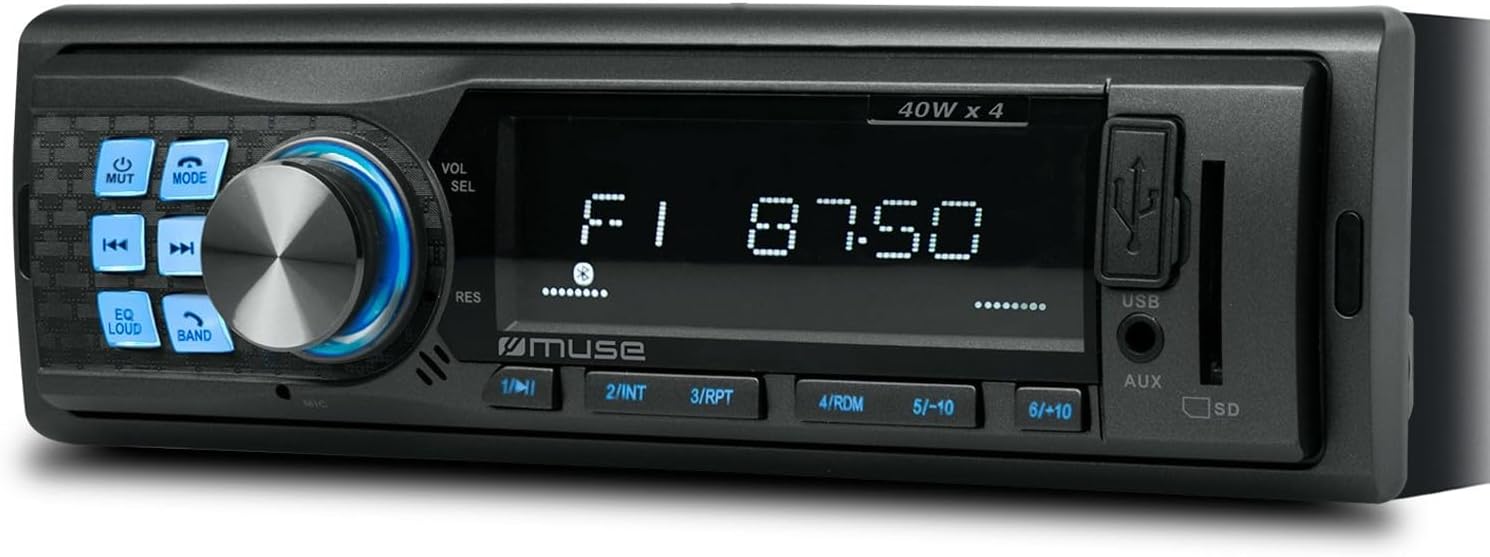
Слика 1: Предна страна view of the Muse M-195 BT car radio. This image displays the main unit with its central display, a large rotary knob for volume and selection, various function buttons (Mute, Mode, EQ, Loud, Band, Skip), and front-facing USB and AUX inputs, along with an SD card slot.
Информации за безбедност
- Внимателно прочитајте ги сите упатства пред инсталацијата и работата.
- Ensure proper wiring to prevent short circuits or damage. Consult a professional if unsure.
- Не ракувајте со уредот на начин што ќе ве одвлече од возењето.
- Избегнувајте изложување на уредот на екстремни температури, директна сончева светлина или влага.
- Не обидувајте се да го расклопите или модифицирате уредот. Ова може да ја поништи гаранцијата и да предизвика штета.
- Одржувајте ја јачината на звукот на ниво што ви овозможува да слушате надворешни звуци, како што се возила за итни случаи.
Содржина на пакетот
Проверете дали сите артикли се присутни во пакетот:
- Muse M-195 BT Car Radio Unit
- Монтажен ракав
- Кабелски сноп (ISO конектор)
- Клучеви за отстранување (2x)
- Упатство за употреба (овој документ)
Поставување и инсталација
1. Инсталација
The M-195 BT is designed for a standard 1-DIN dashboard opening (180x50mm). Ensure sufficient space behind the dashboard for wiring and ventilation.

Figure 2: Dimensions of the Muse M-195 BT car radio. The diagram illustrates the standard 1-DIN size, with a width of 185mm and a height of 58mm, crucial for proper fitment in a vehicle's dashboard.
- Prepare the Dashboard Opening: Отстранете го постоечкото автомобилско радио или заштитната плоча од 1-DIN слотот.
- Install the Mounting Sleeve: Insert the supplied metal mounting sleeve into the dashboard opening. Bend the tabs on the sleeve outwards with a screwdriver to secure it firmly.
- Поврзете жици: Connect the car's wiring harness to the supplied ISO connector. Ensure correct connections for power (constant 12V, ignition 12V, ground), speaker outputs, and antenna.
- Жолта жица: Постојана 12V (батерија)
- Црвена жица: Ignition 12V (ACC)
- Црна жица: Земјата
- Сина жица: Моќна антена / Amplifier Remote (Output)
- Жици за звучници: Connect to corresponding vehicle speakers (e.g., White/White-Black for Front Left, Grey/Grey-Black for Front Right, Green/Green-Black for Rear Left, Purple/Purple-Black for Rear Right).
- Slide in the Unit: Carefully slide the M-195 BT unit into the mounting sleeve until it clicks into place.
- Тест функционалност: Turn on the car ignition and test all functions of the radio (power, radio, USB, Bluetooth, sound output).
2. Првично вклучување
По успешната инсталација, притиснете го копчето Енергија / режим button to turn on the unit. The display will illuminate. The unit will typically start in the last used mode (e.g., FM radio).
Упатства за работа
1. Основни контроли
- POWER/MODE Button: Press to turn the unit ON/OFF. Short press to cycle through modes (FM, USB, SD, AUX, Bluetooth).
- Volume Knob (VOL/SEL): Rotate to adjust volume. Press to enter menu settings (e.g., Bass, Treble, Balance, Fader, EQ).
- Копче MUTE: Го исклучува/исклучува звукот на аудио излезот.
- EQ копче: Cycles through preset equalizer settings (e.g., Pop, Rock, Classic, Flat).
- Копче ГЛАСНО: Activates/deactivates loudness compensation for enhanced bass and treble at low volumes.
- Копче за лента: Во FM режим, циклично се менува низ FM опсезите (FM1, FM2, FM3).
- SKIP Buttons (◀◀ / ►►): In radio mode, short press to seek previous/next station. Long press for manual tuning. In USB/SD/BT mode, short press for previous/next track.
- Нумерички копчиња (1-6): In radio mode, short press to recall preset stations. Long press to save current station to a preset.
2. Радио работа (FM)
- Притиснете РЕЖИМ until "FM" is displayed.
- Притиснете БЕНД to select FM1, FM2, or FM3.
- Кратко притиснете ◀◀ or ►► за автоматско барање на следната силна станица.
- Долго притиснете ◀◀ or ►► to manually tune the frequency.
- To save a station: Tune to the desired station, then long press one of the numeric buttons (1-6) until the display confirms saving.
3. USB / SD Card Playback
- Insert a USB flash drive into the front USB port or an SD/MMC card into the SD card slot.
- Уредот автоматски ќе се префрли во USB/SD режим и ќе започне со репродукција на компатибилен звук files (MP3). If not, press РЕЖИМ да изберете.
- Користете ◀◀ or ►► за прескокнување песни.
- Use numeric buttons for specific functions like 1/►►I (Play/Pause), 2/INT (Intro scan), 3/RPT (Repeat), 4/RDM (Random).
4. Работа со Bluetooth
The M-195 BT supports Bluetooth for audio streaming and hands-free calling.
- Спарување:
- Проверете дали Bluetooth е овозможен на вашиот мобилен уред.
- Притиснете РЕЖИМ on the car radio until "BT" or "Bluetooth" is displayed. The unit will enter pairing mode.
- On your mobile device, search for available Bluetooth devices. Select "M-195 BT" from the list.
- Доколку се побара ПИН, внесете „0000“ (стандардно).
- Once paired, the display will show "CONNECTED" or similar confirmation.
- Аудио стриминг (A2DP):
- After pairing, play music on your mobile device. Audio will stream through the car speakers.
- Користете ◀◀ or ►► on the car radio to skip tracks.
- Hands-Free Calling (HFP):
- When a call comes in, the radio display will show "CALL" or the caller ID.
- Притиснете го Одговори button (often the Play/Pause button or a dedicated call button if available) to answer.
- Притиснете го Заврши повик копче за прекинување.
- The built-in microphone will be used for conversations.
5. Влез AUX
Connect an external audio device (e.g., MP3 player, smartphone) to the front 3.5mm AUX input using an audio cable.
- Connect the audio cable from your device to the AUX port on the car radio.
- Притиснете РЕЖИМ додека не се прикаже „AUX“.
- Контролирајте ја репродукцијата од вашиот надворешен уред.
Одржување
- Чистење: Користете мека, сува крпа за чистење на површината на уредот. За тврдокорна нечистотија, dampИзмијте ја крпата малку со вода. Не користете абразивни средства за чистење или растворувачи.
- Избегнувајте течности: Do not allow liquids to enter the unit, as this can cause damage.
- Температура: Избегнувајте изложување на уредот на екстремни температури, директна сончева светлина или висока влажност.
- USB/SD Slot Care: Чувајте ги слотовите за USB и SD картички без прашина и остатоци.
Решавање проблеми
| Проблем | Можна причина | Решение |
|---|---|---|
| Нема моќ | Неправилно поврзување; Прегорен осигурувач; Лабава врска. | Check power (yellow, red) and ground (black) wire connections. Check vehicle's fuse box and the unit's fuse. Ensure connections are secure. |
| Нема звук | Јачината на звукот е прениска; Исклучено е звукот; Неправилно поврзување на звучникот; Оштетени звучници. | Increase volume. Press MUTE button. Check speaker wire connections. Test with different speakers if possible. |
| Лош радио прием | Antenna not connected; Weak signal; Damaged antenna. | Ensure antenna is properly connected. Try tuning to a stronger station. Check antenna for damage. |
| USB/SD не се репродуцира. | Некомпатибилни file format; USB/SD card corrupted; Incorrect mode selected. | Обезбедете files are MP3 format. Try a different USB/SD card. Press MODE to select USB/SD. |
| Спарувањето со Bluetooth не успеа | Bluetooth not enabled on device; Device too far; Incorrect PIN; Previous connection interference. | Ensure Bluetooth is ON on your device. Bring device closer. Re-enter PIN "0000". Delete previous pairings on your device and try again. |
Спецификации
- Модел: М-195 БТ
- Излезна моќност: 4 x 40 W
- Прикажи: MCD Multi-function
- Поврзување: Bluetooth, USB, SD/MMC, AUX (3.5mm Jack)
- Поддржани аудио формати: MP3
- Радио приемник: FM (18 претходно поставени поставки)
- Повикување без раце: Интегриран микрофон
- Димензии (Д x Ш x В): 14 x 18.5 x 5.8 cm (approx. 1-DIN standard)
- Тежина: 550 гр
- пред-ampпотврдени излези: 1 pair (RCA audio rear or sub)
Гаранција и поддршка
This product comes with a standard manufacturer's warranty. For detailed warranty terms and conditions, please refer to the warranty card included with your purchase or visit the official Muse website. For technical support, troubleshooting assistance beyond this manual, or service inquiries, please contact your retailer or the Muse customer service department.
Ве молиме чувајте го вашиот доказ за купување за барањата за гаранција.


