Вовед
The Logitech POP Mouse is a compact, wireless mouse designed for enhanced productivity and personal expression. Featuring SilentTouch Technology for quiet clicks, a customizable top button for emojis or shortcuts, and a SmartWheel that shifts between precision and speed scrolling, it offers a versatile user experience. This mouse supports multi-device connectivity via Bluetooth, allowing seamless switching between up to three devices. It is built with durability in mind, offering up to 24 months of battery life and auto-sleep power-saving features.
Што има во кутијата
- Глушец Logitech POP
- 1 x AA батерија (претходно инсталирана)
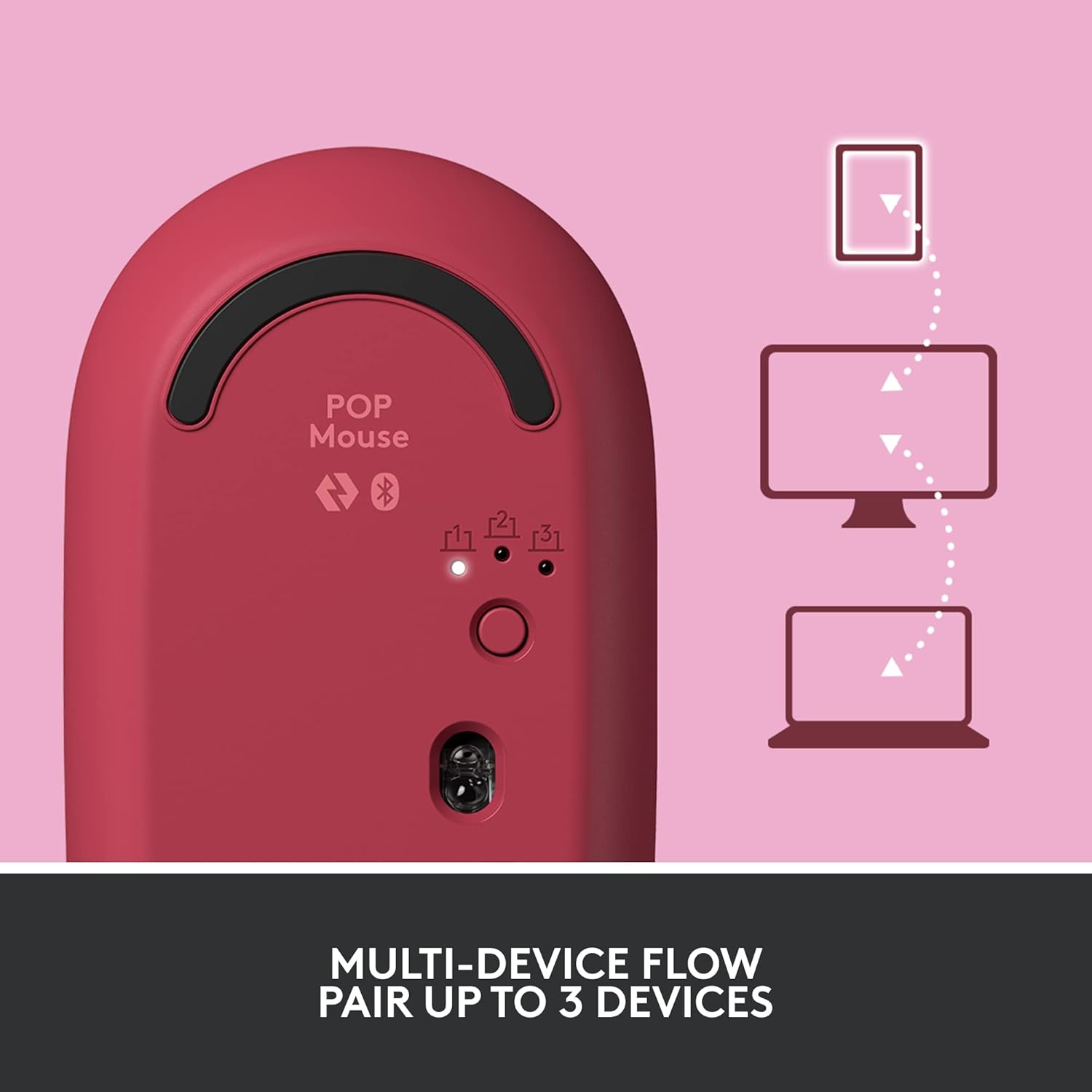
Image: The Logitech POP Mouse and an included AA battery, as typically found in the product packaging.
Поставување
1. Инсталација на батерија
- Пронајдете ја преградата за батерии на долната страна на глувчето.
- Gently slide the top cover of the mouse backward to remove it.
- Вметнете ја вклучената AA батерија, внимавајќи на точниот поларитет (+/-).
- Replace the top cover by aligning it and sliding it forward until it clicks into place.
2. Вклучување
- Flip the mouse over. Locate the On/Off switch on the bottom of the mouse.
- Slide the switch to the 'On' position (usually indicated by green color).
3. Device Pairing (Bluetooth)
- On the bottom of the mouse, press and hold the Easy-Switch button (labeled with 1, 2, or 3) for 3 seconds until the LED light starts blinking rapidly. This indicates pairing mode.
- On your computer, tablet, or phone, open your Bluetooth settings.
- Изберете „Logitech POP Mouse“ од листата на достапни уреди.
- Follow any on-screen prompts to complete the pairing process. The LED light on the mouse will turn solid for 5 seconds when connected.
4. Префрлување на повеќе уреди
- The POP Mouse can be paired with up to three devices. To switch between paired devices, simply press the Easy-Switch button on the bottom of the mouse. The corresponding LED (1, 2, or 3) will light up to indicate the active device.
Image: The Logitech POP Mouse can seamlessly connect and switch between up to three different devices, such as a tablet, desktop computer, and laptop.
Работа со глувчето
1. Основни функции
- Лев клик: Примарна селекција и интеракција.
- Десен клик: Пристапува до контекстуални менија.
- Тркало за лизгање: Скролува вертикално низ документите и web страници.
2. SmartWheel Technology
- The SmartWheel automatically shifts between high-precision scrolling for detailed work and super-fast scrolling for quickly navigating long documents or web страници.

Image: The SmartWheel on the Logitech POP Mouse dynamically adjusts its scrolling mode for precision or speed.
3. Технологија SilentTouch
- Enjoy a quiet working environment with SilentTouch Technology, which significantly reduces click noise without compromising tactile feedback.

Image: SilentTouch Technology ensures a quiet and comfortable user experience.
Прилагодување
1. Прилагодливо горно копче
- The top button, located below the scroll wheel, is customizable. By default, it opens an emoji menu for quick access to your favorite emojis.

Image: The customizable top button allows for quick access to an emoji menu on your screen.
2. Logi Options+ App
- Преземете го Опции за логирање + Апликација (Windows and macOS only) to personalize your POP Mouse.
- You can reassign the top button to perform various shortcuts, such as Snip Screen, Mic Mute, Voice-to-Text, or any other function you desire.
- The app also allows you to adjust pointer speed, scroll speed, and enable Flow for cross-computer control.
Одржување
- Чистење: Користете мека, гamp cloth to clean the exterior of the mouse. Avoid harsh chemicals or abrasive materials.
- Замена на батерија: Replace the AA battery when the low battery indicator light appears.
- Складирање: When not in use for extended periods, turn off the mouse using the On/Off switch to conserve battery life.
Решавање проблеми
- Глувчето не се поврзува: Ensure the mouse is powered on and within range of your device. Check your device's Bluetooth settings to confirm it's enabled and the mouse is paired. Try re-pairing the mouse.
- Задоцнување или неправилно движење: Replace the battery if it's low. Ensure there are no obstructions between the mouse and your device. Avoid using the mouse on highly reflective or uneven surfaces.
- Custom button not working: Verify that the Logi Options+ App is installed and running on your computer. Check the button assignments within the app.
Спецификации
| Бренд | Логитек |
| Број на модел | 910-006545 |
| Технологија за поврзување | Bluetooth 5.1 |
| Опсег | 32.81 стапки (10 м) |
| Технологија на сензори | Logitech високопрецизно оптичко следење |
| Број на копчиња | 4 (Left/Right click, Scroll wheel click, Top button) |
| Прилагодливо копче | Yes (Top button, via Logi Options+ App) |
| Тип на батерија | 1 x AA батерија |
| Траење на батеријата | До 24 месеци (може да варира во зависност од употребата) |
| Компатибилност на оперативниот систем | Windows 10 или понов, macOS 10.15 или понов, iPadOS, Chrome OS, Android |
| Тежина на ставката | 2.89 унци |
| Димензии на производот (ДxШxВ) | 4.3 x 2.6 x 1.7 инчи |
| Материјал | Plastic parts include certified post-consumer recycled plastic (Heartbreaker Rose: 29%) |
Гаранција и поддршка
За информации за гаранцијата и техничка поддршка, посетете ја официјалната страница за поддршка на Logitech. website or refer to the warranty card included with your product. You can find detailed FAQs, troubleshooting guides, and contact options for customer service.
- Поддршка преку Интернет: Посетете support.logi.com
- Регистрација на производ: Регистрирајте го вашиот производ за да добивате ажурирања и поддршка.


