1. Вовед
The FULODE FX-888 is a dual-channel, 31-band digital graphic equalizer designed for precise audio signal processing. It allows users to boost or attenuate specific frequency bands to compensate for room acoustics, modify sound characteristics, and enhance overall audio quality. Featuring a large LED liquid crystal screen and computer control capabilities, the FX-888 offers intuitive operation and versatile compatibility for various audio setups, including home studios, live performances, and professional audio environments.
2. Клучни карактеристики
- Dual-Channel Synchronized Control: Independent control over two audio channels for balanced sound adjustment.
- 31-Band DSP-Processed Equalizer: Fine-tune audio frequencies with 31 individual bands for precise sound shaping.
- LED Spectrum Indication: Real-time visual feedback of frequency levels for accurate monitoring.
- Large LED Liquid Crystal Screen: User-friendly interface displaying operation content and parameters clearly.
- Noise Gate Noise Reduction: Advanced feature to minimize unwanted background noise.
- Разновидно поврзување: Supports TRS6.35, RCA Lotus, and XLR CANNON balanced interfaces for broad compatibility.
- Компјутерска контрола: Adjust parameters and debug the unit via a connected computer for enhanced precision.
- Save and Recall Functions: Store and retrieve multiple custom audio settings (up to 16 modes).
- One-Click Sound Quality Incentive (BBE): Improves clarity, boosts loudness, and reduces listening fatigue.

Figure 2.1: Key features of the FULODE FX-888, highlighting the 31-segment LED spectrum display, noise reduction, DSP processing, and preset memory slots.

Figure 2.2: The FX-888 features a large LED liquid crystal screen for clear display of operation content, offering a significant improvement over older models.
3. Содржина на пакетот
По отварањето на пакувањето, проверете дали сите предмети се присутни и во добра состојба:
- FULODE FX-888 Digital Equalizer Unit
- Кабел за напојување
- USB Cable for Computer Connection
- Софтвер USB-диск
- Упатство за употреба (овој документ)
- Гарантна картичка

Слика 3.1: Преден и заден дел views of the FX-888 unit, illustrating its compact design and comprehensive connectivity options.
4. Поставување и врски
Follow these steps to properly connect your FULODE FX-888 Digital Equalizer to your audio system.
4.1 Поврзување за напојување
- Осигурајте се дека прекинувачот за напојување на задниот панел е во положба OFF (ИСКЛУЧЕНО).
- Connect the provided power cable to the AC input on the rear panel of the equalizer.
- Plug the other end of the power cable into a suitable AC power outlet (110V/60Hz).
4.2 Аудио врски
The FX-888 supports multiple input and output interfaces: TRS6.35, RCA Lotus, and XLR CANNON balanced interfaces. Choose the appropriate cables for your setup.

Figure 4.1: Rear panel interfaces, illustrating the diverse input and output options for seamless integration with audio equipment.
- Влезна врска: Connect the audio source (e.g., mixer, pre-amplifier) to the INPUT ports (CH-R, CH-L) on the rear panel of the equalizer.
- Излезна врска: Connect the OUTPUT ports (OUTPUT R, OUTPUT L) of the equalizer to your power ampзајакнувач или активни звучници.
4.3 Computer Control Connection
For advanced control and parameter adjustment, connect the equalizer to a computer.
- Insert the provided software USB drive into your computer's USB port. Install the dedicated control software.
- Connect the equalizer to your computer using the supplied USB cable. The USB port is located on the rear panel.

Figure 4.2: Computer connection for software control, enabling precise adjustments and debugging.
4.4 Visual Guide: Sound System Connection
Watch this video for a visual demonstration of connecting the FULODE FX-888 to a sound system.
Video 4.1: Demonstrates the physical connections of the FULODE FX-888 equalizer within an audio setup, including inputs, outputs, and power.
5. Операција
The FULODE FX-888 offers both manual and computer-controlled operation. This section covers manual operation using the front panel controls.
5.1 Контроли на предниот панелview

Figure 5.1: Front panel layout and control functions.
- SAVE Key: Click to enter SAVZ storage status. 1-16 memory slots are displayed. Use the function key to switch between slots. Long press to enter RELOAD MODE, and long press again to confirm reset operation.
- Клуч за ПОВИКУВАЊЕ: Press briefly to enter RECALL FROM call mode. Select the function key to call out 1-16 memory storage modes. Press and hold the RECALL key for mixed adjustment of EQ parameter status, then press again to exit.
- EQ/BYPASS Button: Click to enter EQ parameter value adjustment content status selection. The content includes EQ FREQ (frequency 20Hz-20KHz) for 31 segment value confirmation adjustment, GAIN for each segment, DELAY for output channel time delay, VOL OUT for output channel volume, HIGH PASS (20Hz-50Hz), and LOW PASS (5KHz-20KHz). Long press to bypass the EQ effect.
- Display Level: Displays and adjusts the dynamic LED input level value for music. Adjusts output 10Hz-20KHz gain by adding or subtracting 31 segments.
- Operation Content Display Screen: Large screen displaying all working parameters in real-time.
- Function Switch Knob (CONTROL/VOL): Turn the knob to adjust input volume. Press to select function.
5.2 Adjusting Equalization
Use the EQ/BYPASS button and the Function Switch Knob to navigate and adjust individual frequency bands. The LED spectrum display will provide visual feedback.

Figure 5.2: Independent adjustment of frequency bands (Bass, Midrange, Soprano) and status indicators.
5.3 Зачувување и повикување на претходно поставени поставки
Once you have achieved your desired sound, you can save the settings to one of the 16 memory slots using the SAVE key. To load a previously saved setting, use the RECALL key.
5.4 Visual Guide: Basic Operation
This video demonstrates the basic operational functions of the FULODE FX-888, including EQ adjustment, saving, and recalling settings.
Видео 5.1: Надview of the FULODE FX-888's features and operational controls, including EQ adjustments and preset management.
6. Компјутерска контрола
The FULODE FX-888 can be controlled via dedicated software on your computer, offering a more detailed and precise interface for adjustments.
6.1 Инсталација на софтвер
- Insert the provided USB drive labeled "SOFTWARE" into your computer.
- Locate and run the installer file на USB-уредот.
- Следете ги упатствата на екранот за да ја завршите инсталацијата на софтверот.
6.2 Connecting and Debugging
- Ensure the FX-888 is powered on and connected to your computer via the USB cable.
- Launch the installed FULODE control software.
- The software should automatically detect the connected equalizer. If not, refer to the software's help menu for device detection options.
- Use the graphical interface within the software to adjust frequency bands, save presets, and access other advanced settings.
7. Одржување
To ensure the longevity and optimal performance of your FULODE FX-888, follow these maintenance guidelines:
- Чистење: Use a soft, dry cloth to clean the exterior of the unit. Avoid abrasive cleaners or solvents that could damage the finish or screen.
- Вентилација: Ensure proper airflow around the unit. Do not block ventilation openings.
- Складирање: When not in use for extended periods, store the equalizer in a cool, dry place, away from direct sunlight and extreme temperatures.
- Ракување: Ракувајте со уредот внимателно. Избегнувајте испуштање или изложување на силни удари.
8 Смена на проблеми
If you encounter issues with your FULODE FX-888, refer to the following common problems and their solutions:
| Проблем | Можна причина | Решение |
|---|---|---|
| Нема моќ | Power cable not connected securely; Power switch off; Power outlet malfunction. | Check power cable connections; Ensure power switch is ON; Test power outlet with another device. |
| Нема излез на звук | Incorrect audio connections; Input/Output volume too low; EQ Bypass active; Mute engaged. | Verify all audio cables are correctly connected to input/output ports; Increase volume levels; Deactivate EQ Bypass; Check for mute status on screen. |
| Искривен звук | Input signal too high (clipping); Incorrect EQ settings; Faulty cables. | Reduce input signal level; Adjust EQ settings to avoid excessive boosting; Replace audio cables. |
| Computer Software Not Connecting | USB cable not connected; Software not installed correctly; Driver issues; USB drive corrupted. | Ensure USB cable is securely connected to both equalizer and computer; Reinstall software and drivers; Try a different USB port or cable. If the software USB drive is corrupted, contact FULODE support for a digital copy. |
| Проблеми со екранот | Loose internal connection; Software glitch. | Power cycle the unit (turn off, wait 10 seconds, turn on). If the issue persists, contact customer support. |
9. Спецификации
| Параметар | Вредност |
|---|---|
| Бренд | ФУЛОДЕ |
| Број на модел | Computer Control Adjust The Parameters (FX-888) |
| Тежина на ставката | 4.84 фунти (2.2 килограми) |
| Димензии на производот | 19 x 6.96 x 1.96 инчи |
| Број на канали | 2 (двоен канал) |
| Фреквенциски опсези | 31-Бенд |
| Сооднос на сигнал до бучава | 92 dB |
| Линиска влезна импеданса | 15KΩ |
| Линиска излезна импеданса | 300Ω |
| Режим на напојување | 110V (Corded Electric) |
| Фреквентен одговор | 20Hz-20KHz |
| Технологија за поврзување | Жичен |
| Боја | Црното |
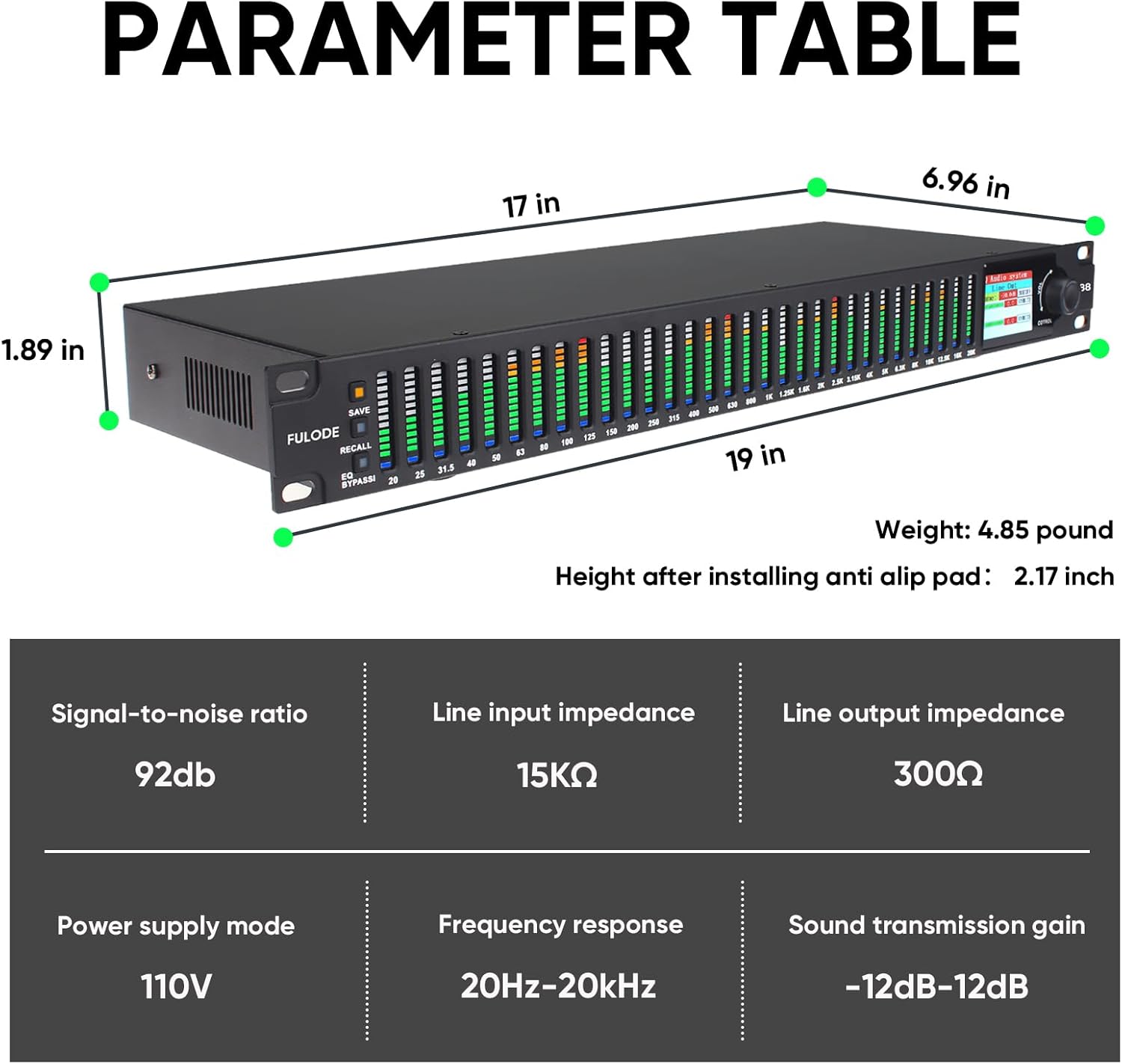
Figure 9.1: Detailed dimensions and technical parameters of the FX-888.
10. Гаранција и поддршка
FULODE products are manufactured to high-quality standards. For warranty information, technical support, or service inquiries, please refer to the warranty card included in your package or visit the official FULODE webлокација. Чувајте ја сметката како доказ за купување за гаранциски побарувања.
За дополнителна поддршка, можете да ја посетите FULODE Store on Amazon.


