Вовед
This manual provides detailed instructions for the setup, operation, and maintenance of your Moultrie W800 All-Purpose Series A Trail Camera. Please read this guide thoroughly to ensure proper use and optimal performance of your device.
Производот завршиview
The Moultrie W800 is a high-performance trail camera designed for capturing images and videos of wildlife. It features an Illumi-Night Sensor for clear nighttime captures and a robust design for outdoor use.
Клучни карактеристики:
- Captures 26 Megapixel images for high clarity.
- 70-foot flash and detection range.
- Fast 0.5 second trigger speed.
- Moultrie Smokescreen Camo Pattern for discreet placement.
Што има во кутијата:
- Moultrie W800 Trail Camera
- 8 АА батерии
- Ремен за монтирање

Image: Moultrie W800 Trail Camera in its retail packaging, showing the camera, batteries, and key features on the box.
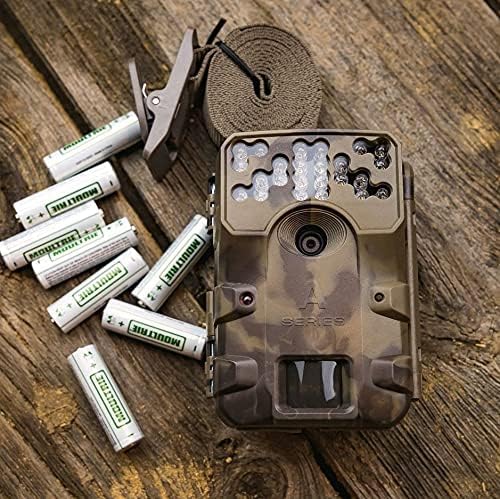
Image: The Moultrie W800 trail camera displayed with the included 8 AA batteries and a mounting strap, ready for setup.
Поставување
1. Инсталација на батерија
- Отворете ја резето на куќиштето на камерата.
- Вметнете 8 AA батерии во преградата за батерии, внимавајќи на точниот поларитет (+/-).
- Close the camera housing latch securely.
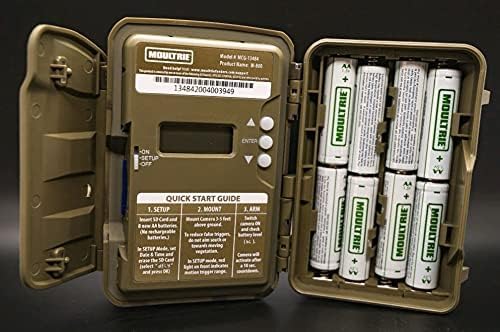
Image: An open Moultrie W800 camera, revealing the battery compartment on the right, the control panel with a small screen, and buttons on the left. This view is essential for battery and SD card installation.
2. Инсталација на SD-картичка
- Со отворено куќиште на камерата, пронајдете го слотот за SD картичка.
- Insert a standard SD card (up to 32GB) into the slot until it clicks into place. Ensure the card is inserted in the correct orientation.
- It is recommended to format the SD card using the camera's menu settings before first use.
3. Монтирање на камерата
- Select a suitable location, typically a tree or post, where the camera can capture the desired area.
- Mount the camera approximately 3-5 feet above the ground.
- Use the provided mounting strap to secure the camera firmly. Thread the strap through the camera's mounting slots and tighten it around the object.
- Angle the camera to avoid direct sunlight and to minimize false triggers from swaying branches.

Image: A Moultrie W800 trail camera, in its camouflage casing, securely mounted to a tree trunk using a strap, demonstrating a typical field setup.
Упатства за работа
Основно работење
- Вклучување/исклучување: Locate the power switch inside the camera housing. Slide it to the 'ON' position to power on the camera. Slide to 'OFF' to power off.
- Режим на поставување: After powering on, the camera will typically enter 'SETUP' mode. In this mode, you can adjust settings such as date, time, photo/video mode, resolution, and trigger delay using the control buttons and display.
- Вооружување на камерата: Once settings are configured, slide the power switch to the 'ARM' position. The camera will initiate a countdown (e.g., 10 seconds) to allow you to leave the area without triggering a capture. After the countdown, the camera will be active and ready to detect motion.
- Проверка на статусот: The small display inside the camera housing provides status information, including battery level, SD card status, and current mode.
Одржување
- Чистење: Периодично чистете го објективот на камерата и прозорецот на сензорот со мека крпа што не остава влакненца. Избегнувајте абразивни материјали или груби хемикалии.
- Проверка на батеријата: Regularly check battery levels, especially before extended deployment. Replace all batteries simultaneously to ensure consistent power.
- Управување со SD картички: Format the SD card regularly to prevent data corruption and ensure optimal performance. Back up important images/videos before formatting.
- Housing Integrity: Ensure the camera housing latch is always securely closed to protect against moisture and dust.
Решавање проблеми
- Camera not taking pictures:
- Check if the camera is in 'ARM' mode.
- Проверете дали SD-картичката е правилно вметната и дали има доволно слободен простор.
- Verify that batteries have adequate charge.
- Check camera settings for trigger delay or sensitivity.
- Форматирајте ја SD -картичката.
- Лош квалитет на сликата:
- Исчистете го објективот на камерата и прозорецот на сензорот.
- Ensure the camera is mounted at the recommended height and angle.
- Проверете дали има пречки пред камерата.
- Кратко траење на батеријата:
- Use fresh, high-quality alkaline or lithium AA batteries.
- Екстремните температури можат да влијаат на перформансите на батеријата.
- Frequent video recording or high trigger frequency can consume more power.
Спецификации
Detailed technical specifications for the Moultrie W800 Trail Camera:
| Карактеристика | Спецификација |
|---|---|
| Ефективна сепак резолуција | 26 MP |
| Брзина на активирањето | 0.5 секунди |
| Опсег на блиц | 70 стапки |
| Опсег на откривање | 70 стапки |
| Технологија на слаба осветленост | Illumi-Night Sensor (Night Color) |
| Резолуција за снимање видео | 720 стр |
| Формат за снимање видео | MPEG-4 |
| Тип на флеш меморија | SD (up to 32GB) |
| Извор на енергија | 8 АА батерии |
| Технологија за поврзување | Безжичен (Wi-Fi) |
| Контролен метод | Апликација |
| Посебни карактеристики | Motion Sensor, Night Vision |
| Оценка за меѓународна заштита | IP54 |
| Тежина на ставката | 1.12 фунти |
| Димензии на пакетот | 8.62 x 5.39 x 3.43 инчи |
| UPC | 053695134840 |

Image: The back of the Moultrie W800 retail box, detailing performance specifications such as trigger speed, detection range, flash range, battery life, and SD card compatibility.
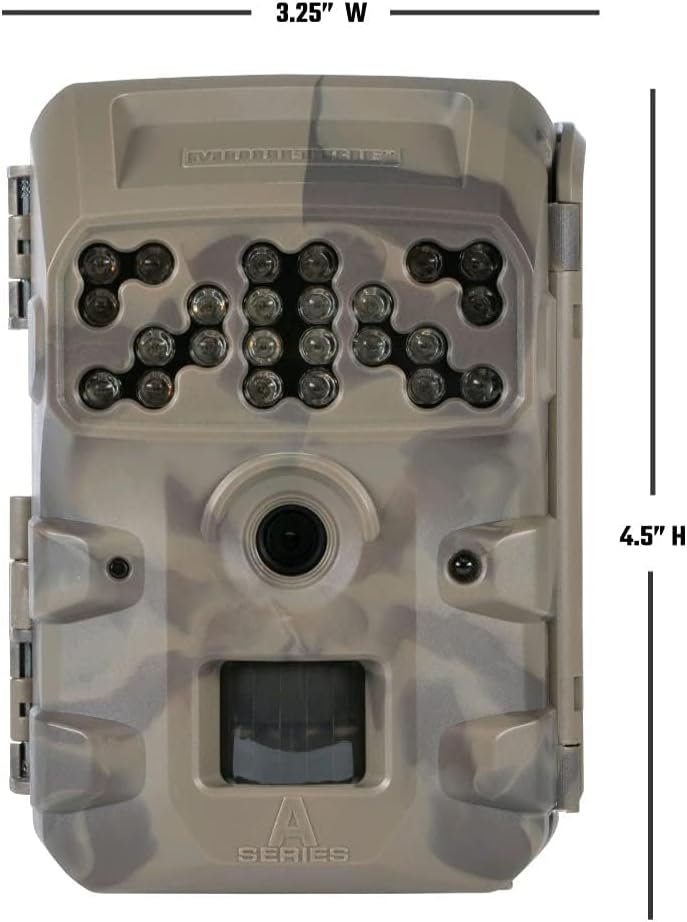
Слика: напред view of the Moultrie W800 trail camera with its dimensions clearly labeled: 3.25 inches wide and 4.5 inches high.
Гаранција и поддршка
Информации за гаранцијата:
The Moultrie W800 Trail Camera comes with a 2 година гаранција од датумот на купување, покривајќи ги производствените дефекти. Ве молиме зачувајте го доказот за купување за гаранциски барања.
Поддршка за корисници:
For technical assistance, troubleshooting, or warranty inquiries, please visit the official Moultrie support webсајт:


