Упатство за користење на DrayTek Vigor 2865ax Ethernet рутер
Модел: V2865AX-K
Вовед
Welcome to the user manual for your DrayTek Vigor 2865ax Ethernet Router. This document provides detailed instructions for setting up, operating, maintaining, and troubleshooting your device to ensure optimal performance and connectivity. The Vigor 2865ax is a high-performance router designed for Small to Medium Businesses (SMBs) and advanced home users, offering robust features like VDSL2/ADSL2+ and Ethernet WAN load balancing, Wi-Fi 6 (AX3000), VPN capabilities, and extensive LAN port options.
Информации за безбедност
Please read these safety instructions carefully before using the device.
- Place the router on a stable, flat surface away from direct sunlight, heat sources, and moisture.
- Обезбедете соодветна вентилација околу уредот за да спречите прегревање.
- Use only the power adapter supplied with the router.
- Не го отворајте рутерот casing; препуштете го целото сервисирање на квалификуван персонал.
- Чувајте го уредот подалеку од деца и домашни миленици.
- Исклучете го напојувањето за време на електрични бури или кога не се користи подолг период.
Содржина на пакетот
Проверете дали сите артикли наведени подолу се вклучени во вашиот пакет:
- Vigor 2865 Series Router
- DC 12V напојување со приклучок од Велика Британија
- Водич за брз почеток
- Screws & wall plugs for wall mounting
- 2m Cat-5e RJ-45 Network Cable
- 2x одвојливи безжични LAN антени
Производот завршиview
Familiarize yourself with the physical components and ports of your DrayTek Vigor 2865ax router.
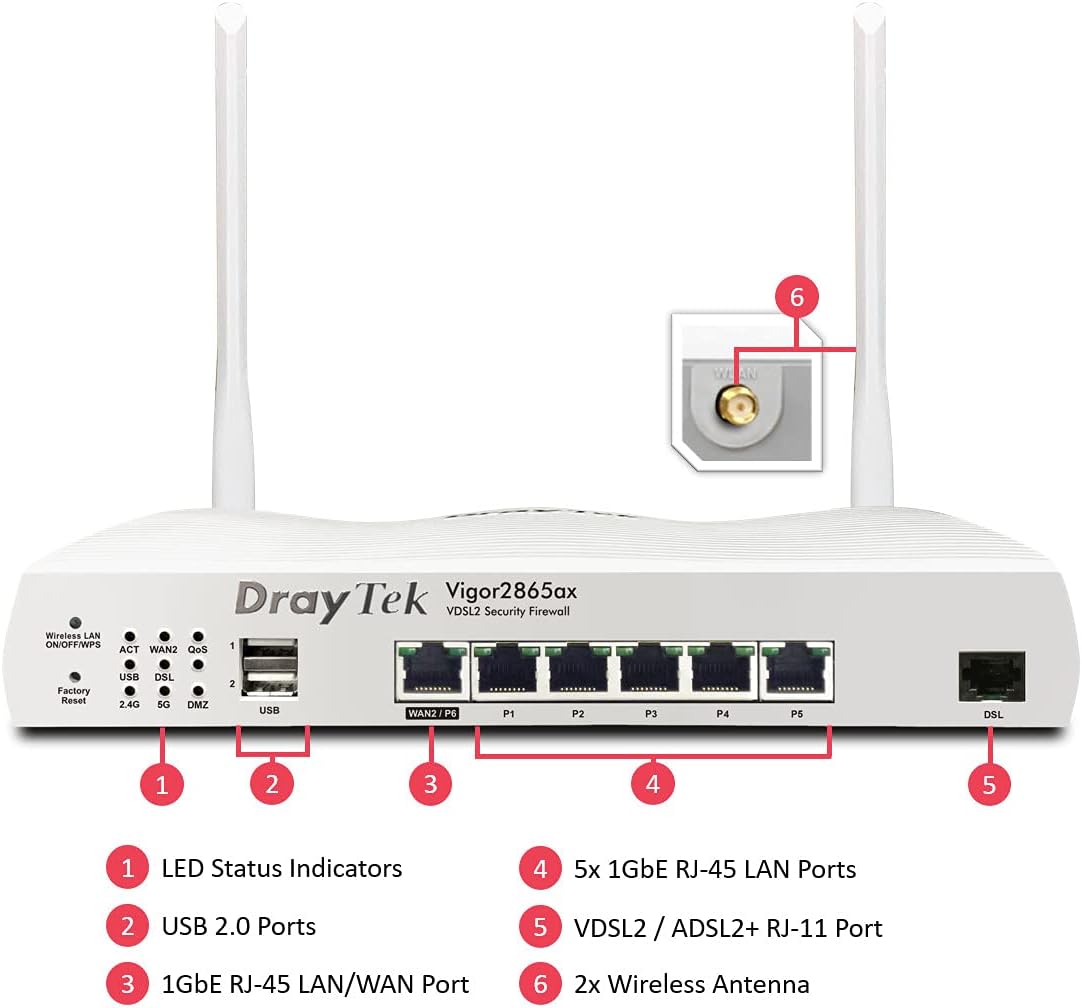
This image displays the front panel of the DrayTek Vigor 2865ax router, highlighting key components. Label 1 points to the LED Status Indicators, Label 2 to the USB 2.0 Ports, Label 3 to the 1GbE RJ-45 LAN/WAN Port (WAN2/P6), Label 4 to the 5x 1GbE RJ-45 LAN Ports (P1-P5), Label 5 to the VDSL2 / ADSL2+ RJ-11 Port (DSL), and Label 6 to the 2x Wireless Antenna connectors.
Преден панел
- LED индикатори за статус: Provide visual feedback on the router's operational status, including power, internet connectivity, Wi-Fi activity, and LAN port status.
- USB 2.0 порти: For connecting external devices such as 3G/4G USB modems for backup WAN or USB storage for network-attached storage (NAS) functionality.
- WAN2/P6 (1GbE RJ-45 LAN/WAN Port): Configurable as either a Gigabit Ethernet WAN port for connecting to a fiber modem or another internet source, or as an additional LAN port.
- P1-P5 (5x 1GbE RJ-45 LAN Ports): Gigabit Ethernet ports for connecting wired devices such as computers, servers, and network switches.
- DSL (VDSL2 / ADSL2+ RJ-11 Port): For connecting directly to your VDSL or ADSL broadband line.
Заден панел
- Влез на енергија: Connects to the supplied DC 12V power adapter.
- Копче за вклучување: За вклучување или исклучување на рутерот.
- Антенски конектори: For attaching the two detachable wireless LAN antennas.
Поставување
Чекор 1: Поврзете го хардверот
- Поврзете антени: Screw the two detachable wireless LAN antennas onto the connectors at the rear of the router.
- Поврзете се на интернет (WAN):
- For VDSL/ADSL: Connect an RJ-11 cable from your telephone line's DSL filter/socket to the DSL port on the router.
- For Ethernet WAN (e.g., Fibre/Cable Modem): Connect an Ethernet cable from your fiber/cable modem to the WAN2/P6 port on the router.
- Поврзување со локална мрежа (LAN): Connect an Ethernet cable from one of the LAN ports (P1-P5) on the router to your computer or network switch.
- Поврзете напојување: Connect the supplied DC 12V power adapter to the router's power input and then plug it into a power outlet. Press the power button to turn on the router.
Чекор 2: Почетна конфигурација
- Пристап Web Интерфејс: Отвори a web browser on a connected computer and enter the default IP address: 192.168.1.1.
- Најавете се: Внесете го стандардното корисничко име (админ) и лозинка (админ). It is highly recommended to change the default password immediately after logging in for the first time.
- Run Quick Start Wizard: Follow the on-screen instructions of the Quick Start Wizard to configure your internet connection (WAN settings), Wi-Fi network name (SSID), and password.
- Ажурирање на фирмверот: After initial setup, navigate to Одржување на системот > Надградба на фирмверот to check for and install the latest firmware. This ensures optimal performance and security.
Упатства за работа
Multi-WAN Load Balancing and Failover
The Vigor 2865ax supports multiple WAN connections, allowing for load balancing to increase bandwidth or failover for connection redundancy.

This diagram shows the DrayTek Vigor 2865ax router connected to various internet sources: WiFi WAN, 1Gb Ethernet & FTTP, ADSL2+ & VDSL2 FTTC, and G.Fast FTTC. This illustrates the router's capability to utilize multiple WAN connections simultaneously for load balancing or failover.
Configure WAN settings under WAN > Општо поставување. You can enable load balancing policies or set up failover rules to ensure continuous internet access.
Wi-Fi 6 (AX3000) Configuration
The router provides high-speed Wi-Fi 6 connectivity across dual bands (2.4GHz and 5GHz).

This image depicts the Wi-Fi coverage provided by the DrayTek Vigor 2865ax router, showing distinct coverage areas for the 2.4GHz (AX600) and 5GHz (AX2400) bands, with various devices connected within these zones.
Пристапете до поставките за Wi-Fi преку Безжичен LAN menu. Here you can:
- Change SSID (Wi-Fi network name) and password.
- Configure security settings (WPA2/WPA3).
- Set up multiple SSIDs for different networks (e.g., guest network).
- Adjust channel and bandwidth settings for optimal performance.
VPN (виртуелна приватна мрежа)
The Vigor 2865ax supports up to 32 VPN tunnels, including SSL VPN and OpenVPN, for secure remote access and site-to-site connectivity.
Одете до VPN и далечински пристап to configure VPN profiles. Detailed guides for various VPN types are available on the DrayTek support webсајт.
LAN Management and VLANs
The router features 5+1 Gigabit LAN ports and supports VLANs for network segmentation.
Manage LAN settings under LAN > General Setup. Ти можеш:
- Configure IP addresses and DHCP server settings.
- Create VLANs (Virtual LANs) to isolate network segments for enhanced security and management (e.g., separating guest Wi-Fi from internal network).
- Set up port mirroring or link aggregation if supported.
Одржување
Ажурирања на фирмверот
Редовно проверувајте и инсталирајте ажурирања на фирмверот за да се осигурате дека вашиот рутер ги има најновите функции, безбедносни закрпи и подобрувања на перформансите.
- Посетете го официјалниот DrayTek website and navigate to the support section for the Vigor 2865ax.
- Преземете го најновиот фирмвер file.
- Пристапете до рутерот web interface and go to Одржување на системот > Надградба на фирмверот.
- Follow the on-screen instructions to upload and install the firmware. Do not power off the router during this process.
Конфигурација за резервна копија
Препорачливо е да направите резервна копија од конфигурациските поставки на вашиот рутер пред да извршите поголеми промени или ажурирања на фирмверот.
Одете на Одржување на системот > Резервна копија на конфигурацијата to save your settings to a file.
Фабрички ресетирање
If you encounter persistent issues or wish to revert all settings to default, you can perform a factory reset.
Предупредување: A factory reset will erase all your custom configurations.
За да извршите фабричко ресетирање:
- Кога рутерот е вклучен, користете спојувалка за хартија или тенок предмет за да притиснете и задржете го Фабрички ресетирање button (located on the front panel, often recessed) for about 5-10 seconds until the LEDs flash.
- Release the button and wait for the router to restart with default settings.
Решавање проблеми
Нема интернет конекција
- Проверете ги каблите: Ensure all Ethernet and DSL cables are securely connected to the correct ports.
- Check WAN LED: Verify that the WAN LED (DSL or WAN2) is lit and stable, indicating a connection to your ISP.
- Поставки на интернет-провајдерот: Confirm that your WAN settings (e.g., PPPoE username/password, static IP, DHCP) are correctly configured in the router's web interface, matching your ISP's requirements.
- Статус на модемот: If using an external modem, check its status lights to ensure it's online.
- Рестартирај: Power cycle both your modem (if applicable) and the DrayTek router.
Wi-Fi Not Working or Slow
- Check Wireless LAN LED: Ensure the Wireless LAN LED is active.
- Емитување на SSID: Verify that your Wi-Fi network (SSID) is being broadcast.
- Лозинка: Проверете ја лозинката за Wi-Fi уште еднаш.
- Пречки на каналот: Try changing the Wi-Fi channel in the router's settings to avoid interference from neighboring networks.
- Јачина на сигналот: Осигурајте се дека рутерот е поставен централно и подалеку од пречки.
Не може да се пристапи Web Интерфејс
- IP адреса: Confirm your computer's IP address is in the same subnet as the router (e.g., 192.168.1.x).
- Кабелско поврзување: Ensure your computer is directly connected to a LAN port on the router.
- Кеш на прелистувачот: Исчистете го кешот на прелистувачот или обидете се со друг прелистувач.
- Заштитен ѕид/Антивирус: Temporarily disable any software firewalls or antivirus programs on your computer that might be blocking access.
- Ресетирање на фабриката: As a last resort, perform a factory reset (see Maintenance section).
Спецификации
| Карактеристика | Детал |
|---|---|
| Димензии на производот | 34.5 x 28.6 x 7.5 cm; 1.6 кг |
| Број на модел на ставка | V2865AX-K |
| Бренд | DrayTek |
| Име на моделот | Vigor 2865ax |
| Специјална карактеристика | Далечински пристап |
| Класа на фреквентен опсег | Двобенд |
| Стандард за безжична комуникација | 802.11a (Wi-Fi 6 AX3000) |
| Компатибилни уреди | Лаптоп, персонален компјутер, таблет, паметен телефон |
| Фреквенција | 2.4 GHz, 5 GHz |
| Препорачана употреба | Игри на среќа, дом, бизнис |
| Технологија за поврзување | Wi-Fi, Ethernet, VDSL2/ADSL2+ |
Гаранција и поддршка
DrayTek products typically come with a standard manufacturer's warranty. Please refer to the warranty card included in your product packaging or visit the official DrayTek webстраница за детални услови за гаранција специфични за вашиот регион.
For technical support, firmware downloads, and additional documentation, please visit the official DrayTek support webсајт: www.draytek.co.uk/support. You may also contact DrayTek customer service directly for assistance.
When contacting support, please have your router's model number (Vigor 2865ax) and serial number ready.


