1. Вовед
Thank you for choosing the Aurora AU200MA 200-Sheet Auto-Feed Micro-Cut Paper Shredder. This manual provides essential information for the safe and efficient operation, maintenance, and troubleshooting of your new shredder. Please read these instructions thoroughly before use and retain them for future reference.

Figure 1.1: Aurora AU200MA Paper Shredder
The Aurora AU200MA is designed for commercial and home office use, offering high-security micro-cut shredding for sensitive documents. It features an automatic feed for up to 200 sheets and a manual feed slot for up to 10 sheets, including credit cards and small paper clips.
2. Важни безбедносни инструкции
За да го намалите ризикот од пожар, електричен удар или повреда, секогаш следете ги основните безбедносни мерки на претпазливост при користење на овој апарат:
- Read all instructions before operating the shredder.
- Чувајте ги децата и миленичињата подалеку од машината за уништување.
- Keep loose clothing, jewelry, hair, and hands away from the paper entry slot.
- Do not spray any aerosol-based products into or around the shredder.
- Do not shred metal objects, cardboard, or plastic other than credit cards.
- Не ракувајте со сечкачот ако кабелот за напојување е оштетен.
- Секогаш исклучувајте го сечкачот од струја пред да го преместите, исчистите или испразните корпата за отпадоци.
- Осигурајте се дека дробилката е поставена на стабилна, рамна површина.
3. Производот завршиview
3.1 Компоненти
- Auto-Feed Tray: For automatic shredding of up to 200 sheets.
- Слот за рачно довод: For manual shredding of up to 10 sheets, credit cards, and small paper clips.
- Контролен панел: Features power button and indicator lights.
- Корпа за отпадоци: 8.5-gallon pullout bin for shredded materials.
- Кастери: За лесна мобилност на единицата.
3.2 Контролна табла и индикатори

Слика 3.1: Контролна табла надview
The control panel includes various LED indicators to communicate the shredder's status:
- Во мирување: Indicates the shredder is powered on and ready for operation.
- Прегревање: Illuminates when the shredder has exceeded its continuous run time and needs to cool down.
- Bin-full: Означува дека корпата за отпадоци е полна и треба да се испразни.
- Преоптоварување: Lights up if too much paper is inserted, triggering the anti-jam auto-reverse function.
- Отворена врата: Indicates the waste bin is not properly closed or inserted.
4. Поставување
- Распакувајте го уништувачот: Внимателно извадете го сечкачот од пакувањето.
- Позиционирајте го уништувачот: Place the shredder on a flat, stable surface. The integrated casters allow for easy movement.
- Поврзете напојување: Приклучете го кабелот за напојување во стандарден штекер за наизменична струја од 120V.
- Ensure Bin is Closed: Make sure the pullout waste bin is fully and correctly inserted into the shredder. The "Door Open" indicator should not be lit.
5. Упатства за работа
5.1 Автоматско сечење со внесување

Figure 5.1: Auto-Feed Tray with Documents
The auto-feed feature allows for convenient shredding of multiple sheets without manual feeding.
- Отворете го капакот на фиоката за автоматско полнење.
- Stack up to 200 sheets of paper neatly into the auto-feed tray. Ensure the paper is free of staples, paper clips (except small ones in manual feed), and other foreign objects.
- Close the auto-feed tray cover. The shredder will automatically begin processing the documents.
- The shredder has a continuous run time of 60 minutes. After this period, it may enter an overheat state to cool down.
5.2 Рачно сечење на подавање

Figure 5.2: Manual Feed Slot and Shredding Capabilities
For smaller quantities of paper or other shreddable items:
- Insert up to 10 sheets of paper into the manual feed slot.
- The manual feed slot can also shred credit cards and small paper clips. Insert these items one at a time into the center of the manual feed slot.
5.3 Anti-Jam Auto-Reverse
The shredder is equipped with an anti-jam auto-reverse function. If too much paper is inserted, the shredder will automatically reverse to clear the jam. If a jam persists, press the reverse button on the control panel to manually clear the paper.
5.4 Auto Power-Sleep
For energy efficiency, the shredder will automatically enter a power-sleep mode after a period of inactivity. It will reactivate when paper is detected or a button is pressed.
6. Одржување
6.1 Празнење на корпата за отпадоци

Figure 6.1: Pullout Waste Bin
When the "Bin-full" indicator illuminates, the waste bin needs to be emptied.
- Ensure the shredder is in standby mode or unplugged.
- Gently pull out the 8.5-gallon waste bin from the front of the shredder.
- Фрлете го искинатиот материјал.
- Slide the waste bin back into the shredder until it clicks securely into place. Ensure the "Door Open" indicator is off.
6.2 Shredder Oiling
Regular oiling of the shredder blades is recommended to maintain optimal performance and extend the life of your micro-cut shredder. Use shredder oil specifically designed for paper shredders.
- Нанесете тенка линија масло за дробење хартија преку отворот за влез на хартија.
- Протнете неколку листови хартија низ отворот за рачно внесување за да го распределите маслото.
- Repeat this process after every 30 minutes of accumulated shredding or when you notice a decrease in performance.
6.3 Чистење
Избришете ја надворешноста на дробилката со мека, сува крпа. Не користете абразивни средства за чистење или растворувачи.
7 Смена на проблеми
| Проблем | Можна причина | Решение |
|---|---|---|
| Шредерот не работи. | Нема струја; Корпата за отпадоци не е правилно вметната; Активирана е заштитата од прегревање. | Check power connection; Ensure waste bin is fully closed (Door Open indicator off); Allow shredder to cool down if Overheat indicator is on. |
| Заглавување на хартија. | Вметната е премногу хартија; Хартијата не е вметната право. | The shredder has an anti-jam auto-reverse function. If it persists, press the reverse button on the control panel to manually clear the paper. Reduce the amount of paper for future shredding. |
| Шредерот запира за време на работата. | Активирана е заштитата од прегревање; Корпата за отпадоци е полна. | Allow shredder to cool down if Overheat indicator is on; Empty the waste bin if Bin-full indicator is on. |
| Искинатиот материјал не е доволно фин. | Not applicable (Micro-cut shredder). | The Aurora AU200MA is a micro-cut shredder, producing tiny particles (P-5 security level). |
8. Спецификации
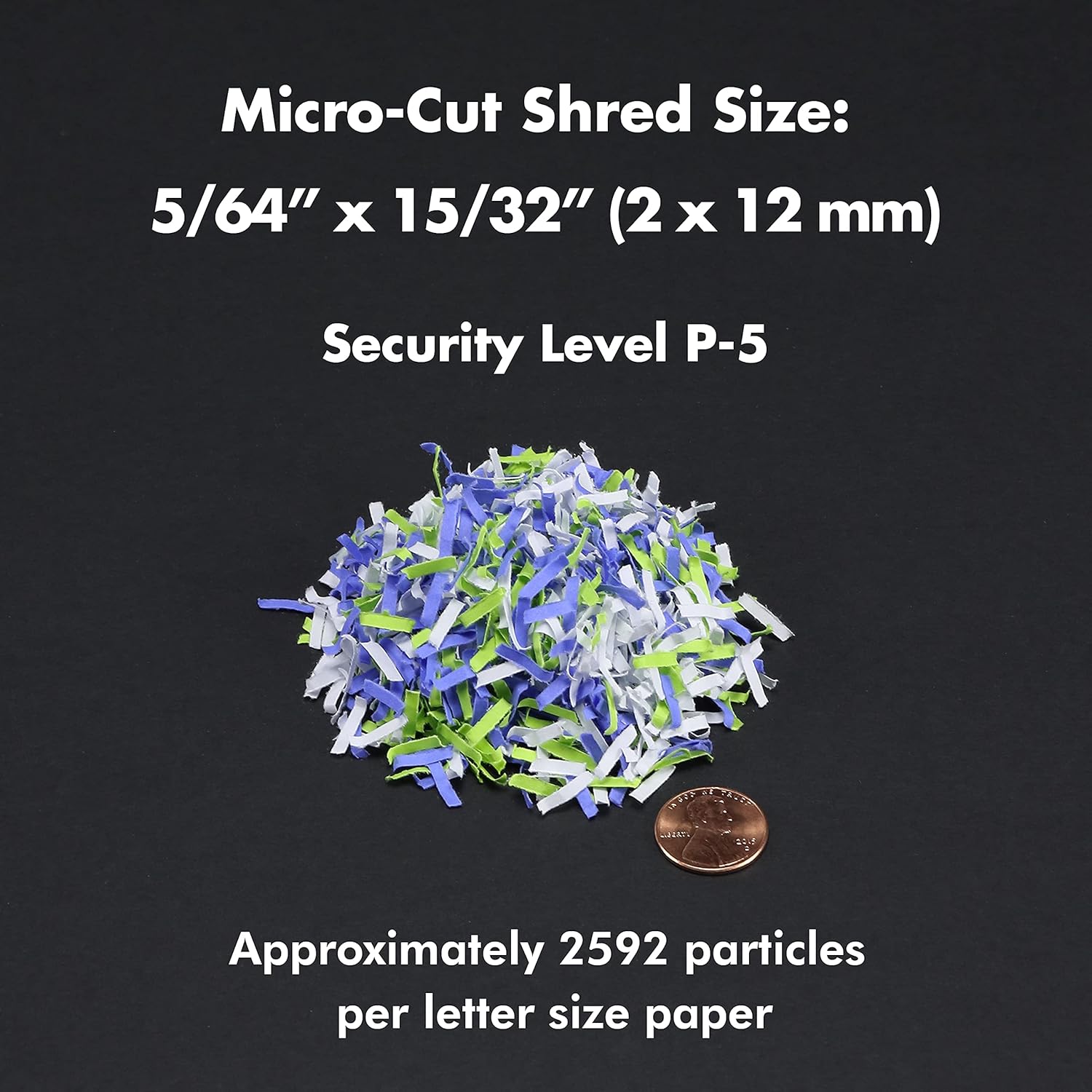
Figure 8.1: Micro-Cut Shred Size and Security Level
- Модел: AU200MA
- Тип на парчиња: Микро-сече
- Големина на парчиња: 5/64" x 15/32" (2 x 12 mm)
- Ниво на безбедност: П-5
- Auto-Feed Capacity: До 200 листови
- Капацитет за рачно напојување: До 10 листови
- Континуирано време: 60 минути
- Време на разладување: Approximately 30-40 minutes (after 60 min continuous use)
- Капацитет на корпа за отпадоци: 8.5 галони
- Парчиња: Paper, Credit Cards, Small Paper Clips
- Voltage: 120V AC
- Фреквенција: 60 Hz
- Product Dimensions (H x W x L): 22.83" x 14.02" x 18.35"
- Тежина на ставката: 38.1 фунти
9. Гаранција и поддршка
For warranty information or technical support, please refer to the warranty card included with your product or visit the official Aurora website. You may also contact Aurora customer service directly for assistance.
Aurora Customer Service: Please refer to your product packaging or the official Aurora webстраница за најактуелните информации за контакт.


