1. Информации за безбедност
Please read all instructions carefully before assembly and use. Failure to follow these instructions may result in injury or product damage. Keep this manual for future reference.
- This desk requires assembly. Ensure all components are correctly installed before use.
- The maximum weight capacity for this desk is 220 pounds (100 kg). Do not exceed this limit.
- When adjusting the desk height, ensure there are no obstructions above or below the desk that could interfere with its movement.
- Држете ги децата и домашните миленици подалеку од работната маса за време на работата.
- Do not attempt to manually force the desk up or down. Use only the electric control panel.
- Ensure the power cord is properly connected and routed to prevent tripping hazards or damage.
- For optimal stability, ensure the desk is placed on a level surface.
Important Note: When using the LED control panel to adjust height, the three height keys must be pressed and held continuously until the desired height is reached.
2. Содржина на пакетот
Проверете дали сите компоненти се присутни пред да започнете со склопување. Доколку недостасуваат или се оштетени некои делови, ве молиме контактирајте ја службата за корисници.
- Desktop (71"x32" Black Top)
- Desk Frame (Black Frame)
- 4 Нозе
- Контролен панел
- Адаптер за напојување и кабел
- Хардвер за склопување (завртки, болтови, итн.)
- Упатство за употреба
3. Инструкции за склопување
Assembly typically requires two people. Please follow these steps carefully. A power drill may be helpful for some steps, but is not strictly required.
- Отпакувајте ги компонентите: Внимателно извадете ги сите делови од пакувањето и поставете ги на чиста, мека површина за да спречите гребнатини.
- Прикачете ги ногарките на рамката: Securely attach the four legs to the desk frame using the provided hardware. Ensure all connections are tight.
- Install Desktop: Place the desktop upside down on a soft surface. Carefully align the assembled frame with the pre-drilled holes on the underside of the desktop. Secure the frame to the desktop using the appropriate screws.
- Монтирајте ја контролната табла: Attach the LED control panel to the underside of the desktop, typically on the front edge, using the provided screws.
- Поврзете кабли: Connect the motor cables from the legs to the control box. Connect the control panel cable to the control box. Finally, connect the power adapter to the control box and plug it into a power outlet. Ensure all cables are neatly managed to avoid interference with desk movement.
- Почетно поставување: Once assembled, carefully flip the desk upright. Perform an initial height calibration by pressing and holding the 'Down' button until the desk reaches its lowest point, then release. The desk is now ready for operation.

Figure 3.1: Fully assembled FLEXISPOT 4 Leg Standing Desk.
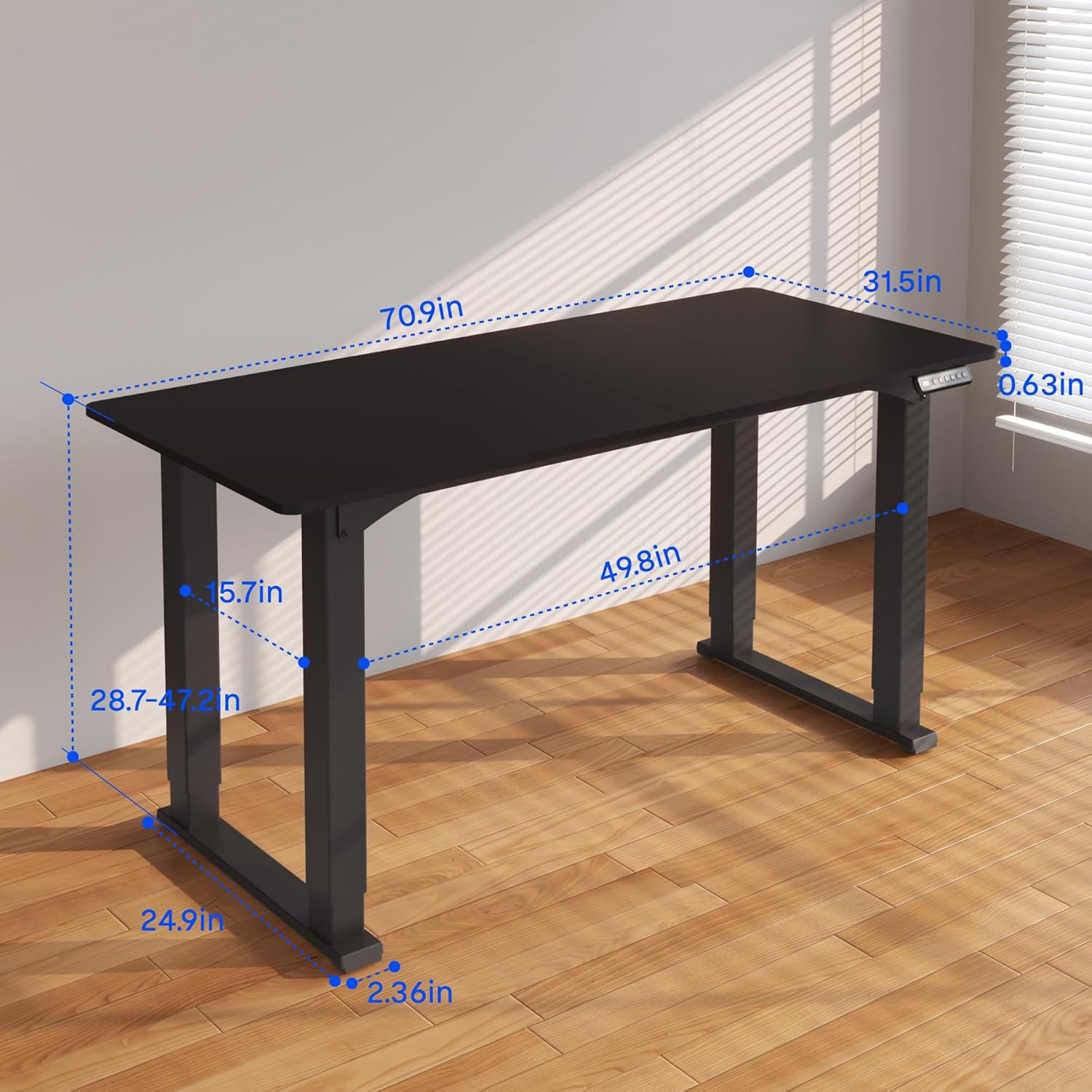
Figure 3.2: Detailed dimensions of the desk, including height range and desktop size.
4. Упатства за работа
The FLEXISPOT 4 Leg Standing Desk features an intuitive LED control panel for easy height adjustments and memory settings.
4.1. Контролен панел е надview

Figure 4.1: Digital Keypad with memory functions and up/down controls.
- Стрелки нагоре/надолу (▲ / ▼): Press and hold to adjust the desk height upwards or downwards. The current height is displayed on the LED screen.
- Копчиња за меморија (1, 2, 3): These buttons allow you to save and recall preferred height settings.
- Memory Set Button (M): Used to program a height into a memory slot.
4.2. Прилагодување на висината
To adjust the desk height, press and hold the ▲ (Up) or ▼ (Down) arrow button until the desk reaches your desired position. The desk will move smoothly between 28.7 inches and 47.2 inches.
4.3. Saving Memory Presets
You can save up to three preferred height settings for quick recall:
- Прилагодете ја масата на саканата висина користејќи ги стрелките нагоре/надолу.
- Press the 'M' button. The LED display will show 'S-'.
- Within 3 seconds, press one of the memory buttons (1, 2, or 3). The LED display will show 'S-1', 'S-2', or 'S-3' to confirm the setting has been saved.
4.4. Повикување на мемориски претходно поставени поставки
To move the desk to a saved height, press and држете the corresponding memory button (1, 2, or 3) until the desk reaches the programmed height.
4.5. Систем против судир
The desk is equipped with an anti-collision system to prevent damage. If the desk encounters an obstruction during movement, it will stop and reverse slightly. Remove the obstruction before resuming operation.

Figure 4.2: Anti-collision system in action, preventing damage from obstructions.
5. Одржување
Regular maintenance ensures the longevity and smooth operation of your standing desk.
- Чистење: Избришете ја работната површина и рамката со мека крпаamp крпа. Избегнувајте груби хемикалии или абразивни средства за чистење.
- Управување со кабли: Periodically check and organize cables to prevent tangles and ensure they do not interfere with the desk's movement.
- Проверка на прицврстувачите: Повремено проверувајте ги сите завртки и клинови за да се осигурате дека се цврсто затегнати. Затегнете ги повторно доколку е потребно.
- Грижа за мотори: The electric motors are maintenance-free. Do not attempt to lubricate or disassemble them.
6 Смена на проблеми
Доколку наидете на проблеми со вашата работна маса, погледнете ги следните вообичаени проблеми и решенија:
- Бирото не се движи:
- Проверете дали кабелот за напојување е безбедно приклучен и во бирото и во ѕидниот штекер.
- Проверете дали сите кабли на моторот се правилно поврзани со контролната кутија.
- Perform a reset: Press and hold the 'Down' button until the desk reaches its lowest point and slightly retracts, then release.
- Нерамномерно движење или нишање:
- Ensure the desk is on a level surface. Adjust the leveling feet if necessary.
- Check that all assembly screws and bolts are tightened securely.
- Verify that the weight on the desk does not exceed the maximum capacity of 220 lbs and is evenly distributed.
- Кодови за грешки на екранот:
- If an error code appears, try performing a reset as described above.
- If the error persists, disconnect power for 10 minutes, then reconnect and try again.
- Консултирајте се со производителот website or contact customer support with the specific error code.
- Поставките за меморија не работат:
- Осигурајте се дека притискате и држење the memory button until the desk reaches the saved height.
- Re-program the memory presets if they are not recalling correctly.
If these steps do not resolve the issue, please contact FLEXISPOT customer support for further assistance.
7. Спецификации
| Карактеристика | Спецификација |
|---|---|
| Бренд | ФЛЕКСИСПОТ |
| Број на модел | QS2B-1880-AU |
| Големина на работната површина | 71"D x 32"W (approx. 180.3cm x 81.3cm) |
| Прилагодлив опсег на висина | 28.7" to 47.2" (approx. 72.9cm to 119.9cm) |
| Максимална тежина капацитет | 220 фунти (100 кг) |
| Материјал за рамка | Метал |
| Врвен материјал | Дрво |
| Боја | Black Frame & Black Top |
| Тип на контрола | LED Digital Keypad with Memory Presets |
| Посебни карактеристики | 4-Leg Design, Anti-Collision System, Corded Operation |
| Потребно е собрание | Да |
8. Гаранција и поддршка
FLEXISPOT provides comprehensive warranty coverage for your peace of mind:
- 5-годишна гаранција: Covers the desk frame and motor components.
- 2-годишна гаранција: Covers the control panel and other electronic parts.
For warranty claims, technical support, or any questions regarding your FLEXISPOT product, please visit the official FLEXISPOT website or contact their customer service department. Please have your model number (QS2B-1880-AU) and proof of purchase available when contacting support.


