1. Производот завршиview
The Anderic OEM NSRCFNA21 Smart Remote is an original equipment manufacturer (OEM) replacement remote control specifically designed for various Insignia TV models. This remote provides seamless functionality and user-friendly operation, ensuring reliable control over your television.
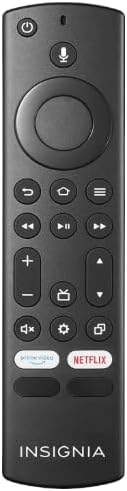
Слика 1.1: The Anderic OEM NSRCFNA21 Smart Remote. This image displays the front view of the black remote control, featuring various buttons for power, voice control, navigation, volume, channel, and dedicated streaming service buttons.
Главните карактеристики вклучуваат:
- Original Quality: An authentic OEM product, ensuring performance and reliability comparable to the remote originally supplied with your TV.
- Дизајн пријатен за корисниците: Intuitive buttons and controls for easy navigation, volume adjustment, channel changes, and access to various TV functions.
- Сигурни перформанси: Provides a stable and responsive connection for accurate command execution.
2. Упатства за поставување и спарување
To ensure proper functionality, the remote control must be paired with your Insignia TV. Follow these steps carefully:
- Ресетирање на ТВ: Unplug your Insignia TV from its power source. Wait for approximately 30 seconds.
- Вклучување на телевизорот: Plug the TV back into the power source and turn it on. Allow the TV to fully boot up.
- Започнете со спарување: Once the TV has completely booted up and is displaying content, press and hold the Дома button on the Anderic NSRCFNA21 remote control for up to 30 seconds.
- Remote Update (if prompted): Your TV may display a message indicating that the remote needs an update. If prompted, allow the TV to proceed with the update. This process may take 1 to 3 minutes to complete.
- Верификација: After the update (if any) and pairing process, test the remote's functions (e.g., volume, channel, navigation) to confirm successful pairing.
If the remote does not pair after following these steps, repeat the process or refer to the troubleshooting section.
3. Ракување со далечинскиот управувач
The Anderic NSRCFNA21 remote control features an intuitive layout for easy operation of your Insignia TV. Below are the general functions of the primary buttons:
- Копче за вклучување: Го вклучува или исклучува телевизорот.
- Копче за гласовна контрола: Активира гласовни команди за пребарување содржина или контролирање на телевизорот.
- Navigation Pad (Directional Buttons and Select): Се користи за движење низ менијата и избирање ставки.
- Копче за почеток: Returns to the TV's main home screen.
- Копче за назад: Се враќа на претходниот екран или мени.
- Menu/Options Button: Accesses additional menu options or settings.
- Јачина на звук нагоре/намалување: Adjusts the TV's audio volume.
- Канал нагоре/надолу: Менува ТВ канали.
- Нечујно копче: Mutes or unmutes the TV's audio.
- Копче за поставки: Го отвора менито за поставки на телевизорот.
- Копче за внесување/извор: Changes the TV's input source (e.g., HDMI 1, HDMI 2).
- Dedicated Streaming Service Buttons: Provides quick access to popular streaming applications (e.g., Amazon Prime Video, Netflix).
4. Компатибилност
The Anderic OEM NSRCFNA21 Smart Remote is compatible with the following Insignia TV models:
- NS24DF310NA21
- NS39DF310NA21
- NS50DF710NA21
- NS55DF710NA21
This remote also replaces the following models:
- NSRCFNA19 Rev B Fire
- NSRCFNA19revB
- NSRCFNA21 Fire
- NSRCFNA21 Rev E
- NSRCFNA21-Rev-E
Ensure your TV model is listed above for optimal performance.
5. Одржување
Proper maintenance can extend the life and functionality of your remote control.
- Замена на батерија: The remote requires two AAA batteries. Replace batteries when the remote's responsiveness decreases or it stops functioning. Ensure correct polarity when inserting new batteries.
- Чистење: Use a soft, dry cloth to clean the remote's surface. Avoid using liquid cleaners or abrasive materials, as these can damage the remote.
- Складирање: Чувајте го далечинскиот управувач на суво место, подалеку од екстремни температури и директна сончева светлина.
6 Смена на проблеми
If you encounter issues with your Anderic NSRCFNA21 Smart Remote, try the following troubleshooting steps:
- Далечинското не реагира:
- Check the batteries. Replace them with fresh AAA batteries, ensuring correct polarity.
- Уверете се дека нема пречки помеѓу далечинскиот управувач и сензорот на телевизорот.
- Обидете се повторно со процесот на спарување како што е опишано во Дел 2.
- Интермитентна функционалност:
- Ова може да укажува на ниско ниво на батеријата. Заменете ги батериите.
- Уверете се дека сте во рамките на ефективниот опсег на сензорот на телевизорот.
- Pairing Fails:
- Confirm your TV model is listed in the compatibility section (Section 4).
- Ensure the TV is fully booted up before attempting to hold the Home button.
- Try unplugging the TV for a longer period (e.g., 1-2 minutes) before plugging it back in and re-attempting pairing.
Доколку проблемите продолжат откако ќе се обидете со овие чекори, контактирајте ја корисничката поддршка за понатамошна помош.
7. Спецификации
| Бренд | Андерик |
| Број на модел | NSRCFNA21 Rev B |
| Компатибилни уреди | Insignia Televisions |
| Извор на енергија | 2 AAA батерии (потребни) |
| Тежина на ставката | 1.76 унци |
| Димензии на пакетот | 6.3 x 2.95 x 0.67 инчи |
| Боја | Црното |
| Производител | Dan's Electronics Etc., Inc. |
8. Гаранција и поддршка
For warranty information or technical support, please contact the manufacturer, Anderic (Dan's Electronics Etc., Inc.). Refer to the product packaging or the official Anderic webстраница за специфични контакт информации и гарантни услови.
Можете да ја посетите Anderic Store on Amazon за повеќе информации.


