1. Вовед
This manual provides essential instructions for the installation, operation, and maintenance of your Power Acoustik CPAA-70D 7-inch Double-DIN In-Dash DVD Receiver. This unit features a high-definition LCD touchscreen, Bluetooth 4.0 connectivity, Apple CarPlay, and Android Auto for enhanced in-car entertainment and communication. Please read this manual thoroughly before using the product to ensure proper function and safety.
2. Информации за безбедност
Observe the following safety guidelines to prevent injury or damage to the unit:
- Не ракувајте со уредот на начин што ќе ве одвлече од возењето. Секогаш давајте приоритет на безбедноста на патот.
- Ensure all wiring is correctly connected to prevent short circuits or electrical hazards. Consult a professional for installation if you are unsure.
- Избегнувајте изложување на уредот на екстремни температури, директна сончева светлина подолг период или прекумерна влага.
- Не обидувајте се да го расклопите или модифицирате уредот. Ова може да ја поништи гаранцијата и да предизвика штета.
- Одржувајте ја јачината на звукот на ниво што ви овозможува да ги слушате звуците од надворешниот сообраќај.
3. Содржина на пакетот
Потврдете дека вашиот пакет ги содржи следниве ставки:
- Power Acoustik CPAA-70D Receiver Unit
- Упатство за употреба
4. Поставување и инсталација
The CPAA-70D is a Double-DIN unit designed for in-dash installation. Proper installation is crucial for optimal performance and safety. It is recommended that installation be performed by a qualified professional.
4.1. Приклучоци за жици
Before making any connections, ensure the vehicle's battery is disconnected. Refer to your vehicle's wiring diagram and the unit's wiring harness for specific connections. Key connections typically include:
- Моќност: Константа 12V (жолта), Додаток 12V (црвена), Заземјување (црна).
- Говорници: Connect to appropriate speaker outputs (e.g., front left, front right, rear left, rear right).
- Антена: Поврзете ја радио антената на возилото.
- Паркирна сопирачка: Connect to the parking brake wire for video playback safety.
- Рикверц: Connect for automatic rear camera display (if applicable).
- USB: Поврзете надворешни USB уреди.

Слика 4.1: Предна страна view of the Power Acoustik CPAA-70D receiver unit. This image shows the general appearance of the unit, including the screen and physical controls, which is helpful for identifying the device during installation.
4.2. Првично вклучување
After all connections are secure and the unit is mounted, reconnect the vehicle's battery. Turn on the vehicle's ignition. The unit should power on and display the initial setup screen or main menu.
5. Упатства за работа
5.1. Основни контроли и екран на допир
The CPAA-70D features a 7-inch HD 1024 x 600 LCD with a clear glass capacitive touchscreen. Navigate menus and control functions by touching the screen. Physical buttons and a rotary knob are located on the left side for quick access to volume, home, and other common functions.
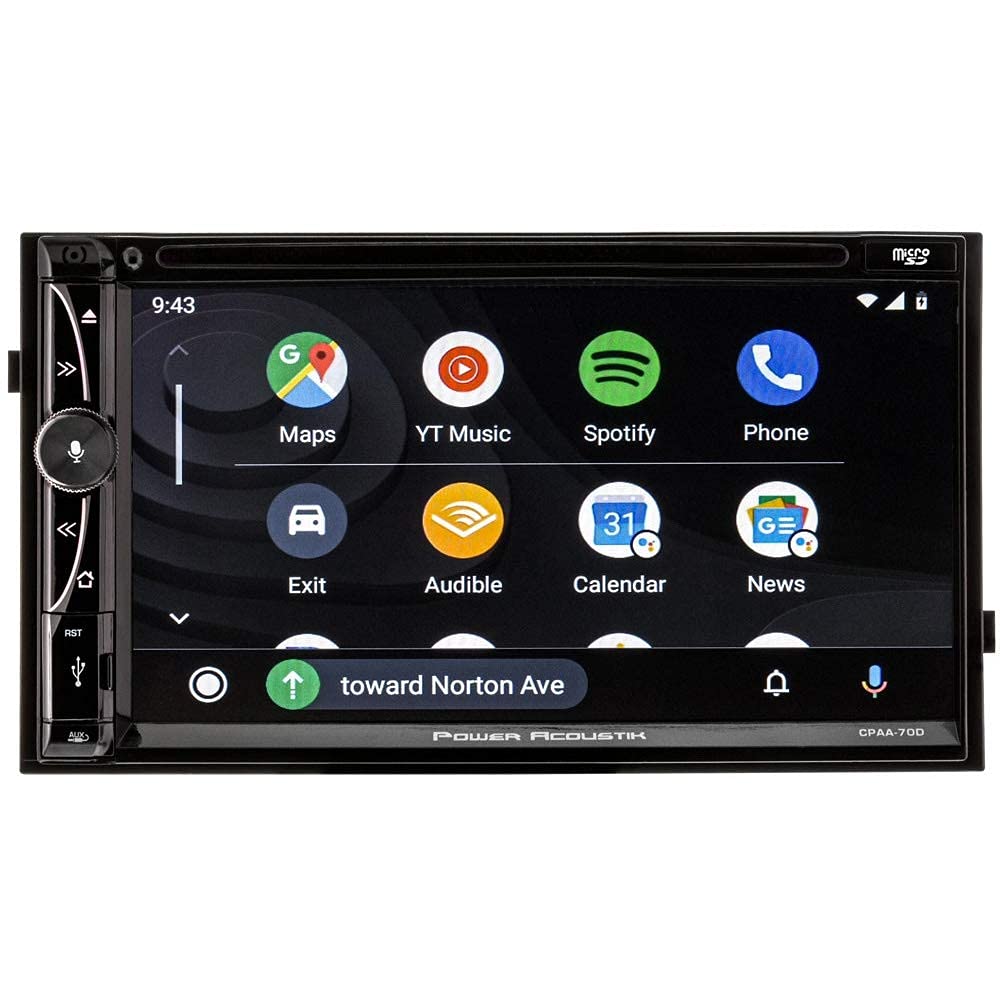
Figure 5.1: The CPAA-70D screen displaying the Apple CarPlay interface. This shows the typical layout of applications like Phone, Music, Maps, and Messages when connected via Apple CarPlay.
5.2. Bluetooth поврзување
The unit supports Bluetooth 4.0 for phone calling and A2DP audio streaming.
- Спарување: On the unit, navigate to the Bluetooth menu. Enable Bluetooth on your mobile device and search for available devices. Select "CPAA-70D" from the list and confirm the pairing code if prompted.
- Телефонски повици: Once paired, you can make and receive calls directly through the unit's interface.
- Аудио стриминг: Play music from your paired device wirelessly through the car's speakers.
5.3. Apple CarPlay и Android Auto
Connect your compatible iPhone or Android smartphone via USB to access Apple CarPlay or Android Auto. This allows you to use navigation, make calls, send messages, and listen to music through the unit's interface, optimized for driving.
- Apple CarPlay: Connect your iPhone using a certified USB cable to the unit's USB port. The CarPlay interface will automatically launch.
- Android Auto: Connect your Android phone using a certified USB cable. Ensure the Android Auto app is installed on your phone. The Android Auto interface will launch automatically.
5.4. Работење со радио
Access the radio function from the main menu. The unit supports AM/FM bands.
- подесување: Use the on-screen controls to manually tune or scan for stations.
- Претходно поставени мемории: Зачувајте ги вашите омилени станици во претходно поставените копчиња за брз пристап.

Figure 5.2: The CPAA-70D screen displaying the radio interface. This image shows the frequency display, band selection (FM1, FM2, AM1, AM2), and various radio control options.
5.5. DVD and Media Playback
The unit includes a DVD receiver and supports media playback from SD cards.
- ДВД: Insert a DVD into the disc slot. Playback will begin automatically or can be selected from the media menu.
- SD-картичка: Insert an SD card containing compatible media files into the SD card slot. Select the SD source from the media menu to browse and play files.
5.6. Далечински управувач
Вклучениот далечински управувач овозможува лесен пристап до разни функции од далечина.

Figure 5.3: Remote control for the Power Acoustik CPAA-70D. This image displays the layout of buttons for power, source selection (CP/AA, SXM, Radio, Disc, BT, USB), navigation, volume, and numeric input.
6. Одржување
To ensure the longevity and optimal performance of your CPAA-70D unit:
- Чистење на екранот: Користете мека крпа без влакненца за нежно да го избришете екранот на допир. За тврдокорни дамки, малку избришете гоampИзмијте ја крпата со вода или средство за чистење екрани наменето за електроника. Не користете абразивни средства за чистење или растворувачи.
- Општо чистење: Чувајте ја надворешноста на уредот чиста од прашина и остатоци. Користете мека, сува крпа.
- Слот за диск: Avoid inserting foreign objects into the disc slot.
7 Смена на проблеми
If you encounter issues with your CPAA-70D, refer to the following common problems and solutions:
| Проблем | Можна причина | Решение |
|---|---|---|
| Уредот не се вклучува. | Неправилно поврзување на жици, прегорен осигурувач, проблем со напојувањето. | Check power and ground connections. Inspect vehicle's fuse box and the unit's fuse. Ensure accessory wire is receiving power. |
| Нема аудио излез. | Volume too low, mute activated, incorrect speaker wiring, source not selected. | Increase volume. Check if mute is active. Verify speaker connections. Select the correct audio source. |
| Проблеми со поврзувањето со Bluetooth. | Уредот не е спарен, Bluetooth е исклучен, пречки. | Проверете дали Bluetooth е овозможен на двата уреди. Повторно спарете го уредот. Приближете се до уредот. |
| Apple CarPlay/Android Auto не се стартува. | Faulty USB cable, incompatible phone, app not installed (Android Auto). | Use a certified USB cable. Ensure your phone is compatible. Install Android Auto app if using an Android device. |
| Екранот на допир не реагира. | Temporary software glitch, physical damage. | Perform a soft reset (refer to unit's specific reset procedure if available). If issue persists, contact support. |
If these solutions do not resolve the issue, contact customer support for further assistance.
8. Спецификации
- Модел: CPAA-70D
- Големина на екранот: 7 инчи
- Тип на приказ: LCD, LED (HD 1024 x 600)
- Технологија за поврзување: Bluetooth 4.0
- Карактеристики: Apple CarPlay, Android Auto, A2DP Audio Streaming
- Тип на медиум: DVD, SD
- Димензии на производот: 7 x 7 x 4 инчи
- Производител: POWER ACOUSTIK
9. Гаранција и поддршка
This Power Acoustik product is covered by a limited warranty. Please refer to the warranty card included with your purchase for specific terms, conditions, and duration. For technical support, service, or warranty claims, please contact Power Acoustik customer service through their official webлокација или контакт информациите наведени во вашата гарантна документација.