Вовед
This manual provides detailed instructions for the installation, operation, and maintenance of your VANBAR 12-inch 2.5K Mirror Dash Cam. Please read this manual thoroughly before using the product to ensure proper function and safety. Keep this manual for future reference.
Информации за безбедност
- Always use the dedicated power cord provided by VANBAR. Using other power cords may cause battery swelling or malfunction due to exceeding the rated voltage од 3.7V.
- Осигурајте се дека камерата на таблата е безбедно монтирана и не го попречува патот на возачот. view или да се мешаат во безбедносните карактеристики на возилото.
- Не го изложувајте уредот на екстремни температури, директна сончева светлина подолг период или прекумерна влага.
- Avoid disassembling or modifying the device, as this will void the warranty and may cause damage or injury.
- Regularly check the device for any signs of damage or malfunction. If issues arise, contact customer support.
Содржина на пакетот
Проверете дали сите артикли наведени подолу се вклучени во вашиот пакет:
- VANBAR 12-inch Mirror Dash Cam Unit
- Водоотпорна задна камера
- 32 GB SD-картичка
- Адаптер за напојување за запалка
- GPS модул
- Anti-reflection Film
- Гумени ленти (за монтирање)
- Wiring Pry Tool
- Alcohol Cleaner & Cleaning Cloth
- Упатство за користење (јапонски)
- Recording Sticker

Image: All components included in the VANBAR 12-inch 2.5K Mirror Dash Cam package.
Карактеристики на производот
- 12-inch Super Wide Digital Inner Mirror: Displays high-quality images from the 140-degree wide-angle rear camera, offering approximately 3 times wider field of view отколку традиционалниот заденview mirrors. Features a right-side camera placement optimized for Japanese roads. Includes a dedicated anti-reflection film.
- СуперView Image Processing & Touch Screen: Utilizes SuperView image enhancement technology for rich color reproduction and a display resolution of 1920x480px. Swipe up/down on the screen to adjust front/rear camera angles, and swipe left/right to adjust screen brightness.
- Sony IMX415 Sensor & Super Night Function: Equipped with a Sony IMX415 sensor, enabling simultaneous high-quality recording: Front 2.5K Full HD + Rear 1080P Full HD. STARVIS compatibility ensures clear images even in low-light conditions, outperforming standard dash cams. Supports vertical/horizontal image flip settings for flexible rear camera installation.
- GPS Function & 24-Hour Parking Monitoring: Records vehicle speed and direction along with video data. Playback on a PC allows tracking of driving routes (requires internet connection for map data). Features a built-in battery for emergency recording during parking monitoring, automatically locking impact footage.
- Backup Assist Function: Automatically displays the rear camera view with adjustable guidelines when reversing. The adjusted angle is saved for subsequent use.
- Japanese Signal Light & Noise Reduction: Front camera frame rate (27.5fps) is set to avoid flickering with Japanese LED traffic lights. Designed with noise reduction measures for the circuit board, lens, rear camera, and power cable to minimize interference with digital TV reception and GPS signals.

Image: Voice control feature in use, allowing hands-free operation while driving.

Image: Front and rear camera angle adjustment and image flip options.

Image: High-performance AI chip for smooth recording and playback.
Поставување
1. Инсталација на главната единица
- Attach the main mirror dash cam unit over your vehicle's existing rearview mirror using the provided rubber bands. Ensure it is securely fastened and does not vibrate.
- Apply the anti-reflection film to the dash cam screen if desired, following the instructions provided with the film.
2. Инсталација на задна камера
- Choose an installation location for the waterproof rear camera. Common locations include above the license plate or inside the rear window.
- Route the rear camera cable from the rear of the vehicle to the main unit, ensuring it is tucked away safely and does not interfere with moving parts or airbags. Use the pry tool to assist with cable routing.
- Connect the rear camera cable to the designated port on the main unit.
- For the backup assist function, connect the red wire from the rear camera cable to your vehicle's reverse light positive wire.

Image: Waterproof rear camera.
3. GPS Module Connection
- Attach the GPS module to the windshield in a location that has a clear view of the sky, typically near the main unit.
- Connect the GPS module cable to the corresponding port on the main unit.
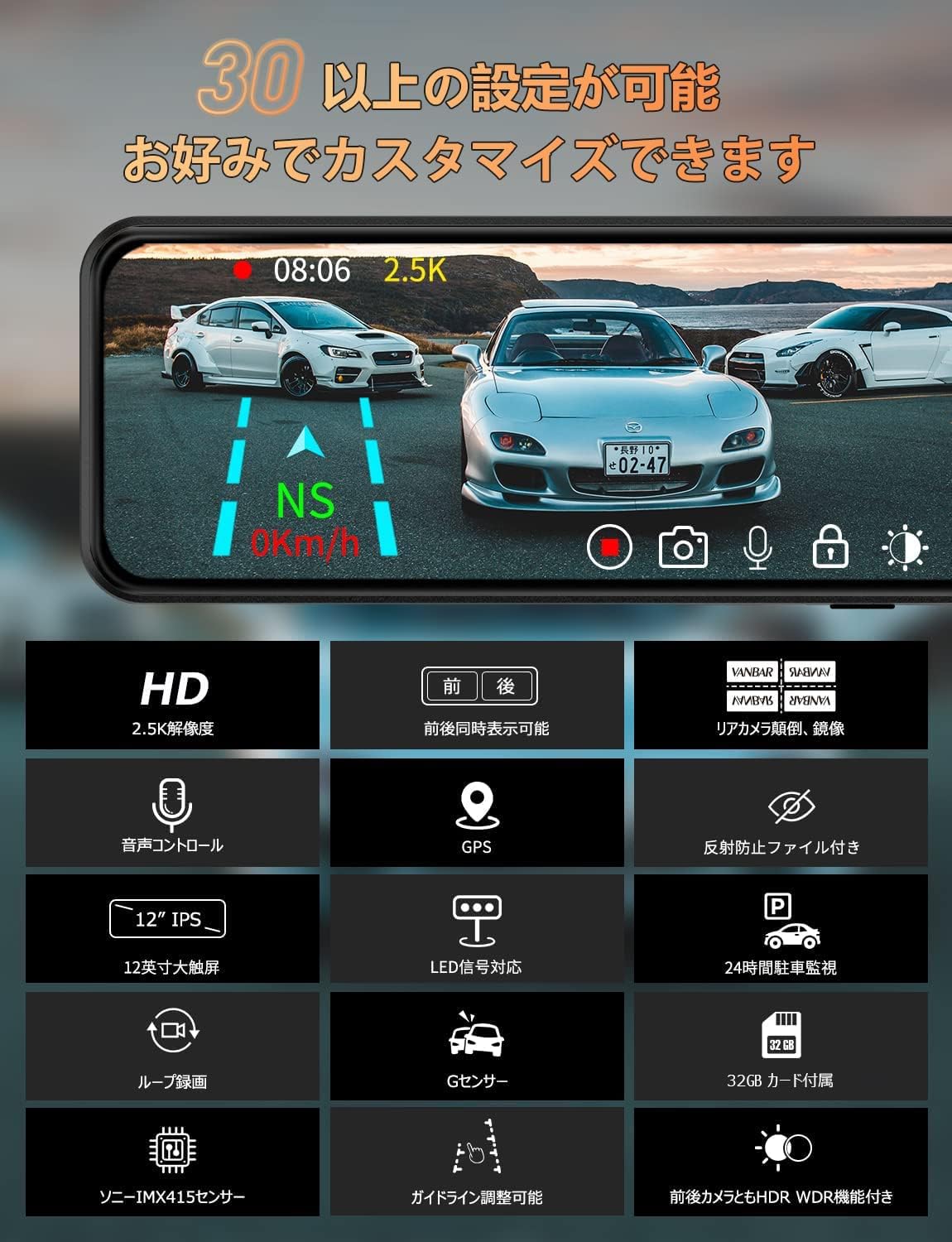
Image: GPS module.
4. Поврзување за напојување
- Insert the provided cigarette lighter power adapter into your vehicle's 12V power outlet.
- Connect the power cable from the adapter to the main unit. Route the cable neatly to avoid obstruction.
5. Вметнување на SD картичка
- Insert the provided 32GB SD card into the SD card slot on the main unit. Ensure it clicks into place.
- It is recommended to format the SD card within the dash cam settings before first use and periodically thereafter.
Упатства за работа
1. Вклучување/исклучување
- The dash cam will automatically power on and begin recording when the vehicle engine starts.
- It will automatically power off when the engine is turned off.
- To manually power on/off, press and hold the power button on the device.
2. Гласовна контрола
The device supports Japanese voice commands for hands-free operation. Speak clearly and directly to the device.
- "録音開始" (Record Start): Begin recording.
- "録音終了" (Record End): Stop recording.
- "写真撮ります" (Take Photo): Capture a still image.
- "モニターオン" (Monitor On): Turn the screen on.
- "モニターオフ" (Monitor Off): Turn the screen off.
- "フロントカメラ" (Front Camera): Switch to front camera view.
- "バックカメラ" (Back Camera): Switch to rear camera view.
- "ロックオンカイシ" (Lock On Start): Start emergency lock recording.
- "ロックオンシュウリョウ" (Lock On End): Stop emergency lock recording.
3. Touch Screen Gestures
- Повлечете нагоре/надолу: Прилагодете ја вертикалата viewing angle of the front or rear camera on the screen. This allows you to see a wider range regardless of the camera's physical mounting position.
- Повлечете лево/десно: Прилагодете ја осветленоста на екранот.
- Допрете: Access menu options or switch between front/rear camera views.
4. Снимање на јамка
The dash cam records video in continuous loops. When the SD card is full, the oldest unlocked files will be overwritten automatically. This ensures continuous recording without manual intervention.

Image: Loop recording function illustration.
5. G-Sensor (Impact Recording)
The built-in G-sensor detects sudden impacts or collisions. When an impact is detected, the current video segment is automatically locked and saved to prevent it from being overwritten by loop recording. This feature helps preserve critical evidence in case of an accident.

Image: Impact recording (G-sensor) function.
6. Следење на паркирање
With the engine off, the dash cam's internal battery allows it to detect impacts and automatically start recording. This provides surveillance for your parked vehicle. For continuous 24-hour parking monitoring, a dedicated hardwire kit (sold separately or available upon request) is recommended.
7. GPS Playback on PC
На view recorded videos with GPS data (speed, direction, route), you can use a dedicated player on your computer.
- Windows Player: Преземете од http://www.sunningsoft.com/en/pcgps.html
- Mac Player: Пребарај за "GXplayer" in the App Store.
Note: An internet connection is required for map data display during GPS playback.

Image: GPS function playback on a computer.
Одржување
1. Чистење
- Use the provided cleaning cloth or a soft, dry cloth to wipe the screen and lens.
- For stubborn smudges, use the alcohol cleaner sparingly on the cloth, not directly on the device.
- Ensure the rear camera lens is clean for optimal image quality, especially after driving in adverse weather.
2. Управување со SD картички
- Format the SD card regularly (e.g., once a month) through the dash cam's settings menu to maintain optimal recording performance and prevent data corruption.
- Replace the SD card if you experience frequent recording errors or if the card is old.
3. Нега на батерии
- Always use the VANBAR-supplied power cord. Using non-dedicated power cords with voltage exceeding 3.7V can cause the internal battery to swell and become unusable.
- Avoid leaving the device in direct sunlight in a parked car for extended periods, especially in hot climates, to prevent battery degradation.
Решавање проблеми
| Проблем | Можна причина / решение |
|---|---|
| Уредот не се вклучува. | Check power connection. Ensure the cigarette lighter adapter is firmly inserted and the vehicle's 12V outlet is functional. Verify the power cable is connected to the dash cam. |
| Снимањето запира или fileсе корумпирани. | Format the SD card. Ensure the SD card is a high-speed Class 10 or U3 card. Replace the SD card if the issue persists. |
| Voice control is not responding or misinterpreting commands. | Speak clearly and at a moderate volume. Reduce background noise. Ensure the microphone is not obstructed. Adjust voice control sensitivity in settings if available. |
| Screen is too dark/bright or has glare. | Adjust screen brightness by swiping left/right on the screen. Ensure the anti-reflection film is properly applied. |
| GPS signal is weak or not acquired. | Ensure the GPS module is mounted with a clear view of the sky. Avoid placing it under metallic tints or other obstructions. |
| Parking monitoring is not activating. | Ensure the G-sensor sensitivity is set appropriately. For continuous 24-hour monitoring, a hardwire kit is required. |
| Rear camera image is upside down or mirrored. | Adjust the image flip settings (vertical/horizontal) in the dash cam's menu to match your installation. |
Спецификации
| Карактеристика | Детал |
|---|---|
| Големина на екранот | 12 инчи |
| Тип на дисплеј | LCD екран |
| Резолуција на предната камера | 2.5K (2560x1440) |
| Резолуција на задната камера | 1080P (1920x1080) |
| Агол на предниот објектив | Широк агол од 170° |
| Агол на задниот објектив | Широк агол од 140° |
| Сензор | Sony IMX415 |
| Складирање | Supports up to 32GB SD card (included) |
| Поврзување | USB |
| Посебни карактеристики | Loop Recording, Built-in GPS, G-Sensor, Parking Monitoring, Voice Control, HDR/WDR, Japanese Signal Light Compatibility |
| Тип на монтирање | Лепило за монтирање |
| Димензии на производот | 5.08 x 10.16 x 10.16 cm; 1 kg (approximate) |
| Боја | Црното |
Гаранција и поддршка
VANBAR offers a 3-year quality warranty for this product. In case of any issues or defects, please contact our customer support team. We are committed to providing excellent service and will respond to inquiries within 24 hours (excluding weekends).
Контакт информации:
Please refer to the last page of the included Japanese user manual for specific contact details, including our LINE ID for support inquiries.
For PC playback software, please visit the links provided in the Operating Instructions section.
Note: The warranty is valid only for purchases made on Amazon. Resale is not covered.


