1. Вовед
This manual provides comprehensive instructions for the installation, operation, and maintenance of your Cabletech URZ0336B DVB-T2 H.265 HEVC Digital Tuner. Please read this manual thoroughly before using the device to ensure proper functionality and to prevent damage.
2. Информации за безбедност
Always observe the following safety precautions to avoid electric shock, fire, or damage to the device:
- Не го изложувајте уредот на дожд или влага.
- Не го отворајте casing. Целото сервисирање обратете се на квалификуван персонал.
- Ensure proper ventilation around the device. Do not block ventilation openings.
- Користете го само адаптерот за напојување испорачан со уредот.
- Чувајте го уредот подалеку од извори на топлина и директна сончева светлина.
- Исклучете го приклучокот за струја од ѕидниот штекер ако уредот нема да се користи подолг период.
3. Содржина на пакетот
Ве молиме проверете го пакувањето за следните ставки:
- Cabletech URZ0336B DVB-T2 H.265 HEVC Digital Tuner
- Далечински управувач
- ААА батерии (2x)
- Адаптер за напојување
- Упатство за употреба (овој документ)
4. Производот завршиview
Familiarize yourself with the main components and connections of your Cabletech URZ0336B tuner.
4.1. Device and Remote Control
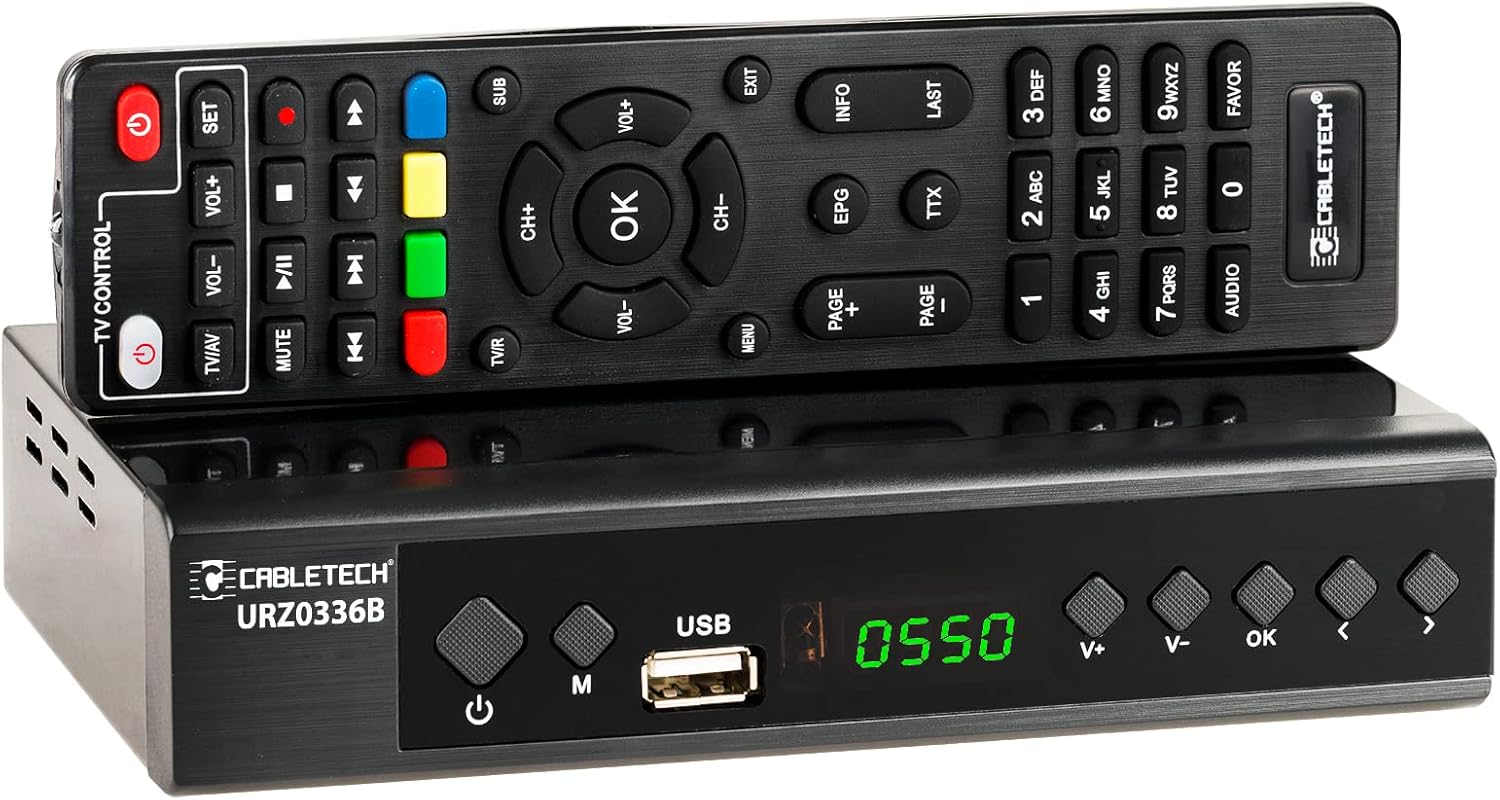
Image: The Cabletech URZ0336B DVB-T2 H.265 HEVC Digital Tuner shown with its accompanying remote control. The tuner is a compact black box, and the remote is also black with various control buttons.
4.2. Преден панел
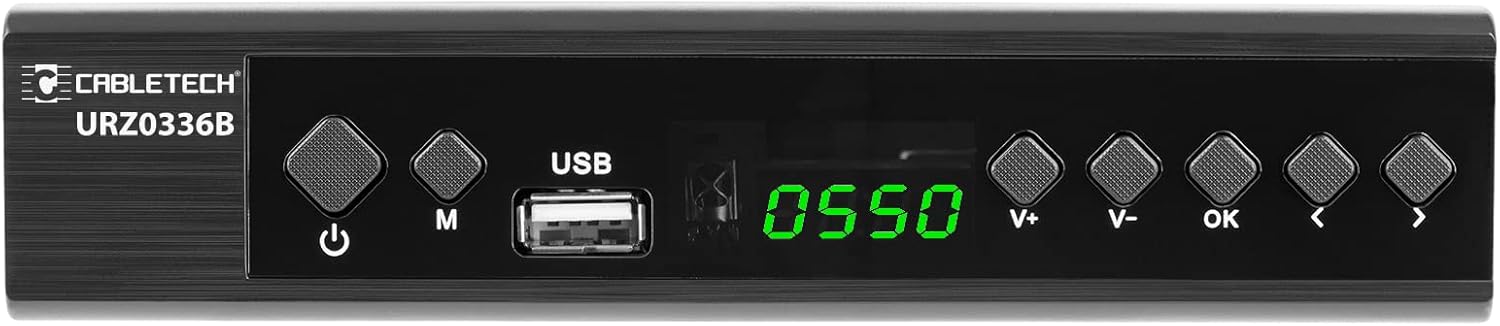
Image: Close-up of the Cabletech URZ0336B front panel, featuring a power button, menu button (M), USB 2.0 port, LED display showing "0550", and navigation/volume buttons (V+, V-, OK, <, >).
- Копче за вклучување: Turns the device on/off or to standby.
- M (Menu) Button: Пристапува до главното мени.
- USB 2.0 порт: For software updates, PVR recording, and media playback.
- Лед екран: Го прикажува бројот на каналот или времето.
- V+/V- Buttons: Ја прилагодува јачината на звукот.
- Добро копче: Ги потврдува изборите.
- </> Buttons: Navigates through menus or changes channels.
4.3. Приклучоци на задниот панел

Image: The rear panel of the Cabletech URZ0336B, showing various input and output ports: ANT IN (IEC socket), COAXIAL, USB, HD OUT (HDMI), SCART, and the power input (110-240V~ 50/60Hz).
- МРАВКА ВО: Connects to your DVB-T/T2 antenna.
- КОАКСИЈАЛНО: Дигитален аудио излез.
- USB: Additional USB 2.0 port for external devices.
- HD OUT (HDMI): Се поврзува со вашиот телевизор за видео и аудио со висока дефиниција.
- SCART: Connects to older TVs or VCRs.
- Влез на енергија: Се поврзува со адаптерот за напојување.
4.4. Распоред на далечински управувач

Слика: Детална view of the Cabletech URZ0336B remote control, showing buttons for power, TV/AV, volume, channel, mute, playback controls, EPG, TTX, INFO, numeric keypad, and special function buttons.
The remote control provides full functionality for operating your tuner. Insert 2x AAA batteries into the battery compartment before first use.
5. Поставување
5.1. Connecting the Tuner
- Поврзете ја антената: Connect your DVB-T/T2 antenna cable to the МРАВКА ВО port on the rear panel of the tuner.
- Поврзете се со телевизор:
- For HD TVs: Connect an HDMI cable from the HD OUT (HDMI) port on the tuner to an HDMI input on your TV.
- For older TVs: Connect a SCART cable from the SCART port on the tuner to the SCART input on your TV.
- Поврзете напојување: Connect the power adapter to the tuner's power input and then plug it into a wall outlet.
- Вметнете батерии: Open the battery compartment on the remote control and insert 2x AAA batteries, observing polarity.
5.2. First-Time Installation and Channel Scan
- Turn on your TV and select the correct HDMI or SCART input source that the tuner is connected to.
- Power on the Cabletech URZ0336B tuner using the power button on the front panel or remote control.
- The first-time installation wizard should appear on your TV screen. Follow the on-screen prompts.
- Select your preferred language and country.
- Initiate an Автоматско пребарување for channels. The tuner will scan for all available DVB-T/T2 channels in your area. This process may take several minutes.
- Once the scan is complete, the tuner will save the found channels and display the first channel.
Note: If you experience poor signal quality, adjust your antenna position or consider using a signal ampживописен.
6. Упатства за работа
6.1. Основни функции
- Вклучување/исклучување: Притиснете го МОЌ копче на далечинскиот управувач.
- Промена на каналот: Користете го CH + / CH- buttons or the numeric keypad to enter a channel number.
- Контрола на јачината на звукот: Користете го VOL + / VOL- копчиња.
- Исклучи звук: Притиснете го МУТИРА копче за привремено замолчување на звукот.
- Мени: Притиснете го МЕНИ копче за пристап до главното мени за поставки и функции.
- ДОБРО: Confirms selections in menus or displays the channel list.
- Излез: Излегува од тековното мени или екран.
6.2. Електронски програмски водич (EPG)
The 7-day EPG provides a schedule of current and upcoming programs.
- Притиснете го EPG копче на далечинскиот управувач.
- Navigate through channels and program times using the arrow buttons.
- Притиснете OK до view details about a selected program.
6.3. PVR (Program Recording) and Timeshift
Connect a USB storage device (e.g., USB flash drive or external hard drive) to one of the USB 2.0 ports to use PVR and Timeshift functions.
- PVR Recording:
- Притиснете го REC button (red circle) on the remote to start immediate recording of the current program. Press СТОП (square) to end recording.
- Schedule recordings via the EPG: Select a program in the EPG and press OK, then choose the record option.
- Временска промена:
- Додека гледате програма, притиснете го копчето ПАУЗА button. The tuner will begin recording the live broadcast to the USB device.
- Тогаш можеш ИГРАЈ, БРЗО НАПРЕД, или ВРАТИ НАЗАД within the buffered content.
- Притиснете СТОП to exit Timeshift and return to live TV.
6.4. Репродукција на медиуми
The tuner supports playback of various media files од поврзан USB уред за складирање.
- Connect your USB device to a USB port on the tuner.
- Go to the main menu and select "Media" or "USB".
- Одете до посакуваното file type (MP3, WMA, JPEG, BMP, AVI) and select the file да игра.
6.5. Supported Applications
The tuner supports various online applications when connected to the internet via an external MT7601 Wi-Fi adapter (not included).
- Време: View local weather forecasts.
- IPTV: Access Internet Protocol Television streams.
- YouTube: Watch videos from YouTube.
- RSS: Read RSS news feeds.
Note: An external MT7601 Wi-Fi adapter is required for internet connectivity and access to these applications.
6.6. Родителска контрола
Set up parental control to restrict access to certain channels or programs based on age ratings.
- Access the "Parental Control" section in the main menu.
- Enter your PIN (default is usually 0000 or 1234, check your device for specifics).
- Configure age restrictions or lock specific channels.
6.7. Функција на тајмер
The timer function allows you to schedule the tuner to turn on/off at specific times or to switch to a particular channel.
- Navigate to the "Timer" section in the main menu.
- Set the event type (e.g., Power On, Power Off, Record), time, and duration.
7. Одржување
7.1. Чистење
To clean the device, disconnect it from the power supply and wipe the exterior with a soft, dry cloth. Do not use liquid or aerosol cleaners.
7.2. Ажурирање на софтвер
Software updates can improve performance and add new features. Updates are performed via the USB port.
- Преземете го најновиот фирмвер file from the official Cabletech support webсајт (доколку е достапен).
- Копирајте го фирмверот file to the root directory of a USB flash drive.
- Connect the USB flash drive to the tuner's USB port.
- Go to the "System" or "Tools" menu, then select "Software Update" or "Upgrade by USB".
- Follow the on-screen instructions to complete the update. Do not power off the device during the update process.
8 Смена на проблеми
If you encounter issues with your tuner, refer to the following common problems and solutions:
| Проблем | Можна причина | Решение |
|---|---|---|
| Нема слика или звук | Incorrect TV input selected; Loose cable connections; Tuner not powered on. | Select correct TV input (HDMI/SCART); Check all cable connections; Ensure tuner is powered on. |
| Порака „Нема сигнал“ | Antenna not connected; Poor antenna signal; No channels scanned. | Connect antenna properly; Adjust antenna position; Perform an automatic channel scan. |
| Далечинскиот управувач не работи | Batteries are dead or inserted incorrectly; Obstruction between remote and tuner. | Replace batteries; Check battery polarity; Remove any obstructions; Point remote directly at the tuner. |
| Не може да се снима на USB | USB device not connected or formatted incorrectly; Insufficient storage space. | Ensure USB device is connected; Format USB device to FAT32 or NTFS; Free up space on USB device. |
| No internet access for apps | No MT7601 Wi-Fi adapter connected; Network configuration issues. | Connect a compatible MT7601 Wi-Fi adapter; Check network settings in the tuner's menu. |
9. Спецификации
| Карактеристика | Детал |
|---|---|
| Број на модел | URZ0336B |
| Процесорот | GX6702S5 |
| Внатрешна меморија | 32 MB |
| RAM меморија | 512 MB DDR2 |
| ANT конектор | IEC приклучок |
| Опсег на фреквенција | VHF: 170–230 MHz, UHF: 470–862 MHz |
| Демодулација | QPSK, 16QAM, 64QAM, 256QAM |
| Пропусен опсег | 7 MHz, 8 MHz |
| Декодирање | MPEG-1, MPEG-2, MPEG-4, H.264, H.265, AAC, HE-AAC, AC-3, DD+ |
| Влез/Излез | 2x USB 2.0, HDMI, SCART, COAXIAL |
| Сооднос на аспект | Auto, 16:9 WS, 16:9 PB, 16:9 PS; 4:3 LB, 4:3 PS, 4:3 Full |
| Поддржани формати | MP3, WMA, JPEG, BMP, AVI |
| Резолуција на екранот | 480i, 480p, 576i, 576p, 720p, 1080i, 1080p |
| Видео резолуција | 1920 x 1080 пиксели |
| Аудио декодирање | MPEG-1 LayerI/II, Dolby-Downmix 2-Channel (License), AAC LC, HE-AAC v1/V2, PCM-Downmix, IEC958 SPDIF |
| File Систем | FAT32, NTFS |
| Компатибилност | Fully compatible with DVB-T2/DVB-T |
| Далечински управувач | Requires 2x AAA batteries |
| Потрошувачка на енергија | Max. 6 W (Operating), Max. 50/60 Hz (Standby) |
| Димензии (Ш x В) | 168 mm x 36 mm |
| Поддршка за Wi-Fi | Requires external MT7601 chip adapter |
| Tuner Bit Depth | 10 бит |
10. Гаранција и поддршка
This product comes with a standard manufacturer's warranty. For specific warranty terms and conditions, please refer to the documentation included with your purchase or contact Cabletech customer support.
For technical assistance, troubleshooting beyond this manual, or warranty claims, please contact your retailer or the official Cabletech support channels.


