Вовед
Thank you for choosing the BUFFBEE Alarm Clock with Wireless Charging Station. This device combines a digital alarm clock with a versatile wireless charging stand, designed to charge your iPhone, Apple Watch, and AirPods simultaneously. It features a dimmable LED display, adjustable volume, and multiple safety protections to ensure efficient and secure charging. Please read this manual carefully before use to ensure proper operation and to maximize the lifespan of your product.
Што има во кутијата
По отварањето на пакувањето, проверете дали се вклучени сите од следниве ставки:
- BUFFBEE Alarm Clock with Wireless Charging Station
- USB-C кабел за полнење
- Адаптер за напојување
- Упатство за употреба (овој документ)
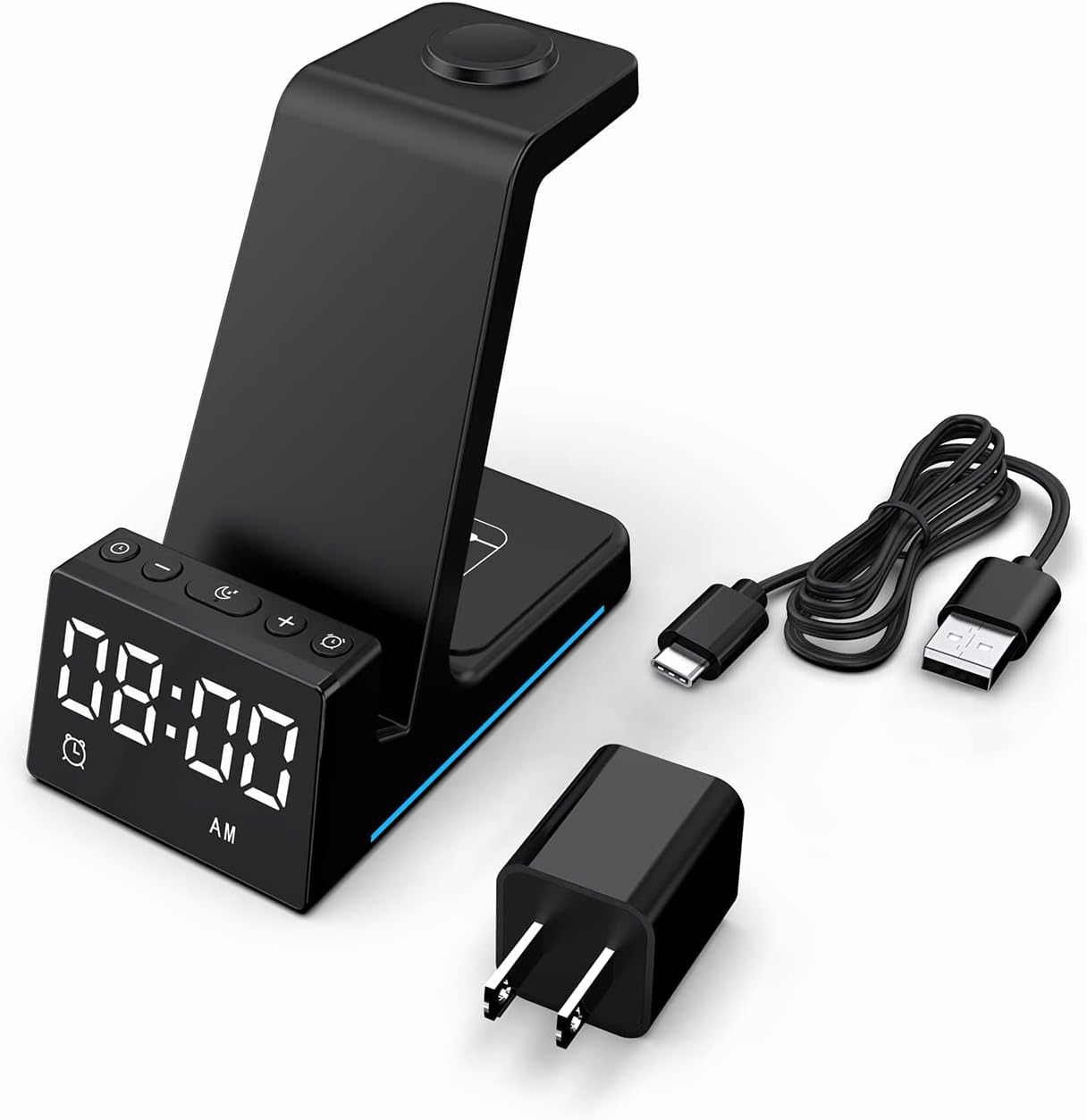
Слика: Сите компоненти се вклучени во пакувањето на производот.
Производот завршиview
The BUFFBEE Alarm Clock with Wireless Charging Station is designed for convenience and efficiency. It features dedicated charging areas for your smartphone, Apple Watch, and AirPods, alongside a clear digital clock display.
Клучни карактеристики:
- Дигитален часовник со будилник: Features adjustable brightness and volume, with 12/24 hour format options.
- Безжично полнење на телефон: Supports 15W, 10W, 7.5W, and 5W output for various wireless charging enabled smartphones.
- Полнење на Apple Watch: Dedicated magnetic charging spot for Apple Watch Series 2-7, SE.
- Полнење на AirPods: Wireless charging pad for AirPods 2 (with wireless charging case), AirPods 3, and AirPods Pro.
- Безбедносна заштита: Built-in overcharge, overvoltage, overheat, and overcurrent protection.

Image: The charging station with devices in place, highlighting its multi-device capability.

Image: Diagram illustrating the internal safety features and charging coils.
Поставување
Follow these steps to set up your BUFFBEE Alarm Clock with Wireless Charging Station:
- Поврзете напојување: Insert the USB-C end of the charging cable into the port on the back of the charging station. Plug the other end of the cable into the provided power adapter, then plug the adapter into a wall outlet. The digital display will light up, indicating power is connected.
- Уреди за поставување:
- Паметен телефон: Place your wireless charging enabled smartphone vertically or horizontally on the main charging stand. Ensure it is centered for optimal charging.
- Apple Watch: Place your Apple Watch on the magnetic charging disc at the top of the stand.
- AirPods: Ставете ги вашите AirPods (со футрола за безжично полнење) на рамната подлога за полнење во основата на уредот.
- Потврдете го полнењето: A blue indicator light will briefly illuminate when a device is correctly placed and charging. Your device's screen will also show a charging icon.
Video: Official product video demonstrating the setup and charging capabilities of the BUFFBEE Alarm Clock with Wireless Charging Station for iPhone, Apple Watch, and AirPods.

Image: Universal compatibility chart for different devices and charging wattagес.
Упатства за работа
Поставување на времето
- Притиснете и задржете го Поставено време button (usually marked with a clock icon) for 3 seconds. The hour digits will begin to flash.
- Користете го + и - копчиња за прилагодување на часот.
- Притиснете го Поставено време повторно притиснете го копчето за да префрлите на прилагодување на минутите. Цифрите за минути ќе трепкаат.
- Користете го + и - копчиња за прилагодување на минутите.
- Притиснете го Поставено време Притиснете го копчето уште еднаш за да потврдите и да излезете од режимот за поставување време.
- To switch between 12-hour and 24-hour format, briefly press the Поставено време копчето кога не е во режим на поставување.
Поставување на алармот
- Притиснете и задржете го Сет за аларми button (usually marked with an alarm clock icon) for 3 seconds. The alarm hour digits will flash.
- Користете го + и - копчиња за прилагодување на часот на алармот.
- Притиснете го Сет за аларми button again to switch to alarm minute adjustment. The alarm minute digits will flash.
- Користете го + и - копчиња за прилагодување на минутите на алармот.
- Притиснете го Сет за аларми Притиснете го копчето уште еднаш за да потврдите и да излезете од режимот за поставување аларм.
- За да го активирате или деактивирате алармот, кратко притиснете го копчето Сет за аларми копче. На екранот ќе се појави/исчезне икона за аларм.
- When the alarm sounds, press any button to activate the snooze function (typically 9 minutes). To turn off the alarm completely, press and hold the Сет за аларми копче.

Слика: Надview of the digital alarm clock features.
Прилагодување на осветленоста на екранот
The LED display has multiple brightness levels to suit your preference, especially for nighttime use.
- Притиснете го Осветленост button (usually marked with a sun icon) repeatedly to cycle through the available brightness levels (e.g., 100%, 40%, 3%, 1%, 0% off).
- Select the desired brightness level. The '0% off' setting turns the display completely off for undisturbed sleep.

Image: Visual representation of the 5-level adjustable brightness settings.
Прилагодување на јачината на звукот на алармот
The alarm volume can be adjusted to your preferred level.
- While the alarm is sounding, or during alarm setting mode, press the Волумен button (usually marked with a speaker icon) to cycle through the available volume levels.
- Select the desired volume.

Image: Illustration of the 3-level adjustable volume feature.
Одржување
To ensure the longevity and optimal performance of your charging station, follow these maintenance guidelines:
- Чистење: Disconnect the power before cleaning. Use a soft, dry cloth to wipe the surface. Do not use abrasive cleaners, solvents, or chemical sprays.
- Избегнувајте течности: Држете го уредот подалеку од вода и други течности. Не ракувајте со него со влажни раце.
- Температура: Store and operate the device in a dry environment at room temperature. Avoid extreme heat or cold.
- Ракување: Ракувајте со уредот внимателно. Избегнувајте испуштање или изложување на силни удари.
- Напојување: Only use the provided power adapter and cable. Using unauthorized power sources may damage the device and void the warranty.
Решавање проблеми
If you encounter any issues with your BUFFBEE Alarm Clock with Wireless Charging Station, please refer to the following troubleshooting guide:
| Проблем | Можна причина | Решение |
|---|---|---|
| Device is not powering on. | Power cable not connected properly; Power adapter faulty; Wall outlet not working. | Ensure the USB-C cable is securely connected to both the station and the power adapter. Try a different wall outlet. Verify the power adapter is functioning. |
| Smartphone/AirPods not charging wirelessly. | Device not placed correctly; Device not wireless charging compatible; Phone case too thick; Foreign objects on charging pad. | Reposition the device to ensure it is centered on the charging pad. Remove any thick phone cases or metallic objects. Confirm your device supports Qi wireless charging. |
| Apple Watch не се полни. | Watch not placed correctly; Watch charger not making contact; Watch model not supported. | Ensure the Apple Watch is securely placed on the magnetic charging disc. Remove any watch cases that might obstruct contact. This charger supports Apple Watch Series 2-7, SE. |
| Полнењето е бавно или наизменично. | Using a non-original power adapter/cable; Device overheating; Multiple devices charging simultaneously. | Use the provided power adapter and cable. Ensure the device is in a well-ventilated area. Charging multiple devices may slightly reduce individual charging speeds. |
| Екранот на будилникот е премногу светол/затемнет. | Поставувањето на осветленоста бара прилагодување. | Притиснете го Осветленост button to cycle through the 5 brightness levels, including 'off'. |
| Alarm is not sounding or is too quiet/loud. | Alarm not set or deactivated; Volume level too low/high. | Verify the alarm is activated (alarm icon visible). Adjust the alarm volume using the Волумен копче. |
Спецификации
| Карактеристика | Детал |
|---|---|
| Димензии на производот | 6.3 x 1.5 x 3.5 инчи |
| Тежина на ставката | 15.8 унци |
| Бренд | БОВИЦА |
| Тип на конектор | Безжичен |
| Компатибилни уреди | Cellular Phones, Apple Watch, AirPods (with wireless charging case) |
| Компатибилни модели на телефони | Samsung Galaxy S10 series, iPhone 8 and newer, other Qi-enabled phones |
| Специјална карактеристика | Adjustable, Fast Charging, Wireless Charger, Wireless Charging |
| Влез волуменtage | 9 волти |
| Вкупно USB порти | 1 (for power input) |
| Ватtage | 15 watts (max output) |
| Спецификација исполнет | Qi |
| Извор на енергија | AC Adapter (Battery Powered refers to internal clock battery backup, not main power) |
Гаранција и поддршка
Your BUFFBEE Alarm Clock with Wireless Charging Station comes with a standard manufacturer's warranty. For specific warranty details, including duration and coverage, please refer to the warranty card included in your product packaging or contact BUFFBEE customer support directly.
If you require technical assistance, have questions about product operation, or need to report a defect, please reach out to BUFFBEE customer service through the contact information provided on the product packaging or the official BUFFBEE webстраница. Ве молиме имајте го моделот на производот и датумот на купување кога контактирате со поддршката.


