1. Вовед
This manual provides essential information for the safe and efficient operation of your Mitsubishi WD720U-G DLP Projector. Please read this manual thoroughly before using the projector and retain it for future reference. This document covers setup, operation, maintenance, troubleshooting, and detailed specifications.
2. Информации за безбедност
Следете ги следниве безбедносни мерки за да спречите оштетување на проекторот и да ја обезбедите безбедноста на корисникот:
- Не ги блокирајте отворите за вентилација. Обезбедете доволен простор околу проекторот за правилен проток на воздух.
- Избегнувајте да гледате директно во објективот на проекторот кога lamp е вклучено, бидејќи може да предизвика оштетување на очите.
- Не ставајте го проекторот на нестабилна количка, држач или маса.
- Disconnect the power cord from the wall outlet if the projector will not be used for an extended period.
- Целото сервисирање упатете го на квалификуван сервисен персонал.
3. Содржина на пакетот
Проверете дали сите од следниве ставки се вклучени во вашиот пакет:
- Mitsubishi WD720U-G DLP Projector
- AC кабел за напојување
- Капа за леќи
- VGA (D-sub) Cable
- Упатство за употреба ЦД
4. Производот завршиview
The Mitsubishi WD720U-G is a high-brightness DLP projector designed for various applications, featuring 3D readiness and multiple connectivity options.
4.1 Врвот View
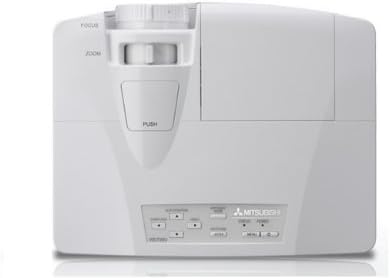
This image displays the top of the Mitsubishi WD720U-G projector. Visible features include the focus and zoom adjustment rings located near the lens, and a control panel with various buttons for menu navigation and settings adjustments.
4.2 Заден дел View (Input/Output Terminals)
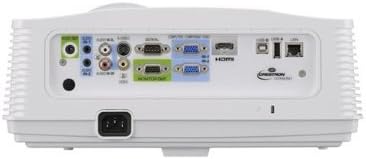
This image illustrates the rear panel of the Mitsubishi WD720U-G projector, highlighting its comprehensive array of input and output terminals. These include multiple RGB (VGA) ports, audio input/output jacks, RCA video and S-Video inputs, an HDMI port, and a network port, among others.
5. Поставување
5.1 Поставување
Position the projector on a stable, flat surface or mount it securely. Ensure the projector is within the optimal projection distance for your screen size (viewable size: 40"- 300"). Avoid placing it in direct sunlight or near heat sources.
5.2 Поврзување на уреди
Connect your source devices (e.g., computer, Blu-ray player) to the appropriate input terminals on the projector's rear panel:
- RGB: Mini D-sub 15pin x2 (for computer connections)
- Аудио: Stereo mini jack (φ3.5mm) x 2 (one for PC1, another for PC2)
- Видео: RCA x 1 + S-VIDEO x 1 (for standard video sources)
- Дигитален: HDMI x 1 (for high-definition digital sources)
- Video Audio: RCA jack (L/R) x 1
5.3 Вклучување/исклучување
Connect the AC power cable to the projector and a power outlet. Press the power button on the projector or remote control to turn the unit on. To turn off, press the power button again and confirm the shutdown when prompted.
6. Ракување со проекторот
6.1 Основно работење
After powering on, adjust the focus and zoom using the rings on the projector lens until the image is clear and fills your screen. Use the control panel buttons or remote control to navigate the on-screen menu.
6.2 Прилагодување на поставките
Access the projector's menu to adjust various settings:
- Осветленост: The projector offers 4300 ANSI Lumens. Adjust as needed for ambient light conditions.
- Контраст: The contrast ratio is 3000:1 (On/Off). Fine-tune for optimal image depth.
- Резолуција: Native resolution is 1280 x 800. The projector supports a maximum resolution of 1600 x 1200.
- Боја: The 5-Segment (R,G,B,W,Y) color wheel provides vibrant colors. Adjust color settings in the menu if necessary.
6.3 Video Compatibility
The projector supports a wide range of video formats:
- NTSC/NTSC 4.43/PAL (including PAL-M, N)/SECAM/PAL-60
- Component Video: 480i/p(525i/p), 576i/p(625i/p), 720p(750p), 1080i/p(1125i/p 60Hz), 1080i/p(1125i/p 50Hz)
6.4 3D Ready Feature
This projector is 3D-Ready. To utilize 3D functionality, compatible 3D content, 3D glasses, and a 3D-compatible source device are required.
7. Одржување
7.1 Чистење
Regularly clean the projector lens with a soft, lint-free cloth specifically designed for optical surfaces. Use a soft brush or compressed air to remove dust from the ventilation grilles. Do not use abrasive cleaners or solvents.
7.2 лamp Замена
Проекторот лamp има ограничен животен век. Кога лamp indicator lights up or the image brightness significantly decreases, the lamp may need replacement. Refer to the detailed instructions in the User Manual CD for safe lamp процедури за замена.
8 Смена на проблеми
Доколку наидете на проблеми со вашиот проектор, погледнете ги следните вообичаени проблеми и решенија:
- Нема слика: Ensure all cables are securely connected, the correct input source is selected, and the projector is powered on.
- Заматена слика: Adjust the focus and zoom rings on the lens. Ensure the projection surface is flat and the projector is stable.
- Image Distorted: Check the projector's keystone correction settings in the menu. Ensure the projector is perpendicular to the screen.
- Нема звук: Verify audio cables are connected correctly and the volume is not muted on both the projector and the source device.
- Предупредување за прегревање: Ensure ventilation openings are clear and the projector is in a well-ventilated area. Turn off the projector and allow it to cool down.
9. Спецификации
| Карактеристика | Спецификација |
|---|---|
| Бренд | MITSUBISHI |
| Модел | WD720U-G |
| Технологија на слики | DLP 0.65" |
| Осветленост | 4300 ANSI лумени |
| Мајчин резолуција | 1280 x 800 |
| Максимална резолуција | 1600 x 1200 |
| Viewспособни Големина | 40" - 300" |
| Сооднос на контраст | 3000:1 (On/Off) |
| Тркало во боја | 5-Segment (R,G,B,W,Y) |
| Специјална карактеристика | 3D подготвен |
| Тип на звучник | Стерео |
| Технологија за поврзување | hdmi, vga |
| Влезни терминали | RGB (Mini D-sub 15pin x2), Audio (Stereo mini jack φ3.5mm x2), Video (RCA x1, S-VIDEO x1), Digital (HDMI x1), Video Audio (RCA L/R x1) |
| Видео компатибилност | NTSC/NTSC 4.43/PAL/SECAM/PAL-60, Component Video (480i/p, 576i/p, 720p, 1080i/p) |
| Тежина на ставката | 9 фунти |
| Димензии на производот | 13.6 x 10.6 x 5.3 инчи |
| Препорачана употреба | Домашно кино |
10. Гаранција и поддршка
This product is offered as an Amazon Renewed item. It has been professionally inspected and tested to work and look like new. Renewed products are eligible for replacement or refund under the Обновена гаранција на Amazon if you are not satisfied with your purchase. For further support or inquiries, please refer to the documentation provided with your renewed product or contact Amazon Renewed customer service.


