Вовед
The OBSBOT Tiny 2 Remote Control is designed to enhance your experience with OBSBOT Tiny series webcams, including Tiny 2 Lite, Tiny 2, Tiny 4K, Tiny 1080P, Tiny SE, and the OBSBOT UVC to HDMI Adapter 2nd Gen. This smart remote provides intuitive control over various camera functions and AI features, offering a more convenient and pleasant usage experience.
It combines the functionality of a remote control with a presentation clicker, allowing for seamless control during video calls, live streaming, and presentations.
Содржина на пакетот
- OBSBOT Tiny 2 Remote Control
- USB Receiver Dongle (stored inside the remote's battery compartment)
- User Guide/Instructions
Видео: Unboxing and initial setup of the OBSBOT Tiny Remote Control, including battery installation and USB dongle location.
Поставување
1. Инсталација на батерија
- Отворете го капакот на одделот за батерии на задниот дел од далечинскиот управувач.
- Вметнете две AAA батерии, внимавајќи на правилниот поларитет (+/-).
- Затворете го капакот на преградата за батерии.
2. Поврзување со USB приемник
- Locate the USB receiver dongle inside the remote's battery compartment.
- Plug the USB receiver dongle into an available USB 2.0 or higher port on your computer.
3. Software Setup (OBSBOT TinyCam)
- Ensure your OBSBOT Tiny series webcam is connected to your computer and the OBSBOT TinyCam software is running.
- Navigate to the settings within the OBSBOT TinyCam software.
- Scroll down to find the "Remote Control" option and enable it.
- Далечинскиот управувач сега треба да биде спарен и подготвен за употреба.
Упатства за работа
Распоред и функции на далечинскиот управувач
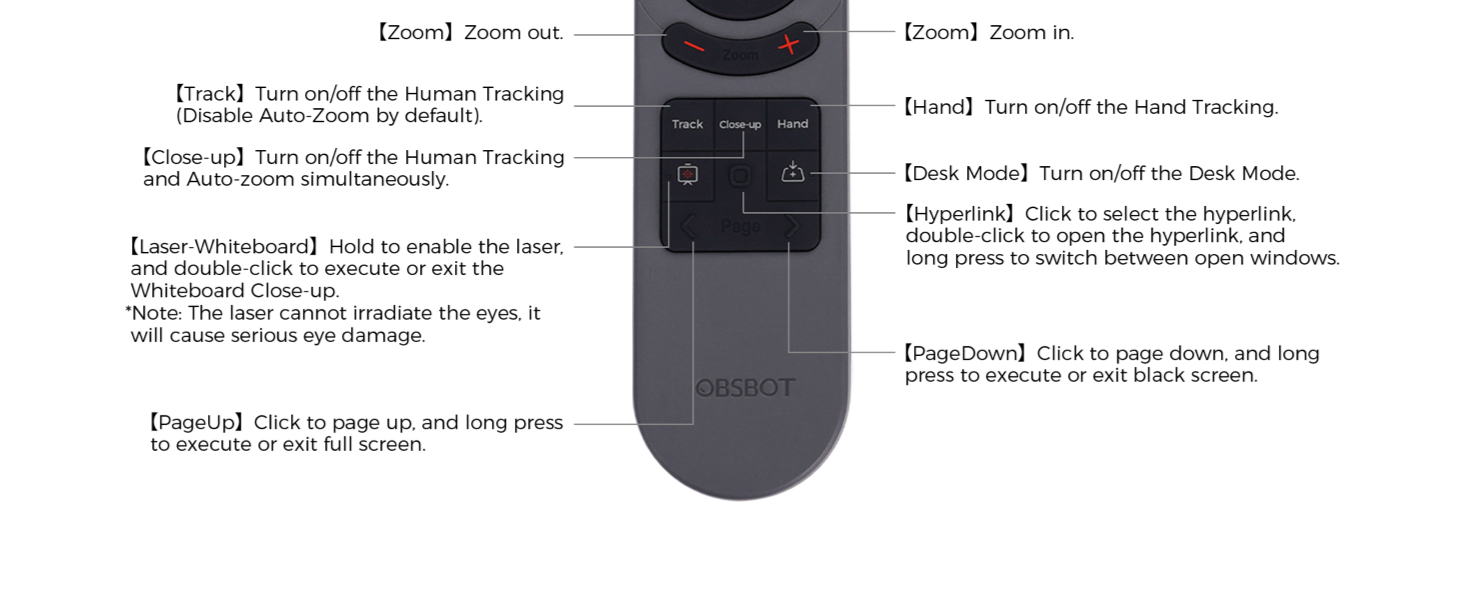
Слика: Detailed diagram illustrating the buttons and their corresponding functions on the OBSBOT Tiny 2 Remote Control.
- Копче за вклучување: Turns the connected OBSBOT Tiny series webвклучена или исклучена камера.
- Копчиња за насочување: Control the pan and tilt of the webкамера
- Копче за ресетирање: Resets the camera's position to its default (square zero).
- Device Selection Buttons (Left/Right Arrows): Allows switching control between multiple connected OBSBOT devices (if connected to the same computer).
- Копчиња за зумирање/одзумирање: Adjust the camera's zoom level.
- P1, P2, P3 Buttons: Preset buttons to save and recall specific camera positions and zoom levels.
- Track Button: Toggles Human Tracking on/off. Disables Auto Zoom by default.
- Close-up Button: Activates Close-up mode, turning on Human Tracking and Auto Zoom simultaneously.
- Hand Button: Toggles Hand Tracking on/off.
- Desk Mode Button: Toggles Desk Mode on/off.
- Laser-Whiteboard Button: Hold to enable the laser pointer. Double-click to execute or exit Whiteboard Close-up. Note: The laser cannot irradiate the eyes; it will cause serious eye damage.
- Копче за хиперврска: Click to select a hyperlink. Double-click to open the hyperlink. Long press to switch between open windows.
- PageDown Button: Click to page down. Long press to execute or exit a black screen.
- PageUp Button: Click to page up. Long press to execute or exit full screen.
Важна забелешка: Some keys on the remote controller will not work with OBSBOT Tiny 4K and OBSBOT Tiny, as the features controlled by those keys (e.g., Close-up, Hand, Laser-Whiteboard, Desk Mode) are not integrated into those specific models.
Гласовна контрола
The OBSBOT Tiny 2 webcam supports voice control for various functions, including waking up the device, initiating tracking, and adjusting zoom. Refer to the OBSBOT TinyCam software settings for a full list of voice commands and to enable/disable this feature.
Видео: Demonstration of the OBSBOT Meet Remote Control features and functions.
Апликации

Video Meetings: Control your camera's focus and framing during online conferences.

Remote Classes: Utilize presentation clicker features and camera control for engaging online teaching.

Стриминг во живо: Adjust camera angles and zoom on the fly for dynamic broadcasts.
Одржување
- Keep the remote control clean and dry. Use a soft, dry cloth for cleaning.
- Avoid exposing the remote to extreme temperatures or direct sunlight.
- Доколку далечинскиот управувач нема да се користи подолг временски период, извадете ги батериите за да спречите протекување.
- Store the USB receiver dongle securely within the remote's battery compartment to prevent loss.
Решавање проблеми
- Далечинското не реагира:
- Проверете дали батериите се правилно инсталирани и дали се доволно наполнети. Заменете ги доколку е потребно.
- Ensure the USB receiver dongle is securely plugged into your computer.
- Verify that the "Remote Control" option is enabled in the OBSBOT TinyCam software settings.
- Restart the OBSBOT TinyCam software and/or your computer.
- Specific features not working:
- Confirm that your OBSBOT webcam model supports the specific feature (e.g., Close-up, Desk Mode). Refer to your webcam's manual for compatibility.
- Ensure your OBSBOT TinyCam software and webcam firmware are up to date.
- Пречки:
- Avoid using the remote near strong electromagnetic interference sources.
Спецификации
| Димензии на производот | 10 x 2 x 0.01 инчи |
| Тежина на ставката | 1.76 унци |
| Број на модел на ставка | ОБС-200002 |
| Батерии | 2 AAA батерии (не се вклучени) |
| Бренд | ОБСБОТ |
| Специјална карактеристика | Ергономски |
| Боја | Црното |
| Максимален број на поддржани уреди | 4 |
| Компатибилни уреди | OBSBOT Tiny series webcams, OBSBOT UVC to HDMI Adapter 2nd Gen, Personal Computer |
Гаранција и поддршка
For warranty information, technical support, or further assistance, please visit the official OBSBOT webлокација или директно контактирајте ја нивната служба за корисници. Зачувајте ја сметката за купување за гаранциски барања.


