1. Вовед
This user manual provides comprehensive information for the FEASYCOM FSC-BT630 module, a compact and high-performance Bluetooth Low Energy (BLE) module based on the Nordic nRF52832 chipset. Designed for reliable and high-speed data transmission, this module is ideal for a wide range of Internet of Things (IoT), industrial, medical, and smart appliance applications. Please read this manual carefully before using the module to ensure proper operation and to maximize its capabilities.
2. Производот завршиview
The FSC-BT630 is a cutting-edge Bluetooth 5.2 module that offers robust wireless connectivity with low power consumption. Its small form factor and integrated antenna make it suitable for space-constrained designs. It supports UART for transparent data transmission, making integration with microcontrollers straightforward. The module is pre-certified with FCC, IC, CE, and KC, simplifying product development and compliance.

Слика 2.1: Предна страна view of the FSC-BT630 module, displaying the FEASYCOM logo and model number.

Слика 2.2: Назад view of the FSC-BT630 module, illustrating the solder pads for integration.
3. Клучни карактеристики
- Усогласеност со Bluetooth 5.2: Supports the latest Bluetooth 5.2 specifications for enhanced performance and reliability.
- Nordic nRF52832 Chipset: Utilizes a powerful and energy-efficient Nordic nRF52832 SoC.
- Ultra-Small Form Factor: Compact size of 10mm x 11.9mm x 1.7mm, ideal for miniature designs.
- High-Speed UART: Supports UART programming and data interface with baud rates up to 921600 bps.
- Transparent Data Transmission: Facilitates easy data transfer between devices.
- Проширен опсег: Coverage up to 50 meters (165 feet) with a transmit power of 4dBm.
- Ниска потрошувачка на енергија: Optimized for battery-powered applications, with low current draw in sleep and working modes.
- Повеќе интерфејси: Includes I²S audio, I²C/AIO/PIO/PWM control, SPI master/slave, and PDM digital microphone interfaces.
- NFC-A Tag Поддршка: Features Type 2 Near Field Communication (NFC-A) tag with wakeup-on-field and touch-to-pair capabilities.
- Интегрирана антена: Comes with an on-board antenna, with support for external antenna options.
- OTA Upgrade Support: Allows for Over-The-Air firmware updates.
- Сертифициран: FCC, IC, CE, KC, and SRRC certified for global compliance.
- Проfile Поддршка: Embedded Bluetooth stack profiles support HID, GATT, ANCS, and more.
- Меморија: 512 KB Flash and 64 KB RAM.

Figure 3.1: FSC-BT630 module dimensions and certifications.

Figure 3.2: FSC-BT630 module memory specifications.
4. Технички спецификации
| Атрибут | Вредност |
|---|---|
| Број на модел | FSC-BT630 |
| Чипсет | Нордиски nRF52832 |
| Bluetooth верзија | Bluetooth 5.2 (BLE) |
| Димензии (Д x Ш x В) | 10 mm x 11.9 mm x 1.7 mm (0.39 x 0.47 x 0.06 инчи) |
| Тежина | 0.07 унци |
| Пренос на енергија | 4dBm |
| Покриеност | До 50 метри (165 стапки) |
| UART Baud Rate | До 921600 bps |
| Флеш меморија | 512 KB |
| RAM меморија | 64 KB |
| Сертификати | FCC, IC, CE, KC, SRRC |
| Хардверски интерфејс | Bluetooth 5 |
| Протокол за врска со податоци | Bluetooth |
| Стапка на пренос на податоци | GATT (Android: 80KB/S, Apple: 8KB/S with flow control, 18KB/S without) |
| UPC | 768253192445 |

Figure 4.1: Size comparison of the FSC-BT630 module with a US dollar coin.
5. Поставување и интеграција
Integrating the FSC-BT630 module into your system requires careful attention to power supply, data communication, and physical mounting.
5.1. Пинут и врски
The module features a stamp form factor with solder pads for connection. Key pins typically include:
- VDD: Power supply input (e.g., 3.3V).
- ГНД: Приклучок за земја.
- TXD (UART Transmit): Connects to the RXD pin of your host microcontroller.
- RXD (UART Receive): Connects to the TXD pin of your host microcontroller.
- RTS/CTS (Flow Control): Optional pins for hardware flow control, recommended for high baud rates.
- GPIO: General Purpose Input/Output pins for various control functions (I²C, SPI, PWM, etc.).
Refer to the detailed datasheet for the complete pinout diagram and electrical characteristics to ensure correct connections.
5.2. Напојување
Provide a stable and clean power supply within the specified voltage range (typically 1.8V to 3.6V for nRF52832, refer to datasheet for exact range). Ensure adequate current capacity, especially during transmission peaks.
5.3. Antenna Considerations
The FSC-BT630 includes an on-board antenna. For optimal performance, ensure the antenna area is clear of metal objects and ground planes. If using an external antenna, connect it to the designated U.FL connector (if present) or solder pad, following impedance matching guidelines.
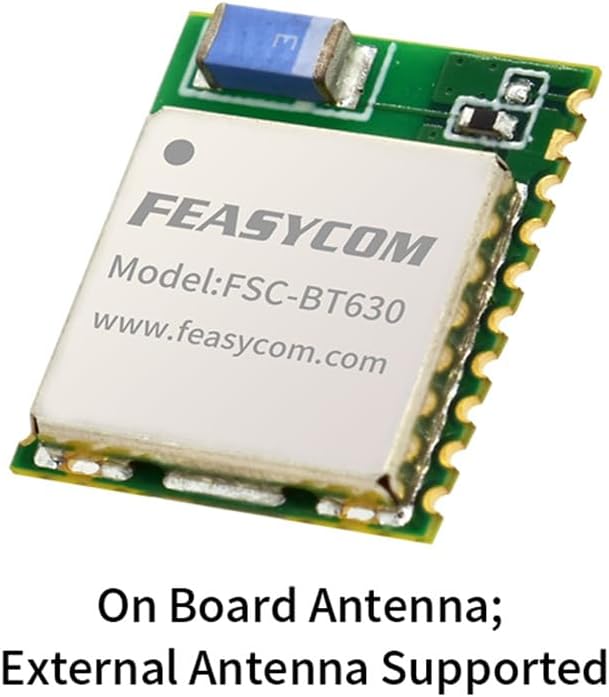
Figure 5.1: FSC-BT630 module with antenna information.
6. Упатства за работа
The FSC-BT630 module operates primarily as a transparent UART bridge for Bluetooth Low Energy communication. Its functionality is typically controlled via AT commands or through a custom firmware application.
6.1. Иницијализирање на модулот
Upon power-up, the module will enter a default state, often discoverable or advertising. You can configure its behavior using AT commands sent over the UART interface. Common commands include setting the device name, baud rate, advertising parameters, and connection modes (e.g., peripheral, central).
6.2. Поврзување со Bluetooth
- Рекламирање: The module can be configured to advertise its presence, allowing other Bluetooth devices (e.g., smartphones, other modules) to discover it.
- Скенирање: If configured as a central device, the module can scan for other advertising Bluetooth devices.
- Воспоставување на врска: Once discovered, a connection can be established. The module supports both BLE Client and Peripheral roles.
- Пренос на податоци: After a successful connection, data sent to the module's UART input will be transmitted over Bluetooth, and data received via Bluetooth will be output through the UART.
The module supports high data transfer speeds, with GATT speeds up to 80KB/s for Android and up to 18KB/s for Apple devices (without flow control).
6.3. Over-The-Air (OTA) Updates
The FSC-BT630 supports OTA firmware updates. This allows for convenient updates to the module's firmware without physical access, typically performed via a dedicated mobile application or host software. Refer to the FEASYCOM SDK and documentation for detailed OTA procedures.
7. Одржување
The FSC-BT630 module is designed for long-term reliability with minimal maintenance. However, adhering to the following guidelines can help ensure optimal performance and longevity:
- Еколошки услови: Работете со модулот во рамките на наведените опсези на температура и влажност. Избегнувајте изложување на екстремни температури, директна сончева светлина, влага или корозивни средини.
- Физичко ракување: Handle the module with care. Avoid dropping or subjecting it to excessive mechanical stress. When soldering, follow proper ESD (Electrostatic Discharge) precautions.
- Чистење: If necessary, gently clean the module's surface with a soft, dry cloth. Do not use liquid cleaners or solvents.
- Ажурирања на фирмверот: Редовно проверувајте ги упатствата на производителот website for new firmware versions. Applying updates can improve performance, add features, or resolve issues. Always follow the official OTA update procedures.
8 Смена на проблеми
If you encounter issues with your FSC-BT630 module, consider the following troubleshooting steps:
8.1. No Power / Module Not Responding
- Проверете го напојувањето: Verify that the VDD pin receives the correct voltage (e.g., 3.3V) and that the GND connection is secure. Ensure the power supply can deliver sufficient current.
- Поларитет: Confirm that power connections are not reversed.
- Физичка врска: Inspect solder joints for cold joints or shorts.
8.2. Unable to Establish Bluetooth Connection
- Module State: Ensure the module is in an advertising or discoverable mode.
- Опсег: Verify that the connecting device is within the module's operational range (up to 50m).
- Пречки: Check for potential sources of 2.4GHz interference (Wi-Fi, other Bluetooth devices).
- Антена: Ensure the antenna area is unobstructed and properly connected (if external).
- Фирмвер: Confirm the module has the latest stable firmware.
8.3. Data Transmission Issues (UART)
- UART Connections: Double-check TXD/RXD connections (TXD of module to RXD of host, and vice-versa).
- Стапка на Бод: Ensure the UART baud rate on both the module and the host device matches.
- Контрола на проток: If using RTS/CTS, ensure they are correctly implemented and enabled on both ends.
- Voltage Нивоа: Verify that UART voltage levels are compatible between the module and the host (e.g., 3.3V logic).
8.4. Unexpected Behavior
- Ресетирај: Try power cycling the module or issuing a software reset command (if available).
- Ресетирање на фабриката: As a last resort, consider performing a factory reset (refer to datasheet for procedure), which will revert all settings to default.
- Документација: Consult the official FEASYCOM FSC-BT630 datasheet and application notes for more in-depth troubleshooting and specific AT commands.
9. Гаранција и поддршка
FEASYCOM provides technical support and warranty services for the FSC-BT630 module. For specific warranty terms and conditions, please refer to the purchase agreement or contact FEASYCOM directly.
9.1. Техничка поддршка
For technical inquiries, detailed datasheets, application notes, and software development kits (SDKs), please visit the official FEASYCOM webстраница или контактирајте го нивниот тим за поддршка:
- Webсајт: www.feasycom.com
- Контакт: Refer to the "Contact Us" section on the website for email and phone support options.
When contacting support, please provide your module's model number (FSC-BT630), a detailed description of the issue, and any relevant system information.


