1. Производот завршиview
The iTOMA CKS209 is a versatile alarm clock radio designed to enhance your bedside experience. It features dual wireless charging capabilities for your smartphone and earbuds, along with two additional USB ports for other devices. Enjoy your favorite music via Bluetooth 5.1 technology or tune into digital FM radio. The clock includes dual alarms with customizable wake-up modes, a large 1.4-inch orange LED display with auto and manual dimmer control, and a 2-level orange night light.
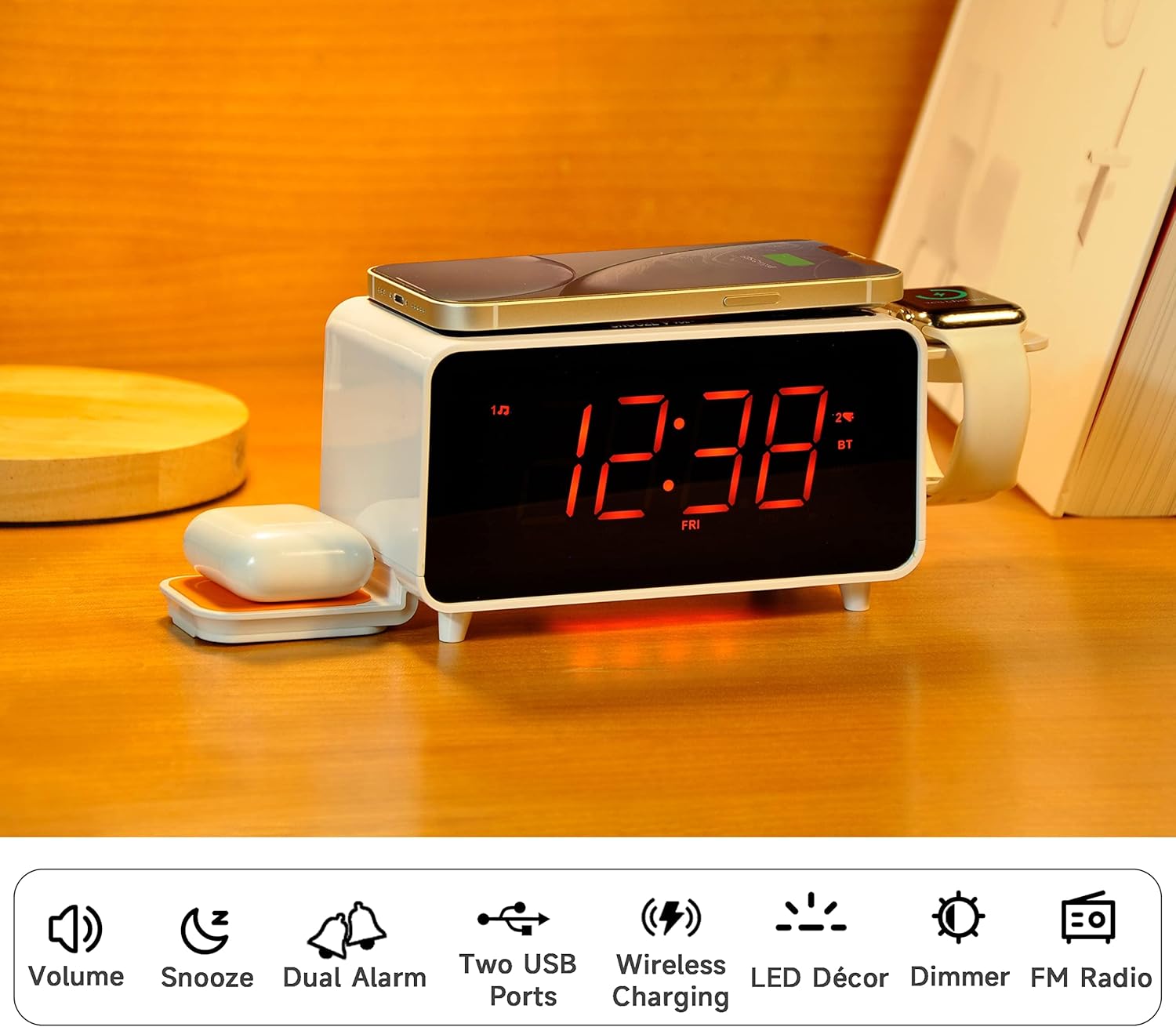
Image: The iTOMA CKS209 alarm clock radio displaying the time, with a smartphone wirelessly charging on top, earbuds on a side wireless charging pad, and a smartwatch on its holder.
Клучни карактеристики:
- Безжично полнење: 15W ultra-fast wireless charger for smartphones and 3W foldable earphone wireless charger. Includes a watch wireless charging support holder (charging cable not included).
- Bluetooth 5.1: Seamless audio streaming from your Bluetooth-enabled devices.
- Двоен USB приклучок: One USB-A and one USB-C port (5V 2.1A) for additional device charging.
- Smart Dual Alarm: Set two independent alarms with options to wake to radio or buzzer. Features snooze, crescendo wake-up, 15-level volume control, and 4 alarm week modes (Every day, single day, weekdays, weekends).
- 1.4" Orange LED Display: Clear 12/24-hour format display with 3-level dimmer brightness and auto-dimmer function.
- Ноќна светлина: 2-level orange night light for ambient illumination.
- Дигитално FM радио: 20 programmable preset stations with external wire antenna for enhanced reception.
- Резервна батерија: Maintains time and alarm settings during power interruptions.
2. Поставување
2.1 Поврзување за напојување
- Unpack the iTOMA CKS209 unit and all accessories.
- Connect the provided AC adapter to the DC IN jack on the back of the unit.
- Plug the AC adapter into a standard wall outlet. The display will light up, and the clock will automatically set the time.
2.2 Initial Time Setting (Manual)
While the clock features auto-time setting, you can manually adjust the time, date, and year if needed.
- Притиснете и задржете го СЕТ НА ЧАСОВНИК button located on the top panel until the year flashes on the display.
- Користете го ПРЕСУДА +/- buttons (or rotate the SNOOZE/VOL dial) to adjust the year.
- Притиснете СЕТ НА ЧАСОВНИК again to confirm and move to the month setting. Repeat the process for month, day, hour, and minute.
- Притиснете СЕТ НА ЧАСОВНИК one last time to save your settings.
2.3 Time Zone and Daylight Saving Time (DST)
- Притиснете и задржете го СПИЕЊЕ/ВРЕМЕНСКА ЗОНА button to enter time zone setting.
- Користете го ПРЕСУДА +/- buttons (or rotate the SNOOZE/VOL dial) to select your desired time zone.
- Притиснете СПИЕЊЕ/ВРЕМЕНСКА ЗОНА again to toggle DST ON or OFF.
- Притиснете СПИЕЊЕ/ВРЕМЕНСКА ЗОНА one last time to confirm and exit.
Video: This video demonstrates the time setting and Bluetooth operation for a similar iTOMA CKS207 model, which shares similar functionalities with the CKS209.
3. Упатства за работа
3.1 Безжично полнење
The iTOMA CKS209 features multiple wireless charging options:
- Smartphone Wireless Charging: Place your Qi-compatible smartphone on the top charging pad. The charging indicator on the display will illuminate to confirm charging.
- Earbud Wireless Charging: Place your Qi-compatible earbuds on the foldable 3W wireless charging pad located on the side.
- Smartwatch Holder: Utilize the integrated holder for your smartwatch. Note: A separate smartwatch charging cable (not included) is required and connects to one of the USB ports.
Image: A smartphone is placed on the top surface of the iTOMA CKS209, indicating wireless charging in progress.
Image: A close-up of the side of the iTOMA CKS209 showing the integrated holder designed for a smartwatch.
3.2 USB порти за полнење
In addition to wireless charging, the unit provides two USB ports (one Type-A and one Type-C) on the back for wired charging of other devices.
- Connect your device's USB charging cable to either the USB-A or USB-C port on the back of the alarm clock.
- Ensure your device is properly connected and charging.
Image: A smartphone is connected via a USB cable to one of the charging ports on the back of the iTOMA CKS209.
3.3 Bluetooth звучник
Стримувајте аудио безжично од вашите уреди со Bluetooth.
- Притиснете го ВКЛУЧЕНО/ИСКЛУЧЕНО копче за вклучување на единицата.
- Притиснете го РЕЖИМ button repeatedly until 'BT' appears on the display and starts flashing, indicating pairing mode.
- On your mobile device, enable Bluetooth and search for 'iTOMA CKS209' (or similar model name).
- Select the device to pair. Once connected, 'BT' will stop flashing and remain solid.
- You can now play audio from your device through the alarm clock speaker. Adjust volume using the VOL +/- buttons or your mobile device.

Image: A smartphone displaying music playback is positioned near the iTOMA CKS209, indicating a Bluetooth connection.
3.4 FM радио
Слушајте ги вашите омилени FM радио станици.
- Притиснете го ВКЛУЧЕНО/ИСКЛУЧЕНО копче за вклучување на единицата.
- Притиснете го РЕЖИМ копчето неколку пати додека на екранот не се појави FM фреквенцијата.
- For automatic station search, press and hold the ПРЕСУДА +/- buttons. The radio will scan and save available stations.
- For manual tuning, short press the ПРЕСУДА +/- копчиња за прилагодување на фреквенцијата чекор по чекор.
- Прилагодете ја јачината на звукот со помош на VOL +/- копчиња.
3.5 Двоен будилник
Поставете два независни аларми.
- Притиснете го AL1 or AL2 button to select the desired alarm. The alarm time will flash on the display.
- Користете го ПРЕСУДА +/- buttons (or rotate the SNOOZE/VOL dial) to set the desired alarm hour and minute.
- Притиснете AL1 or AL2 again to select the wake-up source (Buzzer or FM Radio).
- Притиснете AL1 or AL2 again to select the alarm week mode (Every day, single day, weekdays, or weekends).
- Притиснете AL1 or AL2 one last time to confirm and activate the alarm. The alarm indicator will appear on the display.
- За да го исклучите алармот, притиснете го соодветното копче AL1 or AL2 копчето додека индикаторот за аларм не исчезне од екранот.
- Функција за одложување: Кога ќе се огласи алармот, притиснете на СНОЗА button to temporarily silence the alarm for 9 minutes.

Image: The iTOMA CKS209 alarm clock radio displaying the time on a bedside table, ready for use.
3.6 Display & Dimmer Control
Adjust the brightness of the 1.4-inch orange LED display.
- Кратко притиснете го ПОТРАГО button to cycle through 3 brightness levels (High, Medium, Low).
- The unit also features an auto-dimmer function that adjusts display brightness based on ambient light conditions.
Image: A visual representation of the iTOMA CKS209 display at different brightness levels, from bright to invisible, and the auto-dimmer setting.
3.7 Ноќно светло
Activate the ambient orange night light.
- Притиснете го LED копче за вклучување на ноќното светло.
- Притиснете го LED button again to cycle through 2 brightness levels.
- Притиснете го LED button a third time to turn the night light OFF.
4. Одржување
To ensure the longevity and optimal performance of your iTOMA CKS209, follow these maintenance guidelines:
- Чистење: Use a soft, dry cloth to clean the exterior of the unit. Do not use liquid cleaners or abrasive materials, as they may damage the finish.
- Вентилација: Уверете се дека уредот е поставен во добро проветрено место за да спречите прегревање. Не ги блокирајте отворите за вентилација.
- Кабел за напојување: Редовно проверувајте го кабелот за напојување за евентуални оштетувања. Доколку е оштетен, прекинете со употреба и контактирајте ја службата за корисничка поддршка.
- Складирање: Доколку го складирате уредот подолг временски период, исклучете го од штекерот и чувајте го на ладно и суво место.
5 Смена на проблеми
If you encounter any issues with your iTOMA CKS209, please refer to the following common troubleshooting steps:
- Нема напојување/исклучено екран:
- Осигурајте се дека адаптерот за наизменична струја е безбедно вклучен и во уредот и во функционален ѕиден штекер.
- Проверете дали штекерот е функционален со вклучување на друг уред.
- Безжичното полнење не работи:
- Проверете дали вашиот уред е компатибилен со Qi.
- Осигурајте се дека вашиот уред е правилно центриран на подлогата за полнење.
- Отстранете ги сите дебели футроли за телефонот или метални предмети што можат да го попречат полнењето.
- Потврдете дека уредот е вклучен.
- Проблеми со спарување Bluetooth:
- Ensure the alarm clock is in Bluetooth pairing mode ('BT' flashing).
- Проверете дали Bluetooth е овозможен на вашиот мобилен уред.
- Move your mobile device closer to the alarm clock.
- Ако претходно сте го спариле уредот, обидете се да го распарите и повторно да го спарите.
- FM Radio Static/Poor Reception:
- Extend the external wire antenna fully for better reception.
- Reposition the antenna or the unit to find a location with better signal strength.
- Алармот не се огласува:
- Ensure the alarm (AL1 or AL2) is activated and its indicator is visible on the display.
- Проверете ја поставката за јачината на алармот.
- Verify the alarm time and day settings are correct.
6. Спецификации
| Карактеристика | Детал |
|---|---|
| Бренд | iTOMA |
| Број на модел | CKS209-CA |
| Боја | Orange Led Display |
| Димензии на производот | 16.8 x 3.81 x 9.1 cm |
| Тежина на ставката | 820 гр |
| Материјал | Пластика |
| Тип на дисплеј | LED |
| Посебни карактеристики | Auto Dimmable, Charging Port, Charging Station, Foldable, Multiple Time Zone |
| Безжично полнење | 15W (Phone), 3W (Earbuds) |
| USB полнење | USB-A, USB-C (5V 2.1A) |
| Bluetooth верзија | 5.1 |
| FM фреквенција | 87.5-108 MHz |
7. Гаранција и поддршка
For warranty information, technical support, or any inquiries regarding your iTOMA CKS209, please refer to the documentation included in your product packaging or visit the official iTOMA webстраница. Можете исто така директно да го контактирате продавачот за помош.


