1. Вовед
Thank you for choosing the Jadfezy WiFi Action Camera. This camera is designed to capture high-quality videos and photos of your adventures, whether on land or underwater. With its compact design, 1080P video recording, 12MP photo capabilities, and built-in WiFi, it is an ideal companion for sports enthusiasts and travelers. Please read this manual carefully before use to ensure proper operation and to maximize the camera's performance.
2. Информации за безбедност
- Не го изложувајте фотоапаратот на екстремни температури или директна сончева светлина подолг период.
- Проверете дали водоотпорното куќиште е правилно затворено пред да го потопите фотоапаратот во вода.
- Use only specified batteries and chargers. Improper use may lead to fire, explosion, or other hazards.
- Држете го фотоапаратот и додатоците подалеку од дофат на деца.
- Избегнувајте испуштање или изложување на камерата на силни удари.
- Не обидувајте се да ја расклопите или модифицирате камерата.
3. Содржина на пакетот
Стандардниот пакет ги вклучува следните артикли:
- Jadfezy 1080P Action Camera
- Водоотпорна футрола
- 2 x 1050mAh Rechargeable Lithium-Ion Batteries
- Helmet Mounting Kit
- Bicycle Mounting Kit
- USB кабел за полнење
- Various Mounting Accessories and Straps

Image: Contents of the Jadfezy Action Camera accessories kit, including the camera, waterproof housing, two batteries, various mounts, and a USB cable.
4. Производот завршиview
The Jadfezy Action Camera features a compact design with a 2-inch LCD screen for easy viewing and navigation. It is capable of recording Ultra HD 1080P video at 30 frames per second and capturing 12-megapixel still photos. The camera comes with a durable waterproof case, allowing for underwater use up to 30 meters (98 feet).

Image: The Jadfezy WiFi Action Camera shown with its transparent waterproof case, two rechargeable batteries, and a display screen illustrating a skydiving scene.

Слика: Надview of the Jadfezy Action Camera highlighting its key features: FHD 1080P/30FPS video, Wi-Fi connectivity, Time-lapse/Loop video modes, 2x 1050mAh batteries, 30m/98ft waterproof capability, and a wide-angle lens.
5. Поставување
5.1. Инсталација и полнење на батеријата
The camera uses 1050mAh rechargeable Lithium-Ion batteries. Ensure batteries are fully charged before first use.
- Отворете го капакот на преградата за батерии на дното од фотоапаратот.
- Вметнете ја батеријата според индикаторите за поларитет.
- Добро затворете го капакот на преградата за батерии.
- Connect the camera to a USB power source using the provided USB cable to charge. The charging indicator will show the charging status.

Image: Two Jadfezy rechargeable Lithium-Ion batteries, highlighting their compact size and design.
5.2. Вметнување на микро SD картичка
A Micro SD card (not included) is required for storing videos and photos. The camera supports Micro SD cards up to 32GB (though some users report success with 64GB cards, 32GB is officially supported).
- Пронајдете го слотот за микро SD картичка на страната од камерата.
- Вметнете ја Micro SD картичката со златните контакти свртени кон задната страна на камерата додека не кликне на своето место.
- За да ја извадите, нежно притиснете ја картичката додека не испадне.
5.3. Користење на водоотпорната футрола
The waterproof case allows the camera to be used underwater up to 30 meters (98 feet).
- Уверете се дека фотоапаратот е сув пред да го ставите во водоотпорното куќиште.
- Place the camera firmly into the case.
- Close the latch securely to ensure a watertight seal.
- Before first use in water, it is recommended to test the waterproof case without the camera inside to ensure no leaks are present.

Image: The Jadfezy Action Camera enclosed in its waterproof case, submerged in clear blue water with colorful fish and coral, demonstrating its 30m/98ft waterproof capability.
5.4. Attaching Mounting Accessories
The camera comes with various mounts for different activities, including helmet and bicycle mounting kits.
- Identify the appropriate mount for your intended use (e.g., helmet mount, bicycle mount).
- Attach the camera (with or without the waterproof case, depending on the activity) to the chosen mount using the provided screws and adapters.
- Securely fasten the mount to your helmet, bicycle, or other desired surface. Ensure all connections are tight to prevent the camera from falling during activity.
6. Ракување со камерата
6.1. Вклучување/исклучување
- За вклучување: Притиснете го и задржете го копчето за вклучување/режим неколку секунди.
- За исклучување: Притиснете го и задржете го копчето за вклучување/режим повторно додека екранот не се исклучи.
6.2. Избор на режим
Притискајте го копчето за вклучување/режим неколку пати за да се движите низ различните режими: снимање видео, режим на фотографирање, режим на репродукција и поставки.
6.3. Снимање видео
- In Video Recording mode, press the OK button to start recording. A red indicator light will flash, and a timer will appear on the screen.
- Притиснете го копчето ОК повторно за да престанете да снимате.
6.4. Снимање фотографии
- In Photo Mode, press the OK button to take a photo.
6.5. Репродукција
- In Playback Mode, use the Up/Down buttons to navigate through your recorded videos and photos.
- Press the OK button to play a video or view фотографија на цел екран.
6.6. WiFi Connection and App Control
The built-in WiFi allows you to connect the camera to your smartphone for remote control, live view, и file трансфер.
- Download the designated app (refer to the camera's screen or packaging for the app name) from your smartphone's app store.
- On the camera, enter WiFi mode (usually by pressing a dedicated WiFi button or cycling through modes). The WiFi icon will appear on the screen.
- On your smartphone, go to WiFi settings and connect to the camera's WiFi network (SSID and password will be displayed on the camera screen).
- Open the app on your smartphone. You can now control the camera, view живеј фаоtage, and download files. The WiFi signal range is up to 33 feet.

Слика: Паметен телефон кој прикажува слика во живо view from the Jadfezy Action Camera, with a skier in the background, illustrating the camera's WiFi connectivity feature for remote control and sharing.
6.7. Special Features: Time-Lapse, Dash Cam, Burst Photo
The camera supports various shooting modes to enhance your recording experience.
- Временски пропуст: Снимајте серија фотографии во одредени интервали за да создадете видео со забрзано движење.
- Цртичка камера: Functions as a car dashboard camera, often with loop recording.
- Рафална фотографија: Take multiple photos in quick succession, ideal for fast-moving action.
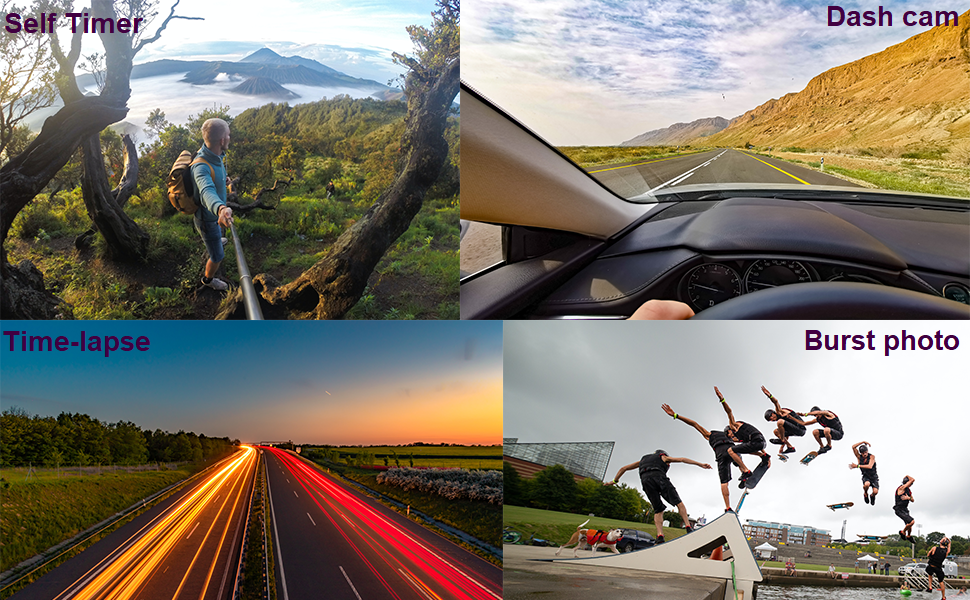
Image: Four panels demonstrating the camera's versatile features: a self-timer shot of a person on a mountain, a dash cam view from inside a car, a time-lapse image of city lights at night, and a burst photo sequence of a skateboarder.
7. Одржување
- Чистење: Користете мека крпа што не остава влакненца за чистење на објективот и екранот на камерата. За водоотпорното куќиште, исплакнете со свежа вода по употреба со солена вода и оставете да се исуши на воздух.
- Нега на батеријата: Store batteries in a cool, dry place. If not using the camera for an extended period, remove the batteries.
- Складирање: Store the camera in a dry, dust-free environment away from direct sunlight and extreme temperatures.
8 Смена на проблеми
If you encounter issues with your Jadfezy Action Camera, please refer to the following common solutions:
| Проблем | Можно решение |
|---|---|
| Камерата не се вклучува. | Проверете дали батеријата е целосно наполнета и правилно вметната. Обидете се да користите друга наполнета батерија. |
| Не може да снима видео или да фотографира. | Check if a Micro SD card is inserted and has sufficient free space. Ensure the card is formatted correctly (FAT32 recommended). The camera may stop recording after 15-minute segments; ensure loop recording is enabled if continuous recording is desired. |
| Лош квалитет на видео/фотографии. | Ensure the lens is clean. Check the selected resolution settings in the camera menu. Ensure adequate lighting conditions. |
| Проблеми со WiFi конекција. | Ensure the camera's WiFi is enabled. Restart both the camera and your smartphone. Ensure you are within the 33-foot WiFi range. Check that the correct app is installed and updated. |
| Water leakage in waterproof case. | Ensure the case is properly sealed and the latch is fully closed. Check the rubber gasket for any debris or damage. Replace the gasket if necessary. |
9. Спецификации
| Карактеристика | Детал |
|---|---|
| Бренд | Џадфези |
| Број на модел | J-03series |
| Видео резолуција | Up to 1080P / 30fps |
| Резолуција на фотографијата | 12 MP |
| Големина на екранот | 2 инчи |
| Водоотпорна длабочина | Up to 30m (98ft) with waterproof case |
| Тип на батерија | 2 x 1050mAh литиум-јонски батерии (вклучени) |
| Складирање | Micro SD (up to 32GB recommended) |
| Поврзување | WiFi, USB |
| Димензии | 2.35 x 1.55 x 1.2 инчи |
| Тежина на ставката | 12.3 унци |
10. Гаранција и поддршка
За информации за гаранцијата и техничка поддршка, ве молиме погледнете ја документацијата што е доставена со вашата нарачка или контактирајте го директно продавачот. Зачувајте го доказот за купување за рекламации во врска со гаранцијата.


