Вовед
This manual provides comprehensive instructions for the setup, operation, and maintenance of your Tesla Smart Pet Feeder (Model TSL-PC-BL4). Please read this manual thoroughly before using the device to ensure proper functionality and safety for your pet.
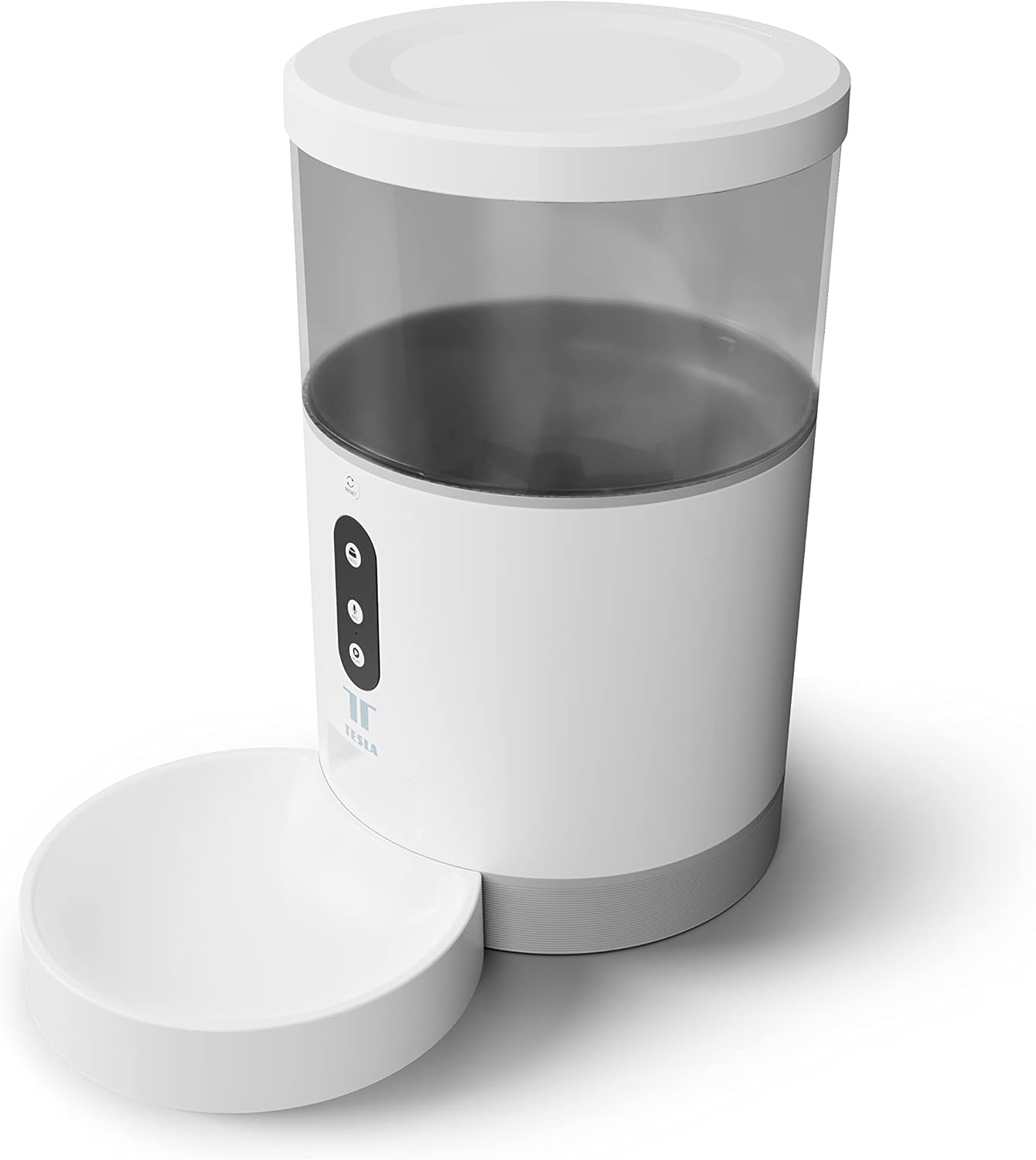
Слика: напред view of the Tesla Smart Pet Feeder, showing the main unit with a transparent food reservoir, control buttons, and an attached white food bowl.
Важни безбедносни информации
Ве молиме почитувајте ги следниве безбедносни мерки за да спречите повреда или оштетување на уредот:
- Не го потопувајте главниот уред во вода или други течности.
- Осигурајте се дека хранилката е поставена на стабилна, рамна површина.
- Keep out of reach of small children and pets when not in use or during assembly.
- Use only dry pet food with a kibble size up to 10 mm.
- Не обидувајте се сами да го расклопите или поправате уредот. Контактирајте ја поддршката за корисници за помош.
- Секогаш исклучувајте го фидерот од струја пред чистење.
Содржина на пакетот
Проверете дали сите компоненти се присутни во пакувањето:
- Tesla Smart Pet Feeder Main Unit
- Чаша за храна
- Адаптер за напојување
- Упатство за употреба (овој документ)
Водич за поставување
1. Собрание
- Поставете ја главната единица за полнење на рамна, стабилна површина.
- Attach the food bowl to the designated slot at the base of the main unit. Ensure it clicks securely into place.

Слика: напред view of the feeder highlighting the control panel with feed, record, and play buttons.
2. Напојување на уредот
- AC напојување: Connect the power adapter to the feeder's power input port and plug it into a standard wall outlet.
- Резервна батерија (опционално): За непречено работење за време на исклучување на струјатаtages, insert three LR20 (D-cell) batteries into the battery compartment located at the bottom of the unit. Батериите не се вклучени и мора да се купат одделно.

Слика: Заден дел view of the Tesla Smart Pet Feeder, showing the power input and battery compartment location.
3. Полнење на садот за храна
- Remove the lid from the top of the feeder.
- Pour dry pet food into the transparent container. The feeder has a capacity of 4 liters. Ensure kibble size does not exceed 10 mm to prevent jamming.
- Поставете го капакот безбедно.

Слика: Крупен план view of dry pet food kibble in the feeder's bowl, demonstrating the type of food suitable for the device.
4. Преземање на апликација и Wi-Fi поврзување
- Download the Tesla Smart app from the App Store (iOS) or Google Play Store (Android).
- Open the app and follow the on-screen instructions to create an account and add your Tesla Smart Pet Feeder.
- Осигурете се дека вашата Wi-Fi мрежа е 2.4 GHz за успешно поврзување.
Упатства за работа
1. Scheduling Feeds via App
The primary method for controlling the feeder is through the Tesla Smart app. The app allows you to:
- Set feeding schedules: Define specific times for food dispensing.
- Adjust portion sizes: Control the amount of food dispensed per feeding. The feeder can dispense up to 10 portions per feeding.
- View feeding history.

Image: An orange cat resting beside the Tesla Smart Pet Feeder, illustrating the feeder in a home environment.
2. Рачно хранење
To dispense food manually, press the "Feed" button on the feeder's control panel. Each press will dispense one portion of food.
3. Voice Recording and Playback
The feeder includes a built-in microphone and speaker, allowing you to record a short message to call your pet at feeding times.
- Запис: Press and hold the "Record" button (microphone icon) on the control panel. Speak your message. Release the button to save.
- Играј: Press the "Play" button (speaker icon) to play your recorded message. The message will also play automatically at scheduled feeding times.
4. Интеграција со паметен дом
The Tesla Smart Pet Feeder is compatible with Google Assistant and Amazon Alexa. You can control the feeder using voice commands after linking it through the respective smart home applications.
Одржување и чистење
Regular cleaning ensures the longevity and hygienic operation of your pet feeder.
- Чинија за храна: The food bowl can be detached and washed by hand with mild soap and water. Rinse thoroughly and dry completely before reattaching.
- Food Container: The transparent food container can be wiped clean with a damp крпа. Уверете се дека е целосно сува пред да ја наполните со храна.
- Главна единица: Wipe the exterior of the main unit with a soft, dry cloth. Не користете абразивни средства за чистење и не го потопувајте главниот уред во вода.
- Продавница за храна: Periodically check the food outlet for any blockages or food residue and clear as necessary.
Important: Always unplug the feeder from the power source before cleaning.
Решавање проблеми
| Проблем | Можна причина | Решение |
|---|---|---|
| Feeder not powering on. | No power from outlet; batteries depleted or incorrectly installed. | Check power adapter connection and wall outlet. Replace or install D-cell batteries correctly. |
| Храна што не се издава. | Food jammed; container empty; incorrect kibble size; feeder offline. | Check for food blockages in the outlet. Refill container. Ensure kibble is max 10mm. Check Wi-Fi connection and app status. |
| Не може да се поврзе на Wi-Fi. | Incorrect Wi-Fi password; 5GHz network; feeder too far from router. | Verify Wi-Fi password. Ensure you are connecting to a 2.4 GHz network. Move feeder closer to router. Restart feeder and router. |
| Voice recording not working. | Microphone issue; recording procedure incorrect. | Ensure you are pressing and holding the record button correctly. Try restarting the feeder. |
Спецификации
| Карактеристика | Детал |
|---|---|
| Број на модел | TSL-PC-BL4 |
| Димензии (Д x Ш x В) | 30 x 30 x 20 cm |
| Тежина | 1.92 килограми |
| Материјал | Пластика |
| Боја | Бело |
| Капацитет | 4 литри |
| Големина на Kibble | До 10 мм |
| Извор на енергија | AC Adapter, 3x LR20 (D-cell) batteries (not included) |
| Поврзување | Wi-Fi (2.4 GHz) |
| Посебни карактеристики | Wi-Fi and App Control, Voice Recording, Google Assistant/Amazon Alexa Compatible |
Гаранција и поддршка
For warranty information, technical support, or service inquiries, please refer to the official Tesla Smart webстраницата или контактирајте го нивниот оддел за услуги на клиентите. Зачувајте ја сметката за купување како доказ за купување.
For the most up-to-date information and support resources, visit: www.teslasmart.com