1. Вовед и повеќеview
The Edision EDI-RCU 4 Learn is a versatile 2-in-1 universal remote control designed for seamless operation of your Edision receiver and television. It is pre-programmed for common TV brands like Samsung and LG, and offers a learning function to customize up to four buttons for any TV.

Оваа слика го прикажува предниот дел view of the Edision EDI-RCU 4 Learn universal remote control, highlighting its compact design and button layout.
Клучни карактеристики:
- 2-in-1 functionality for Edision receivers and televisions.
- Pre-programmed for major TV brands (Samsung, LG).
- Four programmable TV buttons for custom control.
- Original replacement remote for compatible Edision models.

This image highlights the 2-in-1 functionality of the Edision EDI-RCU 4 Learn remote, indicating its use for both Set-Top Box (STB) and TV control. It also shows a close-up of the TV control buttons.
2. Поставување
2.1 Инсталација на батерија
The Edision EDI-RCU 4 Learn remote control requires two AAA batteries (not included). Follow these steps to install them:
- Лоцирајте го капакот на преградата за батерии на задниот дел од далечинскиот управувач.
- Лизнете го капакот надолу или притиснете го резето за да го отворите.
- Вметнете две AAA батерии, осигурувајќи се дека позитивните (+) и негативните (-) терминали се правилно порамнети со индикаторите во преградата.
- Лизгајте го капакот на батеријата на своето место додека не кликне безбедно.
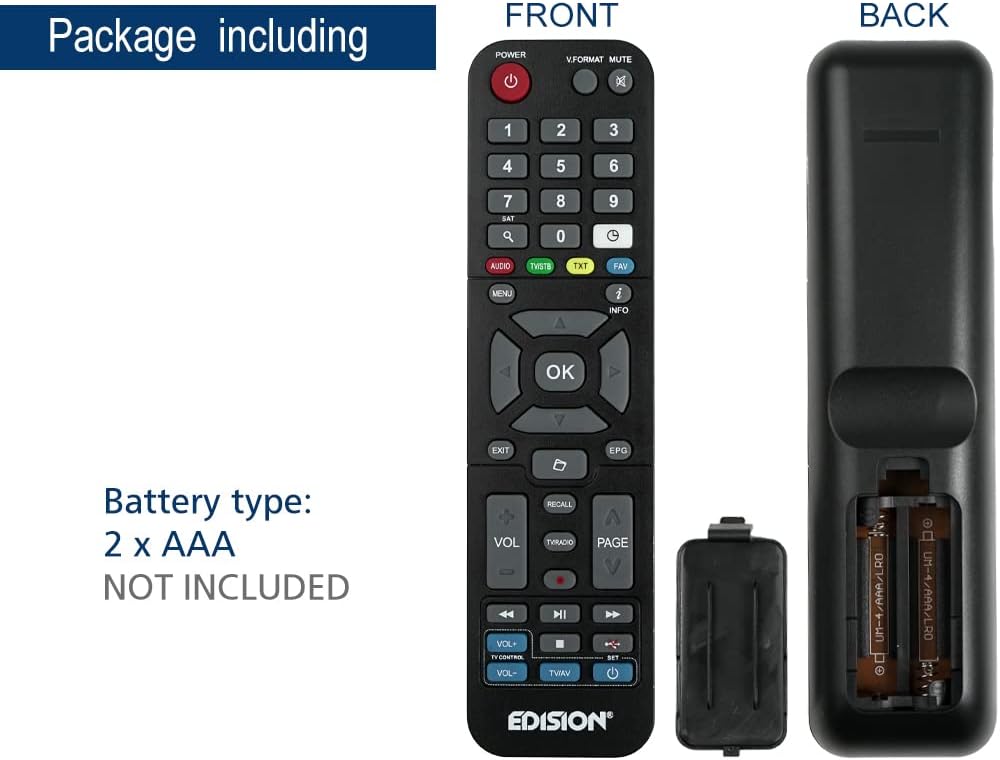
This image illustrates the battery compartment of the Edision EDI-RCU 4 Learn remote control, showing where to insert two AAA batteries. Batteries are not included.
2.2 Initial Setup and Pre-programmed Functions
The remote is pre-programmed for immediate use with compatible Edision receivers. Additionally, the four main TV control buttons (VOL+, VOL-, TV/AV, Power) are pre-programmed for Samsung and LG televisions. For other TV brands or custom functions, use the learning feature described in the Operating Instructions section.
3. Упатства за работа
3.1 Основни функции
The remote control features standard buttons for navigating your Edision receiver and controlling basic TV functions:
- Копче за вклучување (црвено): Turns the Edision receiver on or off.
- Нумеричка тастатура (0-9): За директен влез на канал.
- Копчиња за навигација (горе, долу, лево, десно, во ред): За навигација низ менито и избор.
- VOL+ / VOL-: Adjusts volume (pre-programmed for TV).
- CH+ / CH-: Ги менува каналите.
- МУТИРА: Mutes TV sound.
- МЕНИ: Пристапува до главното мени на приемникот.
- Излез: Излегува од тековното мени или екран.
- ИНФОРМАЦИИ: Ги прикажува информациите за програмата.
- ТВ/АВ: Switches TV input source (pre-programmed for TV).
- TV Power Button (Blue): Turns the TV on or off (pre-programmed for TV).
3.2 Learning Function for TV Control
The EDI-RCU 4 Learn allows you to program its four dedicated TV control buttons (VOL+, VOL-, TV/AV, TV Power) using your original TV remote control. This enables universal control over your TV's essential functions.
- Влезете во режим на учење: Press and hold the blue 'SET' button on the EDI-RCU 4 Learn remote until the red LED light stays lit.
- Select Button to Learn: Press the specific TV control button on the EDI-RCU 4 Learn remote that you wish to program (e.g., VOL+). The red LED will blink slowly.
- Transmit Signal: Point your original TV remote control directly at the EDI-RCU 4 Learn remote (infrared sensors should face each other, typically 1-3 cm apart). Press and hold the corresponding button on your original TV remote (e.g., TV's VOL+ button). The red LED on the EDI-RCU 4 Learn will blink rapidly, then light up steadily to indicate successful learning.
- Излез од режим на учење: Once all desired buttons are programmed, press the blue 'SET' button again to exit learning mode. The red LED will turn off.

Image illustrating holding the SET button to enter learning mode.

Image showing selection of a button on the EDI-RCU 4 Learn remote for learning.

Image depicting the process of transmitting the signal from the original TV remote to the EDI-RCU 4 Learn.

Image showing pressing the SET button to exit learning mode.
Tips for Learning:
- Ensure both remotes have fresh batteries.
- Perform the learning process in a well-lit area, away from direct sunlight or strong artificial light sources that might interfere with infrared signals.
- If a button fails to learn, repeat the process for that specific button.
4. Одржување
4.1 Замена на батеријата
Replace the AAA batteries when the remote's performance degrades or if the LED indicator does not light up during button presses. Refer to section 2.1 for battery installation instructions.
4.2 Чистење
За чистење на далечинскиот управувач, користете мека, сува крпа. За тврдокорна нечистотија, малкуampИзмијте ја крпата со вода или со благ, неабразивен чистач. Не користете јаки хемикалии и не го потопувајте далечинскиот управувач во вода.
5 Смена на проблеми
- Далечинското не реагира:
- Проверете дали батериите се правилно вметнати и дали се доволно наполнети. Заменете ги доколку е потребно.
- Уверете се дека нема пречки помеѓу далечинскиот управувач и приемникот/телевизорот.
- Проверете дали далечинскиот управувач е насочен директно кон инфрацрвениот сензор на уредот.
- Learning function not working:
- Ensure the original remote has working batteries and is transmitting a strong signal.
- Make sure the distance between the two remotes is correct (1-3 cm) and they are aligned properly.
- Avoid strong light sources during the learning process.
- Repeat the learning steps carefully.
- Some buttons work, others don't:
- For TV control buttons, re-program the non-working buttons using the learning function.
- For receiver control buttons, ensure the remote is compatible with your specific Edision receiver model.
6. Спецификации

This image displays the Edision EDI-RCU 4 Learn remote control, indicating its dimensions: approximately 17.5 cm in length and 4.5 cm in width. It also lists key features such as original replacement, 2-in-1 functionality, learn function, and 4 programmable TV buttons.
| Карактеристика | Детал |
|---|---|
| Име на моделот | EDI-RCU 4 Научете |
| Број на модел | 07-00-0064 |
| Бренд | Издание |
| Боја | Црното |
| Технологија за поврзување | Инфрацрвена |
| Специјална карактеристика | Universal, Programmable |
| Компатибилни уреди | EDISION Set Top Box, Various TVs (via learning function) |
| Тип на батерија | 2 x AAA (не се вклучени) |
| Максимален опсег | 2 метри |
| Number of Programmable Buttons | 4 (for TV control) |
7. Гаранција и поддршка
Warranty information for the Edision EDI-RCU 4 Learn remote control is typically provided with your purchase or can be found on the official Edision webстраница. Ве молиме задржете го доказот за купување за гаранциски барања.
For technical support, troubleshooting assistance, or further inquiries, please visit the official Edision support website or contact their customer service department. Contact details are usually available on the manufacturer's packaging or webсајт.


