Вовед
На ViewSonic X11-4K projector offers true 4K Ultra HD resolution with HDR/HLG support, advanced LED technology, and smart capabilities in a portable design. This manual provides essential information for setting up, operating, maintaining, and troubleshooting your projector to ensure an optimal cinematic experience in any home environment.
Што има во кутијата
- ViewSonic X11-4K Projector
- Кабел за напојување
- Далечински управувач
- Водич за брз почеток
Карактеристики на производот
- 4K UHD LED Projection: Delivers bright 1000 ANSI lumens with a short throw lens for supersized movies and games.
- Живи бои: Achieves 125% Rec. 709 color accuracy and supports HDR/HLG content for lifelike visuals.
- Премиум аудио: Features built-in Dual Harman Kardon Bluetooth speakers for room-filling sound.
- Лесно поставување: Includes 0.8x-1x digital zoom, instant auto focus, vertical/horizontal keystone, and 4-corner adjustment for flexible placement.
- Способности за стриминг: Supports livestreaming and content consumption from various platforms by adding a compatible dongle (not included).
- Флексибилно поврзување: Compatible with most media players, PCs, Macs, and mobile devices via Wi-Fi, HDMI, and USB-C inputs.
Поставување
На ViewSonic X11-4K is designed for effortless setup. Place the projector on a stable surface a few feet from your desired projection area. The short throw lens can project images up to 100 inches from a short distance. Utilize the instant auto focus, H/V keystone, and 4-corner adjustments to achieve a perfectly aligned and sharp image.
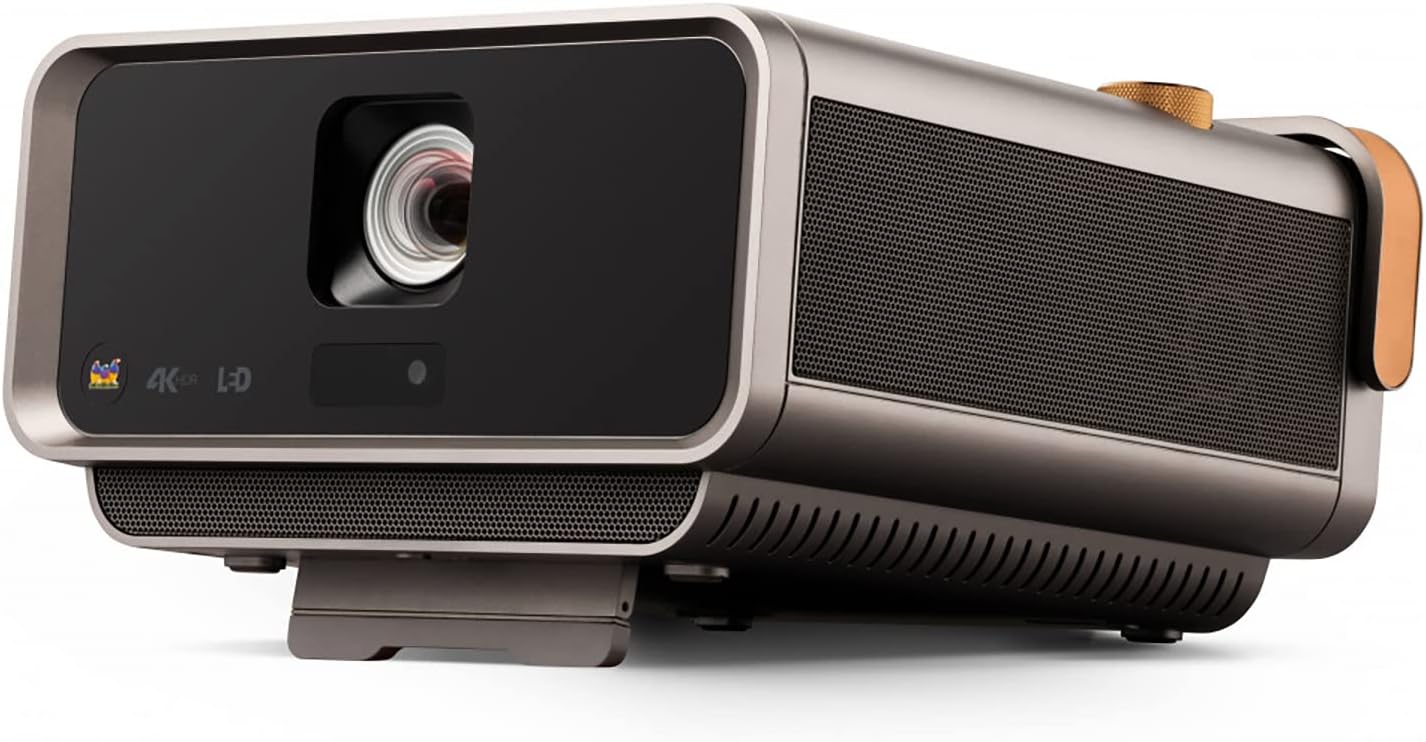
Слика 1: Предна страна view на ViewSonic X11-4K projector, showcasing the lens and sleek design.

Figure 2: Visual representation of the autofocus, digital zoom, 4-corner keystone, and auto keystone adjustment features for easy setup.
Упатства за работа
Power on the projector using the dedicated button or remote control. Navigate the on-screen menu using the remote to select input sources, adjust picture settings, and manage audio options. The intuitive interface allows for quick access to all functionalities.

Слика 3: Врв view of the projector showing the integrated control knob for power and volume, along with other control buttons.
Поврзување
The X11-4K offers diverse connectivity options:
- HDMI: Connect external devices such as Blu-ray players, gaming consoles, or set-top boxes.
- USB-C: Directly connect compatible mobile devices, laptops, or gaming consoles like the Nintendo Switch for video streaming and power delivery.
- Wi-Fi: Enable wireless screen mirroring from your smartphone, tablet, or computer.
- Bluetooth: Connect to external Bluetooth speakers or headphones for enhanced audio, or use the projector's built-in Harman Kardon speakers.

Слика 4: Заден дел view of the projector displaying various input and output ports including HDMI, USB-C, and audio jacks.

Figure 5: Illustration of USB-C connectivity with various devices like smartphones, tablets, laptops, and a Nintendo Switch.
Прилагодување на сликата
Achieve the perfect picture with the following adjustment features:
- Instant Auto Focus: The projector automatically adjusts for optimal clarity.
- H/V Keystone: Corrects distorted images when the projector is not perfectly centered.
- Прилагодување на 4 агли: Fine-tune each corner of the image independently for a precise fit on any surface.
- Дигитален зум: Прилагодете ја големината на сликата без да го поместувате проекторот.

Figure 6: Diagram illustrating the short throw capability, showing screen sizes (80", 100", 120") at various distances (4.7', 5.8', 7').
Аудио
Experience rich and immersive sound with the integrated Harman Kardon speakers. For private listening or connecting to external audio systems, utilize the Bluetooth connectivity or audio output ports.

Figure 7: Image depicting the projector with sound waves emanating from it, highlighting the Harman Kardon speakers and Bluetooth connectivity.
Спецификации
| Карактеристика | Детал |
|---|---|
| Број на модел | X11-4K |
| Резолуција на екранот | 3840 x 2160 (4K UHD) |
| Осветленост | 1000 ANSI лумени |
| Точност на бојата | 125% Rec. 709 |
| Поврзување | Wi-Fi, HDMI, USB-C, Ethernet, USB 2.0 Type A |
| Посебни карактеристики | Short Throw, H/V Keystone, 4-Corner Adjustment, Instant Auto Focus, Dual Harman Kardon Speakers |
| Димензии на производот | 10.3 x 10.7 x 2.7 инчи |
| Тежина на ставката | 9.9 фунти |

Figure 8: Image detailing the physical dimensions of the ViewSonic X11-4K projector.
Одржување
За да се обезбеди долговечност и оптимални перформанси на вашиот ViewSonic X11-4K projector, follow these maintenance guidelines:
- Чистење леќи: Нежно избришете го објективот на проекторот со мека крпа без влакненца, наменета за оптички површини. Избегнувајте абразивни материјали или груби хемикалии.
- Надворешно чистење: Користете мека, сува крпа за чистење на надворешноста на проекторот. За тврдокорни дамки, малкуampmk крпата со вода.
- Вентилација: Ensure that the projector's ventilation openings are clear and unobstructed to prevent overheating.
- Складирање: Кога не го користите подолг период, чувајте го проекторот на ладно и суво место, идеално во оригиналното пакување или во заштитна кутија.
Решавање проблеми
Доколку наидете на проблеми со вашиот проектор, погледнете ги следниве вообичаени решенија:
- Нема слика: Check all cable connections (HDMI, USB-C) and ensure the correct input source is selected on the projector. Verify the power cable is securely connected.
- Заматена слика: Use the instant auto focus feature or manually adjust the focus. Ensure the projection surface is flat and the projector is stable.
- Искривена слика: Utilize the H/V keystone and 4-corner adjustment features to correct any trapezoidal or uneven image shapes.
- Нема звук: Check the volume settings on both the projector and the connected source device. Ensure external speakers (if connected via Bluetooth or audio out) are properly paired and powered on.
- Далечинскиот управувач не работи: Заменете ги батериите во далечинскиот управувач. Уверете се дека нема пречки помеѓу далечинскиот управувач и IR приемникот на проекторот.
Гаранција и поддршка
For warranty information, technical support, or service inquiries, please refer to the official ViewСоник website or contact their customer support. Keep your purchase receipt and product serial number handy for any support requests.
Официјални видеа за производи
ViewSonic Home Theater and Business Projectors
Ова видео дава крајview of ViewSonic's home theater and business projectors, highlighting key features and applications.
4K проектор за домашно кино
This video demonstrates the capabilities of the 4K home theater projector, focusing on visual quality and user experience.


