1. Вовед
Ви благодарам за купувањетоasing the Muse MT-106 BT Stereo Turntable. This manual provides essential information for the safe and efficient operation of your new device. Please read it thoroughly before use and retain it for future reference.
The Muse MT-106 BT is a versatile 3-speed (33/45/78 RPM) stereo turntable featuring a Bluetooth receiver, a USB port for playback and encoding, and two integrated speakers. It is designed to play vinyl records and can also stream music from any Bluetooth-compatible device such as a tablet, smartphone, or laptop.
2. Инструкции за безбедност
- Извор на енергија: Обезбедете ја јачината на напојувањетоtage matches the rating indicated on the unit.
- Вода и влага: Do not expose the unit to rain, moisture, or dripping water. Do not place objects filled with liquids, such as vases, on the unit.
- Вентилација: Обезбедете соодветна вентилација. Не ги блокирајте отворите за вентилација.
- Топлина: Држете го уредот подалеку од извори на топлина како што се радијатори, грејни тела, шпорети или други апарати што произведуваат топлина.
- Чистење: Исклучете го уредот од штекерот пред чистење. Користете мека, сува крпа. Не користете течни средства за чистење или аеросолни средства за чистење.
- Сервисирање: Не обидувајте се сами да го сервисирате овој производ. Пренесете ги сите сервиси на квалификуван сервисен персонал.
- Поставување: Поставете го уредот на стабилна, рамна површина за да спречите оштетување од паѓање.
3. Содржина на пакетот
Ве молиме проверете дали следните артикли се вклучени во вашиот пакет:
- Muse MT-106 BT Stereo Turntable
- Упатство за употреба
- Адаптер за напојување
- Адаптер за 45 вртежи во минута
4. Производот завршиview
Familiarize yourself with the components and controls of your Muse MT-106 BT Turntable.

Слика 4.1: Севкупно view of the Muse MT-106 BT Stereo Turntable. This image displays the turntable from an angled perspective, with its transparent dust cover lifted. The wooden base and integrated speakers are visible, along with the black platter, tonearm, and control knobs on the right side.
4.1 Front and Top Components
- Покривка за прашина: Ги заштитува плочката и тонот од прашина.
- Послужавник: Ротирачката платформа каде што се поставуваат записи.
- Вретено: Го држи рекордот на место на послужавникот.
- Адаптер за 45 вртежи во минута: Used for playing 7-inch records with large center holes.
- Тонеарм: Го држи пенкалото и ги следи жлебовите на плочата.
- Пенкало (игла): The part that reads the record grooves.
- Рачка за знак: Lifts and lowers the tonearm.
- Избор на брзина: Switch to select 33, 45, or 78 RPM.
- Интегрирани звучници: Вградени звучници за аудио излез.

Слика 4.2: Контролен панел. Оваа слика дава детален приказ view of the control panel located on the right side of the turntable. It shows three rotary knobs for volume and function selection, along with several buttons for playback control and mode switching.
4.2 Контролен панел
- Копче за напојување/гласност: Го вклучува/исклучува уредот и ја прилагодува јачината на звукот.
- Копче за избор на функции: Switches between Phono, Bluetooth, USB, and Aux-in modes.
- Контролни копчиња за репродукција: Play/Pause, Skip Forward, Skip Backward (for USB mode).
- Прекинувач за автоматско запирање: Enables or disables the automatic stop function for vinyl playback.
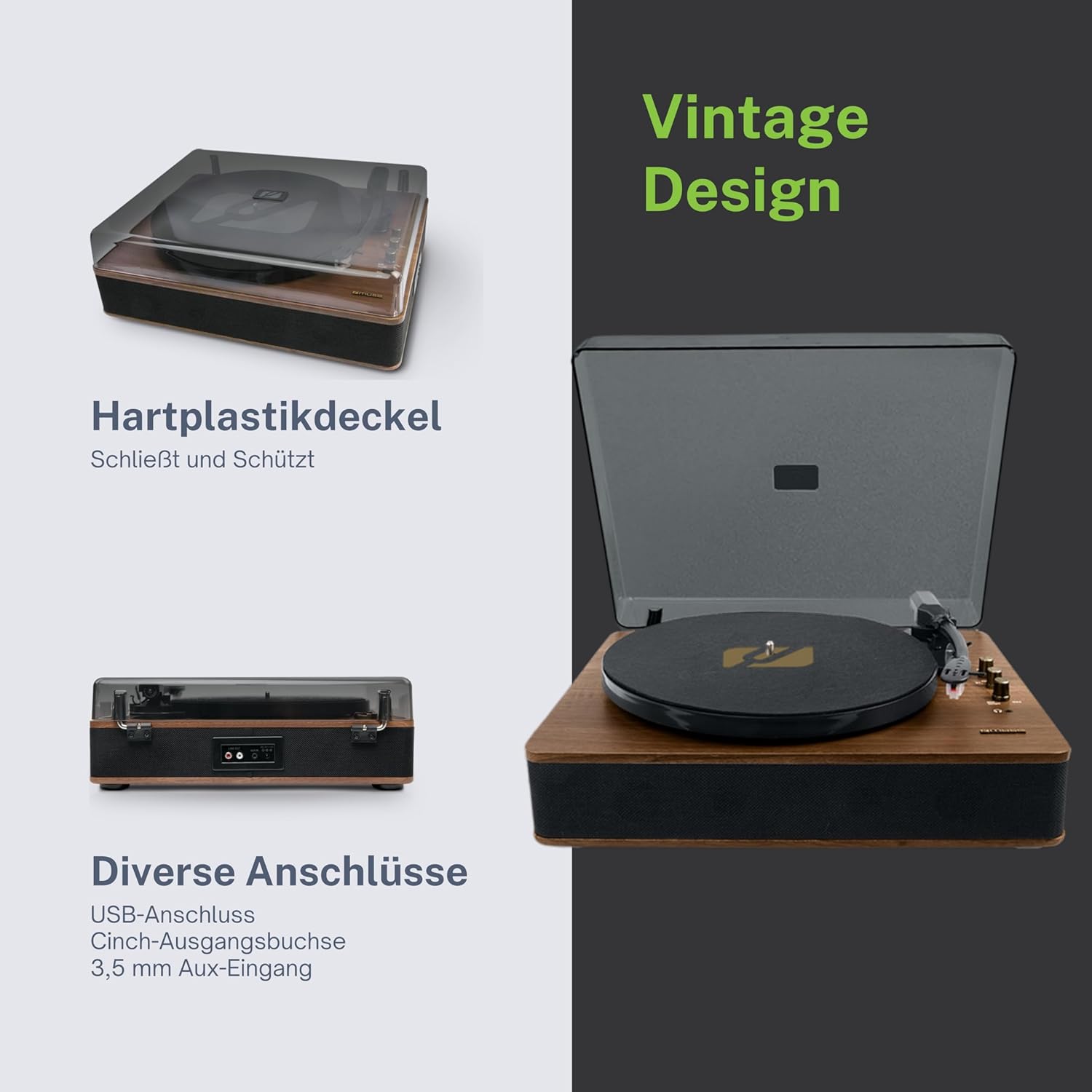
Figure 4.3: Rear Connections. The rear panel of the turntable is shown, featuring various connection ports including RCA audio outputs, a USB port, and an auxiliary input jack, allowing connection to external audio systems or devices.
4.3 Rear and Side Connections
- RCA излезни приклучоци (лева/десна): Поврзете се со надворешен ampзајакнувач или звучници со напојување.
- USB порта: За репродукција на MP3 files од USB уред или кодирање винил на USB.
- AUX IN приклучок (3.5 мм): Поврзете надворешни аудио уреди.
- DC IN Џек: Поврзете го адаптерот за напојување.
- Приклучок за слушалки (3.5 мм): За приватно слушање.

Figure 4.4: Key Functions Overview. An illustrative graphic highlighting the key functions and connectivity options of the turntable. Icons represent features such as USB encoding, MP3 playback via USB, RCA output, auto-stop, integrated speakers, headphone jack, auxiliary input, and AC power input.
5. Поставување
5.1 Отпакување
- Внимателно отстранете го уредот од пакувањето.
- Отстранете ги сите материјали за пакување и заштитните фолии.
- Keep the packaging for future transport or storage.
5.2 Поставување
- Place the turntable on a flat, stable, and level surface.
- Avoid placing it near strong magnetic fields, direct sunlight, or heat sources.
- Осигурете се дека има доволно простор околу уредот за соодветна вентилација.
5.3 Поврзување за напојување
- Connect the supplied power adapter to the DC IN jack on the rear of the turntable.
- Вклучете го адаптерот за напојување во соодветен ѕиден штекер.
5.4 Инсталација на капак за прашина
- Carefully attach the dust cover to the hinges on the back of the turntable.
- The dust cover protects the unit when not in use. Remove it or lift it fully when playing records.
6. Упатства за работа
6.1 Свирење винил плочи
- Подигнете го капакот за прав.
- Rotate the Power/Volume knob clockwise to turn on the unit.
- Set the Function Selector knob to 'Phono'.
- Ставете плоча на послужавникот. Ако свирите сингл од 45 вртежи во минута, прво ставете го адаптерот за 45 вртежи во минута на вретеното.
- Select the correct speed (33, 45, or 78 RPM) using the Speed Selector switch.
- Отстранете го заштитникот на иглата од иглата.
- Lift the tonearm using the cue lever.
- Поместете го тонот над саканата почетна точка на записот.
- Gently lower the tonearm onto the record using the cue lever. The music will begin to play.
- Прилагодете ја јачината на звукот користејќи го копчето за вклучување/јачина на звук.
- At the end of the record, if the Auto Stop switch is ON, the platter will stop rotating. If OFF, the platter will continue to rotate. Manually lift the tonearm and return it to its rest.
6.2 режим на Bluetooth
- Rotate the Power/Volume knob clockwise to turn on the unit.
- Set the Function Selector knob to 'BT' (Bluetooth). The Bluetooth indicator will flash, indicating pairing mode.
- Овозможете Bluetooth на вашиот надворешен уред (паметен телефон, таблет итн.) и пребарајте достапни уреди.
- Select 'MUSE MT-106 BT' from the list of devices. Once connected, the Bluetooth indicator will stop flashing and remain solid.
- You can now play music from your external device through the turntable's speakers. Adjust volume using both the turntable's knob and your external device.
6.3 USB репродукција и кодирање
6.3.1 USB репродукција
- Rotate the Power/Volume knob clockwise to turn on the unit.
- Set the Function Selector knob to 'USB'.
- Insert a USB flash drive into the USB port. The unit will automatically detect and begin playing MP3 files.
- Use the Playback Control Buttons (Play/Pause, Skip Forward, Skip Backward) to navigate tracks.
6.3.2 USB Encoding (Recording Vinyl to USB)
The MT-106 BT allows you to convert your vinyl records into digital MP3 files на USB-уред.
- Осигурајте се дека USB флеш-драјвот е вметнат во USB-портата.
- Set the Function Selector knob to 'Phono'.
- Start playing your vinyl record as described in section 6.1.
- Press the 'Record' button (refer to Figure 4.2 for button location, typically indicated by a circle or 'REC' label). The recording indicator will illuminate.
- To stop recording, press the 'Record' button again. The recording indicator will turn off.
- The recorded audio will be saved as an MP3 file on your USB drive.
6.4 Помошен влез (AUX IN)
- Rotate the Power/Volume knob clockwise to turn on the unit.
- Set the Function Selector knob to 'AUX'.
- Connect an external audio device (e.g., MP3 player, CD player) to the AUX IN jack (3.5mm) on the rear of the turntable using an audio cable (not supplied).
- Play audio from your external device. The sound will be output through the turntable's speakers.
6.5 RCA излез
To connect your turntable to an external amplifier or powered speakers:
- Ensure the turntable and the external audio system are turned off.
- Connect an RCA audio cable (not supplied) from the RCA Output Jacks (L/R) on the rear of the turntable to the corresponding audio input jacks on your ampзајакнувач или звучници со напојување.
- Turn on both the turntable and your external audio system.
- Изберете го соодветниот влез на вашиот надворешен аудио систем.
7. Одржување
7.1 Чистење на пенкалото
- Use a soft brush, specifically designed for stylus cleaning, to gently brush the stylus from back to front.
- Не употребувајте прекумерна сила или четка од една на друга страна, бидејќи тоа може да го оштети пенкалото.
- Менувајте го пенкалото приближно на секои 300-500 часа репродукција или ако забележите влошување на квалитетот на звукот.
7.2 Чистење на единицата
- Wipe the exterior of the turntable with a soft, dry, lint-free cloth.
- Не користете абразивни средства за чистење, восоци или растворувачи бидејќи тие можат да го оштетат финишот.
- For the dust cover, use a soft cloth and a mild, non-abrasive cleaner if necessary.
8 Смена на проблеми
If you experience issues with your turntable, please consult the following table before contacting support.
| Проблем | Можна причина | Решение |
|---|---|---|
| Нема моќ | Адаптерот за напојување не е поврзан или штекерот е неисправен. | Проверете дали адаптерот за напојување е безбедно поврзан и дали штекерот е функционален. |
| Нема звук | Volume too low; incorrect function mode; external speakers not connected/powered. | Increase volume; select correct function (Phono, BT, USB, AUX); check external speaker connections and power. |
| Poor sound quality (vinyl) | Dirty or worn stylus; dirty record; incorrect speed selected. | Clean or replace stylus; clean record; select correct RPM. |
| Bluetooth не се поврзува | Turntable not in pairing mode; device too far; already connected to another device. | Ensure turntable is in BT mode and flashing; move device closer; disconnect from other devices. |
| Репродукцијата преку USB не работи | USB drive not inserted correctly; unsupported file формат; USB-уредот е неисправен. | Reinsert USB drive; ensure files are MP3 format; try a different USB drive. |
9. Спецификации
| Бренд | МУЗА |
| Име на моделот | МТ-106 БТ |
| Боја | Дрво |
| Материјал | Дрво |
| Тежина на ставката | 4.3 килограми |
| Брзини на ротација | 33, 45, 78 вртежи во минута |
| Поврзување | Bluetooth, USB, RCA Output, 3.5mm AUX Input, 3.5mm Headphone Jack |
| Посебни карактеристики | Integrated Speaker, Dust Protection, Adjustable Speed, USB Encoding |
| Компатибилни уреди | Паметен телефон, таблет |
| Извор на енергија | AC Adapter (1 AAAA battery required for unspecified function, likely remote or internal clock) |
| Земја на потекло | Кина |
10. Гаранција и поддршка
This product is covered by a manufacturer's warranty. Please refer to the warranty card included with your purchase or visit the official MUSE webстраница за детални услови за гаранција.
For technical support, troubleshooting assistance, or inquiries regarding spare parts, please contact MUSE customer service through their official channels. Information regarding spare parts availability is currently not available.


