1. Вовед
Thank you for choosing the FLEXISPOT F8L Gas Spring Monitor Arm. This manual provides detailed instructions for the safe and efficient installation, operation, and maintenance of your new monitor arm. Please read this manual thoroughly before use and keep it for future reference.
Клучни карактеристики:
- Detachable VESA plate for easy monitor attachment.
- Adjustable height for ergonomic viewing, reducing neck, eye, and back strain.
- Wide range of motion for tilt, swivel, and rotation, allowing optimal viewинг агли.
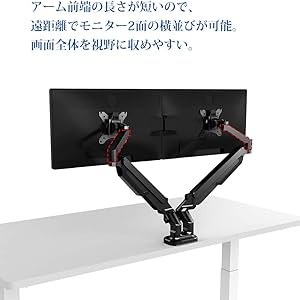
- Compact design suitable for narrow desks, enabling side-by-side monitor placement at a distance.
- Supports VESA standards: 75x75mm and 100x100mm.
- Compatible with monitors from 17" to 36" and weighing between 2-9kg.

This image shows the FLEXISPOT F8L Gas Spring Monitor Arm in white, supporting a monitor. The arm is extended, demonstrating its adjustable nature and sleek design.
2. Инструкции за безбедност
- Пред склопување, проверете дали сите делови се присутни и неоштетени. Не го користете ако некои делови недостасуваат или се неисправни.
- Do not exceed the maximum weight capacity of 9kg (19.8 lbs) or the maximum screen size of 36 inches. Overloading can cause instability and potential injury.
- Install the monitor arm on a stable and sturdy desk surface that can support the combined weight of the arm and your monitor.
- Perform all adjustments slowly and carefully. Avoid sudden movements that could cause the monitor to swing or fall.
- Држете ги децата и домашните миленици подалеку од местото на инсталација.
- If you encounter any difficulties during installation or operation, refer to the troubleshooting section or contact customer support.
3. Содржина на пакетот
Ве молиме проверете дали сите компоненти се вклучени во вашиот пакет:
- Склоп на рачката на мониторот
- Биро Clamp База
- Grommet Mount Base
- Плоча ВЕСА
- Комплет за хардвер (шрафови, подлошки, шестоаголни клучеви)
- Клипови за управување со кабли
- Упатство за употреба
4. Поставување и инсталација
The FLEXISPOT F8L monitor arm supports two installation methods: C-clamp and Grommet mount. Choose the method suitable for your desk.
4.1 Choosing Your Mounting Method

This diagram illustrates the two primary ways to attach the monitor arm to your desk: the C-clamp method (bottom right) for desk edges and the grommet mount method (top right) for desks with existing cable holes. The grommet mount requires a hole size of 8.5-70mm, and both methods support a desk thickness of 20-100mm.
- C-Clamp Монтирање: Ideal for desks with edges. Supports desk thickness from 20mm to 100mm.
- Монтирање на прстен: Requires an existing hole in your desk (diameter 8.5mm to 70mm). Supports desk thickness from 20mm to 100mm.
4.2 Attaching the Monitor Arm to Your Desk
- За C-Clamp Монтирање:
- Прикачете го C-clamp base to the main pole of the monitor arm.
- Поставете го clamp on the edge of your desk and tighten the knob until it is securely fastened.
- За држач за прстен:
- Assemble the grommet mount base and insert it through the hole in your desk.
- Secure it from underneath the desk using the provided plate and nut.
4.3 Прикачување на мониторот на рачката

This image demonstrates the detachable VESA plate feature. The VESA plate can be easily removed from the monitor arm, allowing you to attach it to the back of your monitor first, and then slide the monitor with the plate onto the arm for a simpler installation process.
- Прикачете ја плочата VESA на мониторот:
- Remove the VESA plate from the monitor arm by lifting it upwards.
- Align the VESA plate with the mounting holes on the back of your monitor (75x75mm or 100x100mm).
- Secure the plate to the monitor using the appropriate screws from the hardware kit. Do not overtighten.
- Монтирање на мониторот за вклучување:
- Carefully slide the monitor (with the attached VESA plate) onto the arm's mounting head until it clicks into place.
- Ensure the monitor is securely seated before releasing тоа
5. Работење и прилагодувања
The FLEXISPOT F8L monitor arm offers a wide range of adjustments to achieve your optimal viewискуство.
5.1 Прилагодување на затегнатоста на гасната пружина
The gas spring tension needs to be adjusted according to your monitor's weight to ensure smooth and stable movement. If the monitor sags or springs up too easily, adjust the tension screw located on the arm joint (often covered by a plastic cap).
- Use the provided Allen wrench to turn the screw.
- Свртете во насока на стрелките на часовникот to increase tension (for heavier monitors).
- Свртете спротивно од стрелките на часовникот to decrease tension (for lighter monitors).
- Adjust gradually until the monitor stays in position when released.
5.2 Monitor Position Adjustments

This diagram illustrates the extensive range of motion for the monitor arm, including 360° rotation, 180° horizontal swivel, and tilt adjustment from -90° to 15°. These features allow for precise positioning of your monitor.
- Прилагодување на висината: Gently push or pull the monitor up or down to adjust its vertical position. The gas spring will hold it in place.
- Прилагодување на навалување: Tilt the monitor screen up or down from -90° to 15° to reduce glare and optimize viewинголен агол.
- Прилагодување на вртење: Swivel the monitor arm horizontally up to 180° to share your screen or change viewнасока.
- Прилагодување на ротација: Rotate the monitor 360° between landscape and portrait orientations.
This illustration compares typical poor posture when using a fixed monitor stand (left) versus the improved ergonomic posture achievable with a monitor arm (right). By allowing flexible height and angle adjustments, the monitor arm helps reduce strain on the neck, eyes, and back.
6. Одржување
- Regularly check all screws and connections to ensure they are tight and secure. Retighten if necessary.
- Исчистете ја рачката на мониторот со мека, дamp крпа. Избегнувајте абразивни средства за чистење или растворувачи кои би можеле да ја оштетат завршната обработка.
- Do not lubricate the gas spring mechanism. It is designed to be maintenance-free.
7 Смена на проблеми
| Проблем | Можна причина | Решение |
|---|---|---|
| Monitor sags or does not stay at desired height. | Затегнатоста на гасната пружина е прениска за тежината на мониторот. | Зголемете ја затегнатоста на гасната пружина со вртење на завртката за прилагодување во насока на стрелките на часовникот со приложениот шестоаголен клуч. |
| Monitor is difficult to push down or springs up too quickly. | Затегнатоста на гасната пружина е превисока за тежината на мониторот. | Decrease gas spring tension by turning the adjustment screw counter-clockwise with the provided Allen wrench. |
| Monitor wobbles or feels unstable. | Монтирање clamp/grommet is not tight enough, or VESA screws are loose. | Обезбедете го бирото clamp/grommet mount is securely tightened. Check and tighten all VESA mounting screws on the back of the monitor. |
| Cannot attach VESA plate to monitor. | Incorrect VESA pattern or screw size. | Verify your monitor's VESA pattern (75x75mm or 100x100mm). Use the correct screws from the hardware kit. |
8. Спецификации
| Карактеристика | Детал |
|---|---|
| Модел | F8L |
| Компатибилност со VESA | 75х75мм, 100х100мм |
| Компатибилност со големината на екранот | 17" - 36" |
| Капацитет на носивост | 2 - 9 kg (4.4 - 19.8 lbs) |
| Опсег на навалување | -90° до +15° |
| Опсег на вртење | 180° |
| Ротација | 360° (Landscape to Portrait) |
| Тип на монтирање | C-Clamp или Grommet Mount |
| Дебелина на работната маса (Clamp/Громет) | 20мм - 100мм |
| Максимално продолжување на раката | Прибл. 62 см (24.4 инчи) |
| Max Height from Desk | Прибл. 51 см (20.1 инчи) |

This diagram provides key dimensions of the monitor arm, including a maximum height of approximately 51cm and a maximum horizontal extension of approximately 62cm, illustrating its reach and adjustability.
9. Гаранција и корисничка поддршка
FLEXISPOT provides a 1 година гаранција from the date of purchase for this product. This warranty covers manufacturing defects and material flaws under normal use.
For any questions, concerns, or issues regarding your FLEXISPOT F8L Gas Spring Monitor Arm, please contact our customer support team:
- Е-пошта: contact@flexispot.jp
- Please provide your purchase details and a description of the issue for faster assistance.


