1. Вовед
Thank you for choosing the Pantum BP5100DN Monochrome Laser Printer. This manual provides essential information for the safe and efficient use of your printer. Please read it thoroughly before operating the device and keep it for future reference.
The Pantum BP5100DN is designed for high-speed, high-quality monochrome printing, featuring automatic two-sided printing and versatile connectivity options including USB and Ethernet.
2. Информации за безбедност
- Секогаш поставувајте го печатачот на стабилна, рамна површина.
- Обезбедете соодветна вентилација околу печатачот за да спречите прегревање.
- Не го изложувајте печатачот на вода или прекумерна влажност.
- Use only the specified power supply and connect to a grounded outlet.
- Држете ги рацете и лабавата облека подалеку од подвижните делови за време на работата.
- Избегнувајте допирање на единицата за грејач, бидејќи може да биде многу жешка.
- Не обидувајте се сами да го сервисирате печатачот. Обратете се кај квалификуван сервисер.
3. Што има во кутијата
Проверете дали сите артикли наведени подолу се вклучени во вашиот пакет:
- Pantum BP5100DN Monochrome Laser Printer
- Кабел за напојување
- USB-интерфејс кабел
- Водич за брзо поставување
- Starter cartridge (3000 pages)
- Starter drum (30000 pages)

Figure 3.1: Package Contents. This image displays the Pantum BP5100DN printer along with its accessories: power cord, USB interface cable, quick setup guide, starter toner cartridge, and starter drum unit.
4. Производот завршиview
4.1. Компоненти на печатачот
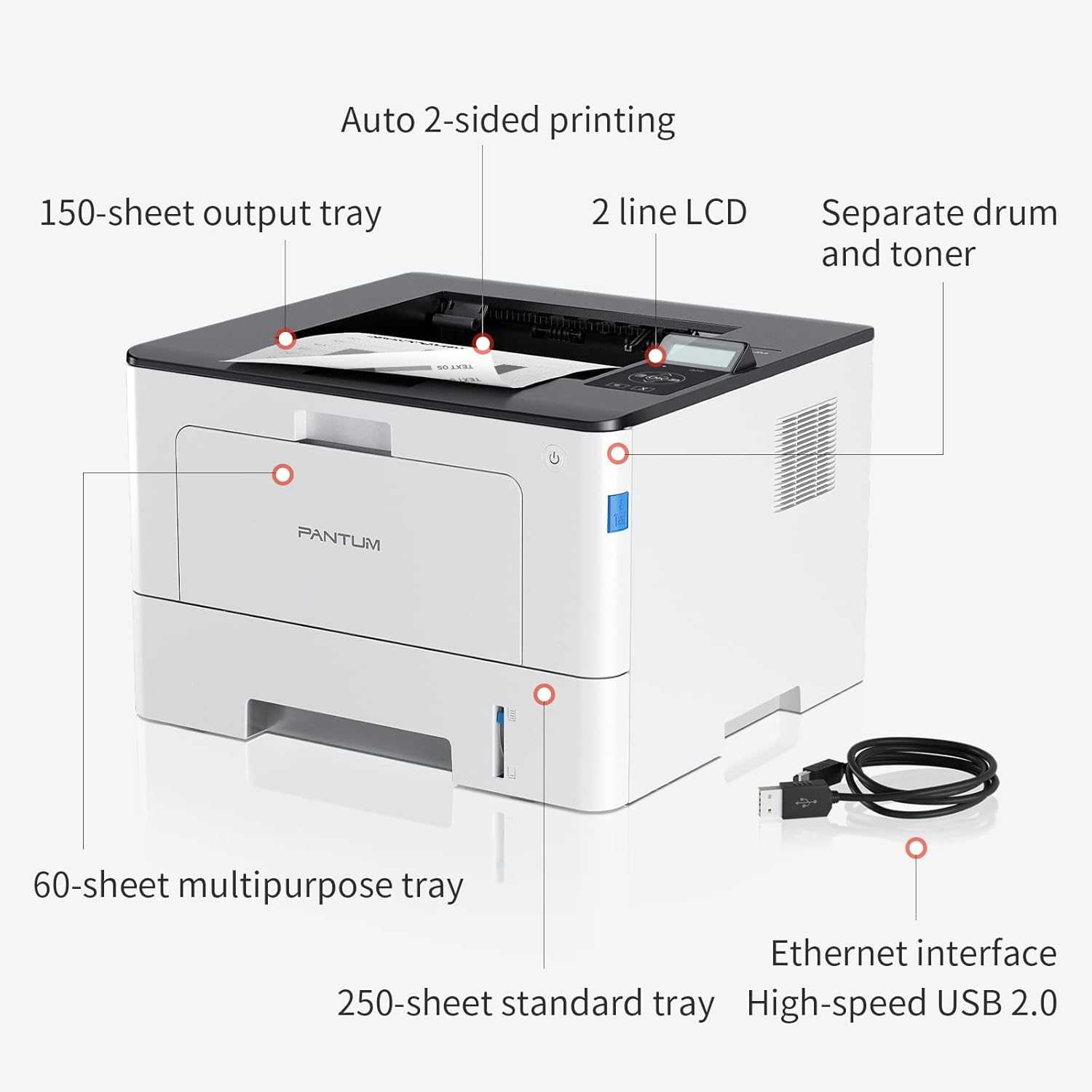
Figure 4.1: Printer Components. Key features include a 150-sheet output tray, a 2-line LCD display, separate drum and toner units, a 60-sheet multipurpose tray, a 250-sheet standard tray, an Ethernet interface, and a High-speed USB 2.0 port.
4.2. Димензии

Figure 4.2: Printer Dimensions. The printer measures approximately 14.33 inches (W) x 10.12 inches (H) x 13.54 inches (D).
4.3. Контролен панел

Figure 4.3: Control Panel. The control panel includes a 2-line LCD display for status messages and menu navigation, along with buttons for OK, arrow controls, and cancel functions.
5. Поставување
5.1. Распакување и поставување
- Внимателно отстранете го печатачот од неговото пакување.
- Отстранете ги сите заштитни ленти и материјали за пакување од печатачот.
- Place the printer on a firm, level surface with adequate space for ventilation.
5.2. Toner and Drum Installation
- Отворете го предниот капак на печатачот.
- Unpack the drum unit and toner cartridge.
- Insert the toner cartridge into the drum unit until it clicks into place.
- Insert the combined drum and toner unit into the printer.
- Затворете го предниот капак.
5.3. Вчитување хартија
- Pull out the standard paper tray or open the multipurpose tray.
- Прилагодете ги водилките за хартија според големината на вашата хартија.
- Load paper into the tray, ensuring it is flat and not exceeding the maximum capacity (250 sheets for standard tray, 60 sheets for multipurpose tray).
- Затворете ја фиоката за хартија.
5.4. Моќност и поврзување
- Поврзете го кабелот за напојување со печатачот, а потоа со заземјен електричен штекер.
- For USB connection: Connect the provided USB 2.0 cable from the printer to your computer.
- For Ethernet connection: Connect an Ethernet cable from the printer to your network router or switch.
- Притиснете го копчето за вклучување за да го вклучите печатачот.
6. Упатства за работа
6.1. Инсталација на драјвери
For optimal performance, install the printer drivers from the official Pantum website or the provided installation media. The printer supports easy one-step installation for quick setup.
6.2. Печатење на документ
- Отворете го документот што сакате да го испечатите на вашиот компјутер или мобилен уред.
- Изберете ја опцијата за печатење од вашата апликација.
- Choose the Pantum BP5100DN from the list of available printers.
- Прилагодете ги поставките за печатење по потреба (на пр., број на копии, големина на хартија, двострано печатење).
- Кликнете на „Печати“.
The printer offers fast printing speeds of up to 40 pages per minute (A4) / 42 pages per minute (Letter) in black and white. It also supports automatic two-sided printing to save paper.
6.3. Мобилно печатење
The Pantum BP5100DN supports direct printing of office documents from mobile devices. Ensure your mobile device and printer are connected to the same network or via USB OTG (if supported by your device and printer).
7. Одржување
7.1. Replacing Toner Cartridge and Drum Unit
When the toner is low or the drum unit reaches its end of life, the printer's display will show a message. Refer to the instructions provided with the replacement consumables for proper installation. The starter toner cartridge yields approximately 3000 pages, and the starter drum unit yields approximately 30000 pages.
7.2. Чистење на печатачот
- Исклучете го печатачот и извадете го кабелот за напојување пред чистење.
- Избришете ја надворешноста на печатачот со мека крпа што не остава влакненца.
- Use a dry cloth to clean the paper path and rollers if paper jams occur frequently.
- Не користете абразивни средства за чистење или растворувачи.
8 Смена на проблеми
Доколку наидете на проблеми со вашиот печатач, погледнете ги следниве вообичаени решенија:
- Печатачот не реагира: Check power connections, USB/Ethernet cable connections, and ensure the printer is turned on. Restart both the printer and your computer.
- Заглавување на хартија: Open all covers and carefully remove any jammed paper. Ensure paper is loaded correctly and not creased or damaged.
- Лош квалитет на печатење: Check toner levels. If print quality is faded, especially with cut and paste text, ensure you are using the correct print settings and consider replacing the toner cartridge or drum unit if they are near end-of-life.
- Проблеми со поврзувањето: For Ethernet, verify network cable connection and IP address settings. For USB, try a different USB port or cable.
- Пораки за грешка: Consult the printer's display for specific error codes and refer to the quick setup guide or online support for detailed solutions.
For persistent issues, please contact customer service for support.
9. Спецификации
| Карактеристика | Спецификација |
|---|---|
| Име на моделот | BP5100DN |
| Технологија на печатење | Ласерски |
| Излез на печатач | Монохроматски |
| Максимална брзина на печатење (монохроматски) | 40 ppm (A4) / 42 ppm (Letter) |
| Максимална резолуција за печатење | 1200 x 1200 dpi |
| Двострано печатење | Да (автоматски) |
| Технологија за поврзување | Етернет, USB 2.0 |
| Максимален капацитет на влезен лист | 250 sheets (Standard Tray), 60 sheets (Multipurpose Tray) |
| Печатени медиуми | Хартија (обична) |
| Големина на лист | A4, Letter, etc. |
| Компатибилни уреди | Smartphones, PCs |
| Ватtage | 650 вати |
| Тежина на ставката | 9.07 kg (approx. 9 kg 70 g) |
| Производител | Пантум |
10. Гаранција и поддршка
The Pantum BP5100DN Monochrome Laser Printer comes with a 1-year warranty from the date of purchase. For warranty claims, technical support, or any inquiries, please refer to the contact information provided in your quick setup guide or visit the official Pantum webсајт.
For a better experience, please kindly refer to the user manual or contact customer service for support.


