1. Вовед
This manual provides essential instructions for the setup, operation, maintenance, and troubleshooting of your Noise ColorFit Icon 2 Smartwatch. Please read this manual thoroughly before using your device to ensure proper function and longevity.
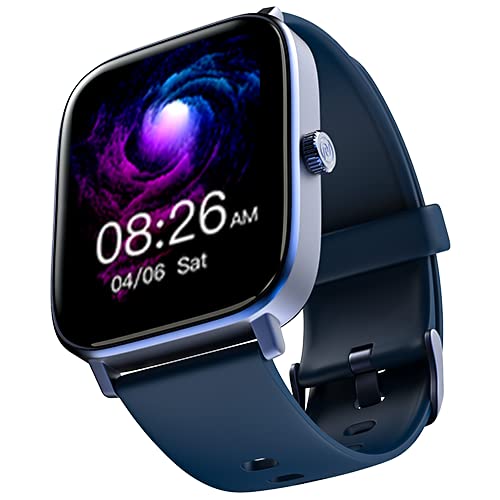
Слика: напред view of the Noise ColorFit Icon 2 Smartwatch, displaying its rectangular screen and strap.
2. Што има во кутијата
Verify that all the following items are present in your product packaging:
- Noise ColorFit Icon 2 Smartwatch
- Магнетски полнач
- Упатство за употреба (овој документ)
- Гарантна картичка
3. Поставување
3.1 Полнење на паметниот часовник
Before initial use, fully charge your smartwatch. Connect the magnetic charger to the charging points on the back of the smartwatch and plug the USB end into a compatible power adapter (not included) or a computer's USB port. The watch display will indicate charging status.
3.2 Вклучување/исклучување
- За вклучување: Притиснете и задржете го страничното копче додека не се појави логото за шум.
- За исклучување: Navigate to the settings menu on the smartwatch, select "Power Off," and confirm. Alternatively, press and hold the side button and select "Power Off" from the options.
3.3 Спарување со вашиот паметен телефон
- Download the official NoiseFit application from your smartphone's app store.
- Проверете дали Bluetooth е овозможен на вашиот паметен телефон.
- Отворете ја апликацијата NoiseFit и следете ги упатствата на екранот за да креирате сметка или да се најавите.
- Select "Add Device" or a similar option within the app and choose "ColorFit Icon 2" from the list of available devices.
- Потврдете го барањето за спарување и на вашиот паметен телефон и на паметниот часовник.
- Your smartwatch is compatible with devices running iOS 8 & + or Android 4.4 & +.
4. Упатства за работа
4.1 Основна навигација
- Повлечете нагоре/надолу: Скролувајте низ менијата и известувањата.
- Повлечете лево/десно: Access quick widgets or different screens.
- Допрете: Изберете ставка или потврдете дејство.
- Странично копче: Притиснете за да се вратите на почетниот екран или да го разбудите уредот.
4.2 Клучни карактеристики
The Noise ColorFit Icon 2 Smartwatch offers various features accessible through its interface and the connected NoiseFit app. These include:
- Activity Tracking (steps, distance, calories)
- Следење на срцевиот ритам
- Следење на спиење
- Notification Alerts (calls, messages, app notifications)
- Контрола на музика
- Информации за времето
For detailed instructions on specific features, refer to the NoiseFit application's help section.
5. Одржување
5.1 Чистење
Редовно чистете го вашиот паметен часовник и ремен за да спречите иритација на кожата и да ги одржите перформансите на уредот. Користете мека крпа без влакненца. Доколку е потребно, малку исплакнетеampen the cloth with water. Avoid using harsh chemicals, abrasive materials, or strong detergents.
5.2 Најдобри практики за наплата
- Use only the provided magnetic charger.
- Avoid exposing the charging contacts to water or sweat. Ensure they are dry before charging.
- Do not leave the smartwatch charging for extended periods after it is fully charged.
5.3 Складирање
When not in use for an extended period, store the smartwatch in a cool, dry place away from direct sunlight and extreme temperatures. Ensure it has a partial charge to prevent battery degradation.
6 Смена на проблеми
| Проблем | Можно решение |
|---|---|
| Паметниот часовник не се вклучува. | Ensure the device is fully charged. Connect to the magnetic charger and wait a few minutes before attempting to power on again. |
| Не може да се спари со паметен телефон. |
|
| Неточно следење на активностите. | Ensure the smartwatch is worn snugly on your wrist, about one finger's width above your wrist bone. Calibrate the device through the NoiseFit app if available. |
| Не се примени известувања. |
|
If you encounter issues not listed here, please refer to the support section of the NoiseFit application or contact customer support.
7. Спецификации
| Карактеристика | Детал |
|---|---|
| Бренд | Бучава |
| Серија на модели | Икона ColorFit 2 |
| Број на модел на ставка | wrb-sw-colorfiticon2-std-blu_blu |
| Димензии на производот | 4.7 x 3.9 x 1.2 cm |
| Тежина на ставката | 45 гр |
| Тип на поврзување | Bluetooth |
| Безжичен тип | Bluetooth |
| Компатибилност на оперативниот систем | iOS 8 & + or Android 4.4 & + |
| Вклучени компоненти | Паметен часовник, магнетен полнач, упатство за употреба, гарантен лист |
| GPS | Нема GPS |
| Облик | Правоаголни |
8. Гаранција и поддршка
Your Noise ColorFit Icon 2 Smartwatch comes with a 1-годишна гарантирана гаранција from Noise, covering manufacturing defects from the date of purchase. Please retain your purchase receipt and warranty card for any warranty claims.
For technical support, warranty claims, or further assistance, please contact Noise customer service. Manufacturer and Importer details:
Nexxbase Marketing Pvt. Ltd.Khasra No-146/25/2/1, Jail Road Badshahpur,
Gurugram Haryana-122101, India
Телефон: 8882-132-132
Можете исто така да ја посетите официјалната страница на Noise webстраница за повеќе информации и ресурси за поддршка.


