1. Вовед
This manual provides comprehensive instructions for the Naxa NDS-6501 Portable Dual 6.5-inch Bluetooth Speaker. Please read this manual thoroughly before operating the device to ensure proper use and to maximize your experience. Keep this manual for future reference.
2. Содржина на пакетот
Проверете дали сите артикли наведени подолу се вклучени во вашиот пакет:
- Naxa NDS-6501 Portable Bluetooth Speaker
- Iredичен микрофон
- USB кабел за полнење
- Упатство за употреба (овој документ)
3. Карактеристики на производот
The Naxa NDS-6501 speaker offers a range of functionalities designed for portable audio entertainment:
- Dual 6.5-inch full-frequency speakers for clear audio output.
- Bluetooth connectivity for wireless audio streaming from compatible devices.
- Integrated multi-color flame lights with various lighting effects.
- True Wireless Stereo (TWS) function for connecting two NDS-6501 speakers wirelessly.
- Wired microphone input for vocal use.
- Built-in FM radio tuner for local station access.
- USB port and MicroSD/TF card slot for playing audio files from external storage.
- Auxiliary (3.5mm) input for wired audio connections.
- Rechargeable battery providing up to 2 hours of playback time.
4. Контроли и порти
The speaker features various controls and input/output ports. A typical layout includes a power button, volume controls, mode selection, playback controls (play/pause, skip tracks), microphone input, USB port, MicroSD card slot, auxiliary input, and a charging port. Refer to the diagram below for specific locations.
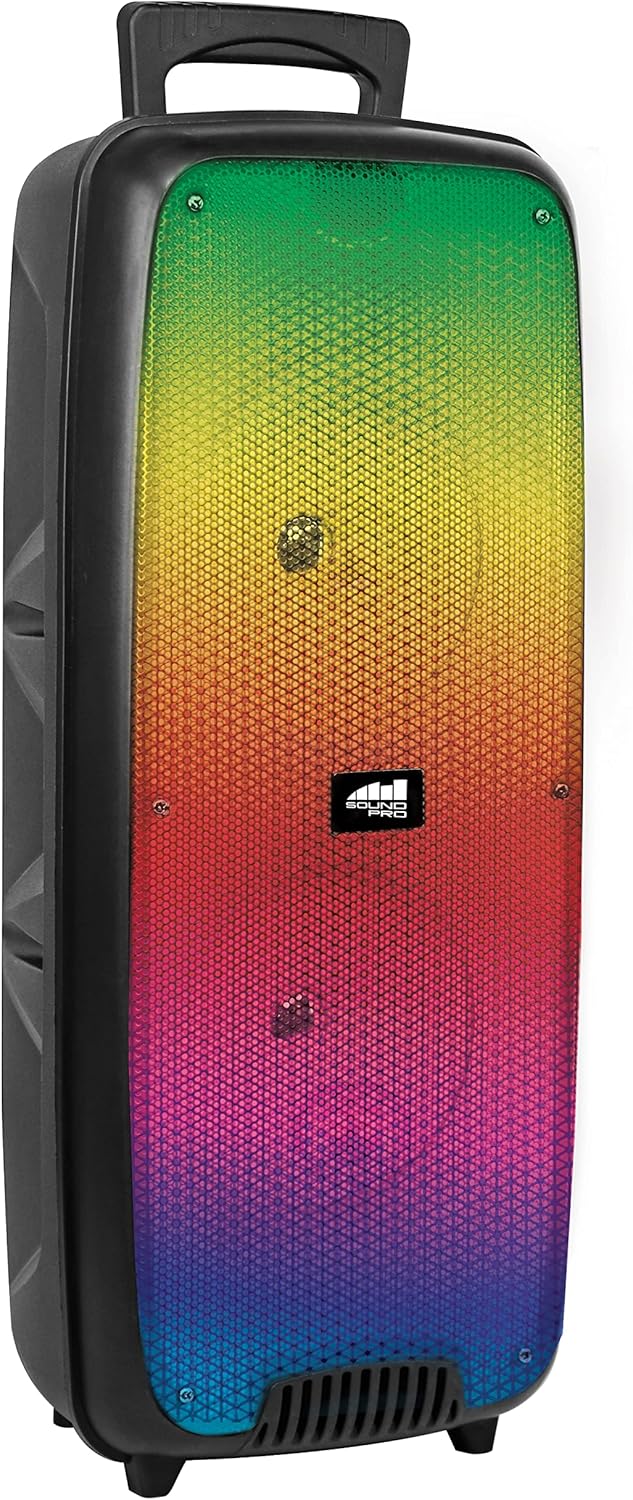
Слика 4.1: Предна страна view of the Naxa NDS-6501 speaker, showcasing the dual 6.5-inch drivers and multi-color flame lights.

Слика 4.2: Страна view of the Naxa NDS-6501 speaker, illustrating its portable design with an integrated handle.
5. Поставување
5.1 Полнење на звучникот
- Поврзете го испорачаниот USB кабел за полнење со приклучокот за полнење на звучникот.
- Поврзете го другиот крај од USB кабелот со компатибилен USB адаптер за напојување (не е вклучен) или USB порт на компјутерот.
- Индикаторското светло за полнење ќе светне, обично црвено, за време на полнењето.
- Once fully charged, the indicator light will change color or turn off (refer to specific LED behavior in your product). A full charge provides approximately 2 hours of playback.
5.2 Вклучување/исклучување
- To power on: Press and hold the Power button for a few seconds until the speaker activates.
- To power off: Press and hold the Power button again until the speaker shuts down.
6. Упатства за работа
6.1 Спарување преку Bluetooth
- Ensure the speaker is powered on and in Bluetooth mode. If not, press the Mode button to switch to Bluetooth. The speaker will indicate it is ready for pairing (e.g., a flashing LED or an audible prompt).
- На вашиот уред со Bluetooth (паметен телефон, таблет итн.), одете во поставките за Bluetooth.
- Пребарај за available devices. You should see "NDS-6501" or a similar name in the list.
- Select "NDS-6501" to initiate pairing.
- Откако успешно ќе се спари, звучникот ќе даде звучна потврда, а индикаторското светло за Bluetooth ќе светне постојано.
6.2 Спарување на вистински безжичен стерео (TWS)
The TWS function allows you to connect two NDS-6501 speakers for a stereo sound experience.

Слика 6.1: Illustration of the True Wireless Stereo (TWS) function, enabling two speakers to connect wirelessly from a single Bluetooth source.
- Ensure both NDS-6501 speakers are powered on and in Bluetooth mode, but not yet paired to any device.
- On one of the speakers (this will be the primary speaker), press and hold the TWS button (or a designated pairing button) for a few seconds.
- Примарниот звучник ќе го побара секундарниот звучник. Откако ќе се поврзат, двата звучника ќе дадат звучна потврда.
- Now, pair your Bluetooth device to the primary speaker as described in Section 6.1. Audio will play through both speakers in stereo.
6.3 Работа со FM радио
- Притиснете го копчето Режим за да се префрлите во режим на FM радио.
- Притиснете го копчето Пушти/Пауза за автоматско скенирање и зачувување на достапните FM станици.
- Користете ги копчињата Претходна/Следна песна за навигација помеѓу зачуваните станици.
6.4 USB/MicroSD Playback
- Insert a USB flash drive or a MicroSD/TF card (with audio files) во соодветниот порт.
- The speaker should automatically switch to USB or MicroSD mode and begin playing audio. If not, press the Mode button to select the correct input.
- Користете ги контролите за репродукција (Репродукција/Пауза, Претходно/Следно) за да ја управувате вашата музика.
6.5 Употреба на микрофон
- Connect the wired microphone to the microphone input jack on the speaker.
- Adjust the microphone volume control (if available) on the speaker to your desired level.
- The microphone audio will be mixed with any music playing through the speaker.
6.6 Светлосни ефекти
- The speaker features integrated multi-color flame lights.
- Press the Light button (if available) to cycle through different lighting modes or to turn the lights on/off.
- The lights may synchronize with the music playback.
7. Одржување
- Чистење: Користете мека, сува крпа за чистење на надворешноста на звучникот. Не користете абразивни средства за чистење, восоци или растворувачи.
- Складирање: Кога не го користите подолго време, чувајте го звучникот на ладно и суво место, подалеку од директна сончева светлина и екстремни температури.
- Нега на батеријата: За да го продолжите животниот век на батеријата, избегнувајте често целосно празнење на батеријата. Полнете го звучникот редовно, дури и ако не е во употреба.
- Изложеност на вода: Овој звучник не е водоотпорен. Избегнувајте изложување на вода или прекумерна влага.
8 Смена на проблеми
| Проблем | Можна причина | Решение |
|---|---|---|
| Звучникот не се вклучува. | Батеријата е испразнета. | Наполнете го звучникот користејќи го дадениот USB-кабел. |
| Нема звук од звучникот. | Volume is too low; incorrect input mode; device not paired. | Increase volume; press Mode button to select correct input; re-pair Bluetooth device. |
| Bluetooth device cannot find speaker. | Звучникот не е во режим на спарување; уредот е предалеку; пречки. | Ensure speaker is in Bluetooth pairing mode; move device closer; avoid obstacles. |
| Спарувањето преку TWS не успева. | Звучниците веќе се спарени со уред; премногу оддалечени еден од друг. | Ensure both speakers are unpaired from other devices; place speakers within 33 feet of each other. |
| Микрофонот не работи. | Microphone not fully plugged in; microphone volume low. | Ensure microphone is securely connected; adjust microphone volume. |
9. Спецификации
| Карактеристика | Спецификација |
|---|---|
| Број на модел | НДС-6501 |
| Големина на звучникот | Двојно 6.5 инчи |
| Технологија за поврзување | Bluetooth, USB, MicroSD, Aux (3.5mm) |
| Аудио влез | Iredичен микрофон |
| Режим за излез на звук | Стерео |
| Максимална излезна моќност | 3 вати |
| Говорник AmpТип на лификација | Активен |
| Тип на батерија | Lithium Ion (rechargeable, included) |
| Просечен век на траење на батеријата | До 2 часа |
| Димензии на производот (Д x Ш x В) | 24.13 x 19.05 x 57.91 cm (9.5 x 7.5 x 22.8 инчи) |
| Тежина на ставката | 2.81 кг (6.2 фунти) |
| Боја | Црното |
| UPC | 840005017555 |
10. Гаранција и поддршка
За информации за гаранцијата или техничка поддршка, ве молиме погледнете ја гарантната картичка што е вклучена во вашиот производ или посетете ја официјалната страница на Naxa Electronics. webлокација. Чувајте ја сметката за купување како доказ за какви било гаранциски побарувања.


