1. Вовед
Welcome to the user manual for your new Avtex W195TS Smart TV. This television is specifically designed for mobile living, offering versatile power options (12V, 24V, and 240V) and a range of smart features, including Wi-Fi, Bluetooth, and an integrated Freesat satellite decoder. This manual provides essential information for setting up, operating, maintaining, and troubleshooting your device to ensure optimal performance and enjoyment.
2. Информации за безбедност
Внимателно прочитајте ги сите безбедносни упатства пред да го користите телевизорот. Зачувајте го ова упатство за во иднина.
- Напојување: Обезбедете го точниот волtage is used (12V, 24V DC or 240V AC). Do not overload power outlets.
- Вентилација: Не ги блокирајте отворите за вентилација. Оставете доволно простор околу телевизорот за правилен проток на воздух.
- Вода и влага: Не го изложувајте телевизорот на дожд или влага. Не ставајте предмети полни со течности врз телевизорот.
- Чистење: Исклучете го телевизорот од струја пред чистење. Користете мека, сува крпа. Не користете течни средства за чистење или аеросолни средства за чистење.
- Поставување: Place the TV on a stable, flat surface or mount securely to a wall/bracket. Avoid direct sunlight or heat sources.
- Сервисирање: Не обидувајте се сами да го сервисирате овој производ. Пренесете ги сите сервиси на квалификуван сервисен персонал.
3. Содржина на пакетот
Before setup, please check that all items are present in the box:
- Smart TV Avtex W195TS
- Далечински управувач со батерии
- 12V/24V DC кабел за напојување
- 240V AC адаптер за напојување
- Table Stand (if applicable)
- Упатство за употреба (овој документ)
4. Производот завршиview
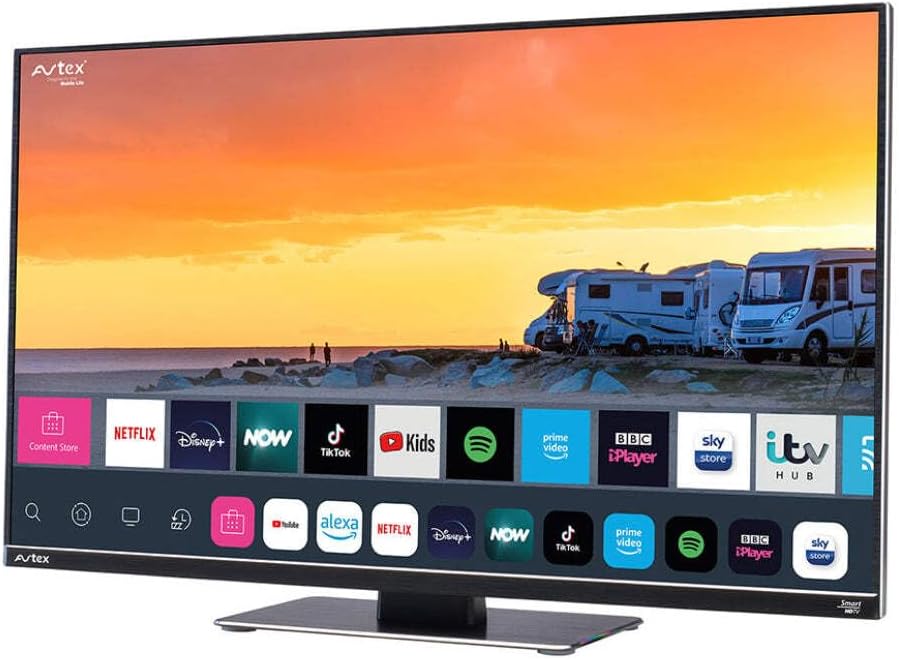
Figure 4.1: Avtex W195TS Smart TV Front View
This image shows the Avtex W195TS Smart TV from a slight angle, highlighting its slim design and the vibrant display. The screen shows a user interface with icons for popular streaming services like Netflix, Disney+, Now, TikTok, Kids, Spotify, Prime Video, BBC iPlayer, Sky Store, and ITV Hub. The background on the screen depicts a scenic view of motorhomes parked near a beach at sunset. The Avtex logo is visible on the top left and bottom left of the TV frame.
4.1. Портови и конекции
- HDMI порти: For connecting external devices like Blu-ray players, game consoles, or set-top boxes.
- USB порти (2): For media playback from USB drives or connecting USB accessories.
- Влез на антена: For connecting a terrestrial TV antenna.
- Сателитски влез: For connecting a satellite dish for Freesat or other satellite services.
- Влез за еднонасочна струја: For 12V/24V DC power connection.
- Влез за напојување со наизменична струја: For 240V AC power connection via adapter.
- Етернет пристаниште: За жична мрежна конекција.
- Аудио излез: За поврзување на надворешни аудио системи или слушалки.
5. Поставување
5.1. Installing the Stand (Optional)
- Внимателно поставете го телевизорот со лицето надолу на мека, чиста површина за да спречите оштетување на екранот.
- Порамнете го држачот со дупките за монтирање на дното од телевизорот.
- Прицврстете го држачот со помош на дадените завртки.
5.2. Поврзување за напојување
The Avtex W195TS supports multiple power inputs:
- 12V/24V DC: Connect the supplied 12V/24V DC power cable to the DC input on the TV and to your vehicle's 12V or 24V power outlet.
- 240V AC: Connect the supplied 240V AC power adapter to the AC input on the TV, then plug the adapter into a standard 240V AC wall socket.
Забелешка: Do not connect both DC and AC power simultaneously.
5.3. Антенска/сателитска врска
- Terrestrial TV: Connect your aerial cable to the 'ANTENNA IN' port.
- Satellite TV (Freesat): Connect your satellite dish cable to the 'SATELLITE IN' port.
5.4. Првично вклучување и прво поставување
- Connect the TV to power and press the power button on the remote control or TV.
- The First-Time Setup Wizard will appear. Follow the on-screen prompts to select your language, country, and time zone.
- Perform an automatic channel scan for both terrestrial and satellite channels.
- Поврзете се на вашата Wi-Fi мрежа со избирање на името на мрежата и внесување на лозинката.
6. Работење
6.1. Функции на далечински управувач
Запознајте се со копчињата на далечинскиот управувач за лесна навигација и контрола на функциите на вашиот телевизор.
- Копче за вклучување: Го вклучува/исклучува телевизорот.
- Изворно копче: Selects input sources (HDMI, USB, TV, Satellite).
- Волумен +/-: Го прилагодува нивото на јачина на звук.
- Канал +/-: Менува ТВ канали.
- Копчиња за навигација (горе/долу/лево/десно/во ред): За навигација низ менито и избор.
- Smart Hub/Home Button: Пристапува до интерфејсот на Smart TV.
- Копчиња за апликации: Dedicated buttons for popular streaming apps (if available).
6.2. Карактеристики на паметниот телевизор
Your Avtex W195TS is equipped with smart TV capabilities:
- App Store: Download and install various applications for streaming, news, and entertainment.
- Услуги за стриминг: Access pre-installed or downloaded apps like Netflix, Disney+, Prime Video, BBC iPlayer, etc. (subscription may be required).
- Web Прелистувач: Пребарувајте на интернет директно на вашиот телевизор.
- Пресликување на екранот: Connect your smartphone or tablet to display content on the TV screen (compatibility may vary).
6.3. Bluetooth поврзување
Pair Bluetooth devices such as headphones or external speakers for enhanced audio experience.
- Одете во менито за поставки на телевизорот.
- Select 'Bluetooth' or 'Connected Devices'.
- Enable Bluetooth and put your device into pairing mode.
- Изберете го вашиот уред од листата за да го спарите.
6.4. Репродукција на медиуми преку USB
Insert a USB drive into one of the USB ports to view фотографии, пуштајте видеа или слушајте музика.
- The TV will usually prompt you to open the media player.
- Навигирајте низ вашиот files користејќи го далечинскиот управувач.
7. Одржување
7.1. Чистење на телевизорот
- Екран: Нежно избришете го екранот со мека крпа што не остава влакненца. За тврдокорни дамки, малку избришете гоampИстријте ја крпата со вода или со раствор за чистење специфичен за екранот (не прскајте директно на екранот).
- Casing: Користете мека, сува крпа за да го избришете телевизоротasing. Избегнувајте абразивни средства за чистење или растворувачи.
7.2. Софтверски ажурирања
Periodically check for software updates to ensure your TV has the latest features and bug fixes. Updates can usually be found in the TV's settings menu under 'System' or 'Software Update'.
8 Смена на проблеми
If you encounter issues with your Avtex W195TS, refer to the following common problems and solutions:
| Проблем | Можна причина | Решение |
|---|---|---|
| Нема моќ | Кабелот за напојување не е поврзан; нема струја од штекерот. | Check power cable connection; test outlet with another device; ensure correct voltagд (12V/24V/240V). |
| Нема слика, но звукот е присутен | Избран е неправилен влезен извор; неисправен кабел. | Press the 'Source' button on the remote to select the correct input; check HDMI/antenna cables. |
| Нема звук, но сликата е присутна | Јачината на звукот е пригушена или прениска; проблем со надворешниот аудио систем. | Unmute volume or increase level; check connections to external audio devices. |
| Не може да се поврзе со Wi-Fi | Неточна лозинка; проблем со рутерот; телевизорот е премногу далеку од рутерот. | Re-enter Wi-Fi password; restart router; move TV closer to router or use an extender. |
| Далечинскиот управувач не работи | Празни батерии; пречка; проблем со спарувањето. | Replace batteries; remove obstructions; re-pair remote if it's a Bluetooth remote. |
9. Спецификации
| Карактеристика | Спецификација |
|---|---|
| Бренд | Avtex |
| Број на модел | AVTEX W195TS |
| Големина на екранот | 19.5 инчи |
| Резолуција | 1080p (Full HD) |
| Сооднос на аспект | 16:9 |
| Технологија за поврзување | Bluetooth, HDMI, Wi-Fi |
| Вкупно USB порти | 2 |
| Voltage | 12 волти, 24 волти, 240 волти |
| Тежина на ставката | 2.5 килограми |
| Година на модел | 2018 |
10. Гаранција и поддршка
Your Avtex W195TS Smart TV comes with a manufacturer's warranty. Please refer to the warranty card included in your product packaging for specific terms and conditions, including warranty period and coverage details. Keep your proof of purchase for warranty claims.
For technical support, troubleshooting assistance beyond this manual, or warranty inquiries, please contact Avtex customer service through their official website or the contact information provided with your product. When contacting support, please have your model number (AVTEX W195TS) and serial number ready.


