1. Вовед
The NovaStar VX16s is an advanced all-in-one controller designed for LED display systems. It seamlessly integrates video processing, video control, and LED screen configuration into a single unit. This device supports Ultra HD 4K×2K@60Hz image processing and sending capabilities, managing up to 10.4 million pixels. When used with NovaStar's V-Can video control software, the VX16s facilitates rich image mosaic effects and streamlined operations. This manual provides essential information for the proper installation, operation, and maintenance of your VX16s unit.
2. Информации за безбедност
Ве молиме прочитајте ги и разберете ги сите безбедносни упатства пред да го користите уредот за да спречите повреда или оштетување. Зачувајте го ова упатство за во иднина.
- Обезбедете ја јачината на напојувањетоtage matches the device's requirements (AC 100~240V).
- Не го изложувајте уредот на дожд, влага или екстремни температури.
- Избегнувајте блокирање на отворите за вентилација за да спречите прегревање.
- Користете само додатоци наведени од производителот.
- Целото сервисирање префрлете го на квалификуван персонал.
- Исклучете го напојувањето пред чистење или вршење на одржување.
3. Содржина на пакетот
Carefully unpack the box and verify that all items listed below are included. If any items are missing or damaged, contact your supplier.

Слика 3.1: NovaStar VX16s Package Contents. This image shows the VX16s unit, a power cord, DVI cable, HDMI cable, USB cable, Ethernet cable, and a Quick Start Guide, all neatly packed in the box.
- NovaStar VX16s Unit
- Кабел за напојување
- DVI кабел
- HDMI кабел
- USB кабел
- Етернет кабел
- Водич за брз почеток
4. Производот завршиview
4.1 Преден панел
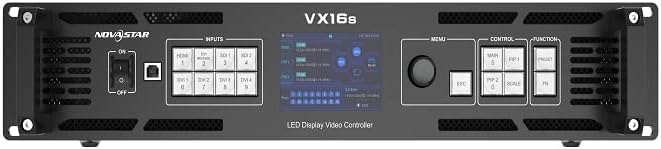
Слика 4.1: NovaStar VX16s Front Panel. The front panel features an ON/OFF switch, input selection buttons (HDMI, DVI, SDI), a central display screen, a menu control knob, and dedicated function buttons for MAIN, PIP1, PIP2, ESC, SCALE, and FN.
The front panel provides access to essential controls and indicators for real-time operation and monitoring.
- Прекинувач: Го вклучува или исклучува уредот.
- Копчиња за внесување: Selects the active input source (HDMI, DVI, SDI).
- Екран за прикажување: Shows current status, menu options, and configuration details.
- Контролно копче: Navigates menus and adjusts parameters.
- Функциски копчиња:
- ГЛАВНА: Controls the main layer.
- PIP1/PIP2: Controls Picture-in-Picture layers.
- ESC: Излегува од тековното мени или откажува операција.
- СКАЛА: Accesses image scaling options.
- FN: Прилагодливо копче за функции.
4.2 Заден панел

Слика 4.2: NovaStar VX16s Rear Panel. This image details the rear panel, featuring Ethernet ports (1-16), Control ports (Ethernet, RS232, USB), Input ports (DVI 1-4, HDMI 2.0, 3G-SDI 1-2), an Output Monitor port (HDMI), and the AC power input.
The rear panel houses all input, output, and control connections.
- Влезни конектори:
- 2x 3G-SDI
- 1x HDMI 2.0
- 4x SL-DVI
- Ethernet Output Ports: 16 ports for LED screen connection, supporting up to 10,400,000 pixels.
- Контролни порти: Ethernet, RS232, USB for V-Can software connection and device control.
- Излез на мониторот: HDMI port for monitoring the output signal.
- Влез за напојување со наизменична струја: За поврзување на кабелот за напојување.
5. Поставување
5.1 Физичка инсталација
The VX16s is designed for rack mounting. Ensure adequate ventilation around the unit.
- Mount the device securely in a standard 19-inch equipment rack.
- Ensure sufficient space for cable connections and airflow.
- Connect the power cord to the AC power input on the rear panel and then to a grounded power outlet.

Слика 5.1: NovaStar VX16s Dimensions. This diagram shows the top-down view of the VX16s unit with its physical dimensions in millimeters, useful for rack installation planning.
5.2 Влезни/Излезни врски
Connect your video sources and LED display panels to the appropriate ports on the rear panel.
- Влези за видео: Connect your video sources (e.g., media players, cameras) to the HDMI, DVI, or 3G-SDI input ports.
- LED Display Outputs: Connect the Ethernet output ports (1-16) to your LED display panels using standard Ethernet cables.
- Излез на мониторот: Connect an external monitor to the HDMI MONITOR output for real-time preview of the processed video.
- Контрола на врската: Connect a computer running NovaStar V-Can software to the CONTROL Ethernet port or USB port for advanced configuration and control.
6. Упатства за работа
6.1 Вклучување/исклучување
To power on the device, flip the power switch on the front panel to the 'ON' position. The display screen will illuminate. To power off, flip the switch to 'OFF'.
6.2 Избор на влезен извор
Press the corresponding input button on the front panel (HDMI, DVI, SDI) to select your desired video source. The active input will be indicated on the display screen.
6.3 Layer Management (Main and PIPs)
The VX16s supports 3 independent layers: one 4K×2K main layer and two 2K×1K Picture-in-Picture (PIP) layers (PIP 1 and PIP 2). Use the MAIN, PIP1, and PIP2 buttons on the front panel to select and configure each layer. Layer priorities are adjustable via the menu.
6.4 Image Scaling
Притиснете го СКАЛА button to access image scaling options. The VX16s offers three scaling modes:
- Pixel-to-Pixel: Displays the input source at its native resolution without scaling.
- Цел екран: Scales the input source to fill the entire LED display area.
- Custom Scaling: Allows for manual adjustment of resolution and position.
6.5 3D Display Function
The device supports 3D display effects on the LED screen. To enable this function, navigate through the menu using the control knob. Забелешка: When the 3D function is enabled, the device's output capacity will be halved.
6.6 DVI Mosaic
Up to four DVI inputs can be combined to form a single, independent input source, known as DVI Mosaic. This feature is configured via the V-Can software or the device's menu.
6.7 Управување со претходно поставени
The VX16s allows you to save up to 10 presets for various display configurations. This enables quick recall of frequently used setups. Presets can be saved and loaded via the device's menu or V-Can software.
6.8 Управување со EDID
The device supports both custom EDID and standard EDID management, allowing for optimized communication between the video sources and the processor. This can be configured in the system settings.
6.9 Device Backup
The VX16s includes a device backup design to ensure system stability and data integrity. Consult the full user manual for detailed instructions on utilizing backup features.
7. Одржување
Regular maintenance ensures optimal performance and extends the lifespan of your VX16s.
- Чистење: Користете мека, сува крпа за чистење на надворешноста на уредот. Не користете течни или аеросолни средства за чистење.
- Вентилација: Periodically check that all ventilation openings are clear of dust and obstructions.
- Ажурирања на фирмверот: Check the NovaStar official website for the latest firmware updates to ensure compatibility and access to new features.
8 Смена на проблеми
Овој дел се однесува на вообичаени проблеми со кои може да се соочите. За посложени проблеми, контактирајте ја техничката поддршка.
| Проблем | Можна причина | Решение |
|---|---|---|
| Нема моќ | Power cable disconnected; Power switch off; Power outlet fault. | Проверете го поврзувањето на кабелот за напојување; Осигурајте се дека прекинувачот за напојување е ВКЛУЧЕН; Тестирајте го штекерот со друг уред. |
| No video output on LED screen | Incorrect input selected; Output cables disconnected; LED screen not configured correctly. | Verify active input source; Check Ethernet cable connections to LED panels; Ensure LED screen configuration (resolution, mapping) is correct via V-Can software. |
| Image distortion or incorrect colors | Incorrect EDID settings; Cable issues; Scaling issues. | Adjust EDID settings; Replace video cables; Check image scaling options. |
| V-Can software cannot connect to device | Ethernet/USB cable disconnected; Network settings incorrect; Firewall blocking connection. | Check control cable connections; Verify IP address settings; Temporarily disable firewall for testing. |
9. Спецификации
Technical specifications for the NovaStar VX16s 4K LED Video Processor.
- Модел: VX16s
- Влез волуменtage: AC 100~240V
- Max Loading Capacity: 10,400,000 пиксели
- Влезни конектори:
- 2x 3G-SDI
- 1x HDMI 2.0
- 4x SL-DVI
- Излезни порти: 16x Ethernet output ports
- Слоеви: 3 independent layers (1x 4K×2K main, 2x 2K×1K PIPs)
- Обработка на слики: Ultra HD 4K×2K@60Hz
- Decimal Frame Rate Support: 23.98 Hz, 29.97 Hz, 47.95 Hz, 59.94 Hz, 71.93 Hz, 119.88 Hz
- 3D дисплеј: Supported (output capacity halved when enabled)
- Scaling Options: Pixel-to-pixel, full screen, custom scaling
- DVI Mosaic: Up to 4 DVI inputs can form an independent source
- Претходно поставени мемории: Up to 10 configurable presets
- Контрола: V-Can software, front panel controls
- Компатибилни уреди: Monitor, Television, Projector (as output/monitoring)
- Боја: Црното
10. Гаранција и поддршка
For warranty information and technical support, please refer to the warranty card included with your product or visit the official NovaStar webлокација. Чувајте ја сметката како доказ за купување за гаранциски побарувања.
- Поддршка преку Интернет: Visit the NovaStar official webстраница за најчесто поставувани прашања, преземање софтвер и информации за контакт.
- Техничка помош: Contact NovaStar customer service for assistance with setup, troubleshooting, or operational questions.


