1. Вовед
Thank you for choosing the RobertDTesta 180mm PC Case Cooling Fan. This manual provides essential information for the proper installation, operation, and maintenance of your new cooling fan. Please read this manual thoroughly before installation to ensure optimal performance and longevity of the product.
2. Информации за безбедност
- Always disconnect power from your computer before installing or removing the fan.
- Handle the fan by its frame to avoid damaging the blades or internal components.
- Обезбедете соодветна вентилација за време на инсталацијата.
- Држете го вентилаторот подалеку од течности и прекумерна влага.
- Do not attempt to modify the fan or its wiring. Unauthorized modifications can lead to malfunction or electrical hazards.
- Да се чува подалеку од дофат на деца.
3. Содржина на пакетот
Проверете дали сите компоненти се присутни и во добра состојба:
- 1 x RobertDTesta 180mm PC Case Cooling Fan (Model: RL4Z S1803212L-3M)
- (Mounting screws may be included with your PC case or sold separately)
4. Спецификации
| Карактеристика | Спецификација |
|---|---|
| Модел | RL4Z S1803212L-3M |
| Големина на вентилаторот | 180 x 180 x 32 mm |
| Mounting Pitch | 165 мм |
| Voltage | 12V |
| Актуелно | 0.15 А |
| Брзина на ротација | 750 вртежи во минута |
| Интерфејс | Main board 3-Pin connector |
| Очекуван животен век | 16,000 часа |
| Тежина | 441.35 g (приближно 15.57 oz) |
| Материјал | Поликарбонат |
| Компатибилни уреди | Десктоп компјутери |
| Земја на потекло | Кина |
5. Поставување и инсталација
Follow these steps to properly install your cooling fan:
- Подгответе го вашиот компјутер: Power off your computer and disconnect it from the power outlet. Open your PC case to access the fan mounting locations.
- Идентификувајте ја локацијата за монтирање: Locate an available 180mm fan mounting point in your PC case. Common locations include the front, top, or rear of the case.
- Одредете ја насоката на протокот на воздух: Most fans have an arrow on the side indicating the direction of airflow. Install the fan to ensure it either draws cool air into the case (intake) or expels hot air out of the case (exhaust), depending on your system's cooling strategy.
- Монтирајте го вентилаторот: Position the fan against the mounting holes. Secure the fan to the PC case using appropriate fan screws (not included). Do not overtighten the screws.
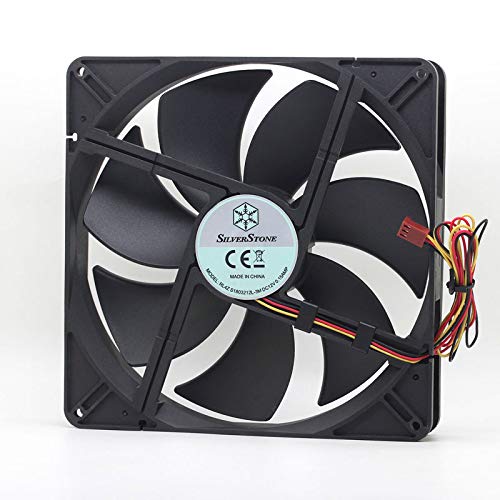
Image 1: The RobertDTesta 180mm PC Case Cooling Fan, showing its 7-blade design and the attached 3-pin power connector wires.
- Поврзете напојување: Connect the fan's 3-pin connector to an available 3-pin fan header on your motherboard. Refer to your motherboard manual for fan header locations.
- Затворете го куќиштето и вклучете го: Once the fan is securely mounted and connected, close your PC case, reconnect the power, and power on your computer. The fan should begin spinning.
6. Операција
The RobertDTesta 180mm PC Case Cooling Fan operates automatically once connected to a motherboard fan header and the computer is powered on. It will spin at its rated speed of 750 RPM to provide consistent airflow for cooling your PC components. Modern motherboards may offer basic fan speed control through BIOS/UEFI settings or software, depending on the fan header type and motherboard capabilities.
7. Одржување
Regular maintenance helps ensure optimal performance and extends the lifespan of your cooling fan:
- Отстранување прашина: Periodically (e.g., every 3-6 months), power off your computer and open the case. Use compressed air to gently blow dust off the fan blades and frame. Hold the fan blades to prevent them from spinning rapidly during cleaning, which can damage the bearings.
- Инспекција: Visually inspect the fan for any signs of damage, such as cracked blades or loose wiring. Ensure the fan is securely mounted.
- Avoid Lubrication: The fan's bearings are factory-sealed and do not require additional lubrication. Attempting to lubricate them may cause damage.
8 Смена на проблеми
If you encounter issues with your cooling fan, refer to the following common problems and solutions:
- Вентилаторот не се врти:
- Проверете дали компјутерот е вклучен.
- Verify the 3-pin connector is securely plugged into a motherboard fan header.
- Check BIOS/UEFI settings to ensure the fan header is enabled and not set to a very low or off speed.
- Test the fan on a different fan header if available.
- Невообичаен шум:
- Power off the computer and check for any cables or obstructions hitting the fan blades.
- Ensure the fan is securely mounted and not vibrating against the PC case.
- Dust buildup can sometimes cause noise; clean the fan as described in the Maintenance section.
- Лоши перформанси на ладење:
- Verify the fan's airflow direction is appropriate for its location (intake for cool air, exhaust for hot air).
- Ensure other case fans are working correctly and that there is adequate overall airflow within the PC case.
- Clean any dust filters in your PC case.
9. Гаранција и поддршка
За информации за гаранцијата или техничка поддршка, ве молиме погледнете ја документацијата доставена при купувањето или контактирајте го вашиот продавач. Зачувајте го доказот за купување за какви било рекламации за гаранција.


