1. Вовед
This manual provides essential information for the safe and efficient operation of your Powertech MB3904 8 Step Intelligent Lead Acid and Lithium Battery Charger. Please read this manual thoroughly before use and retain it for future reference.
2. Информации за безбедност
Секогаш почитувајте ги следните безбедносни мерки:
- Уверете се дека полначот е исклучен од напојувањето пред да правите или прекинувате поврзувања со батеријата.
- Користете го полначот само во добро проветрени простории.
- Избегнувајте полнење замрзнати батерии.
- Не изложувајте го полначот на дожд или прекумерна влага.
- Да се чува подалеку од дофат на деца.
- This charger is designed for 6V or 12V Lead Acid or LiFePO4 batteries only. Do not use with other battery types.
3. Содржина на пакетот
Проверете дали сите артикли се присутни во пакувањето:
- Powertech MB3904 8 Step Intelligent Battery Charger Unit
- Батерија Clamp Connectors (Red and Black)
- Ring Terminal Connectors
- Кабел за напојување со наизменична струја
- Упатство за употреба (овој документ)
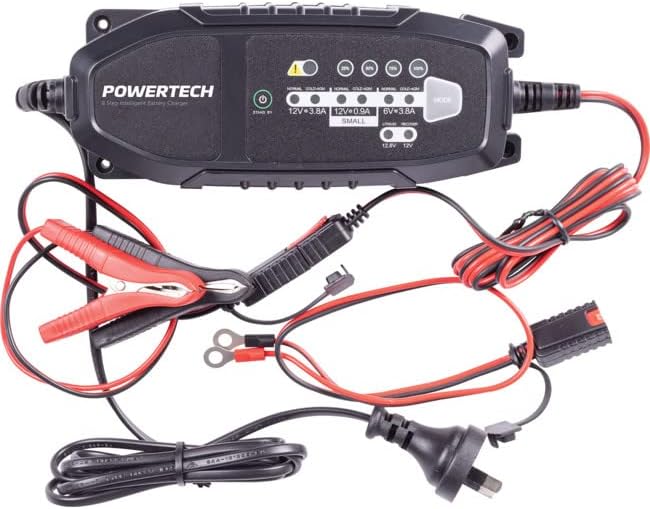
Image: The Powertech MB3904 battery charger unit shown with its various included accessories, including battery clamps, ring terminals, and the AC power cord.
4. Карактеристики на производот
The Powertech MB3904 charger offers advanced features for optimal battery maintenance:
- 8-Step Charging Process: Ensures thorough and efficient charging for various battery types.
- Мулти-волtagд Компатибилност: Suitable for both 6V and 12V lead acid and LiFePO4 batteries.
- Сеопфатна заштита: Includes overload, short circuit, reverse polarity, safety timer, and wrong battery protection.
- Интуитивни LED индикатори: Clearly display charge status and selected mode.
- Копче за избор на режим: Allows easy switching between charging modes.
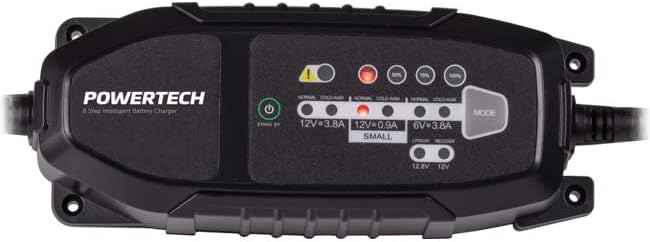
Слика: Од горе надолу view of the Powertech MB3904 charger, highlighting the LED indicators for charge status and the 'MODE' button for selecting charging programs.
5. Поставување
- Поставување: Place the charger on a stable, flat surface in a well-ventilated area, away from direct sunlight or heat sources.
- Поврзување со батерија: Ensure the battery terminals are clean. Connect the red (+) clamp/ring terminal to the positive (+) battery terminal and the black (-) clamp/ring terminal to the negative (-) battery terminal. Ensure a secure connection.
- Поврзување за напојување: Plug the AC power cord into a suitable wall outlet. The charger will enter standby mode.
6. Упатства за работа
6.1. Избор на режим на полнење
After connecting the battery and power, press the РЕЖИМ button to cycle through the available charging programs. The corresponding LED will illuminate to indicate the selected mode:
- 12V 3.8A (Normal): Standard charging for 12V lead acid batteries.
- 12V 3.8A (Cold/AGM): For charging 12V lead acid batteries in cold conditions or AGM batteries.
- 12V 0.9A (Small): For charging smaller 12V lead acid batteries.
- 6V 3.8A: For charging 6V lead acid batteries.
- Lithium (12.8V/12V): For charging 12V LiFePO4 batteries.
- Поправка: A special mode for desulfation of deeply discharged lead acid batteries.
6.2. Процес на полнење
Once a mode is selected, the charger will automatically begin the 8-step charging process. The progress LEDs (25%, 50%, 75%, 100%) will illuminate sequentially to indicate the battery's charge level. When the 100% LED is solid, the battery is fully charged.
6.3. Исклучување на полначот
- Исклучете го кабелот за напојување со наизменична струја од ѕидниот штекер.
- Исклучете го црниот (-) clamp/ring terminal from the negative (-) battery terminal.
- Исклучете го црвениот (+) clamp/ring terminal from the positive (+) battery terminal.
7. Одржување
- Чистење: Clean the charger casinсо мека, сува крпа. Не користете абразивни средства за чистење или растворувачи.
- Складирање: Чувајте го полначот на ладно и суво место кога не го користите.
- Инспекција на кабел: Periodically inspect the power cord and battery cables for any signs of damage. Do not use the charger if cables are damaged.
8 Смена на проблеми
| Проблем | Можна причина | Решение |
|---|---|---|
| Полначот не се вклучува. | Нема струја од штекерот; лабава врска. | Проверете го штекерот; проверете дали кабелот за напојување е безбедно вклучен. |
| Error LED illuminated. | Reverse polarity; short circuit; wrong battery type. | Check battery connections for correct polarity; inspect cables for shorts; ensure battery type matches selected mode. |
| Батеријата не се полни. | Battery deeply discharged/damaged; incorrect mode selected. | Try "Repair" mode for lead acid batteries; test battery with a multimeter; ensure correct charging mode is selected. |
9. Спецификации
- Модел: MB3904
- Влез волуменtage: 220-240V AC, 50/60Hz
- Излез Voltage: 6V / 12V DC
- Струја на полнење: 0.9А / 3.8А
- Видови батерии: Lead Acid (WET, MF, CA, EFB, GEL, AGM), LiFePO4
- Заштита: Overload, Short Circuit, Reverse Polarity, Safety Timer, Wrong Battery
- Димензии: Приближно 20.4 x 7.4 x 4.8 cm
- Тежина: Приближно 534 гр
- Усогласеност: CE
10. Гаранција и поддршка
This Powertech product is covered by a standard manufacturer's warranty. For specific warranty terms and conditions, please refer to the warranty card included with your purchase or contact your retailer.
For technical support or service inquiries, please contact Jaycar Electronics customer service or visit their official webстраница. Зачувајте го доказот за купување за гаранциски побарувања.
Џејкар Електроникс Webсајт: www.jaycar.com.au


