1. Вовед
Thank you for choosing the Karlsson LED Mirror Alarm Clock. This digital alarm clock features a modern design with a clear LED display integrated into a silver mirror surface, showing time and temperature. This manual provides essential information for the safe and efficient use of your device.
Што има во кутијата:
- Karlsson LED Mirror Alarm Clock
- USB кабел за напојување

Слика 1: Предна страна view of the Karlsson LED Mirror Alarm Clock, showing the time (15:08) and temperature (19°C) on its reflective display.
2. Информации за безбедност
- Не го изложувајте уредот на вода или прекумерна влага.
- Избегнувајте екстремни температури, директна сончева светлина или прашливи средини.
- Да се чува подалеку од дофат на деца.
- Use only the provided USB cable or a compatible power adapter.
- When inserting batteries, ensure correct polarity (+/-).
- Не мешајте стари и нови батерии или различни типови на батерии.
- Отстранете ги батериите ако уредот нема да се користи подолг период.
3. Производот завршиview
Запознајте се со компонентите и контролите на вашиот будилник.
Преден дисплеј:
- Приказ на време: Го прикажува тековното време во 12-часовен или 24-часовен формат.
- Приказ на температура: Shows ambient temperature in Celsius or Fahrenheit.
Задни контроли:
- Копче SET: Used to enter setting modes (time, alarm).
- Копче UP: Се користи за зголемување на вредностите или навигација низ менијата.
- ДОЛЕ копче: Се користи за намалување на вредностите или навигација низ менијата.
- MODE/V Button: Used to switch display modes or activate voice control (if available).
- Копче RESET: Го ресетира уредот на фабрички поставки.
- DC 5V влез: За поврзување на USB кабелот за напојување.
- Оддел за батерии: Holds 3 x AAA batteries for backup power.
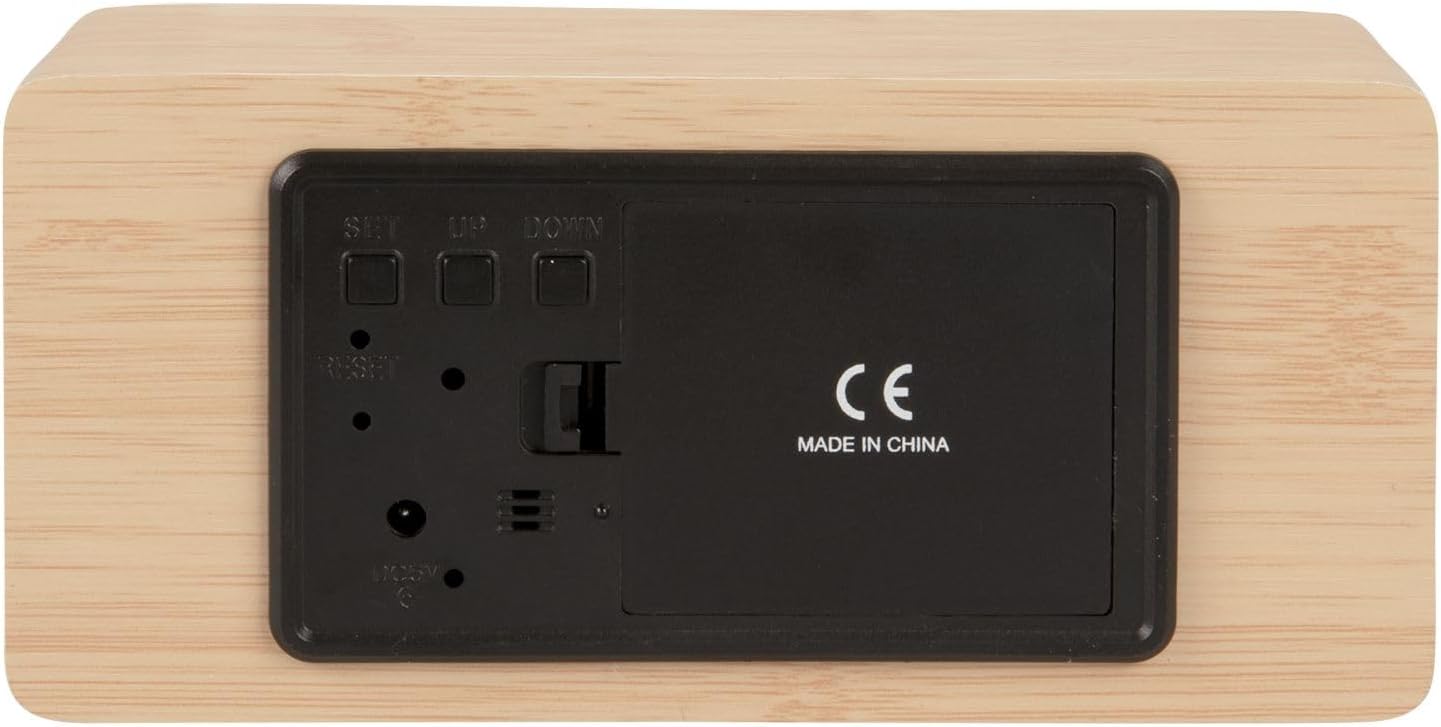
Слика 2: Заден дел view of the alarm clock, highlighting the SET, UP, DOWN buttons, power input, and battery compartment.
4. Поставување
Напојување на уредот:
The alarm clock can be powered via the included USB cable or by 3 x AAA batteries (not included) for backup.
- USB моќност: Connect the small end of the USB cable to the DC 5V input port on the back of the alarm clock. Connect the other end to a USB power adapter (not included) or a powered USB port.
- Резервна копија на батеријата: Open the battery compartment cover on the back of the clock. Insert 3 x AAA batteries, ensuring correct polarity. Close the cover securely. Batteries are primarily for backup and may not power the display continuously.

Слика 3: The USB power cable provided for connecting the alarm clock to a power source.
5. Упатства за работа
Поставување на времето:
- Притиснете и задржете го ПОСТАВЕТЕ копчето додека цифрите за часот не почнат да трепкаат.
- Користете го UP or ДОЛУ копчиња за прилагодување на часот.
- Притиснете ПОСТАВЕТЕ again to confirm the hour and move to minute setting.
- Користете го UP or ДОЛУ копчиња за прилагодување на минутите.
- Притиснете ПОСТАВЕТЕ to confirm the minutes and exit time setting mode.
Поставување аларм:
- Притиснете го ПОСТАВЕТЕ button once (do not hold) to cycle through display modes until 'AL' or an alarm icon appears.
- Притиснете и задржете го ПОСТАВЕТЕ button again until the alarm hour digits flash.
- Користете го UP or ДОЛУ копчиња за да го поставите посакуваниот час за аларм.
- Притиснете ПОСТАВЕТЕ to confirm the alarm hour and move to alarm minute setting.
- Користете го UP or ДОЛУ копчиња за да ги поставите посакуваните минути за алармот.
- Притиснете ПОСТАВЕТЕ за да потврдите и да излезете од режимот за поставување аларм.
- За да го активирате/деактивирате алармот, притиснете го копчето UP button while in normal time display mode. An alarm icon will appear/disappear on the display.
Switching Display Modes (12/24 Hour, Temperature Unit):
- Во нормалниот режим на прикажување на времето, притиснете го UP копче за префрлување помеѓу 12-часовен и 24-часовен формат.
- Притиснете го ДОЛУ копче за префрлување помеѓу температурни единици Целзиус (°C) и Фаренхајт (°F).
6. Одржување
- Clean the alarm clock with a soft, dry cloth.
- Do not use abrasive cleaners, solvents, or harsh chemicals, as these may damage the mirror surface or casing.
- Ensure the device is unplugged and batteries are removed before cleaning.
7 Смена на проблеми
- Екранот е празен: Check if the USB cable is securely connected to a power source. If using batteries, ensure they are inserted correctly and are not depleted.
- Алармот не се огласува: Verify that the alarm is set and activated (alarm icon visible on display). Check the alarm volume if adjustable (this model may not have adjustable volume).
- Incorrect time/settings: Притиснете го РЕСЕТИРАЈ button on the back of the unit using a thin object (e.g., a paperclip) to restore factory settings, then re-set the time and alarm.
- Отчитувањето на температурата се чини неточно: Ensure the clock is placed in a location away from direct heat sources or drafts that could affect ambient temperature readings.
8. Спецификации
| Број на модел | PTG-KA5879WD |
| Материјал | Дрвен фурнир |
| Димензии (Д x Ш x В) | 15 см x 7 см x 4.5 см (приближно 5.9 x 2.76 x 1.77 инчи) |
| Тежина | 245 г (приближно 0.54 фунти) |
| Боја | Light wood casing, silver mirror display |
| Тип на дисплеј | Дигитална LED диода |
| Специјална карактеристика | Аларм |
| Извор на енергија | USB powered (cable included), 3 x AAA batteries (not included) for backup |
9. Гаранција и поддршка
This product is manufactured by Karlsson. For any support inquiries, warranty information, or service requests, please refer to the retailer where the product was purchased or visit the official Karlsson webвеб-страница за контакт информации. Ве молиме задржете го доказот за купување за гаранциски барања.


