1. Производот завршиview
The Sinotimer TM618N-2 is a versatile 7-day weekly digital programmable timer designed for automated control of electrical equipment. It allows users to set specific daily or weekly schedules for turning devices on and off, ensuring efficient energy management and convenience. This timer is suitable for a wide range of applications, including controlling lighting, heating, ventilation, and other electrical appliances.

Слика 1: Предна страна view of the Sinotimer TM618N-2 Digital Timer, showing the display and control buttons.
2. Клучни карактеристики
- Неделно програмирано: Allows up to 16 ON/OFF programs per day or week.
- Мултифункционален: Includes Clock display, Timer, Countdown, Automatic weekly time deviation correction, and Sleep mode.
- Висок капацитет: Поддржува 16 Amp / 220 Volt AC loads.
- Широк волуменtagд Компатибилност: Operates with 220V, 230V, 240V AC.
- Вградена батерија: Ги задржува поставките за време на напојувањетоtages (Lithium battery type).
- Разновидни апликации: Ideal for controlling dryers, defrosting equipment, swimming pool pumps, gates, lighting, and more.
3. Спецификации
| Карактеристика | Детал |
|---|---|
| Модел | TM618N-2 |
| Бренд | Sinotimer |
| Voltage | 220V / 230V / 240V AC |
| Тековен рејтинг | 16 Amp |
| Број на програми | 16 програми за вклучување/исклучување |
| Материјал | Пластика |
| Тип на батерија | Lithium (internal, non-replaceable by user) |
| Боја | Multi-color (typically white/grey) |
4. Инсталација
Важна забелешка за безбедност: Installation should only be performed by a qualified electrician. Ensure power is disconnected before attempting any wiring.
- Монтирање: The TM618N-2 is designed for DIN rail mounting or screw mounting. Secure the timer in a suitable electrical enclosure.
- Жици: Refer to the wiring diagram on the back of the unit.
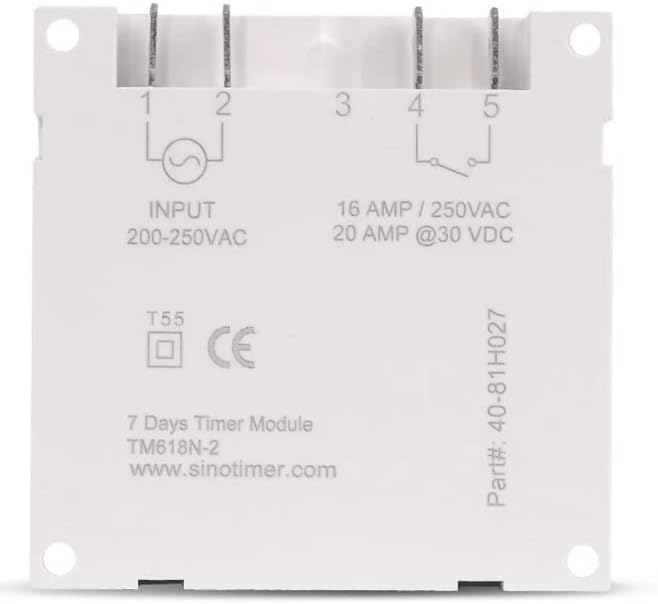
Слика 2: Назад view of the Sinotimer TM618N-2, showing input/output terminals and wiring diagram.
- Input (Terminals 1 & 2): Connect your 200-250VAC power supply to these terminals.
- Output (Terminals 3, 4, & 5):
- Терминал 3: Заеднички (COM)
- Terminal 4: Normally Open (NO) - Connect your load here for switched power.
- Terminal 5: Normally Closed (NC) - (Less commonly used for timer applications, but available).
- Вклучување: Once wiring is complete and secure, restore power to the circuit. The timer display should illuminate.

Figure 3: Technical drawing showing the dimensions of the Sinotimer TM618N-2 timer.
5. Упатства за работа
5.1. Функции на копчињата
- ЧАСОВНИК: Се користи за поставување на тековното време и ден.
- ПРОГ: Enters/exits programming mode for ON/OFF schedules.
- НЕДЕЛА: Selects the day(s) of the week during time or program setting.
- ЧАС: Adjusts the hour during time or program setting.
- МИН: Adjusts the minute during time or program setting.
- ПОТСЕТИМЕ: Recalls or cancels a program setting.
- ПРИРАЧНИК: Manually overrides the timer's current state (ON/AUTO/OFF).
- R (Ресетирање): Small button (requires a pointed object) to reset the timer to factory defaults.
5.2. Поставување на тековното време и ден
- Притиснете и задржете го ЧАСОВНИК копче.
- Додека се држи ЧАСОВНИК, притиснете НЕДЕЛА за да го поставите тековниот ден (ПО, ВТО, СРЕ, ЧТ, ПЕТ, СА, НЕД).
- Додека се држи ЧАСОВНИК, притиснете ЧАС за да го поставите тековниот час.
- Додека се држи ЧАСОВНИК, притиснете МИН за да ја поставите тековната минута.
- Ослободете го ЧАСОВНИК копче за зачувување на поставките.
5.3. Програмирање на распореди за вклучување/исклучување
The timer supports up to 16 ON and 16 OFF programs. Each program can be set for a specific day or group of days.
- Притиснете го ПРОГ копчето еднаш. На екранот ќе се прикаже „1 ВКЛУЧЕНО“.
- Притиснете НЕДЕЛА repeatedly to select the desired day(s) for this program (e.g., MO, TU, WE, TH, FR, SA, SU; MO-FR; SA-SU; MO-SA; etc.).
- Притиснете ЧАС за да го поставите посакуваниот час на вклучување.
- Притиснете МИН за да ја поставите саканата минута за вклучување.
- Притиснете ПРОГ повторно. На екранот ќе се прикаже „1 OFF“.
- Repeat steps 2-4 to set the desired OFF time for the first program.
- Притиснете ПРОГ to move to the next program ("2 ON", "2 OFF", etc.) and repeat the process for up to 16 programs.
- За да излезете од режимот на програмирање и да ги зачувате поставките, притиснете го копчето ЧАСОВНИК копче.
5.4. Рачно отфрлање
Притиснете го ПРИРАЧНИК button to cycle through the output modes:
- НА: Output is continuously ON, ignoring programs.
- АВТОМАТ: Output follows the programmed schedules.
- ИСКЛУЧЕНО: Output is continuously OFF, ignoring programs.
Осигурајте се дека тајмерот е вклучен АВТОМАТСКИ mode for programmed operation.
5.5. Ресетирање на тајмерот
To clear all settings and return the timer to its factory default state, insert a pointed object (like a paperclip) into the small R (Reset) hole and press gently.
6. Одржување
The Sinotimer TM618N-2 requires minimal maintenance.
- Одржувајте го уредот чист и без прашина. Користете мека, сува крпа за чистење.
- Не користете абразивни средства за чистење или растворувачи.
- Ensure the timer is installed in a dry environment, away from direct moisture or extreme temperatures.
- The internal battery is designed for long life and is not user-replaceable. If the display goes blank or settings are not retained after a power outage, the battery may need professional service.
7 Смена на проблеми
| Проблем | Можна причина | Решение |
|---|---|---|
| Екранот е празен. | Нема напојување; внатрешната батерија е празна. | Check power connections. If power is present, the internal battery may need charging (leave connected to power for several hours) or replacement (professional service required). |
| Timer not switching ON/OFF as programmed. | Timer is not in AUTO mode; incorrect program settings; wiring issue. | Притиснете ПРИРАЧНИК додека не се прикаже „AUTO“. Повторноview and correct program settings. Verify wiring connections. |
| Поставките се губат по исклучувањето на струјатаtage. | Внатрешната батерија е празна или неисправна. | Leave the timer connected to power for at least 4 hours to charge the internal battery. If the problem persists, the battery may need replacement (professional service recommended). |
| Копчињата не реагираат. | Temporary software glitch; unit needs reset. | Perform a full reset using the R button. If the issue continues, contact support. |
8. Гаранција и поддршка
За информации за гаранцијата и техничка поддршка, ве молиме погледнете ја документацијата што ја приложивте со вашата нарачка или контактирајте го вашиот продавач. Зачувајте го доказот за купување за рекламации во врска со гаранцијата.
Manufacturer: Sinotimer


