1. Производот завршиview
The PENO XK-W2001 is an electronic socket thermostat designed for automatic temperature control. It features a digital display for clear temperature readings and easy setting adjustments. This device is suitable for various applications requiring precise temperature regulation, such as aquaculture, greenhouse environments, or home brewing.
Содржина на пакетот:
- 1 x PENO XK-W2001 Temperature Controller
Клучни компоненти:
Familiarize yourself with the main parts of your temperature controller:
- Дигитален екран: Shows current and set temperatures.
- Копче SET: Used to enter temperature setting mode.
- Копчиња горе/долу: Adjust temperature values.
- Output Indicator (OUT): Illuminates when the controlled device is active.
- Температурна сонда: Мери температура на околината.
- Приклучок за напојување: Connects the controller to a power outlet.
- Controlled Device Socket: Where the heating or cooling device is plugged in.

Слика 1: Предна страна view of the PENO XK-W2001 Electronic Socket Thermostat, showing the digital display, control buttons, and output socket.

Figure 2: Close-up of the digital display and control buttons (SET, Up, Down) on the PENO XK-W2001, indicating temperature measurement accuracy.
2. Информации за безбедност
Ве молиме прочитајте ги и разберете ги сите безбедносни упатства пред да го користите овој производ. Непочитувањето на овие упатства може да резултира со електричен удар, пожар или сериозни повреди.
- Не ја потопувајте контролната единица во вода и не ја изложувајте на прекумерна влага. Сондата за температура е водоотпорна, но главната единица не е.
- Обезбедете ја јачината на напојувањетоtage одговара на барањата на уредот (110-220V).
- Do not exceed the maximum output power of 1500W (10A).
- Чувајте го уредот подалеку од дофат на деца.
- Не го расклопувајте или модифицирајте уредот. За сите сервисирања обратете се на квалификуван персонал.
- Обезбедете соодветна вентилација околу уредот.
- Исклучете го уредот од штекерот пред чистење или вршење какво било одржување.
3. Спецификации на производот
| Карактеристика | Спецификација |
|---|---|
| Модел | XK-W2001 |
| Тип на контрола | Intelligent Temperature Control Regulator |
| Температурен опсег | -50°C до 110°C |
| Грешка при мерење на температурата | 0.1°C |
| Излезна моќност | 1500 W (максимум) |
| Тековен капацитет | Максимална 10A |
| Влез волуменtage | 110-220 V (US приклучок) |
| Материјал | ABS and PCB |
| Тежина на ставката | 4.2 унци |
| Димензии на пакетот | 6.3 x 3.15 x 1.18 инчи |
4. Упатства за поставување
Follow these steps to set up your PENO XK-W2001 temperature controller:
- Connect the Temperature Probe: Insert the metal tip of the temperature probe into the environment where you wish to measure and control the temperature. Ensure the probe cable is securely connected to the controller.
- Plug in the Controlled Device: Connect your heating or cooling device (e.g., heater, fan) into the output socket of the temperature controller. Ensure the device's power consumption does not exceed 1500W (10A).
- Поврзете се на напојување: Plug the temperature controller's power plug into a standard 110-220V US wall outlet. The digital display will illuminate, showing the current measured temperature.

Figure 3: The PENO XK-W2001 controller showing its integrated temperature probe and power cord, ready for connection.
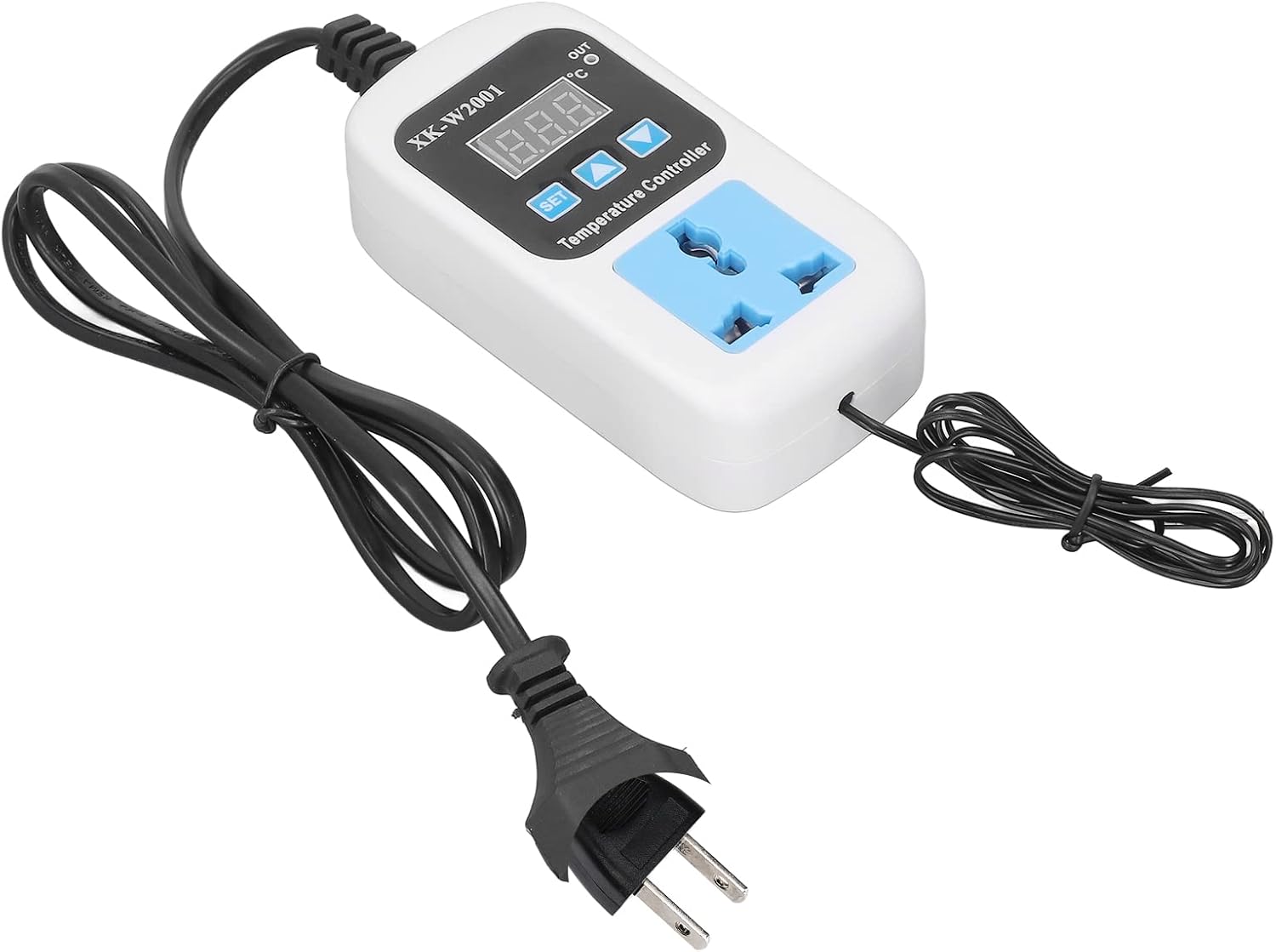
Figure 4: The PENO XK-W2001 temperature controller plugged into a wall outlet, indicating it is powered on.
5. Упатства за работа
The PENO XK-W2001 allows for precise temperature control. The display shows the current temperature measured by the probe. The 'OUT' indicator light will illuminate when the connected device is actively heating or cooling to reach the set temperature.
Поставување на саканата температура:
- Притиснете го ПОСТАВЕТЕ button once. The digital display will start flashing, indicating it is in setting mode.
- Користете го Горе (▲) и Долу (▼) копчиња за прилагодување на саканата вредност на температурата.
- Once the desired temperature is set, press the ПОСТАВЕТЕ button again to confirm and exit the setting mode. The display will return to showing the current measured temperature.
The controller will now automatically activate or deactivate the connected device to maintain the temperature around your set point. The device supports both Celsius and Fahrenheit readings, which can typically be toggled through a long press of the SET button or a combination of buttons (refer to on-device markings if available for specific instructions).

Figure 5: The PENO XK-W2001 operating in a greenhouse, demonstrating its intelligent temperature control capabilities and digital display.
6. Одржување
Proper maintenance ensures the longevity and accurate operation of your temperature controller.
- Чистење: Disconnect the device from power before cleaning. Use a soft, dry cloth to wipe the exterior of the controller. Do not use abrasive cleaners or solvents.
- Грижа за сонда: Periodically inspect the temperature probe for any damage or buildup. Clean the probe gently if necessary, ensuring it remains free of debris that could affect readings.
- Складирање: Кога не го користите подолг период, чувајте го контролерот на ладно и суво место, подалеку од директна сончева светлина и екстремни температури.
7 Смена на проблеми
If you encounter issues with your PENO XK-W2001, refer to the following common problems and solutions:
| Проблем | Можна причина | Решение |
|---|---|---|
| Екранот е исклучен | Нема напојување | Проверете дали контролерот е правилно вклучен во штекер со вклучено напојување. Проверете дали штекерот е функционален. |
| Читањето на температурата е неточно | Probe is damaged or improperly placed | Ensure the probe is fully inserted and positioned correctly in the measurement area. Inspect the probe for visible damage. |
| Connected device not turning on/off | Set temperature not reached; device malfunction; controller malfunction | Verify the set temperature is appropriate. Check if the connected device is working independently. Ensure the controller's output indicator (OUT) illuminates when it should be active. |
| Display shows 'HHH' or 'LLL' | Temperature probe error (out of range or disconnected) | Check the temperature probe connection. Ensure the measured temperature is within the -50°C to 110°C range. |
8. Гаранција и поддршка
PENO products are manufactured to high-quality standards. For information regarding warranty coverage, technical support, or service, please refer to the documentation provided at the time of purchase or contact your retailer. Keep your purchase receipt as proof of purchase.


