Вовед
This manual provides detailed instructions for the installation, operation, and maintenance of your GLEDOPTO ZigBee 3.0 RGBCCT Mini LED Controller Pro. This device is designed for controlling RGB, CCT, and dimmable LED strips, offering versatile smart lighting solutions for various indoor applications. Please read this manual thoroughly before use to ensure proper functionality and safety.
Производот завршиview
The GLEDOPTO ZigBee 3.0 RGBCCT Mini LED Controller Pro is a compact and versatile device for managing your LED lighting. It supports multiple control methods and offers advanced features for a customized lighting experience.
Клучни карактеристики:
- ZigBee Gateway Compatibility: Works seamlessly with ZigBee hubs such as SmartThings and Tuya for reliable and efficient smart lighting control.
- Повеќе методи за контрола: Supports APP control via Android/iOS phones (requires ZigBee gateway), voice control through Amazon Alexa/Google Home/Homekit (via ZigBee hub), and direct 2.4G RF remote control/wall switch without a ZigBee hub.
- Поставки за фреквенција: Adjustable frequency (600Hz, 800Hz, 1000Hz, 2000Hz, 4000Hz, 8000Hz) to suit different power supplies and reduce noise. Default frequency is 1000Hz.
- Grouping and Scene Functionality: Create custom rooms and set scenes to manage multiple light strips with ease.
- Ултра тенок дизајн: Compact and lightweight, making installation simple and discreet.

Слика: Детална view of the GLEDOPTO Mini LED Controller Pro, highlighting its small size, press-type terminals, Reset button, and OPT button.
Компоненти на производот:

Image: Contents of the product package, including the Mini Ultra Thin LED Controller, a 3CM sticker, a female DC connector, a wiring tool, an instruction manual, and the product box.
The package typically includes: 1x GLEDOPTO Mini Ultra Thin LED Controller, 1x 3CM Sticker, 1x Female DC Connector, 1x Wiring Tool, 1x Instruction Manual, and 1x Product Box.
Поставување и инсталација
Follow these steps to set up your GLEDOPTO Mini LED Controller Pro.

Image: Visual guide showing the four steps for usage: Powering light sources, setting up the bridge, downloading the gateway app, and completing setup to control lights.
- Step 1: Power Your Light Sources
Connect the LED light strip, the controller, and the power adapter. Ensure all connections are secure. The controller uses press-type terminals for wiring. - Step 2: Set Up Your ZigBee Bridge/Gateway
Plug in your ZigBee bridge (e.g., SmartThings, Tuya gateway) and ensure it powers up. Connect it to your Wi-Fi router using the provided network cable. - Step 3: Download the Gateway App
Download the appropriate app for your ZigBee gateway (e.g., SmartThings, Tuya Smart). Open the app and start the device searching process. This may take some time. If the device is not found, try powering the controller off/on or performing a reset. - Step 4: Complete Setup and Control the Lights
Once the controller is detected and paired with your gateway, you can control the light color, color temperature, and brightness through the app.
Инструкции за поврзување:
The controller features press-type terminals. To connect wires, gently press the terminal lever, insert the stripped wire, and release the lever to secure the connection. Ensure wires are properly tinned or crimped for a secure connection, especially for thin gauge wires.
Упатства за работа
Контролни методи:
- Контрола на апликации: After pairing with a ZigBee gateway, use the corresponding smartphone app (Android/iOS) to adjust colors, brightness, and color temperature.
- Гласовна контрола: Integrate with Amazon Alexa, Google Home, or Homekit via your ZigBee hub to control your lights using voice commands.
- 2.4G RF Remote Control: The controller supports direct control via a 2.4G RF remote control or wall switch, even without a ZigBee hub.
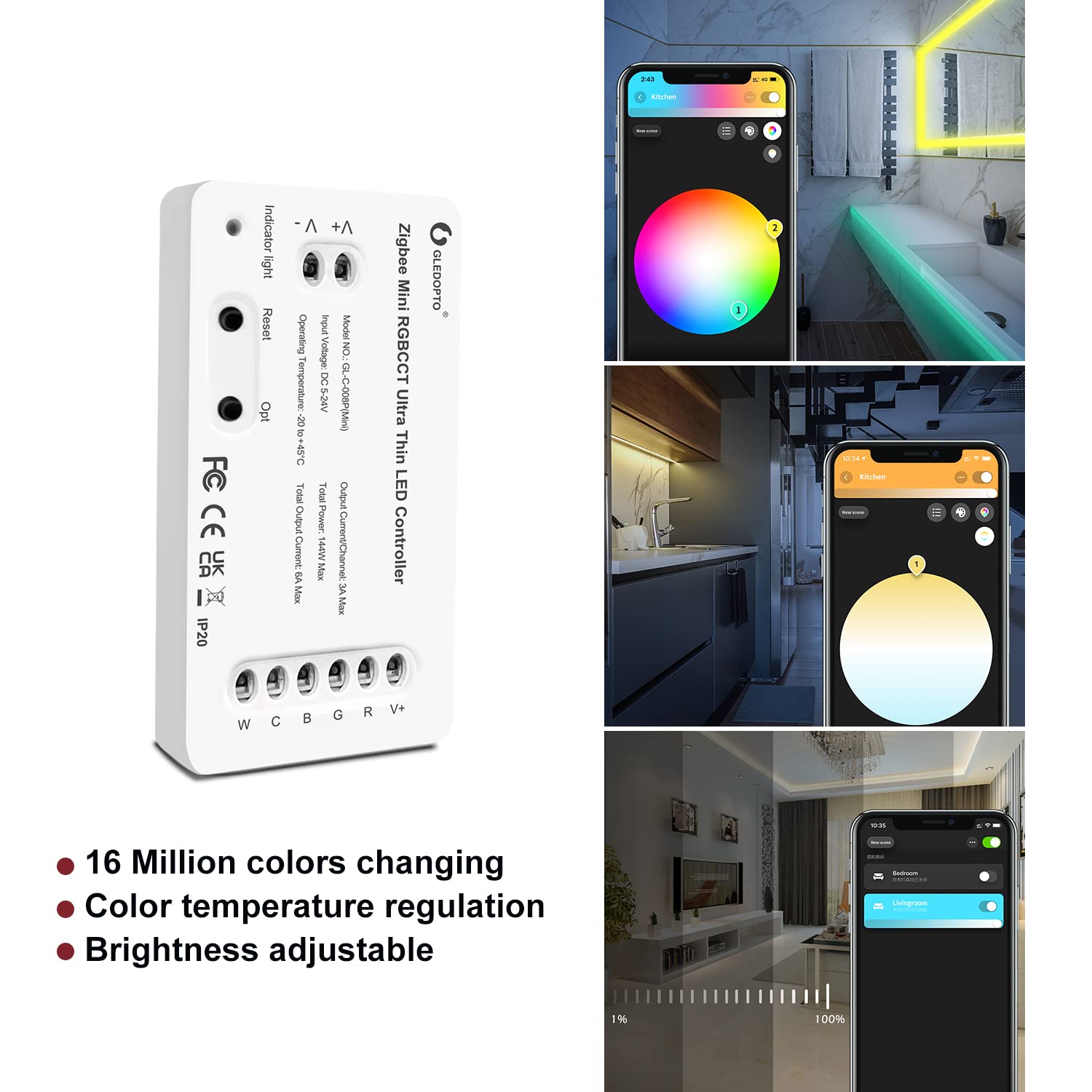
Image: A smartphone screen showing the color selection interface for LED lights in a bathroom, demonstrating app control capabilities.
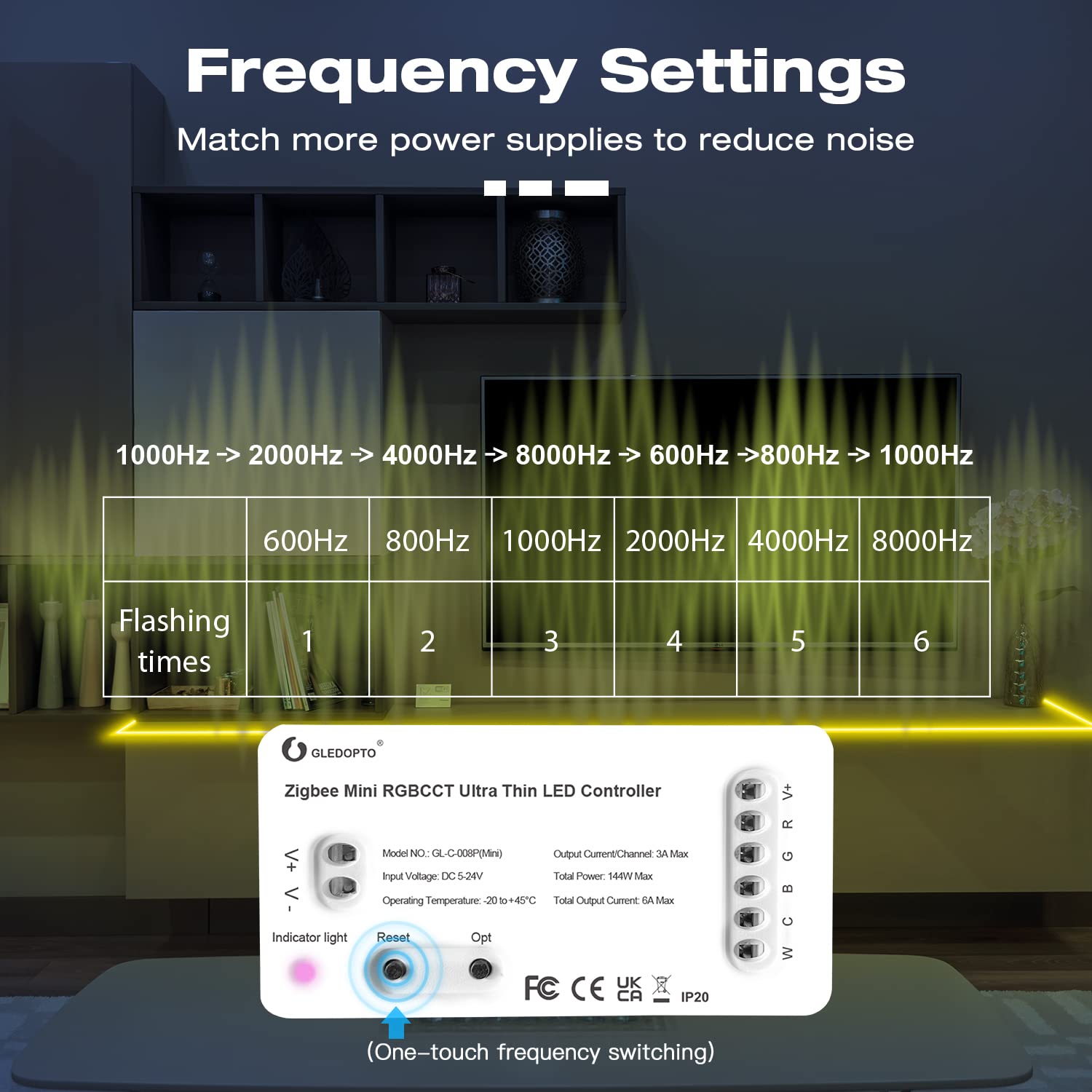
Image: A person interacting with smart speakers (Amazon Alexa and Google Home) to control lighting, illustrating voice control functionality.
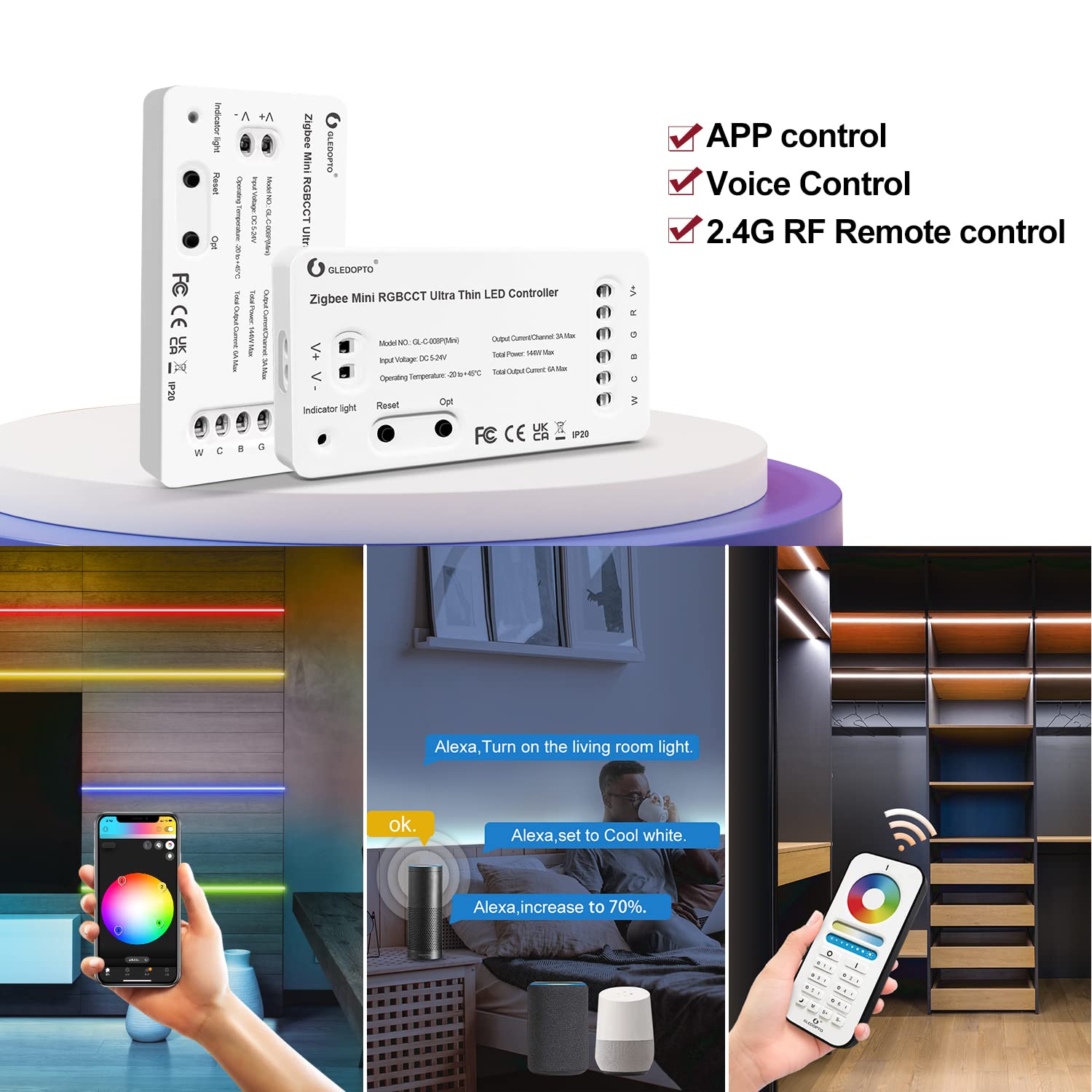
Image: A hand holding a 2.4G RF remote control, demonstrating direct remote control of LED lights in a closet setting.
Поставки за фреквенција:
The device's frequency can be adjusted to optimize performance with different power supplies and minimize noise. The selectable frequencies are 600Hz, 800Hz, 1000Hz, 2000Hz, 4000Hz, and 8000Hz. The default frequency is 1000Hz.
To change the frequency, short press the "Reset" key. Each short press will cycle to the next frequency. The indicator light will flash pink and then return to its previous color after 2 seconds. The number of flashes corresponds to the selected frequency:
- 1 flash: 600Hz
- 2 flashes: 800Hz
- 3 flashes: 1000Hz (Default)
- 4 flashes: 2000Hz
- 5 flashes: 4000Hz
- 6 flashes: 8000Hz

Image: A table illustrating the relationship between flashing times of the indicator light and the corresponding frequency settings (600Hz to 8000Hz).
Power-on State Setting:
You can configure the controller's behavior after a power outage. There are two options:
- Remember Last State: The lights will return to their state (on/off and previous settings) before the power failure.
- Lights Up by Default: The lights will turn on to a default setting when power is restored.
To switch between these modes, long press the "Opt" key for more than 5 seconds. The indicator light will flash blue 3 times to confirm the change.

Image: Diagram showing the two power-on state options: remembering the last state or lighting up by default, with instructions to long press the 'Opt' button.
Спецификации
Detailed technical specifications for the GLEDOPTO ZigBee 3.0 RGBCCT Mini LED Controller Pro.

Image: A table listing the product parameters for the GLEDOPTO ZigBee Mini RGBCCT Ultra Thin LED Controller Pro, including model number, input voltage, total power, size, output current, operating temperature, and protection rate.
| Параметар | Вредност |
|---|---|
| Име на производ | Zigbee Mini RGBCCT Ultra Thin LED Controller Pro |
| Број на модел | GL-C-008P(Mini) |
| Влез волуменtage | DC 5-24V |
| Вкупна моќност | 144W Макс |
| Излезна струја/канал | 3А Макс |
| Вкупна излезна струја | 6А Макс |
| Работна температура | -20°C до +45°C |
| Стапка на заштита | IP20 |
| Димензии (Д x Ш x В) | 70 x 10 x 36 mm (2.76 x 1.42 x 0.39 инчи) |
| Тежина на ставката | 1.41 ounces (approx. 23.5g N.W.) |
| Протокол за поврзување | ZigBee 3.0 |
| Контролен метод | App Control, Remote Control, Voice Control |
| Материјал | Акрилонитрил бутадиен стирен, метал |
Решавање проблеми
If you encounter issues with your GLEDOPTO Mini LED Controller Pro, refer to the following common problems and solutions:
- Lights not responding or intermittent connection:
Ensure all wiring connections are secure. The press-type connectors require wires to be inserted firmly. Consider tinning the ends of thin gauge wires with solder or crimping appropriate pins to ensure a solid contact. Verify the power supply is adequate and properly connected. - Controller not pairing with ZigBee gateway:
Ensure your ZigBee gateway is powered on and connected to your network. Try restarting the controller by cycling its power off and on. Perform a reset on the controller by long pressing the "Reset" button for more than 5 seconds. Ensure the controller is within range of your ZigBee gateway. - Неточна боја или осветленост:
Check your app settings to ensure the correct color and brightness levels are selected. If using a remote, ensure it is properly paired and functioning. - Noise or flickering:
Adjust the frequency setting of the controller as described in the "Frequency Settings" section to find the optimal setting for your power supply.
Одржување
To ensure the longevity and optimal performance of your GLEDOPTO Mini LED Controller Pro:
- Одржувајте го уредот чист и без прашина. Користете мека, сува крпа за чистење.
- Avoid exposing the controller to moisture, extreme temperatures, or direct sunlight.
- Do not attempt to open or repair the device yourself, as this will void the warranty and may cause damage.
Гаранција и поддршка
GLEDOPTO products are designed for reliability and performance. For warranty information or technical support, please refer to the contact details provided with your purchase or visit the official GLEDOPTO webлокација. Чувајте ја сметката како доказ за купување за гаранциски побарувања.


