1. Вовед
The FINGERS Lil’Clicks is a versatile mini keyboard designed for seamless connectivity across multiple devices and operating systems. It offers dual connectivity options: Bluetooth and 2.4 GHz Wireless, allowing you to switch between your laptop, tablet, or smartphone effortlessly. This manual provides detailed instructions for setup, operation, maintenance, and troubleshooting to ensure optimal use of your keyboard.

Image 1.1: The FINGERS Lil’Clicks Bluetooth Wireless Mini Keyboard, showcasing неговиот компактен дизајн.
2. Содржина на пакетот
Ве молиме означете го полето за следните ставки:
- 1 x FINGERS Lil’Clicks Bluetooth Wireless Mini Keyboard
- 1 x Wireless USB Receiver (for 2.4 GHz connection)
- 1 x Micro USB кабел за полнење
- 1 x Водич за брзо користење
- 1 x Бренд Белешка

Image 2.1: Contents included in the FINGERS Lil’Clicks keyboard package.
3. Поставување и поврзување
The Lil’Clicks keyboard offers two primary connection methods: Bluetooth and 2.4 GHz Wireless.
3.1. Полнење на тастатурата
Before initial use, ensure the keyboard is fully charged. Connect the provided Micro USB charging cable to the keyboard's charging port and the other end to a USB power source (e.g., computer USB port, USB wall adapter). The charging indicator light will show the charging status.
3.2. Безжична конекција од 2.4 GHz
- Locate the USB Wireless Receiver in the keyboard package.
- Вклучете го USB приемникот во слободен USB порт на вашиот компјутер или уред.
- Вклучете ја тастатурата користејќи го прекинувачот за вклучување, кој обично се наоѓа од страна или на задната страна.
- The keyboard should automatically connect to your device. No additional drivers are typically required.
3.3. Bluetooth Connection (Up to 3 Devices)
The Lil’Clicks keyboard can connect to up to three Bluetooth devices simultaneously.
- Вклучете ја тастатурата користејќи го прекинувачот за напојување.
- Притиснете и задржете го Fn копче и едно од Bluetooth копчињата (БТ1, БТ2, или БТ3) for 3-5 seconds until the corresponding Bluetooth indicator light starts blinking. This indicates the keyboard is in pairing mode.
- На вашиот уред (лаптоп, таблет, паметен телефон), одете во поставките за Bluetooth и овозможете Bluetooth.
- Пребарај за available devices. You should see "FINGERS Lil’Clicks" or a similar name appear in the list.
- Select the keyboard to pair. If prompted, enter the displayed code on the keyboard and press Внесете.
- Once paired, the indicator light will stop blinking and remain solid for a few seconds before turning off.
- To connect another device, repeat steps 2-5 using a different Bluetooth key (BT2 or BT3).
3.4. Префрлување помеѓу поврзани уреди
To switch between paired Bluetooth devices or the 2.4 GHz wireless connection:
- For Bluetooth devices: Briefly press the Fn key along with the desired Bluetooth key (БТ1, БТ2, или БТ3).
- For 2.4 GHz Wireless: Briefly press the Fn клучот заедно со 2.4G key (if available, otherwise ensure the USB receiver is plugged in and no Bluetooth connection is active).

Image 3.1: The Lil’Clicks keyboard demonstrating multi-device connectivity with a laptop, monitor, phone, and tablet.
4. Ракување со тастатурата
4.1. Основно пишување
The keyboard features a standard QWERTY layout. Simply type as you would on any other keyboard.
4.2. Медиумски контроли
The Lil’Clicks keyboard includes 12 soft-touch media control keys. These functions are typically accessed by pressing the Fn key simultaneously with the corresponding function key (F1-F12 or dedicated media keys).
- Fn+F1-F12: Access various media functions such as play/pause, volume control, track skipping, and more. Refer to the quick usage guide for specific key mappings.

Слика 4.1: Крупен план view of the keyboard layout, highlighting the media control keys and function row.
4.3. Using the Built-in Cradle
The keyboard features a built-in cradle designed to hold most phones and tablets up to 10 mm thick and 265 mm wide. This allows you to position your device at an optimal viewing angle for comfortable typing.
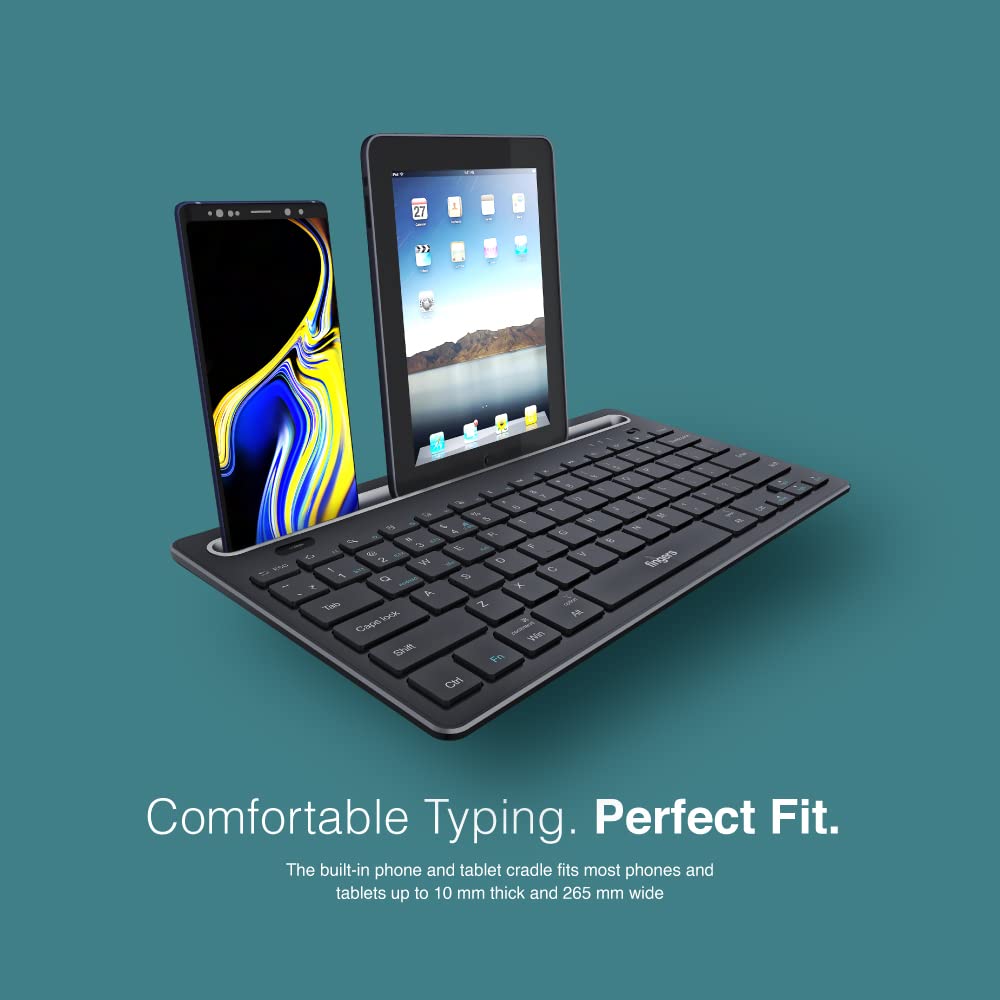
Image 4.2: The keyboard's integrated cradle holding a smartphone and a tablet for ergonomic viewинг.
4.4. Компатибилност на оперативниот систем
The Lil’Clicks keyboard is compatible with a wide range of operating systems:
- Windows
- macOS
- Андроид
- Linux
- Хром ОС
The keyboard automatically adapts to the connected operating system for optimal functionality. Some function key behaviors may vary slightly depending on the OS.
5. Одржување
5.1. Чистење
За да ја исчистите тастатурата, нежно избришете ја површината со мека, дamp, lint-free cloth. Avoid using harsh chemicals, abrasive cleaners, or excessive moisture, as these can damage the keyboard. The membrane-coated sheet beneath the keys helps protect against dust and minor spills.
5.2. Нега на батерии
The keyboard features a long-lasting battery, providing up to 45 days of usage on a single charge. To prolong battery life:
- Наполнете ја тастатурата целосно пред првата употреба.
- Избегнувајте често целосно празнење на батеријата.
- If storing the keyboard for an extended period, charge it to about 50% and store in a cool, dry place.
5.3. Складирање
When not in use, store the keyboard in a clean, dry environment away from extreme temperatures and direct sunlight. Its compact and lightweight design makes it easy to carry and store.

Image 5.1: The Lil’Clicks keyboard's portability, shown being carried and used in a cafe setting.
6 Смена на проблеми
If you encounter issues with your FINGERS Lil’Clicks keyboard, please refer to the following troubleshooting steps:
6.1. Тастатурата не се поврзува/спарува
- Проверете ја моќноста: Осигурајте се дека тастатурата е вклучена и дека батеријата е доволно наполнета.
- Повторно влезете во режим на спарување: For Bluetooth, press and hold Fn + BT1/BT2/BT3 until the indicator blinks. For 2.4 GHz, ensure the USB receiver is securely plugged in.
- Bluetooth на уредот: Проверете дали Bluetooth е овозможен на вашиот уред и дали е откриен.
- Forget Device (Bluetooth): If previously paired, try removing/forgetting the keyboard from your device's Bluetooth list and then re-pairing.
- USB-приемник: Try plugging the 2.4 GHz USB receiver into a different USB port on your device.
- Пречки: Поместете ја тастатурата поблиску до вашиот уред, а подалеку од други безжични уреди што би можеле да предизвикаат пречки.
6.2. Keys Not Responding or Typing Incorrectly
- Ниво на батерија: A low battery can affect key responsiveness. Charge the keyboard fully.
- Стабилност на врската: Ensure a stable connection. If using Bluetooth, try switching to a different Bluetooth channel (BT1, BT2, BT3) or re-pairing. If using 2.4 GHz, ensure the receiver is firmly connected.
- Пречки: Wireless interference can sometimes cause missed keystrokes. Try moving to a different location or reducing other wireless activity.
- Чисти клучеви: Check for any debris or foreign objects under the keys that might be obstructing their movement.
- Режим на оперативен систем: Ensure the keyboard is in the correct operating system mode if there are specific key combinations for OS switching (e.g., Fn + Android/Win/Mac keys).
6.3. Батеријата не се полни
- Проверете го кабелот: Ensure the Micro USB charging cable is securely connected to both the keyboard and the power source.
- Извор на енергија: Try a different USB power source (e.g., another USB port on your computer, a different wall adapter).
- Интегритет на кабелот: Inspect the charging cable for any signs of damage. Try using a different Micro USB cable if available.
7. Спецификации
| Бренд | ПРСТИ |
| Модел | Lil’Clicks |
| Поврзување | Bluetooth, 2.4 GHz Wireless |
| Компатибилност | Windows, macOS, Android, Linux, Chrome OS |
| Боја | Црното |
| Димензии (ДxШxВ) | 29 x 16 x 2 cm |
| Тежина на ставката | 400 гр |
| Траење на батеријата | Up to 45 days (on a single charge) |
| Притискање на тастатурата Живот | 5 милиони копчиња |
| Cradle Dimensions | Fits devices up to 10 mm thick and 265 mm wide |
| Извор на енергија | Напојува со батерија |
8. Гаранција и поддршка
8.1. Информации за гаранцијата
The FINGERS Lil’Clicks Bluetooth Wireless Mini Keyboard comes with a 1 години гаранција from the date of purchase. This warranty covers manufacturing defects under normal use. Please retain your purchase receipt as proof of purchase for warranty claims.
Гаранцијата не покрива штети кои произлегуваат од:
- Accidental damage, misuse, abuse, or negligence.
- Неовластена поправка или модификација.
- Нормално абење.
8.2. Manufacturer and Importer Details
Производител: Dynamic Conglomerate Pvt. Ltd., 329/330, GIDC Phase II, Near Sardar Chowk, Vapi, Dist. Valsad, Gujarat - 396195.
Увозник: Dynamic Conglomerate Pvt. Ltd. 4th Floor, Simba Tower, Vishveshwar Nagar, Goregaon (E), Mumbai - 400063, Maharashtra
8.3. Поддршка за корисници
For technical assistance, warranty claims, or any other inquiries, please contact FINGERS customer support through their official website or the contact information provided in your Quick Usage Guide.


