1. Вовед
The Kinivo 8K HDMI Switch SW-840BN allows you to connect up to four HDMI source devices to a single HDMI display. This device supports advanced video and audio technologies, including 8K 60Hz, 4K 120Hz, HDR10+, Dolby Vision, and Dolby Atmos, ensuring a high-quality viewing and listening experience. It is designed to simplify your home entertainment setup by eliminating the need to constantly swap HDMI cables between devices.
2. Содржина на пакетот
- Kinivo 8K HDMI Switch SW-840BN
- Адаптер за напојување
- IR далечински управувач
- Упатство за употреба
3. Производот завршиview
The Kinivo SW-840BN features four HDMI input ports and one HDMI output port, along with a power input and control buttons. Its compact design and robust construction ensure reliable performance.
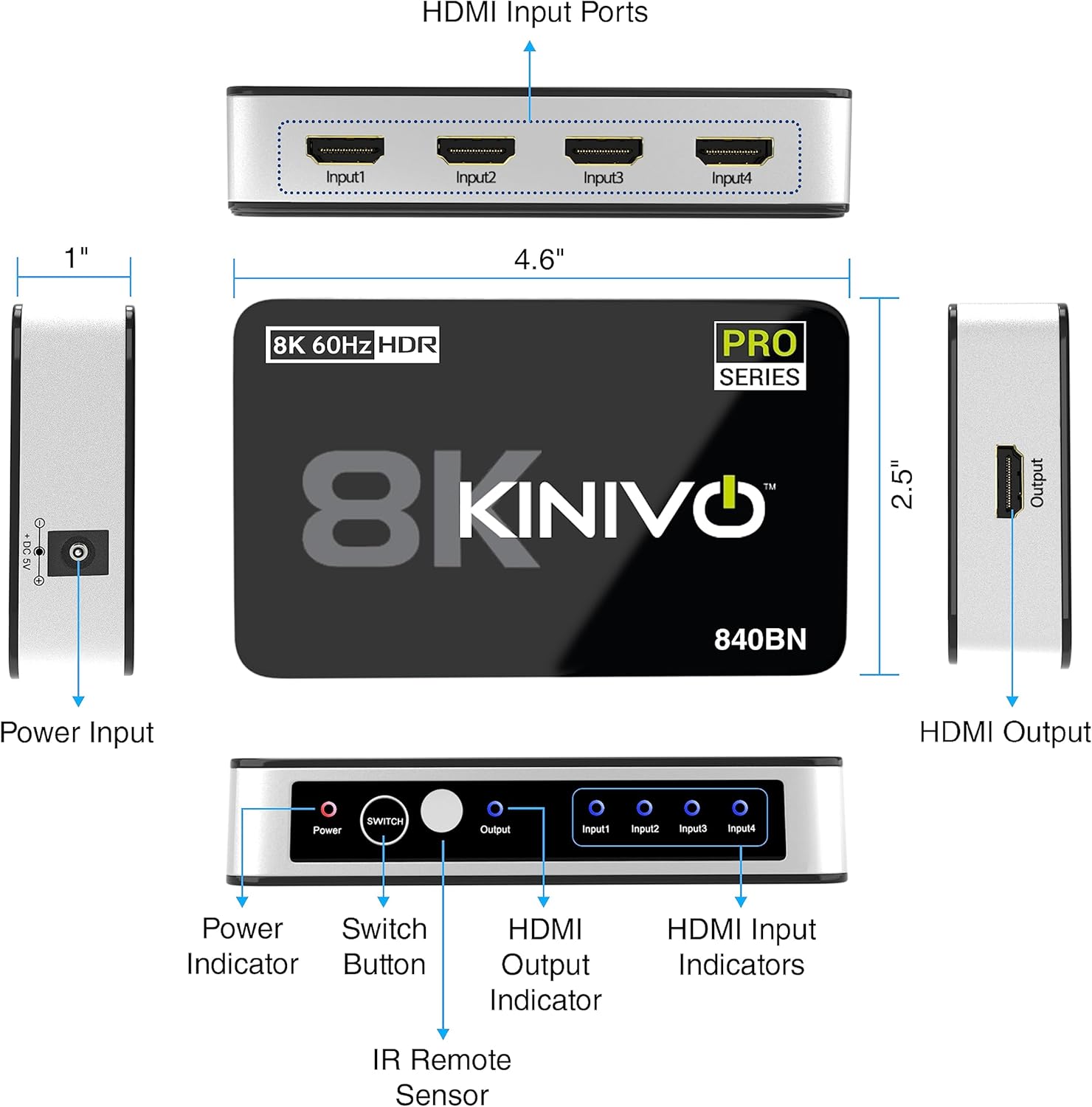
Detailed diagram of the Kinivo 8K HDMI Switch SW-840BN, showing all ports (Power Input, HDMI Input Ports 1-4, HDMI Output), buttons (Power, Switch), and indicators (Power, Output, Input 1-4), along with product dimensions.
Клучни компоненти:
- HDMI влезни порти (1-4): Connect your source devices (e.g., gaming consoles, Blu-ray players, streaming devices).
- HDMI излезен порт: Connects to your display (e.g., HDTV, monitor, projector).
- Влез на напојување (DC 5V): Поврзете го вклучениот адаптер за напојување.
- Копче за вклучување: Го вклучува или исклучува уредот.
- Копче за префрлување: Manually cycles through input sources.
- IR Remote Sensor: Прима сигнали од далечинскиот управувач.
- LED индикатори: Show power status and active input source.
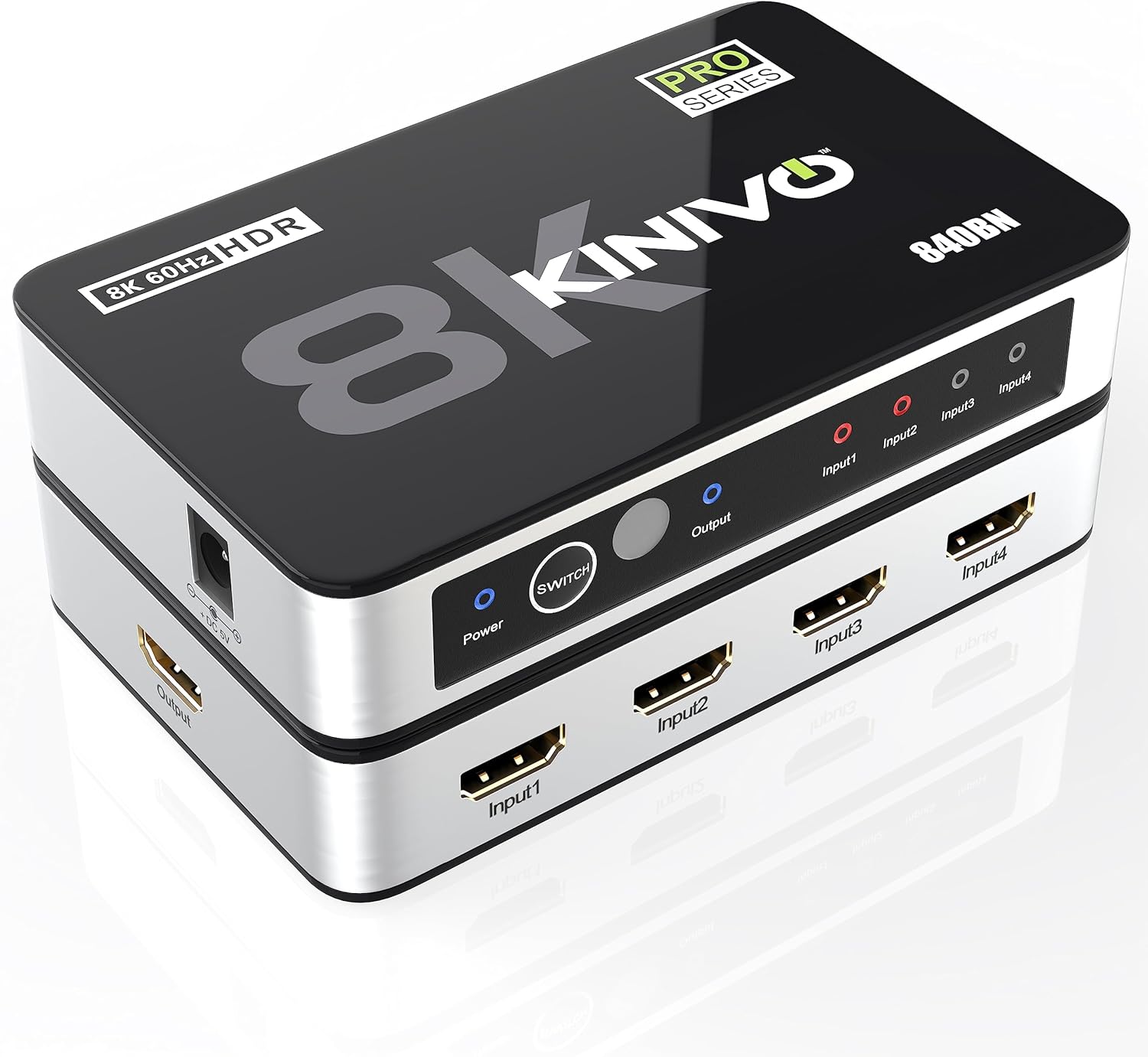
Kinivo 8K HDMI Switch SW-840BN, top-down angled view showing inputs, output, power button, and indicator lights.
4. Упатства за поставување
- Поврзете ги изворните уреди: Plug your HDMI source devices (e.g., PS5, Xbox, Apple TV, Blu-ray player) into the HDMI Input ports (Input1, Input2, Input3, Input4) on the Kinivo switch using high-quality HDMI 2.1 cables.
- Поврзете се со екранот: Connect the HDMI Output port of the Kinivo switch to an HDMI input on your display (HDTV, monitor, projector) using a high-quality HDMI 2.1 cable.
- Поврзете напојување: Plug the included power adapter into the DC 5V power input on the switch, then connect it to a power outlet. The Power LED indicator will illuminate.
- Вклучување: Press the Power button on the switch or use the remote control to turn on the device.

Diagram showing the connection of a PlayStation 5, Xbox Series X, and Apple TV to the Kinivo 8K HDMI Switch, which then connects to a television display.
5. Упатства за работа
Switching Input Sources:
- Рачно префрлување: Press the 'Switch' button on the front panel of the Kinivo device to cycle through the connected HDMI input sources. The corresponding input LED will light up.
- Префрлување со далечински управувач: Use the included IR remote control to directly select an input source (Input 1, Input 2, Input 3, Input 4) or to cycle through them. Ensure the remote is pointed towards the IR sensor on the switch.
- Автоматско префрлување: The Kinivo switch supports automatic input detection. When a new device is powered on or starts sending an HDMI signal, the switch may automatically switch to that input. Note: Not all devices support auto-switching (e.g., Apple TV, Fire TV, Xbox One, PS5, Roku). Manual or remote switching may be required for these devices.

Image depicting two methods of switching inputs on the Kinivo 8K HDMI Switch: manual switching via the device button and remote control switching, with a family enjoying content on a TV.
6. Карактеристики и можности
- 8K 60Hz and 4K 120Hz Support: Experience ultra-high-definition video with smooth motion.
- Пропусен опсег од 48Gbps: High-speed data transmission for uncompressed video and audio.
- HDR10+ и Dolby Vision: Enhanced contrast and color depth for a more realistic picture.
- Dolby Atmos: Извонредно аудио искуство.
- HDCP 2.3: Ensures compatibility with protected content.
- Супериорна конструкција: Features 24K gold-plated connectors for optimal signal transfer and an aluminum alloy shell for efficient heat dissipation and durability.

Visual comparison of 4K 30Hz, 4K 60Hz, and 8K 60Hz resolutions, illustrating the enhanced clarity of 8K with a vibrant underwater scene.

Експлодираше view of the Kinivo 8K HDMI Switch SW-840BN, highlighting its internal components: powerful IC chip, aluminum alloy shell for heat dissipation, and 24K gold-plated connectors.
7. Компатибилност
The Kinivo 8K HDMI Switch is broadly compatible with a variety of HDMI-enabled devices.
Компатибилни влезни уреди:
- Gaming Consoles (e.g., PS5, Xbox Series X/S, Nintendo Switch 2)
- Streaming Devices (e.g., Apple TV, Fire TV, Roku)
- Blu-ray Players, DVD Players
- Laptops, Desktop PCs
- Сет-топ боксови
Compatible Output Devices:
- HD телевизори
- Монитори
- Проектори

Compatibility chart for the Kinivo 8K HDMI Switch, listing various input devices like laptops, TV boxes, streaming devices, game consoles, desktops, and output devices such as HDTVs, monitors, and projectors.
8. Спецификации
| Карактеристика | Спецификација |
|---|---|
| Број на модел | SW-840BN |
| HDMI порти | 4 Inputs, 1 Output |
| Пропусна моќ на податоци | 48 Gbps |
| Поддршка за резолуција | 8K 60Hz, 4K 120Hz |
| Поддршка за HDR | HDR10+, Dolby Vision |
| Аудио поддршка | Dolby Atmos, Dolby Digital, Dolby TrueHD, DTSHD |
| Верзија за HDCP | 2.3 |
| Димензии на производот | 3.23 x 3.98 x 5.79 инчи |
| Тежина на ставката | 7.1 унци |
| Влез на енергија | DC 5V |
| Боја | Црното |

Comparison table of Kinivo HDMI switch models (840BN, 360BNT, 550BN/350BN) detailing HDMI ports, data throughput, resolution, audio output, and support for Dolby Vision, HDR, HDCP. Below the table, a visual comparison of 8K 60Hz and 4K 60Hz gaming visuals.
9 Смена на проблеми
- Нема слика/сигнал:
- Ensure all HDMI cables are securely connected to both the switch and your devices/display.
- Verify the power adapter is correctly connected and the switch is powered on.
- Try selecting the input source manually using the switch button or remote control.
- Test with different HDMI cables, especially high-quality HDMI 2.1 certified cables for 8K/4K 120Hz content.
- Заобиколете го прекинувачот и поврзете го изворот директно со екранот за да потврдите дека изворот и екранот работат правилно.
- Треперење или повремен сигнал:
- This often indicates a cable issue. Replace HDMI cables with shorter, higher-quality ones, especially for 8K/4K 120Hz signals.
- Ensure the power adapter is providing stable power to the switch.
- Reduce the resolution or refresh rate of the source device temporarily to see if the issue persists.
- Нема аудио:
- Check audio settings on your source device and display to ensure correct output.
- Verify that the HDMI cables support audio transmission.
- Автоматското префрлување не работи:
- As noted, some devices (e.g., Apple TV, Xbox, PS5) may not trigger auto-switching. Use manual or remote control switching for these devices.
- Ensure the source device is fully powered off when not in use to allow auto-switching to other active inputs.
10. Одржување
- Чувајте го уредот на ладно и суво место, подалеку од директна сончева светлина и извори на топлина.
- Чистете го уредот со мека, сува крпа. Не користете течни средства за чистење или аеросоли.
- Avoid blocking ventilation openings to ensure proper heat dissipation.
- Не обидувајте се сами да го расклопите или поправите уредот. Обратете се кај квалификуван сервисер.
11. Гаранција и поддршка
Kinivo offers a two-year warranty for the SW-840BN HDMI Switch. Additionally, lifetime US-based customer support is available to assist with any questions or issues you may encounter.
For technical support or warranty claims, please visit the official Kinivo webсајт или контактирајте со нивниот оддел за услуги на клиентите.