1. Вовед
This manual provides detailed instructions for the installation, operation, and maintenance of your Fractal Design Define 7 Nano Black Solid Mini ITX PC Case. Please read this manual thoroughly before beginning assembly to ensure proper installation and to maximize the performance and longevity of your system.
The Define 7 Nano is a compact Mini ITX case designed for silent operation and flexible component support, offering a balance of size and functionality for small form factor builds.

Слика 1: Предна страна view of the Fractal Design Define 7 Nano Black Solid Mini ITX PC Case.
2. Информации за безбедност
Внимавајте на следниве безбедносни мерки за време на инсталацијата и работата:
- Секогаш исклучувајте го напојувањето од ѕидниот штекер пред да инсталирате или отстраните било кои компоненти.
- Носете антистатички ремен за зглоб за да спречите оштетување на чувствителните компоненти од електростатско празнење (ESD).
- Внимателно ракувајте со компонентите за да избегнете физичко оштетување.
- Обезбедете соодветна вентилација околу куќиштето на компјутерот за да спречите прегревање.
- Држете го куќиштето подалеку од течности и прекумерна влажност.
- Do not attempt to modify the case structure, as this may void your warranty and pose safety risks.
3. Содржина на пакетот
Проверете дали сите компоненти се присутни во пакувањето:
- Fractal Design Define 7 Nano PC Case
- Accessory Box (screws, zip ties, standoffs, cleaning cloth)
- Упатство за употреба (овој документ)
- Pre-installed fans (Dynamic X2 GP-12/GP-14, quantity may vary)

Слика 2: Експлодирано view showing the various removable components of the Define 7 Nano case.
4. Поставување и инсталација на компоненти
4.1. Подготовка
- Распакувајте го куферот: Внимателно извадете ја кутијата од нејзиното пакување.
- Отстранете ги страничните панели: The side panels are secured with captive thumbscrews. Loosen the thumbscrews and slide the panels backward to remove them.
- Remove Top Panel (Optional): The top panel can be removed for easier access during installation or for enhanced airflow. Press the release button at the rear of the top panel and lift it off.
- Remove Front Panel (Optional): The front panel can be carefully pulled off from the bottom for access to front fan mounts and dust filters.
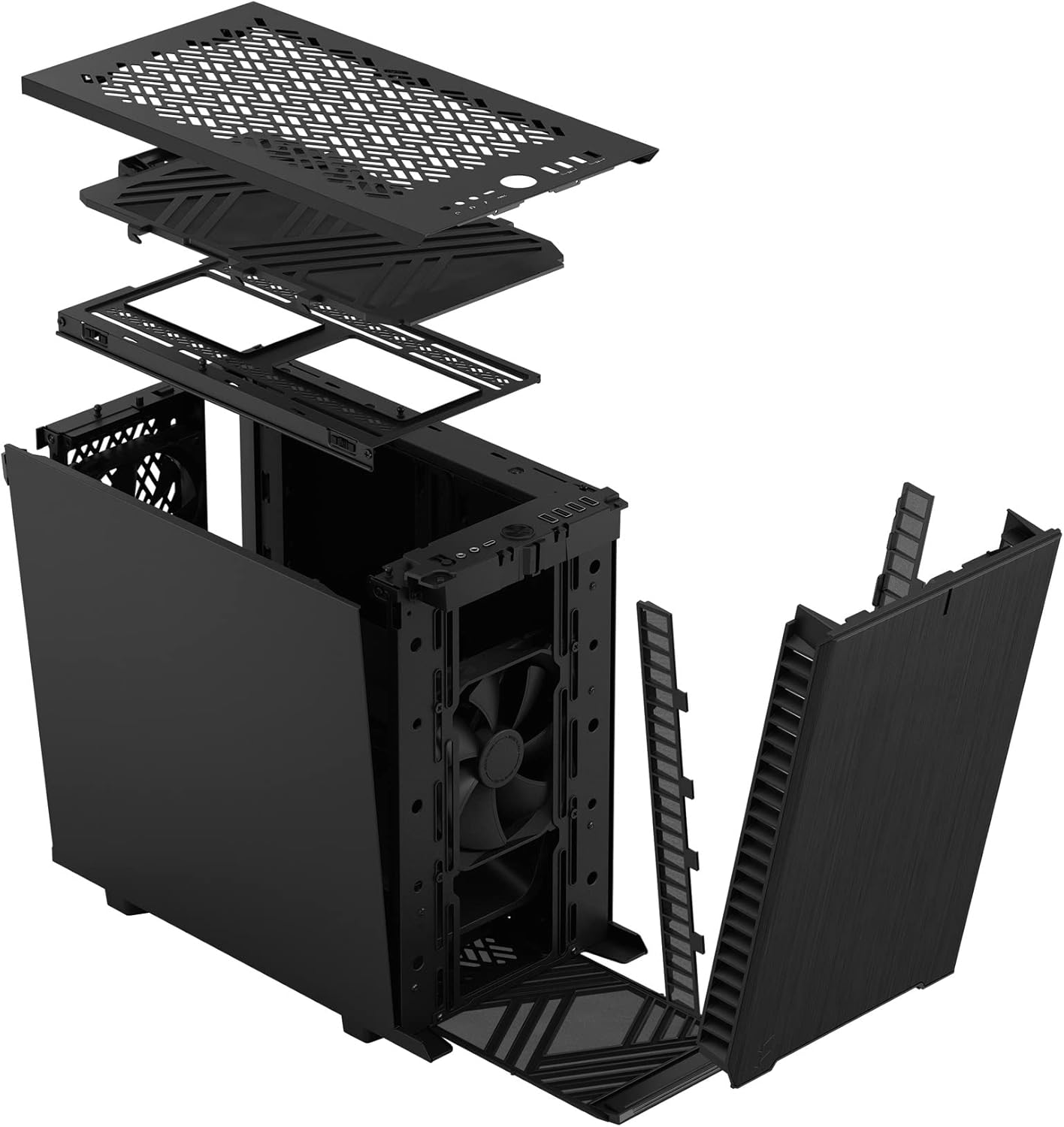
Слика 3: Експлодирано view illustrating the removal process for the front and top panels.
4.2. Инсталација на матична плоча
The Define 7 Nano supports Mini ITX motherboards.
- Инсталирајте I/O штит: If your motherboard requires an I/O shield, install it into the rear opening of the case before mounting the motherboard.
- Позиција на матичната плоча: Align your Mini ITX motherboard with the pre-installed standoffs inside the case.
- Безбедна матична плоча: Use the provided screws from the accessory box to secure the motherboard to the standoffs.
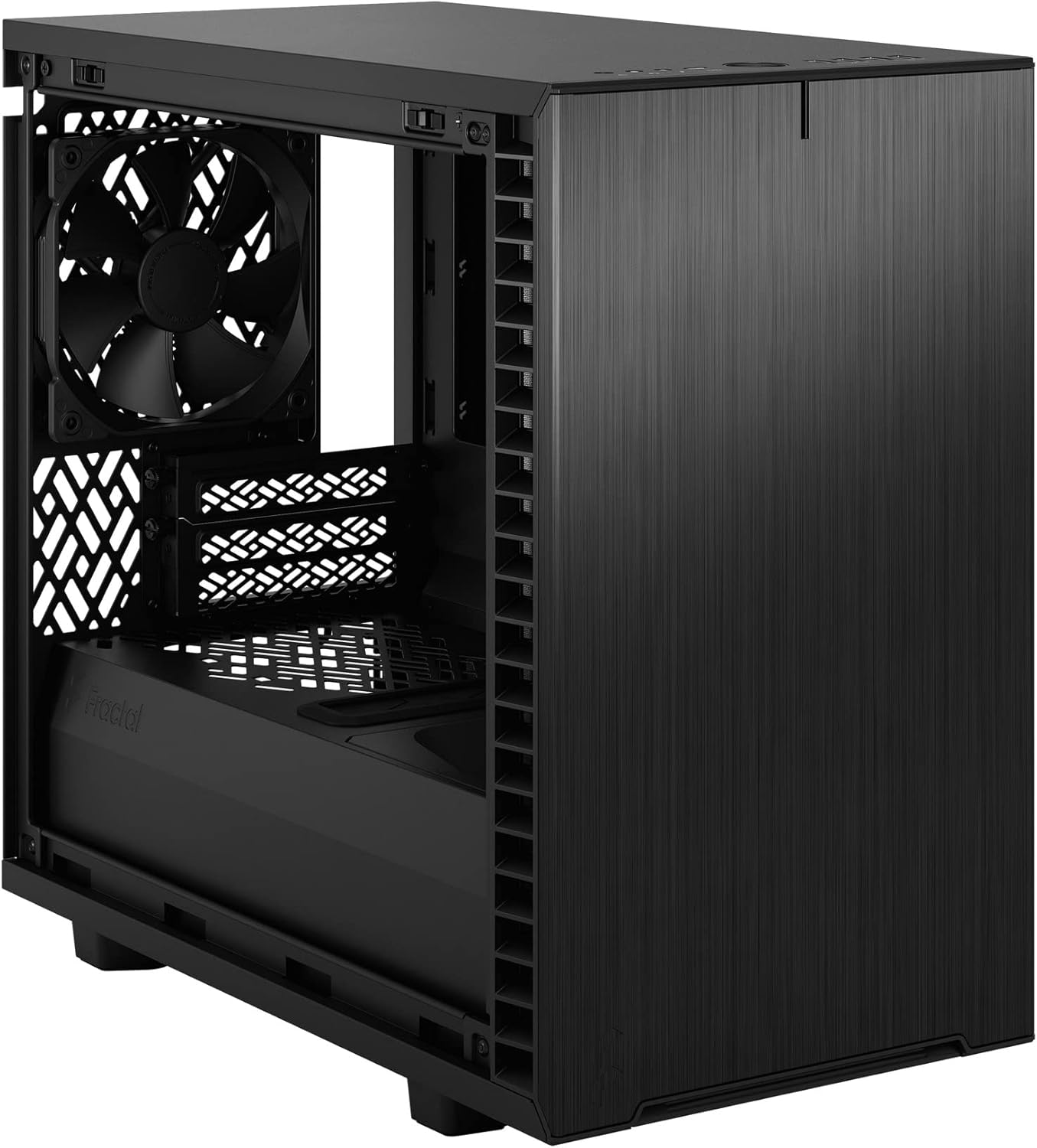
Слика 4: Внатрешност view of the case, highlighting the motherboard mounting area and fan locations.
4.3. Инсталација на единица за напојување (PSU)
The Define 7 Nano supports ATX PSUs.
- Mount PSU Bracket: Attach the PSU mounting bracket to your power supply using the screws provided with the PSU.
- Slide PSU into Case: Slide the PSU with the attached bracket into the rear of the case.
- Безбедно напојување: Secure the PSU bracket to the case using the thumbscrews.
4.4. Инсталација на диск за складирање
Куќиштето поддржува 2.5" SSD и 3.5" HDD дискови.
- 2.5" Drives: Mount 2.5" drives to the dedicated SSD brackets located behind the motherboard tray or on the PSU shroud. Secure with screws.
- 3.5" Drives: Install 3.5" drives into the drive cage located beneath the PSU shroud. Secure with screws.
4.5. Инсталација на графичка картичка (GPU)
- Отстранете ги капаците на PCIe слотовите: Отстранете ги потребните капаци за PCIe слотовите од задната страна на куќиштето.
- Вметнете графичка картичка: Carefully insert your graphics card into the primary PCIe slot on the motherboard.
- Безбеден графички процесор: Secure the graphics card to the case using the thumbscrews or standard screws.
4.6. Cooling System Installation (Fans/Radiators)
The Define 7 Nano offers flexible cooling options.
- Предни вентилатори: Up to two 120/140mm fans or a 240/280mm radiator can be installed at the front.
- Врвни фанови: Up to two 120/140mm fans or a 240mm radiator can be installed at the top (requires removing the solid top panel and installing the ventilated top panel).
- Заден вентилатор: One 120mm fan can be installed at the rear.
- Долен вентилатор: One 120mm fan can be installed at the bottom.
Ensure fans are oriented correctly for optimal airflow (intake or exhaust).
4.7. Управување со кабли
The case features routing channels and Velcro straps behind the motherboard tray for organized cable management.
- Кабли за маршрута: Pass power and data cables through the rubber grommets to the back of the motherboard tray.
- Безбедни кабли: Use the pre-installed Velcro straps and included zip ties to bundle and secure cables.

Слика 5: Заден внатрешен дел view demonstrating the cable management system with Velcro straps.
4.8. Приклучоци на предниот панел
Поврзете ги каблите на предниот панел со соодветните конектори на матичната плоча:
- Power Button (PWR SW)
- Reset Button (RESET SW)
- Power LED (PWR LED)
- HDD Activity LED (HDD LED)
- Заглавие USB 3.0
- USB Type-C Header (if applicable)
- HD аудио заглавие
Refer to your motherboard manual for exact header locations.
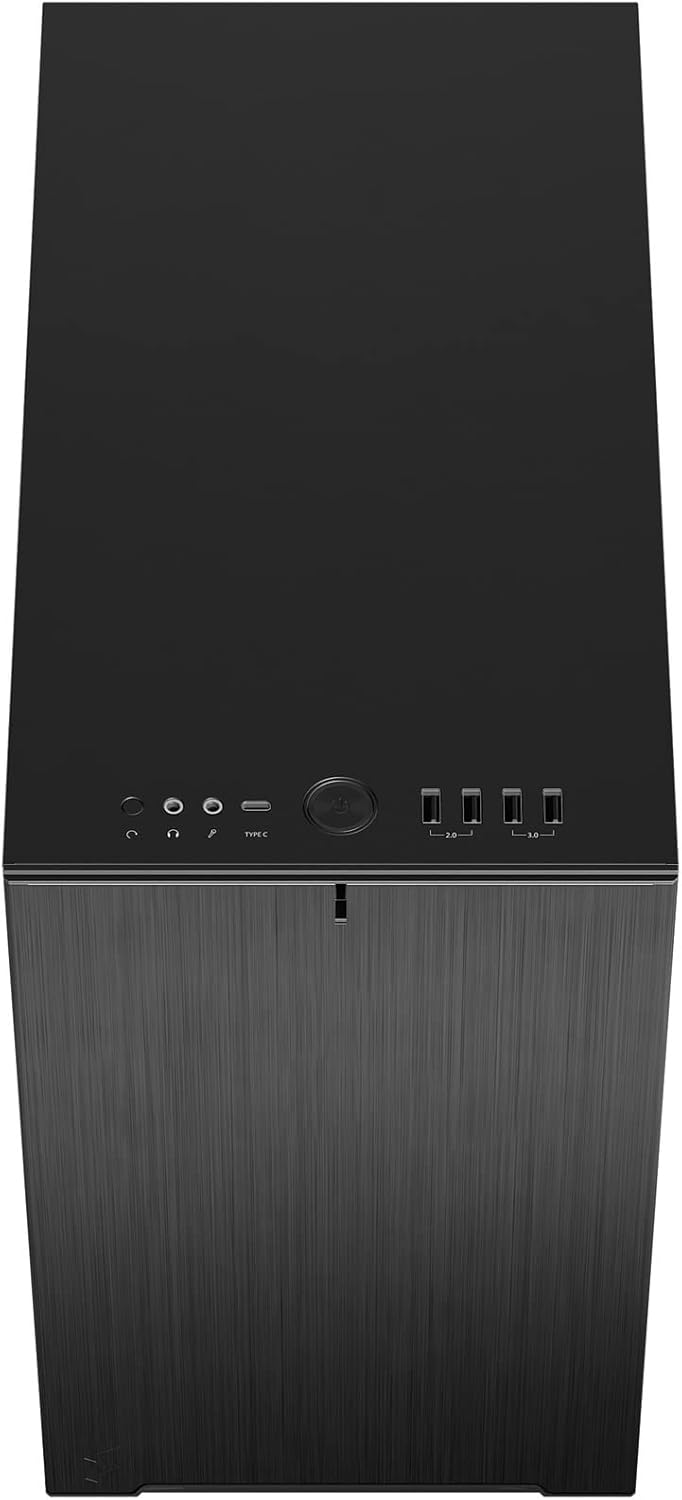
Слика 6: Горе-предна страна view displaying the front I/O panel with USB ports, audio jacks, and power button.
5. Упатства за работа
5.1. Вклучување/исклучување
- Вклучување: Press the power button located on the front I/O panel.
- Исклучено: Initiate a shutdown from your operating system. Alternatively, press and hold the power button for 5 seconds for a forced shutdown.
5.2. Using Front Panel Ports
The front I/O panel provides convenient access to:
- USB 3.0 порти: За брз пренос на податоци со компатибилни уреди.
- Приклучок за USB Type-C: For modern devices requiring a Type-C connection.
- Аудио приклучоци: За поврзување на слушалки и микрофони.
6. Одржување
Редовното одржување помага да се обезбедат оптимални перформанси и долготрајност на компонентите на вашиот компјутер.
6.1. Чистење на филтерот за прашина
The Define 7 Nano is equipped with easily removable dust filters to prevent dust buildup inside the case.
- Преден филтер: Can be accessed by removing the front panel.
- Горен филтер: Located beneath the ventilated top panel (if installed).
- Долен филтер: Slides out from the front of the case.
Clean filters regularly (e.g., monthly) by rinsing them with water and allowing them to dry completely, or by using a soft brush or compressed air.
6.2. Општо чистење
- Користете мека, гamp cloth to wipe down the exterior surfaces of the case.
- Избегнувајте употреба на груби хемикалии или абразивни материјали кои би можеле да ја оштетат завршницата.
- For interior cleaning, use compressed air to remove dust from components. Ensure the system is powered off and unplugged.
7 Смена на проблеми
Овој дел се однесува на вообичаени проблеми со кои може да се соочите.
7.1. No Power / System Not Starting
- Проверете ги приклучоците за напојување: Ensure the PSU is properly connected to the wall outlet and the power switch on the PSU is in the 'ON' position. Verify all internal power cables (24-pin ATX, 8-pin CPU, PCIe, SATA) are securely connected.
- Заглавија на предниот панел: Double-check that the power button header (PWR SW) is correctly connected to the motherboard.
- Motherboard/CPU: Осигурајте се дека процесорот и RAM меморијата се правилно поставени.
7.2. Прекумерна бучава
- Бучава од вентилаторот: Check if any fan cables are obstructing fan blades. Ensure fans are securely mounted. Consider adjusting fan speeds in your motherboard's BIOS/UEFI or operating system.
- Вибрации: Ensure all components (PSU, drives, GPU) are securely fastened to prevent rattling.
7.3. Прегревање
- Проток на воздух: Verify that fans are oriented correctly (intake/exhaust) and that there is adequate airflow.
- Филтри за прашина: Clean dust filters regularly to prevent restricted airflow.
- Термална паста: Ensure CPU cooler has proper thermal paste application.
8. Спецификации
| Карактеристика | Спецификација |
|---|---|
| Име на моделот | Define 7 Nano |
| Број на модел | FD-C-DEF7N-01 |
| Тип на случај | Мини-кула |
| Компатибилност со матична плоча | Мини ITX |
| Димензии (Д x Ш x В) | Приближно 18.74 x 11.38 x 17.91 инчи (пакет) |
| Тежина | Приближно 18.37 фунти |
| Материјал | Алуминиум |
| Боја | Црно цврсто |
| Предни влезни порти | 5x USB 3.0, Audio In/Out, Power Button |
| Диск Бејс | 2.5" SSD, 3.5" HDD (specific quantities vary by configuration) |
| Метод на ладење | Воздух |
| Претходно инсталирани вентилатори | Dynamic X2 GP-12 (rear), Dynamic X2 GP-14 (front) |
9. Гаранција и поддршка
Fractal Design products are manufactured to the highest quality standards and come with a limited warranty. For detailed warranty information, please refer to the official Fractal Design webлокацијата или гарантната картичка вклучена со вашиот производ.
For technical support, troubleshooting assistance, or to inquire about replacement parts, please visit the official Fractal Design support page:
www.fractal-design.com/support/
Please have your product model number (FD-C-DEF7N-01) and proof of purchase ready when contacting support.


