1. Вовед
This manual provides essential instructions for the safe and effective installation, operation, and maintenance of your DALY Smart BMS Li-ion 20S 72V 200A Battery Management System. Please read this manual thoroughly before use to ensure proper functionality and to prevent damage to the device or battery pack.
2. Производот завршиview
The DALY Smart BMS is designed to manage and protect Li-ion battery packs with 20 series cells and a nominal voltage of 72V, supporting a continuous discharge current of 200A. It integrates advanced protection features and communication capabilities.

Слика: напред view of the DALY Smart BMS, showcasing its robust red heat sink design and connection points.
Клучни карактеристики:
- Overcurrent, Overcharge, Overdischarge, Short circuit, and Temperature protection.
- Double protection with injection patent technology and patent shell for waterproof, dustproof, shockproof, and anti-static properties.
- Smart monitoring via Bluetooth app or PC software for real-time battery status and parameter modification.
- High acquisition accuracy with quality components.
Содржина на пакетот:

Image: The DALY Smart BMS package includes the BMS unit, Bluetooth module, NTC temperature sensor, sampling cable, and UART cable.
- 3.7V Li-ion BMS (1 unit)
- Bluetooth Module (1 unit)
- NTC Temperature Sensor (1 unit)
- Sampling Cable (1 unit)
- UART Cable (1 unit)
- Упатство за употреба (1 единица)
3. Информации за безбедност
Always prioritize safety when working with battery management systems and high-voltage battery packs. Improper installation or handling can lead to serious injury, fire, or damage to equipment.
- Се препорачува професионална инсталација: Installation should be performed by qualified personnel with experience in battery systems.
- Изолирани алатки: Use only insulated tools to prevent short circuits.
- Voltagд Потврда: Секогаш проверувајте го томtage levels with a multimeter before making any connections.
- Правилен поларитет: Ensure all connections are made with correct polarity. Reversing polarity can cause severe damage.
- Вентилација: Ensure adequate ventilation when working with battery packs.
- Итни постапки: Be aware of emergency procedures for battery fires or electrical shocks.
4. Поставување и инсталација
Careful adherence to the wiring diagram and instructions is crucial for the correct operation of the BMS.
Дијаграм за поврзување:

Image: Detailed wiring diagram for connecting the DALY Smart BMS to a battery pack, motor/load, and charger, including balance wire connections.
Чекори за инсталација:
- Подгответе жици: Use appropriate tools (soldering machine, scissors, double-sided tape, tin wire, multimeter) for preparing connections.
- Disconnect Balance Wires: ВАЖНО: Before connecting the BMS, disconnect all balance wires. Connect the BMS connection port после connecting the black and red balance wires on the battery pack.
- Обезбедете ладење: Keep the BMS red cooling surface side uncovered to allow for proper heat dissipation.
- Use Matching Wires: Use DALY matching balance wires (regular length 450 mm / 17.72 inches).
- Поврзете ги жиците за балансирање: After confirming that the balance wires are correctly welded and installed, connect the balance wires and the BMS connection port.
- Connect Communication Modules: Attach communication accessories such as UART, Bluetooth, RS485, or CAN as needed.
- Почетно активирање: Press the activation button on the battery board or charge the battery to activate the BMS for the first time.
For detailed video tutorials on connections, please visit the DALY webсајт: www.dalyelec.cn/newsshow.php?cid=25&id=78&lang=1
5. Упатства за работа
The DALY Smart BMS offers various communication interfaces for monitoring and configuration.
Комуникациски интерфејси:

Image: Diagram illustrating the various communication interfaces available on the DALY Smart BMS, including RS485, CAN, UART, and Bluetooth, and their connection to external devices like computers or mobile phones.
- Bluetooth (BT): Connect to the DALY Smart BMS app on your smartphone.
- UART: Universal Asynchronous Receiver-Transmitter for serial communication, typically with a PC.
- RS485: Industrial standard for serial communication over long distances, often used with PC software.
- МОANЕ: Controller Area Network, a robust vehicle bus standard for communication.
Користење на Bluetooth апликацијата:
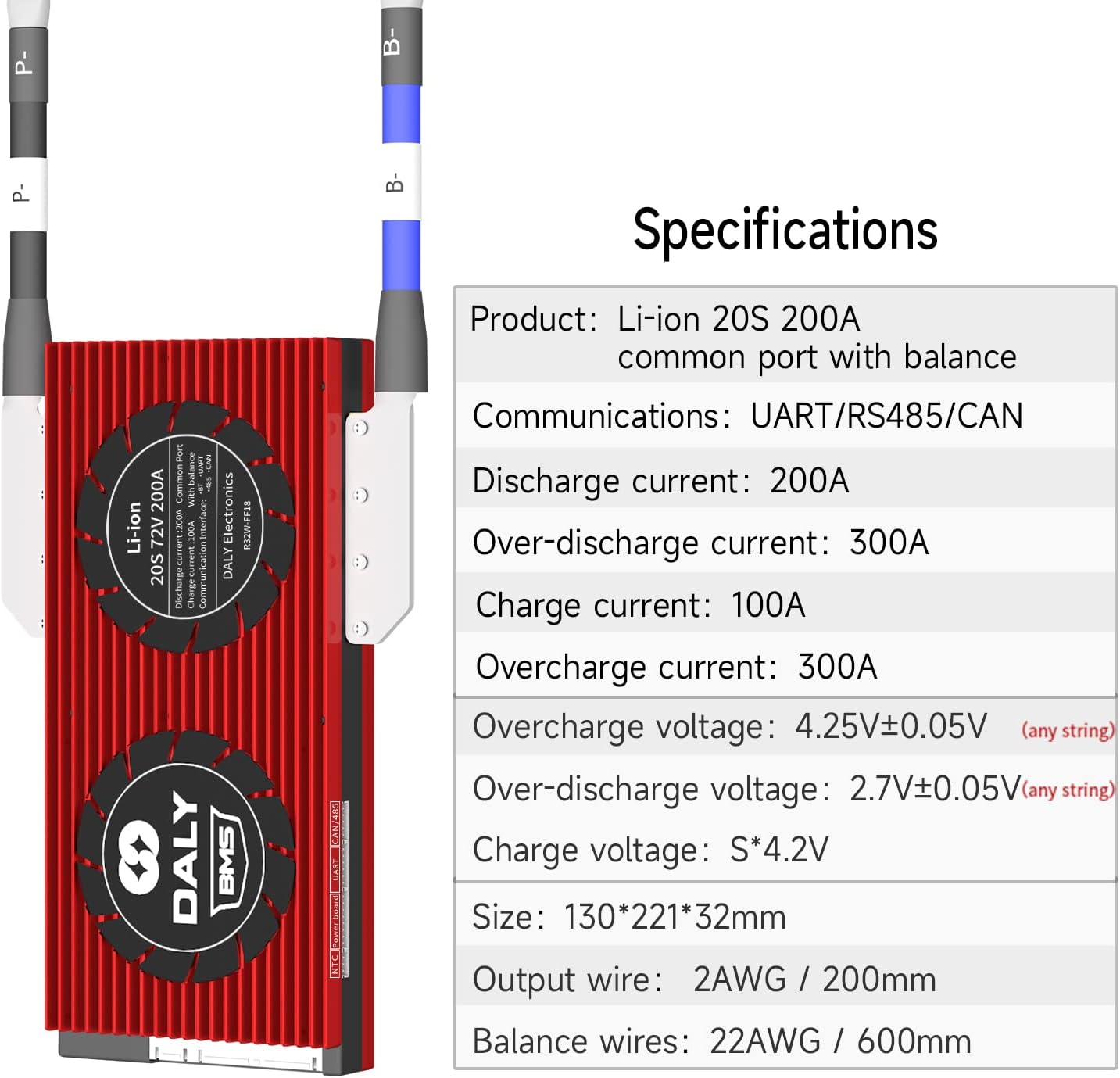
Image: Screenshot of the DALY Smart BMS Bluetooth application interface, showing battery status, voltage, current, and fault alarms.
The Bluetooth app allows you to check battery status and modify parameters. The initial password for the Smart Board APP to change parameters is 123456.
The serial number of the BMS and the protection parameters (Li-ion, LiFePO4) have default values from the factory. The capacity of the battery pack needs to be set according to the actual capacity (AH) of the battery pack. If the capacity AH is not set correctly, the percentage of remaining power will be inaccurate. Other parameters can also be set to your needs.
6. Одржување
Proper maintenance ensures the longevity and reliable performance of your DALY Smart BMS.
- Одржувајте чисто: Regularly inspect the BMS for dust or debris and clean gently if necessary.
- Обезбедете проток на воздух: Always ensure the red cooling surface of the BMS is uncovered and has adequate airflow to prevent overheating.
- Проверки за поврзување: Периодично проверувајте ги сите жичени врски за затегнатост и знаци на корозија.
- Ажурирања на софтверот: Keep the Bluetooth app and PC software updated to the latest versions for optimal performance and bug fixes.
7 Смена на проблеми
If you encounter issues with your DALY Smart BMS, refer to the following common problems and solutions:
| Проблем | Можна причина / решение |
|---|---|
| BMS not activating / No power output | Ensure the activation button has been pressed or the battery pack has received an initial charge. Check all main power connections and balance wire connections. |
| Overcurrent/Overcharge/Overdischarge Protection Triggered | Reduce load, check charger output, or verify battery cell voltages. The BMS is functioning to protect the battery. Review configured parameters in the app/software. |
| Temperature Protection Triggered | Ensure adequate cooling for the BMS and battery pack. Check NTC sensor connection and placement. |
| Bluetooth App Connectivity Issues | Ensure Bluetooth is enabled on your device. Check that the BMS is powered on. Try restarting the app or updating it to the latest version. Some devices may require location services to be enabled for Bluetooth scanning. |
| Inaccurate State of Charge (SOC) Reading | Verify that the battery pack's actual capacity (AH) is correctly set in the BMS parameters via the app or PC software. |
| "Collection Chip Error" or similar cell voltage reading issues | This often indicates an issue with the balance wire connections or the internal cell monitoring circuitry. Carefully re-check all balance wire connections for proper seating and continuity. If the issue persists, contact technical support. |
If troubleshooting steps do not resolve the issue, please contact DALY customer service for further assistance.
8. Спецификации

Image: Table detailing the technical specifications of the DALY Smart BMS, including current ratings, voltage thresholds, and physical dimensions.
| Параметар | Вредност |
|---|---|
| Тип на производ | Li-ion 20S 200A common port with balance |
| Комуникациски интерфејси | UART/RS485/CAN/Bluetooth |
| Струја на празнење | 200 А |
| Прекумерно празнење Струја | 300 А |
| Струја на полнење | 100 А |
| Преполнување Voltage | 4.25V ± 0.05V (any string) |
| Прекумерно празнење Voltage | 2.7V ± 0.05V (any string) |
| Полнење Voltage | S*4.2V (where S is number of series cells) |
| Димензии (Д x Ш x В) | 130 x 221 x 32 mm (5.12 x 8.7 x 1.26 инчи) |
| Излезна жица | 2AWG / 200mm |
| Balance Wires | 22AWG / 600mm |
| Тежина на ставката | 4.1 фунти |
9. Гаранција и поддршка
DALY is committed to providing reliable products and customer satisfaction.
- Техничка поддршка: We offer 24-hour one-on-one customer service and lifetime technical support.
- Обезбедување квалитет: This product is ISO/FCC/RoHS/PSE/CE APPROVED, ensuring adherence to international quality and safety standards.
- Контакт: For any inquiries, technical assistance, or if you require a customized BMS or bulk order, please contact DALY customer service.


