1. Производот завршиview
The UNV NVR302-16E2 is a high-performance Network Video Recorder (NVR) designed for advanced surveillance systems. It supports 4K resolution recording and playback, offering robust video management capabilities for up to 32 channels. This NVR is compatible with various camera protocols, including ONVIF, and features Ultra H.265 compression for efficient storage.
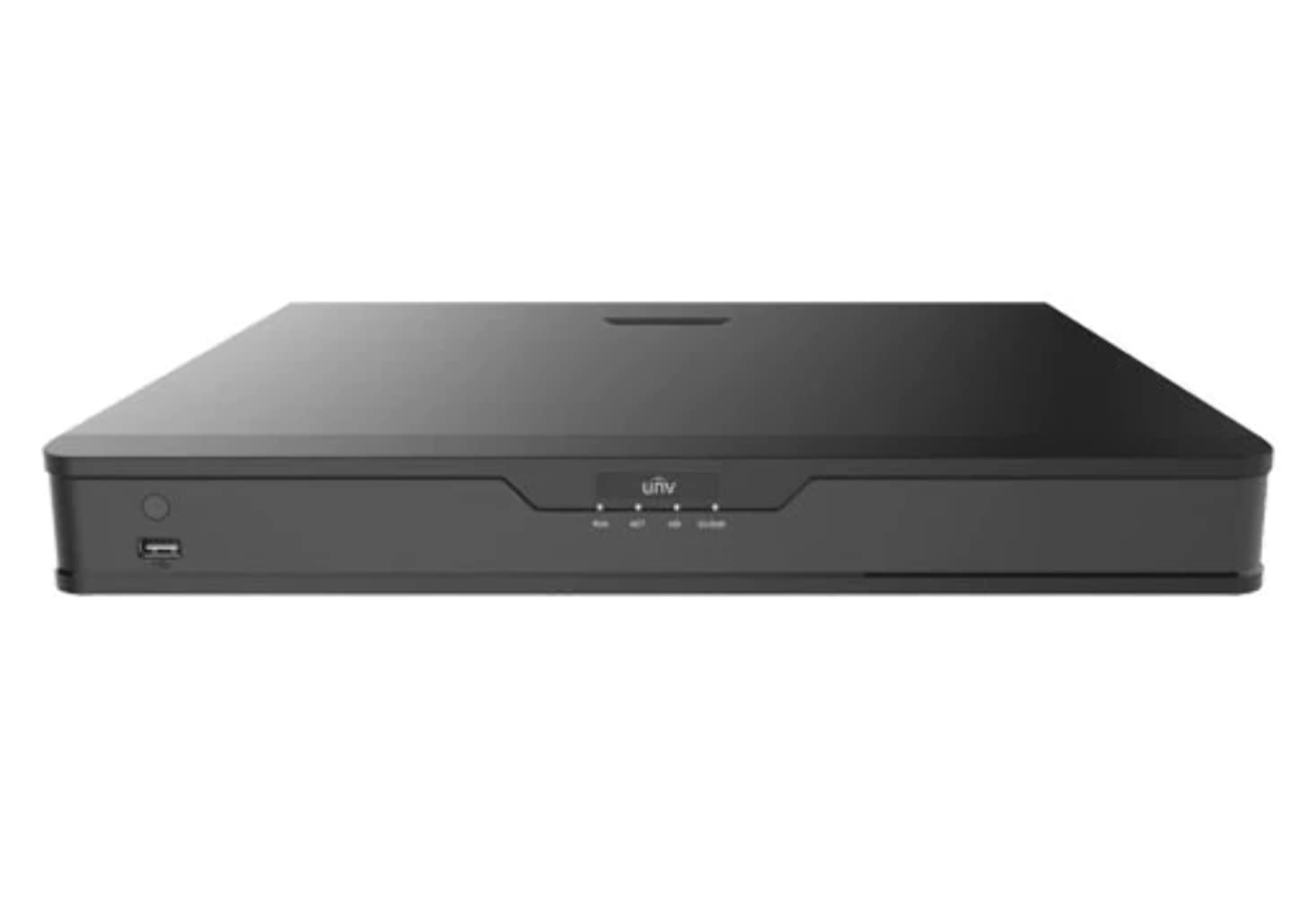
Слика 1: Предна страна view of the UNV NVR302-16E2 4K NVR. The front panel includes a power button, a USB port, and indicator lights for power, HDD activity, network status, and alarm.
2. Клучни карактеристики
- Supports Ultra H.265/H.265/H.264 video formats for efficient compression.
- 8/16-channel input with Plug & Play functionality via independent PoE network interfaces.
- Compatibility with mainstream cameras supporting ONVIF conformance (Profile С, Проfile Г, Проfile Т) и RTSP протоколи.
- Equipped with 1-channel HDMI and 1-channel VGA outputs, with HDMI supporting up to 4K (3840x2160) resolution.
- Independent HDMI and VGA outputs for flexible display options.
- Supports recording resolutions up to 12 Megapixels.
- Accommodates 2 SATA HDDs, with support for up to 10TB per HDD.
- Features various fisheye dewarping modes for live view and playback, accessible via both web interface and GUI.
- Incorporates ANR (Automatic Network Replenishment) technology to enhance storage reliability during network disconnections.
- Supports cloud upgrade for convenient firmware updates.
3. Содржина на пакетот
Ве молиме проверете ја содржината на пакувањето по отпакувањето. Доколку недостасуваат или се оштетени некои предмети, веднаш контактирајте го вашиот продавач.
- UNV NVR302-16E2 NVR Unit
- Адаптер за напојување
- USB глушец
- SATA Data Cables (for HDD installation)
- HDD Mounting Screws
- Водич за брз почеток
4. Поставување
4.1 Физичка инсталација
- Инсталација на HDD:
Unscrew and remove the NVR cover. Securely mount the SATA hard disk drives (HDDs) into the designated bays using the provided screws. Connect the SATA data and power cables from the NVR motherboard to the HDDs. Replace the NVR cover and secure it with screws.
- Поврзување на дисплеј:
Connect a monitor to the NVR's HDMI or VGA output port using a compatible cable.
- Поврзете го глувчето:
Вклучете го USB-глушецoт во еден од USB-портите на NVR-от.
- Поврзете мрежа:
Поврзете етернет кабел од LAN-портата на NVR-от со вашиот мрежен рутер или прекинувач.
- Поврзување камери:
For PoE cameras, connect them directly to the NVR's independent PoE ports. For non-PoE cameras, ensure they are connected to the same network as the NVR and powered separately.
- Поврзете напојување:
Поврзете го адаптерот за напојување со приклучокот за напојување на NVR, а потоа вклучете го во штекер. NVR ќе се вклучи автоматски.
4.2 Почетна конфигурација
Upon the first boot, the NVR will guide you through an initial setup wizard. Follow the on-screen prompts to configure essential settings.
- Поставете администраторска лозинка: Create a strong password for the 'admin' user. This is crucial for security.
- Мрежни поставки: Configure the NVR's IP address (DHCP or Static IP). Ensure it is on the same network as your cameras for proper communication.
- Датум и време: Поставете го точниот датум, време и временска зона.
- Иницијализација на HDD: The NVR will prompt you to initialize (format) the newly installed HDDs. This step is necessary before recording can begin.
- Camera Search and Add: The NVR will automatically search for connected cameras. Select and add the cameras you wish to manage.
5. Управување со NVR
5.1 Во живо View
After setup, the NVR will display the live view на поврзани камери. Можете да префрлате помеѓу единечна камера view, мрежа со повеќе камери viewи прилагодете го распоредот на екранот.
- Избор на канал: Click on a channel window to select it.
- Контрола на PTZ: If using PTZ cameras, use the on-screen controls or joystick (if connected) to pan, tilt, and zoom.
- Инстант репродукција: Right-click on a channel and select "Instant Playback" to view неодамнешни снимки.
5.2 Управување со снимање
The NVR supports various recording modes.
- Закажано снимање: Configure recording schedules based on time, day, and event (e.g., motion detection).
- Снимање на откривање на движење: Set up motion detection zones and sensitivity for each camera to trigger recording only when movement is detected.
- Рачно снимање: Start or stop recording manually from the live view интерфејс.
5.3 Репродукција
Пристап до снимената хранаtagе за повторноview.
- Navigate to the "Playback" menu.
- Select the camera(s) and date/time range for playback.
- Користете ја временската линија за да се движите низ снимките.
- Options include fast forward, rewind, pause, and frame-by-frame playback.
5.4 Резервна копија
Export recorded video clips to an external USB drive.
- Insert a USB flash drive into the NVR's USB port.
- Go to the "Backup" menu.
- Select the camera, time range, and desired video format for export.
- Start the backup process.
5.5 Далечински пристап
Access your NVR remotely via a web прелистувач или мобилна апликација.
- Web Прелистувач: Внесете ја IP адресата на NVR во web прелистувач на компјутер поврзан на истата мрежа. Најавете се со вашите акредитиви.
- Мобилна апликација: Download the official Uniview mobile application (e.g., EZView). Register an account, add your NVR by scanning the QR code or entering its serial number, and view live feeds or playback remotely.
6. Одржување
6.1 Ажурирања на фирмверот
Regularly check for and install firmware updates to ensure optimal performance, security, and access to new features. Updates can typically be performed via the NVR's web interface or local GUI, often with cloud upgrade support.
6.2 HDD Management
Monitor the health and status of your hard drives. The NVR provides tools to check HDD status, format drives, and configure overwrite settings when storage is full.
6.3 Системски дневници
Review system logs for any errors, warnings, or important events. This can assist in troubleshooting and system monitoring.
7 Смена на проблеми
| Проблем | Можна причина | Решение |
|---|---|---|
| Нема видео излез на мониторот. | Loose cable connection; incorrect display resolution; NVR not powered on. | Check HDMI/VGA cable connections. Ensure NVR is powered. Try a different monitor or cable. Adjust NVR output resolution if possible. |
| Камерите не се прикажуваат. | Network issue; incorrect camera IP; camera not powered; camera not added to NVR. | Verify network connectivity. Ensure cameras are powered. Check camera IP addresses and add them to the NVR if not already done. |
| Не може да се пристапи до NVR од далечина. | Network configuration issue (port forwarding, DDNS); NVR offline; incorrect credentials. | Verify NVR's network settings. Ensure necessary ports are forwarded on your router. Check internet connection. Confirm login credentials. |
| Нема снимање. | HDD not initialized or full; recording schedule not set; camera not recording. | Initialize the HDD. Check recording schedules and ensure they are active. Verify camera status and ensure it's configured to record. |
8. Спецификации
| Карактеристика | Детал |
|---|---|
| Број на модел | NVR302-16E2 |
| Поддржани видео формати | Ultra H.265 / H.265 / H.264 |
| Внесување на канал | 8/16-channel (with independent PoE interfaces) |
| HDMI излез | 1-channel, up to 4K (3840x2160) resolution |
| Излез на VGA | 1-канал |
| Максимална резолуција за снимање | До 12 мегапиксели |
| Поддршка за HDD | 2 SATA HDDs, up to 10TB each (20TB total) |
| Технологија за поврзување | HDMI, VGA, Ethernet, USB |
| Компатибилни уреди | IP Cameras (ONVIF Profile S, G, T; RTSP) |
| Димензии на производот | 18 x 14 x 4 инчи (45.72 x 35.56 x 10.16 см) |
| Тежина на ставката | 3.97 фунти (1.8 кг) |
| Производител | Униview |
9. Гаранција и поддршка
Униview products typically come with a limited manufacturer's warranty. For specific warranty terms and conditions, please refer to the warranty card included with your product or visit the official Uniview webсајт.
For technical support, troubleshooting assistance, or service inquiries, please contact Uniview customer support through their official channels. You can usually find contact information, FAQs, and support resources on the Uniview webсајт (www.uniview.com).
Поврзани документи - NVR302-16E2
 |
Troubleshoot Uniview NVR Two-Way Audio Issues | Uniview Поддршка Comprehensive guide to troubleshoot and resolve two-way audio problems on Uniview NVRs and cameras. Includes steps for web interface, mobile app, and NVR GUI. |
 |
Униview Network Video Recorder Quick Guide A quick guide for Uniview Network Video Recorders (NVRs), covering device indicators, interface ports, disk installation for various HDD configurations (1, 2, 4, 8, 9, 16-bay), startup and shutdown procedures, local operations like adding IP devices and playback, UNV-Link mobile app usage, web login, and essential safety warnings, disclaimers, and regulatory compliance information. |
 |
Како да се смени универзитетотview Поставки за време на NVR Чекор-по-чекор водич за тоа како да ги прилагодите поставките за време и датум за Униview Мрежни видео рекордери (NVR) кои користат различни методи, вклучувајќи web интерфејс, директен пристап до мониторот, софтвер EZTools и мобилни апликации како EZView и UNV-Link. |
 |
Униview Дигитален видео рекордер од серијата XVR301-G3: Технички лист усогласен со NDAA Сеопфатен лист со податоци за Униview Дигитален видео рекордер од серијата XVR301-G3, вклучувајќи ги моделите XVR301-04G3, XVR301-08G3 и XVR301-16G3. Детали за карактеристиките, спецификациите, поврзувањето и усогласеноста. |
 |
Униview 2021 Product Guide: Network Cameras, NVRs, VMS & Security Solutions Откријте го сеопфатниот Универзитетview 2021 Product Guide, detailing a wide array of professional video surveillance solutions. This guide covers Network Cameras, NVRs, VMS, Professional Storage, Display & Control systems, and Accessories, featuring advanced technologies like LightHunter and PixelSense. Find detailed specifications and model information for Easy, Prime, and Pro series products, suitable for various applications from residential security to large-scale enterprise deployments. |
 |
NVR-B3601.33.45.221212 Белешки за издавање - Жеџијанг Униview Технологии Официјални белешки за објавување за Zhejiang Uniview Софтвер за мрежен видео рекордер NVR-B3601.33.45.221212 од Technologies, со детални информации за верзијата, нови функции, промени и процедури за надградба. |