1. Вовед
Thank you for choosing the Meetion C4120 2.4G Wireless Mouse and Keyboard Combo. This manual provides essential information for setting up, operating, and maintaining your new wireless peripheral set. Please read it thoroughly before use to ensure optimal performance and longevity.
This combo includes a full-size wireless keyboard and a wireless optical mouse, designed for efficient and comfortable use across various operating systems.
2. Содржина на пакетот
- Meetion 2.4G Wireless Keyboard
- Meetion 2.4G Wireless Mouse
- USB Nano Receiver (typically stored inside the mouse battery compartment)
- Упатство за употреба (овој документ)
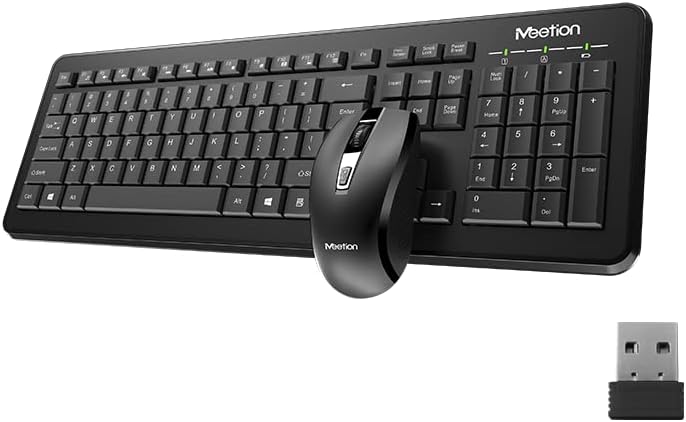
Image Description: This image displays the Meetion C4120 wireless keyboard, the wireless mouse, and the compact USB nano receiver, which is essential for connecting both devices to your computer.
3. Водич за поставување
3.1. Инсталирање батерии
Инсталација на батерија на тастатура
- Пронајдете го делот за батерии на долната страна од тастатурата.
- Отворете го капакот на преградата за батерии.
- Insert the required batteries (e.g., 2 x AAA alkaline batteries), ensuring correct polarity (+/-).
- Добро затворете го капакот на преградата за батерии.
Инсталација на батерија на глувчето
- Пронајдете ја преградата за батерии на долната страна на глувчето.
- Отворете го капакот на преградата за батерии.
- Remove the USB Nano Receiver from its storage slot.
- Insert the required battery (e.g., 1 x AA alkaline battery), ensuring correct polarity (+/-).
- Добро затворете го капакот на преградата за батерии.
3.2. Поврзување со вашиот компјутер
- Ensure batteries are correctly installed in both the keyboard and mouse.
- Turn on the power switch on the underside of the mouse (if present).
- Приклучете го USB нано приемникот во слободен USB порт на вашиот компјутер.
- Вашиот компјутер треба автоматски да ги открие и инсталира потребните драјвери. Овој процес може да потрае неколку моменти.
- Once drivers are installed, the keyboard and mouse should be ready for use.

Image Description: This image shows the top view of the wireless keyboard and mouse, along with the USB receiver, illustrating their compact design and how they appear together.
4. Упатства за работа
4.1. Функции на тастатурата
The Meetion C4120 keyboard features a standard layout with a numeric keypad for efficient data entry.
Индикаторски светла:
- Индикатор за заклучување на број: Свети кога е активна нумеричката тастатура.
- Индикатор за заклучување на капачиња: Illuminates when Caps Lock is engaged.
- Индикатор за заклучување на скролување: Illuminates when Scroll Lock is active.
- Индикатор за батерија: May flash or illuminate to indicate low battery power. Replace batteries when this occurs.
4.2. Функции на глувчето
The Meetion C4120 wireless mouse is equipped with a 1200 DPI optical sensor for precise tracking and smooth cursor movement.
Копчиња:
- Лево копче за кликнување: Стандарден избор и активирање.
- Десен клик на копче: Пристапува до контекстуални менија.
- Тркало за лизгање: Свитоци документи и web страници. Може да функционира и како средно копче за кликнување.
- Копче за прилагодување на DPI: Located below the scroll wheel, this button allows you to cycle through different DPI settings for varying cursor speeds.
DPI (точки по инч): The mouse operates at 1200 DPI, providing accurate and smooth cursor movement suitable for general computing tasks.

Image Description: This image provides a detailed view of the Meetion C4120 wireless mouse, highlighting its ergonomic design and the USB nano receiver.
5 Смена на проблеми
5.1. Keyboard or Mouse Not Responding
- Проверете ги батериите: Проверете дали батериите се правилно вметнати и имаат доволно полнење. Заменете ги доколку е потребно.
- Проверете го USB приемникот: Make sure the USB Nano Receiver is securely plugged into a working USB port on your computer. Try a different USB port.
- Прекинувач: Ensure the mouse's power switch (if applicable) is in the "ON" position.
- Повторно воспоставување врска: Unplug the USB receiver, wait a few seconds, and plug it back in.
- Пречки: Move the keyboard and mouse closer to the USB receiver. Avoid placing the receiver near other wireless devices or large metal objects that could cause interference.
- Рестартирајте го компјутерот: Понекогаш едноставно рестартирање на компјутерот може да ги реши проблемите со поврзувањето.
5.2. Lagging or Intermittent Connection
This can often be caused by wireless interference. Try the suggestions above regarding proximity and interference sources.
5.3. Mouse Cursor Jumps or is Inaccurate
Ensure the mouse optical sensor is clean and free from dust or debris. Use the mouse on a clean, non-reflective surface.
6. Одржување
To ensure the longevity and optimal performance of your Meetion C4120 wireless combo, follow these maintenance guidelines:
- Чистење:
- Keyboard: Use a soft, dry cloth to wipe the surface. For deeper cleaning, use compressed air to remove debris from between keys. Avoid liquid cleaners directly on the keys.
- Mouse: Use a soft, dry cloth to clean the exterior. Ensure the optical sensor on the underside is free of dust and lint.
- Замена на батерија: Replace batteries promptly when the low battery indicator appears or performance degrades. Dispose of old batteries responsibly according to local regulations.
- Складирање: When not in use for extended periods, remove batteries and store the devices in a cool, dry place away from direct sunlight and extreme temperatures.
- Избегнувајте течности: Keep the keyboard and mouse away from liquids to prevent damage.
7. Спецификации на производот
| Карактеристика | Детал |
|---|---|
| Модел | C4120 (MT-C4120) |
| Бренд | СРЕДБА |
| Поврзување | 2.4G безжичен |
| DPI на глувчето | 1200 DPI Optical |
| Компатибилност | Windows, Mac, Linux |
| Тип на тастатура | Full-size with Numeric Keypad |
| Тип на батерија (тастатура) | Alkaline (e.g., 2x AAA*) |
| Battery Type (Mouse) | Alkaline (e.g., 1x AA*) |
| Боја | Црното |
*Note: Battery types are typical for such devices; please refer to the product packaging for exact requirements.
8. Гаранција и поддршка
8.1. Гаранција на производителот
The Meetion C4120 Wireless Mouse and Keyboard Combo comes with a 1 година гаранција од производителот од датумот на купување. Оваа гаранција ги покрива дефектите на материјалите и изработката при нормална употреба.
The warranty does not cover damage caused by misuse, accident, unauthorized modification, or external causes such as liquid damage.
8.2. Поддршка за корисници
For technical assistance, warranty claims, or further inquiries, please contact Meetion customer support through their official webлокацијата или продавачот на мало каде што е купен производот.
Please have your product model number (C4120 or MT-C4120) and proof of purchase ready when contacting support.