Вовед
The One For All URC4810 is a dedicated replacement remote control designed specifically for Samsung televisions. This remote offers 100% compatibility with all Samsung TV models, providing a seamless and intuitive user experience. It features a quick setup process called SimpleSet and a learning function to transfer commands from your original remote, ensuring you retain all necessary functionalities.
Информации за безбедност
- Чувајте ги батериите подалеку од дофат на деца.
- Не мешајте стари и нови батерии или различни типови на батерии.
- Remove batteries if the remote control is not used for an extended period.
- Avoid exposing the remote control to direct sunlight, heat sources, or excessive moisture.
- Не обидувајте се да го расклопите или модифицирате далечинскиот управувач.
Содржина на пакетот
Ве молиме проверете го пакувањето за следните ставки:
- One For All Samsung TV Replacement Remote Control (URC4810)
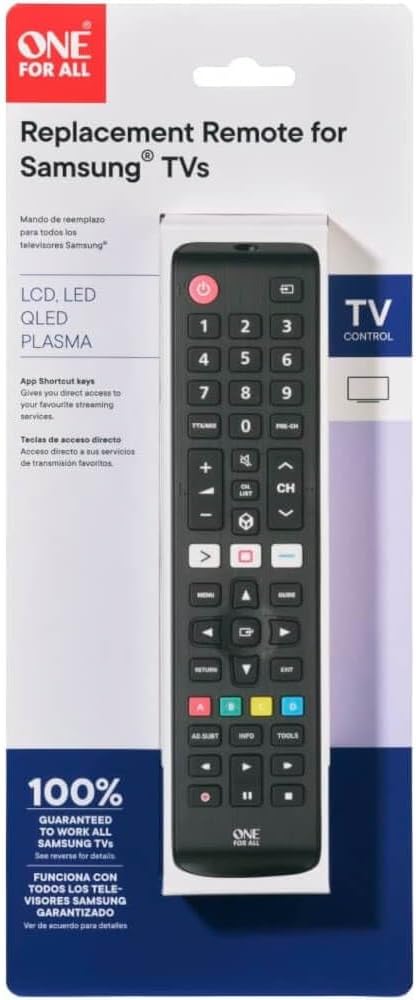
Image: The One For All URC4810 remote control displayed within its retail packaging, showing the product name and key features.
Поставување
1. Инсталација на батерија
The URC4810 remote control requires 2x AAA batteries (not included). Follow these steps to install them:
- Отворете го капакот на одделот за батерии на задниот дел од далечинскиот управувач.
- Вметнете две AAA батерии, осигурувајќи се дека позитивните (+) и негативните (-) терминали се порамнети со ознаките во преградата.
- Добро затворете го капакот на преградата за батерии.

Слика: Страничен професионалецfile view of the One For All URC4810 remote control, illustrating its ergonomic design and the location of the battery compartment seam.
2. SimpleSet Setup
The URC4810 remote features SimpleSet, allowing for quick setup in under 30 seconds. No codes are needed.
- Проверете дали вашиот Samsung телевизор е вклучен.
- Point the One For All remote at your Samsung TV.
- Притиснете и задржете го Моќ button on the One For All remote until your TV turns off. This may take a few seconds.
- Once the TV turns off, release the Моќ button immediately. The remote is now set up.
- Test other functions like Volume Up/Down and Channel Up/Down to confirm full functionality.

Слика: Директен фронт view на далечинскиот управувач One For All URC4810, прикажаноasing its full button layout, including the power button at the top.
3. Learning Feature (Optional)
The learning feature allows you to copy functions from your original Samsung TV remote to the URC4810. This is useful for any specific buttons not covered by the default setup.
- Place the One For All remote and your original Samsung remote on a flat surface, facing each other, about 1-2 inches apart.
- On the One For All remote, press and hold the ПОСТАВУВАЊЕ button (if available, otherwise refer to the specific manual for learning mode entry, typically a combination of buttons like SHIFT + УЧЕТЕ or similar) until the LED blinks twice and then stays lit.
- Press the button on the One For All remote that you wish to program (e.g., a specific app button). The LED will blink rapidly.
- On your original Samsung remote, press the corresponding button you want to copy. The LED on the One For All remote will blink twice to confirm successful learning.
- Repeat steps 3 and 4 for any other buttons you wish to learn.
- За да излезете од режимот на учење, притиснете го копчето ПОСТАВУВАЊЕ button again (or the button used to enter learning mode). The LED will turn off.

Слика: Аголна view на далечинскиот управувач One For All URC4810, прикажаноasing its comfortable grip and button placement.
Упатства за работа
Once set up, the URC4810 remote functions like your original Samsung TV remote. Here are some common button functions:
- Вклучување (црвено копче): Го вклучува или исклучува телевизорот.
- Копчиња со броеви (0-9): Директен избор на канали.
- Јачина на звук нагоре/надолу (+/-): Ја прилагодува јачината на телевизорот.
- Канал нагоре/надолу (CH +/-): Менува ТВ канали.
- Исклучи звук: Го пригушува или вклучува звукот на телевизорот.
- Мени: Пристапува до главното мени на телевизорот.
- Navigation (Arrow Buttons): Се движи низ менија и опции.
- Во ред/Внесете: Ги потврдува изборите.
- Враќање/Назад: Се враќа на претходниот екран или мени.
- Излез: Излегува од тековното мени или апликација.
- Копчиња во боја (црвена, зелена, жолта, сина): Функционалноста варира во зависност од моделот на телевизорот и неговата намена.
- Smart Hub/Home: Accesses the TV's Smart Hub or Home screen.
Одржување
Чистење
To clean your remote control, use a soft, dry cloth. Do not use abrasive cleaners, waxes, or solvents. Avoid spraying liquids directly onto the remote.
Замена на батеријата
If the remote control's range decreases or buttons become unresponsive, it may be time to replace the batteries. Follow the "Battery Installation" steps in the Setup section to replace the old batteries with new AAA alkaline batteries.
Решавање проблеми
| Проблем |
Можна причина |
Решение |
| Remote does not work after setup. |
Incorrect setup or dead batteries. |
Ensure batteries are correctly inserted and charged. Repeat the SimpleSet process carefully. |
| Некои копчиња не работат. |
Button not recognized by SimpleSet or not learned. |
Use the Learning Feature to copy the function from your original remote. Ensure the remote is pointed directly at the TV. |
| Дометот на далечинскиот управувач е слаб. |
Слаби батерии или пречки. |
Replace batteries. Ensure there are no obstructions between the remote and the TV's IR receiver. |
| LED диодата на далечинскиот управувач не свети. |
No batteries or incorrect battery insertion. |
Check battery orientation and ensure they are new and correctly inserted. |
Спецификации
| Бренд |
Еден за сите |
| Број на модел |
URC4810 |
| Компатибилни уреди |
Samsung телевизори |
| Извор на енергија |
Battery Powered (2x AAA, not included) |
| Боја |
White (Note: Product images show black, but specification states white. Please refer to product packaging for exact color.) |
| Тежина на ставката |
3.52 унци (приближно 100 грама) |
| Димензии на производот (Д x Ш x В) |
Approx. 4"D x 3"W x 1"H (Note: Dimensions may refer to packaging or a specific part. Actual remote dimensions are typically longer and narrower.) |
| UPC |
810209030940 |
Гаранција и поддршка
One For All products are designed and manufactured to the highest standards. For information regarding warranty, technical support, or frequently asked questions, please visit the official One For All webстраницата или директно контактирајте ја нивната служба за корисници.
For the most up-to-date support information, please refer to the manufacturer's official channels:
- Еден за сите Webсајт: www.oneforall.com
- Услуга за клиенти: Видете на webстраница за регионални контакт информации.
Вовед
The One For All URC4810 is a dedicated replacement remote control designed specifically for Samsung televisions. This remote offers 100% compatibility with all Samsung TV models, providing a seamless and intuitive user experience. It features a quick setup process called SimpleSet and a learning function to transfer commands from your original remote, ensuring you retain all necessary functionalities.
Информации за безбедност
- Чувајте ги батериите подалеку од дофат на деца.
- Не мешајте стари и нови батерии или различни типови на батерии.
- Remove batteries if the remote control is not used for an extended period.
- Avoid exposing the remote control to direct sunlight, heat sources, or excessive moisture.
- Не обидувајте се да го расклопите или модифицирате далечинскиот управувач.
Содржина на пакетот
Ве молиме проверете го пакувањето за следните ставки:
- One For All Samsung TV Replacement Remote Control (URC4810)
Image: The One For All URC4810 remote control displayed within its retail packaging, showing the product name and key features.
Поставување
1. Инсталација на батерија
The URC4810 remote control requires 2x AAA batteries (not included). Follow these steps to install them:
- Отворете го капакот на одделот за батерии на задниот дел од далечинскиот управувач.
- Вметнете две AAA батерии, осигурувајќи се дека позитивните (+) и негативните (-) терминали се порамнети со ознаките во преградата.
- Добро затворете го капакот на преградата за батерии.
Слика: Страничен професионалецfile view of the One For All URC4810 remote control, illustrating its ergonomic design and the location of the battery compartment seam.
2. SimpleSet Setup
The URC4810 remote features SimpleSet, allowing for quick setup in under 30 seconds. No codes are needed.
- Проверете дали вашиот Samsung телевизор е вклучен.
- Point the One For All remote at your Samsung TV.
- Притиснете и задржете го Моќ button on the One For All remote until your TV turns off. This may take a few seconds.
- Once the TV turns off, release the Моќ button immediately. The remote is now set up.
- Test other functions like Volume Up/Down and Channel Up/Down to confirm full functionality.
Слика: Директен фронт view на далечинскиот управувач One For All URC4810, прикажаноasing its full button layout, including the power button at the top.
3. Learning Feature (Optional)
The learning feature allows you to copy functions from your original Samsung TV remote to the URC4810. This is useful for any specific buttons not covered by the default setup.
- Place the One For All remote and your original Samsung remote on a flat surface, facing each other, about 1-2 inches apart.
- On the One For All remote, press and hold the ПОСТАВУВАЊЕ button (if available, otherwise refer to the specific manual for learning mode entry, typically a combination of buttons like SHIFT + УЧЕТЕ or similar) until the LED blinks twice and then stays lit.
- Press the button on the One For All remote that you wish to program (e.g., a specific app button). The LED will blink rapidly.
- On your original Samsung remote, press the corresponding button you want to copy. The LED on the One For All remote will blink twice to confirm successful learning.
- Repeat steps 3 and 4 for any other buttons you wish to learn.
- За да излезете од режимот на учење, притиснете го копчето ПОСТАВУВАЊЕ button again (or the button used to enter learning mode). The LED will turn off.
Слика: Аголна view на далечинскиот управувач One For All URC4810, прикажаноasing its comfortable grip and button placement.
Упатства за работа
Once set up, the URC4810 remote functions like your original Samsung TV remote. Here are some common button functions:
- Вклучување (црвено копче): Го вклучува или исклучува телевизорот.
- Копчиња со броеви (0-9): Директен избор на канали.
- Јачина на звук нагоре/надолу (+/-): Ја прилагодува јачината на телевизорот.
- Канал нагоре/надолу (CH +/-): Менува ТВ канали.
- Исклучи звук: Го пригушува или вклучува звукот на телевизорот.
- Мени: Пристапува до главното мени на телевизорот.
- Navigation (Arrow Buttons): Се движи низ менија и опции.
- Во ред/Внесете: Ги потврдува изборите.
- Враќање/Назад: Се враќа на претходниот екран или мени.
- Излез: Излегува од тековното мени или апликација.
- Копчиња во боја (црвена, зелена, жолта, сина): Функционалноста варира во зависност од моделот на телевизорот и неговата намена.
- Smart Hub/Home: Accesses the TV's Smart Hub or Home screen.
Одржување
Чистење
To clean your remote control, use a soft, dry cloth. Do not use abrasive cleaners, waxes, or solvents. Avoid spraying liquids directly onto the remote.
Замена на батеријата
If the remote control's range decreases or buttons become unresponsive, it may be time to replace the batteries. Follow the "Battery Installation" steps in the Setup section to replace the old batteries with new AAA alkaline batteries.
Решавање проблеми
| Проблем |
Можна причина |
Решение |
| Remote does not work after setup. |
Incorrect setup or dead batteries. |
Ensure batteries are correctly inserted and charged. Repeat the SimpleSet process carefully. |
| Некои копчиња не работат. |
Button not recognized by SimpleSet or not learned. |
Use the Learning Feature to copy the function from your original remote. Ensure the remote is pointed directly at the TV. |
| Дометот на далечинскиот управувач е слаб. |
Слаби батерии или пречки. |
Replace batteries. Ensure there are no obstructions between the remote and the TV's IR receiver. |
| LED диодата на далечинскиот управувач не свети. |
No batteries or incorrect battery insertion. |
Check battery orientation and ensure they are new and correctly inserted. |
Спецификации
| Бренд |
Еден за сите |
| Број на модел |
URC4810 |
| Компатибилни уреди |
Samsung телевизори |
| Извор на енергија |
Battery Powered (2x AAA, not included) |
| Боја |
White (Note: Product images show black, but specification states white. Please refer to product packaging for exact color.) |
| Тежина на ставката |
3.52 унци (приближно 100 грама) |
| Димензии на производот (Д x Ш x В) |
Approx. 4"D x 3"W x 1"H (Note: Dimensions may refer to packaging or a specific part. Actual remote dimensions are typically longer and narrower.) |
| UPC |
810209030940 |
Гаранција и поддршка
One For All products are designed and manufactured to the highest standards. For information regarding warranty, technical support, or frequently asked questions, please visit the official One For All webстраницата или директно контактирајте ја нивната служба за корисници.
For the most up-to-date support information, please refer to the manufacturer's official channels:
- Еден за сите Webсајт: www.oneforall.com
- Услуга за клиенти: Видете на webстраница за регионални контакт информации.
Вовед
The One For All URC4810 is a dedicated replacement remote control designed specifically for Samsung televisions. This remote offers 100% compatibility with all Samsung TV models, providing a seamless and intuitive user experience. It features a quick setup process called SimpleSet and a learning function to transfer commands from your original remote, ensuring you retain all necessary functionalities.
Информации за безбедност
- Чувајте ги батериите подалеку од дофат на деца.
- Не мешајте стари и нови батерии или различни типови на батерии.
- Remove batteries if the remote control is not used for an extended period.
- Avoid exposing the remote control to direct sunlight, heat sources, or excessive moisture.
- Не обидувајте се да го расклопите или модифицирате далечинскиот управувач.
Содржина на пакетот
Ве молиме проверете го пакувањето за следните ставки:
- One For All Samsung TV Replacement Remote Control (URC4810)
Image: The One For All URC4810 remote control displayed within its retail packaging, showing the product name and key features.
Поставување
1. Инсталација на батерија
The URC4810 remote control requires 2x AAA batteries (not included). Follow these steps to install them:
- Отворете го капакот на одделот за батерии на задниот дел од далечинскиот управувач.
- Вметнете две AAA батерии, осигурувајќи се дека позитивните (+) и негативните (-) терминали се порамнети со ознаките во преградата.
- Добро затворете го капакот на преградата за батерии.
Слика: Страничен професионалецfile view of the One For All URC4810 remote control, illustrating its ergonomic design and the location of the battery compartment seam.
2. SimpleSet Setup
The URC4810 remote features SimpleSet, allowing for quick setup in under 30 seconds. No codes are needed.
- Проверете дали вашиот Samsung телевизор е вклучен.
- Point the One For All remote at your Samsung TV.
- Притиснете и задржете го Моќ button on the One For All remote until your TV turns off. This may take a few seconds.
- Once the TV turns off, release the Моќ button immediately. The remote is now set up.
- Test other functions like Volume Up/Down and Channel Up/Down to confirm full functionality.
Слика: Директен фронт view на далечинскиот управувач One For All URC4810, прикажаноasing its full button layout, including the power button at the top.
3. Learning Feature (Optional)
The learning feature allows you to copy functions from your original Samsung TV remote to the URC4810. This is useful for any specific buttons not covered by the default setup.
- Place the One For All remote and your original Samsung remote on a flat surface, facing each other, about 1-2 inches apart.
- On the One For All remote, press and hold the ПОСТАВУВАЊЕ button (if available, otherwise refer to the specific manual for learning mode entry, typically a combination of buttons like SHIFT + УЧЕТЕ or similar) until the LED blinks twice and then stays lit.
- Press the button on the One For All remote that you wish to program (e.g., a specific app button). The LED will blink rapidly.
- On your original Samsung remote, press the corresponding button you want to copy. The LED on the One For All remote will blink twice to confirm successful learning.
- Repeat steps 3 and 4 for any other buttons you wish to learn.
- За да излезете од режимот на учење, притиснете го копчето ПОСТАВУВАЊЕ button again (or the button used to enter learning mode). The LED will turn off.
Слика: Аголна view на далечинскиот управувач One For All URC4810, прикажаноasing its comfortable grip and button placement.
Упатства за работа
Once set up, the URC4810 remote functions like your original Samsung TV remote. Here are some common button functions:
- Вклучување (црвено копче): Го вклучува или исклучува телевизорот.
- Копчиња со броеви (0-9): Директен избор на канали.
- Јачина на звук нагоре/надолу (+/-): Ја прилагодува јачината на телевизорот.
- Канал нагоре/надолу (CH +/-): Менува ТВ канали.
- Исклучи звук: Го пригушува или вклучува звукот на телевизорот.
- Мени: Пристапува до главното мени на телевизорот.
- Navigation (Arrow Buttons): Се движи низ менија и опции.
- Во ред/Внесете: Ги потврдува изборите.
- Враќање/Назад: Се враќа на претходниот екран или мени.
- Излез: Излегува од тековното мени или апликација.
- Копчиња во боја (црвена, зелена, жолта, сина): Функционалноста варира во зависност од моделот на телевизорот и неговата намена.
- Smart Hub/Home: Accesses the TV's Smart Hub or Home screen.
Одржување
Чистење
To clean your remote control, use a soft, dry cloth. Do not use abrasive cleaners, waxes, or solvents. Avoid spraying liquids directly onto the remote.
Замена на батеријата
If the remote control's range decreases or buttons become unresponsive, it may be time to replace the batteries. Follow the "Battery Installation" steps in the Setup section to replace the old batteries with new AAA alkaline batteries.
Решавање проблеми
| Проблем |
Можна причина |
Решение |
| Remote does not work after setup. |
Incorrect setup or dead batteries. |
Ensure batteries are correctly inserted and charged. Repeat the SimpleSet process carefully. |
| Некои копчиња не работат. |
Button not recognized by SimpleSet or not learned. |
Use the Learning Feature to copy the function from your original remote. Ensure the remote is pointed directly at the TV. |
| Дометот на далечинскиот управувач е слаб. |
Слаби батерии или пречки. |
Replace batteries. Ensure there are no obstructions between the remote and the TV's IR receiver. |
| LED диодата на далечинскиот управувач не свети. |
No batteries or incorrect battery insertion. |
Check battery orientation and ensure they are new and correctly inserted. |
Спецификации
| Бренд |
Еден за сите |
| Број на модел |
URC4810 |
| Компатибилни уреди |
Samsung телевизори |
| Извор на енергија |
Battery Powered (2x AAA, not included) |
| Боја |
White (Note: Product images show black, but specification states white. Please refer to product packaging for exact color.) |
| Тежина на ставката |
3.52 унци (приближно 100 грама) |
| Димензии на производот (Д x Ш x В) |
Approx. 4"D x 3"W x 1"H (Note: Dimensions may refer to packaging or a specific part. Actual remote dimensions are typically longer and narrower.) |
| UPC |
810209030940 |
Гаранција и поддршка
One For All products are designed and manufactured to the highest standards. For information regarding warranty, technical support, or frequently asked questions, please visit the official One For All webстраницата или директно контактирајте ја нивната служба за корисници.
For the most up-to-date support information, please refer to the manufacturer's official channels:
- Еден за сите Webсајт: www.oneforall.com
- Услуга за клиенти: Видете на webстраница за регионални контакт информации.


