Вовед
Thank you for choosing the ROCAM CR1023 7-Inch Digital Alarm Clock. This manual provides detailed instructions for setting up, operating, and maintaining your new alarm clock. Please read this manual thoroughly before use to ensure optimal performance and longevity of your device.

The ROCAM CR1023 digital alarm clock features a large blue LED display, with a smartphone and wireless earbuds charging via its integrated USB ports.
Содржина на пакетот
Ве молиме проверете го пакувањето за следните ставки:
- 1 x ROCAM CR1023 Digital Alarm Clock
- 1 x Power Adapter with Cable (AC 100-240V compatible)
- 1 x Упатство за употреба

The package includes the ROCAM CR1023 digital alarm clock, a power adapter with cable, and a user manual.
Карактеристики на производот
- 7-Inch Large LED Display: Clear and bold digital time display.
- Двојни аларми: Set two independent alarms for different wake-up times.
- Функција за одложување: Provides an additional 9 minutes of sleep.
- Adjustable Brightness (Dimmer): 0-100% dimming for display.
- Ноќно светло со контрола на допир: Integrated night light with adjustable brightness.
- USB и порти за полнење од тип C: Conveniently charge your mobile devices (5V, 1A output).
- Прилагодување на јачината на звукот на 7 нивоа: Customize alarm volume.
- 12/24 Hour & DST Mode: Switch between time formats and activate Daylight Saving Time.
- Резервна копија на батеријата: Ги задржува поставките за време и аларм за време на исклучување на струјатаtages (requires 2 x AAA batteries, not included).
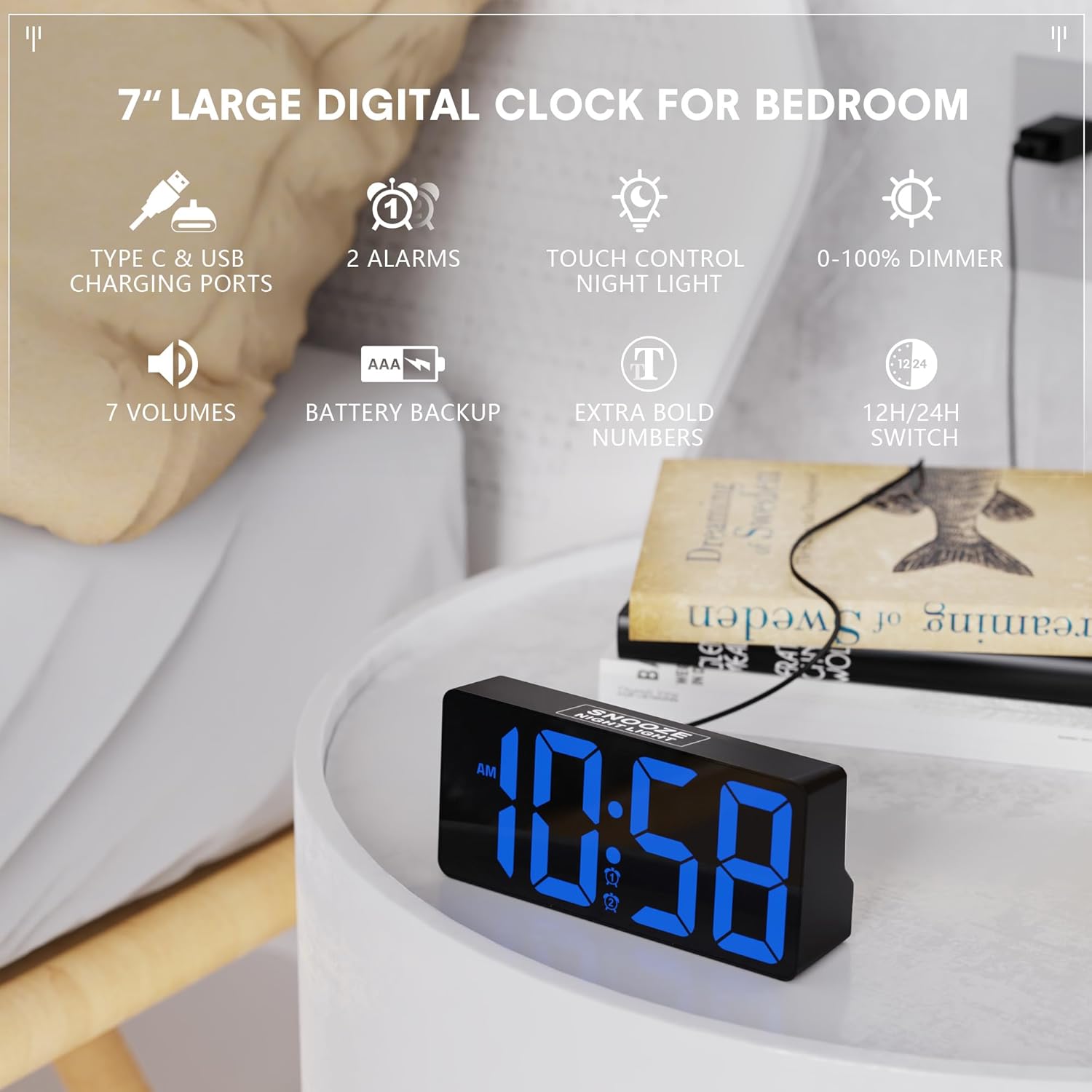
This image illustrates the ROCAM CR1023 digital alarm clock's main features, including its 7-inch display, dual alarms, touch-controlled night light, and USB charging capabilities.
Поставување
1. Поврзување за напојување
- Unpack the alarm clock and all accessories.
- Connect the provided power adapter cable to the DC IN port on the back of the clock.
- Plug the power adapter into a standard AC 100-240V wall outlet. The clock display will light up.
2. Battery Backup Installation (Optional but Recommended)
The battery backup function is designed to save your time and alarm settings during a power outage. The display will not remain on when operating on battery backup alone.
- Пронајдете го преградата за батерии на дното од часовникот.
- Отворете го капакот на преградата за батерии.
- Insert 2 x 1.5V AAA batteries (not included) according to the polarity markings (+/-).
- Добро затворете го капакот на преградата за батерии.
Упатства за работа
1. Поставување на времето
- Притиснете и задржете го TIME/DST button on the back of the clock until the hour digits flash.
- Користете го + or - копчиња за прилагодување на часот.
- Притиснете го TIME/DST button again to confirm the hour and move to minute setting. The minute digits will flash.
- Користете го + or - копчиња за прилагодување на минутите.
- Притиснете го TIME/DST Притиснете го копчето уште еднаш за да потврдите и да излезете од режимот за поставување време.
2. Поставување аларми (Аларм 1 и Аларм 2)
Часовникот поддржува два независни аларми.
- Притиснете и задржете го АЛАРМ 1 копче (за Аларм 1) или АЛАРМ 2 button (for Alarm 2) on the back until the alarm hour digits flash.
- Користете го + or - копчиња за прилагодување на часот на алармот.
- Press the respective alarm button again to confirm the hour and move to minute setting. The alarm minute digits will flash.
- Користете го + or - копчиња за прилагодување на минутите на алармот.
- Press the respective alarm button one more time to confirm and exit alarm setting mode.
3. Activating/Deactivating Alarms
- Накратко притиснете го АЛАРМ 1 or АЛАРМ 2 button to toggle the alarm on or off.
- An alarm icon will appear on the display when the alarm is active.

The dual alarm feature allows for two separate wake-up times, and the snooze function provides an additional 9 minutes of sleep.
4. Функција за одложување
When an alarm sounds, touch the SNOOZE/NIGHT LIGHT area on the top of the clock to activate the snooze function. The alarm will pause for 9 minutes and then sound again.
5. Display Brightness Adjustment (Dimmer)
Завртете го ПОТРАГО knob on the back of the clock to adjust the display brightness from 0% (off) to 100% (brightest).

The clock offers a 0-100% adjustable dimming feature, allowing users to set the display brightness from completely off to high, suitable for any environment.
6. Функција за ноќно светло
Допрете го SNOOZE/NIGHT LIGHT area on the top of the clock to turn the night light on or off. Hold the touch area to adjust the brightness of the night light.
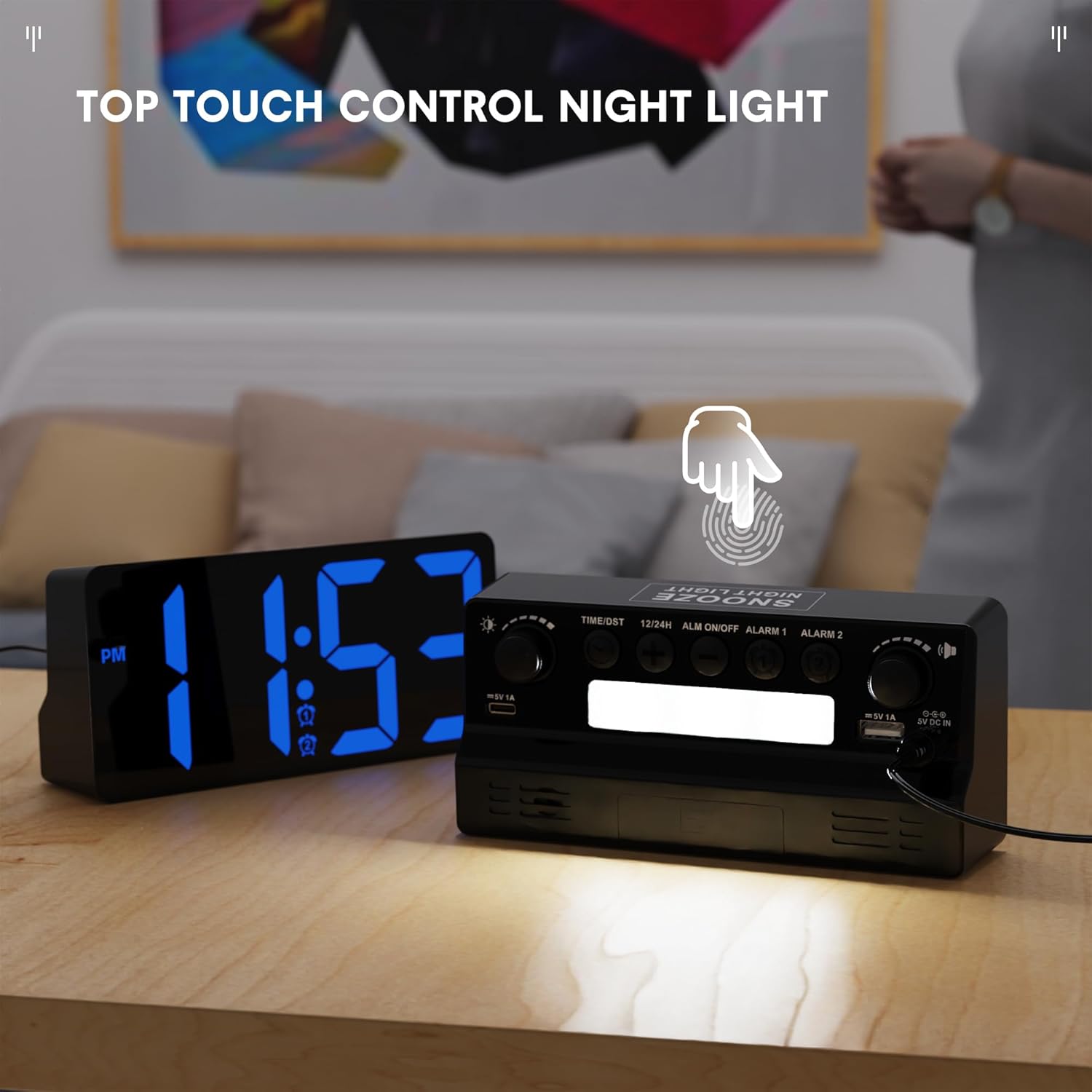
The integrated night light can be activated and controlled via a touch-sensitive area on the top of the clock, providing soft illumination.
7. 12/24 Hour Format and DST
- Накратко притиснете го 12/24 ч button on the back to switch between 12-hour and 24-hour time formats.
- Накратко притиснете го TIME/DST button to activate or deactivate Daylight Saving Time (DST). An indicator will appear on the display when DST is active.

Users can easily switch between 12-hour and 24-hour time formats, and activate Daylight Saving Time (DST) mode as needed.
Using the USB and Type-C Charging Ports
The ROCAM CR1023 features both a standard USB-A port and a Type-C port (5V, 1A output) for charging your mobile devices.
- Connect your device's charging cable to either the USB-A or Type-C port on the back of the clock.
- Ensure the clock is powered via the AC adapter for the charging ports to function.
- The charging ports are for convenience and provide standard 5V/1A output. Charging speed may vary depending on your device.

The clock provides convenient charging for mobile devices through its integrated USB and Type-C ports, as shown with two smartphones connected.
Спецификации
| Карактеристика | Детал |
|---|---|
| Модел | CR1023 |
| Приказ | 7-inch LED HD Display |
| Влез на адаптер за наизменична струја | AC 100-240V |
| Покажете го затемнетиот | Прилагодлив 0-100%. |
| USB порти за полнење | Type C & USB (5V, 1A) |
| Резервна батерија | 2 x 1.5V AAA батерии (не се вклучени) |
| Тежина на производот | Прибл. 0.23 кг (0.5 фунти) |
| Димензии на производот | Приближно 16.5 x 7.6 x 4.5 см (6.5 x 3 x 1.77 инчи) |
Одржување
- Чистење: Избришете го часовникот со мека, сува крпа. Не користете абразивни средства за чистење или растворувачи.
- Поставување: Place the clock on a stable, flat surface away from direct sunlight, heat sources, and moisture.
- Замена на батерија: If using battery backup, replace AAA batteries annually or when they are depleted to ensure settings are retained during power interruptions.
Решавање проблеми
- Clock display is blank:
- Ensure the power adapter is securely plugged into both the clock and a working wall outlet. If using battery backup during a power outage, the display will be blank, but settings are retained.
- Алармот не се огласува:
- Check if the alarm is activated (alarm icon visible on display). Ensure the alarm volume is not set to minimum. Verify the alarm time is set correctly.
- USB/Type-C charging not working:
- Confirm the clock is connected to AC power. Check if the charging cable is properly connected to both the clock and your device. Ensure your device is compatible with 5V/1A charging.
- Времето е неточно по исклучувањето на струјатаtage:
- If backup batteries were not installed or were depleted, the time may reset. Re-set the time manually. Ensure fresh AAA batteries are installed for future backup.
Гаранција и поддршка
За информации за гаранцијата или техничка поддршка, ве молиме погледнете ги контакт информациите дадени со вашата нарачка или посетете ја официјалната ROCAM webлокација. Чувајте ја сметката како доказ за купување за гаранциски побарувања.


