1. Вовед
This manual provides comprehensive instructions for the installation, operation, and maintenance of your ASRock Intel Arc A380 Challenger ITX 6GB OC Graphics Card. Please read this manual thoroughly before using the product to ensure proper functionality and to prevent damage. Keep this manual for future reference.
2. Информации за безбедност
Always observe the following safety precautions when handling and installing your graphics card:
- Пред инсталацијата, проверете дали вашиот компјутерски систем е исклучен од струја и исклучен од штекерот.
- Discharge any static electricity from your body by touching a grounded metal object (e.g., the computer chassis) before handling components.
- Avoid touching the gold-plated connector pins on the graphics card.
- Install the graphics card in a well-ventilated area to prevent overheating.
- Не ја изложувајте графичката картичка на влага или екстремни температури.
3. Содржина на пакетот
Проверете дали сите артикли се присутни во пакувањето на вашиот производ:
- ASRock Intel Arc A380 Challenger ITX 6GB OC Graphics Card
- Водич за брза инсталација
4. Производот завршиview
The ASRock Intel Arc A380 Challenger ITX 6GB OC Graphics Card is designed for compact systems, offering capable graphics performance in a single-slot ITX form factor. It features Intel's Arc A380 GPU with 6GB of GDDR6 memory and a 2250 MHz clock speed. Key features include a striped axial fan, 0dB silent cooling, and support for modern display technologies.

Figure 4.1: ASRock Intel Arc A380 Challenger ITX 6GB OC Graphics Card
4.1. Димензии
This graphics card features a compact design suitable for ITX systems.
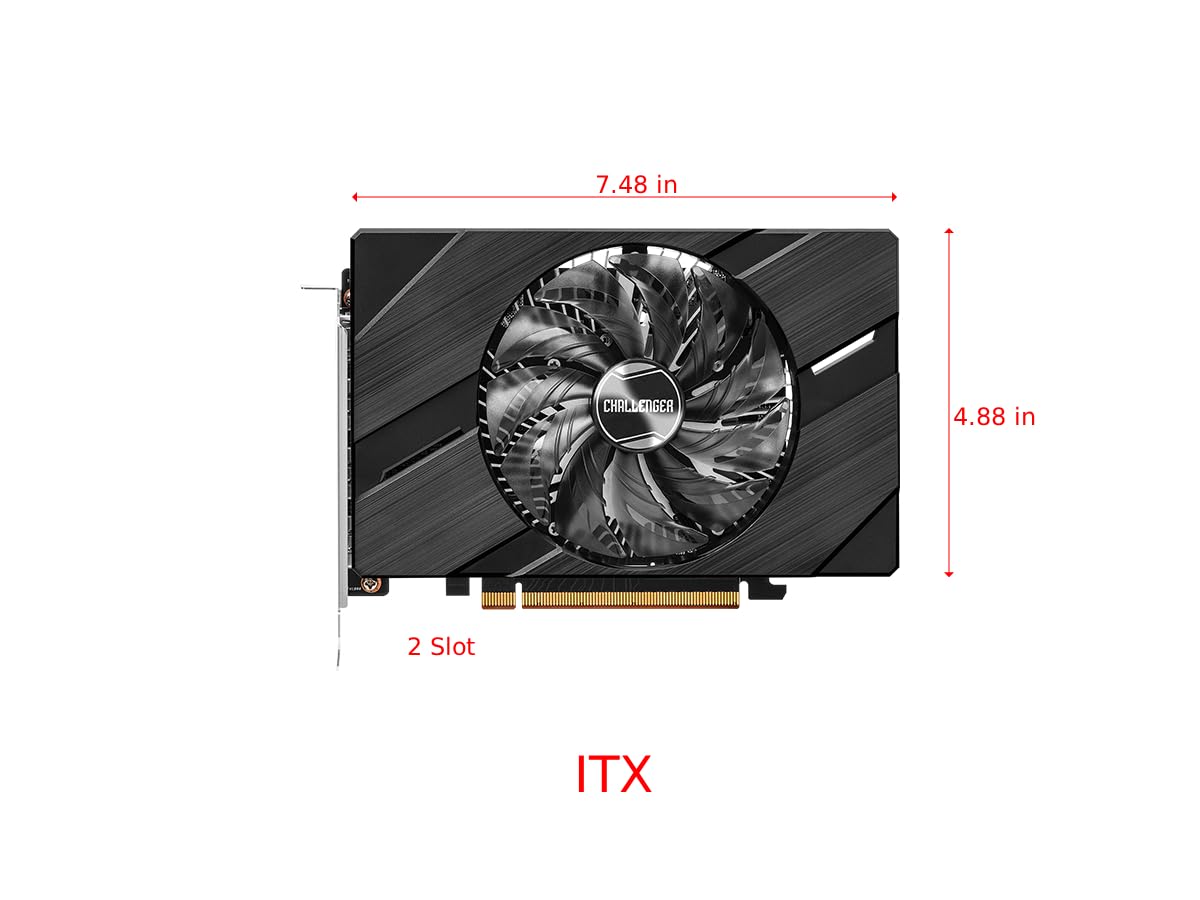
Figure 4.2: Graphics Card Dimensions (Approx. 7.48 in x 4.88 in, 2-slot)
4.2. Display Outputs
The card provides multiple display outputs for versatile connectivity.
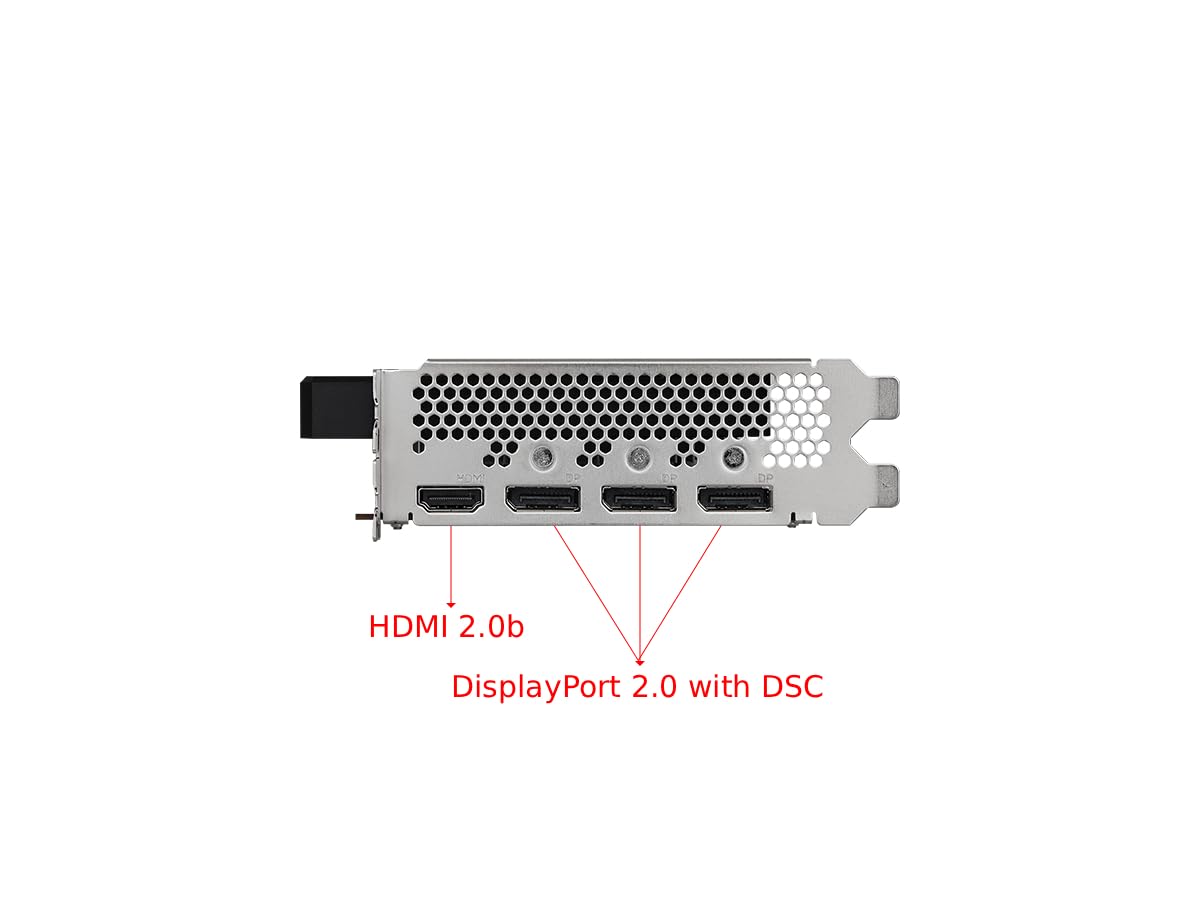
Figure 4.3: Display Outputs (1x HDMI 2.0b, 3x DisplayPort 2.0 with DSC)
4.3. Систем за ладење
The ASRock custom Striped Axial Fan design enhances airflow for optimal cooling. The 0dB Silent Cooling technology ensures the fans stop spinning under light workloads for quiet operation.

Figure 4.4: Striped Axial Fan for enhanced airflow

Figure 4.5: 0dB Silent Cooling: Fans stop under light workloads
4.4. Официјално видео за производот
Видео 4.1: Надview of Intel ARC Graphics Cards by ASRock USA. This video provides a general introduction to the Intel ARC graphics card series.
5. Поставување
5.1. Физичка инсталација
- Подгответе го вашиот систем: Исклучете го компјутерот и исклучете ги сите кабли. Отворете го куќиштето на компјутерот.
- Лоцирајте PCIe слот: Идентификувајте достапен PCI Express 4.0 x16 слот на вашата матична плоча.
- Remove slot cover: Remove the corresponding slot cover from your computer case.
- Вметнете ја графичката картичка: Внимателно порамнете ја графичката картичка со PCIe слотот и цврсто притиснете ја додека не се смести безбедно. Осигурајте се дека клипот за држење на PCIe слотот е заклучен на своето место.
- Обезбедете ја картичката: Fasten the graphics card to the computer case with a screw.
- Поврзете напојување: Connect the single 8-pin PCIe power connector from your power supply to the graphics card. Ensure your power supply meets the recommended 500W minimum.
- Close case: Затворете го куќиштето на компјутерот и повторно поврзете ги сите кабли.
5.2. Инсталација на драјвери
After physical installation, you must install the latest drivers for your graphics card:
- Вклучете го вашиот компјутер.
- Посетете го официјалниот ASRock website or Intel's support webсајт.
- Navigate to the support section and locate the drivers for the Intel Arc A380 series.
- Download the latest graphics drivers for your operating system.
- Run the installer and follow the on-screen instructions. A system restart may be required.
6. Работење
Once drivers are installed, your ASRock Intel Arc A380 Challenger ITX graphics card is ready for use. Connect your display(s) to the available DisplayPort 2.0 or HDMI 2.0b ports. You can configure display settings, resolution, and refresh rates through your operating system's display settings or the Intel Arc Control software.
7. Одржување
Редовното одржување помага да се обезбеди долготрајност и оптимални перформанси на вашата графичка картичка:
- Отстранување прашина: Periodically clean dust from the fan and heatsink using compressed air. Ensure the system is powered off and unplugged before cleaning.
- Ажурирања на возачот: Keep your graphics drivers updated to the latest version. New drivers often include performance improvements, bug fixes, and compatibility enhancements.
- Следење на температурата: Use monitoring software to keep an eye on the GPU temperature, especially during heavy workloads. While the 0dB cooling feature is efficient, ensuring good case airflow is crucial.
8 Смена на проблеми
Ако наидете на проблеми со вашата графичка картичка, разгледајте ги следниве чекори за решавање проблеми:
- Нема излез за прикажување:
- Уверете се дека графичката картичка е целосно сместена во PCIe слотот.
- Verify that the 8-pin power connector is securely attached.
- Check that your monitor cable is correctly connected to the graphics card and the monitor.
- Try a different display output port or cable.
- Driver Issues/Instability:
- Perform a clean installation of the latest graphics drivers. Uninstall previous drivers completely before installing new ones.
- Ensure your motherboard BIOS/UEFI is updated to the latest version, as this can improve compatibility.
- Verify that Resizable BAR (ReBAR) is enabled in your system's BIOS/UEFI for optimal performance with Intel Arc GPUs.
- Прегревање:
- Обезбедете доволен проток на воздух во куќиштето на вашиот компјутер.
- Clean any dust buildup from the graphics card's fan and heatsink.
- Check that the fan is spinning correctly under load.
9. Спецификации
| Карактеристика | Спецификација |
|---|---|
| Графички копроцесор | Intel Arc A380 |
| Видео меморија | 6 GB GDDR6 |
| Брзина на меморија | 15.5 Gbps |
| Часовник на моторот | 2250 MHz |
| Максимална резолуција на екранот | 7680x4320 пиксели (8K) |
| Интерфејс за видео излез | 3x DisplayPort 2.0, 1x HDMI 2.0b |
| Број на модел на ставка | 90-GA3KZZ-00UANF |
| Тежина на ставката | 1.32 фунти |
| Димензии на производот | 1.1 x 9.7 x 0.04 инчи |
| Препорачана PSU | 500 W |
10. Гаранција и поддршка
ASRock provides a manufacturer's warranty for this product. Please refer to the warranty card included in your package or visit the official ASRock website for detailed warranty terms and conditions. For technical support, driver downloads, and FAQs, please visit the ASRock support page at www.asrock.com/support.asp.
Optional protection plans are available for purchase, offering extended coverage beyond the standard manufacturer's warranty. These plans typically cover 3-year or 4-year durations, or monthly subscription options.