1. Вовед
The FOREO LUNA 4 mini is a compact facial cleansing brush and massager designed to provide a deep and hygienic cleanse. It utilizes T-Sonic pulsations and ultra-soft silicone touchpoints to remove impurities and enhance the absorption of skincare products. This device is suitable for all skin types and features a dual-sided brush head for targeted cleansing.

Image 1: FOREO LUNA 4 mini device in Arctic Blue, both in its transparent packaging and as a standalone unit.
2. Што има во кутијата
Your FOREO LUNA 4 mini package includes the following items:
- LUNA 4 mini Device (Arctic Blue)
- Патувачка торбичка
- USB кабел за полнач
- Водич за брз почеток
- Основен прирачник

Image 2: All components included with the FOREO LUNA 4 mini: the device, a grey travel pouch, a USB charging cable, a quick start guide, and a basic manual.
3. Поставување
Пред првата употреба, преземете ја мобилната апликација FOREO For You за да го отклучите и регистрирате вашиот уред. Следете ги овие едноставни чекори:
- Преземете ја апликацијата FOREO For You на вашиот мобилен телефон.
- Најавете се на вашата сметка или регистрирајте се за нова.
- Додадете уред (на горниот дел од екранот).
- Изберете серија на уреди.
- Притиснете и задржете го копчето за вклучување за да го поврзете вашиот уред со мобилната апликација.
- Пополнете ги информациите за купување.
Вашиот уред сега е подготвен за употреба!
Image 3: Visual guide for unlocking and registering your FOREO LUNA 4 mini using the FOREO For You mobile application. The image shows a QR code for app download and a list of steps.
For app download, visit: www.foreo.com/app
4. Упатства за работа
The LUNA 4 mini combines ultra-hygienic silicone and T-Sonic pulsations to deeply cleanse your face, removing 99.5% of dirt, oil, sweat, and makeup residue in just one minute. This prepares your skin for enhanced absorption of skincare actives.
4.1 Cleansing Mode
- DampИзмијте го лицето и нанесете го преферираното средство за чистење.
- Wet the LUNA 4 mini device.
- Press the universal button to turn on the device. You can customize the device settings on the FOREO app if desired.
- Gently glide the device in circular motions over your face and neck for 1 minute. The dual-sided brush features thinner touch points on the front for facial areas like cheeks, and thicker touch points on the back for oilier T-zone cleansing.
4.2 30-Second Glow Boost Mode
For a quick refresh and instant glow, activate the Glow Boost mode:
- While the device is on, double-press the universal button to activate the 30-second Glow Boost mode.
- Use this mode for a deep exfoliation and to achieve naturally radiant, flawless results.
Image 4: A woman demonstrating the use of the FOREO LUNA 4 mini for facial cleansing, highlighting its ergonomic design and dual-sided brush head.
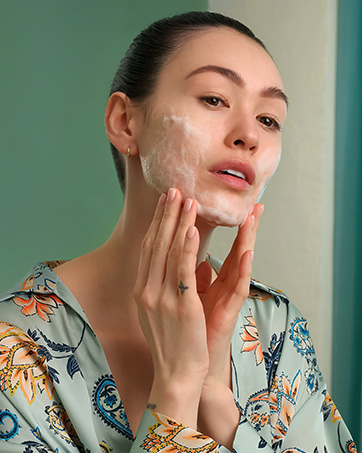
Image 5: A visual representation of the improved 30-second Glow Boost mode, indicating adjustable intensity and massage patterns for superior glow.
4.3 Official Usage Video
Video 1: An official demonstration by FOREO Inc. (US Lux Beauty) on how to use the LUNA 4 mini for daily cleansing and activating the Glow Boost mode.
5. Одржување
The LUNA 4 mini is made from ultra-hygienic silicone, which is 35 times more hygienic than nylon-bristled face brushes. To maintain its effectiveness and hygiene:
- After each use, rinse the device thoroughly with water.
- Оставете уредот целосно да се исуши на воздух.
- Избегнувајте употреба на средства за чистење што содржат алкохол, бензин или ацетон, бидејќи тие можат да го оштетат силиконот.
6 Смена на проблеми
If you encounter any issues with your FOREO LUNA 4 mini, refer to the following troubleshooting steps:
Уредот не се активира
- Батеријата е празна: Полнете го уредот со USB кабелот за полнење до 2 часа додека не се наполни целосно. Потоа рестартирајте го со држење на копчето за вклучување.
- Device cannot be switched off/interface buttons do not respond: The microprocessor may be temporarily malfunctioning. Press and hold the power button to restart the device.
Уредот не се синхронизира со апликацијата FOREO
- Проверете дали вашиот уред е целосно наполнет и дали вашиот Bluetooth е вклучен.
- Исклучете го Bluetooth и повторно вклучете го за да се обидете повторно да се поврзете.
- Затворете ја апликацијата FOREO и повторно отворете ја за да започне процесот одново.
- Delete and reinstall the application; the app may need to be updated.
- Откако ќе ја избришете и повторно ќе ја инсталирате апликацијата, рестартирајте го телефонот.
- Избришете ги колачињата и кеш меморијата на телефонот.
- Осигурете се дека оперативниот систем на вашиот мобилен телефон е ажуриран на најновата верзија.
7. Спецификации
| Карактеристика | Детал |
|---|---|
| Име на моделот | LUNA 4 mini |
| Број на модел на ставка | F1313 |
| Бренд | ФРОЕО |
| Материјал | Силикон |
| Боја | Арктичко сино |
| Извор на енергија | Напојува со батерија |
| Батерии | 1 Потребна е батерија (вклучена) |
| Димензии на производот | 5.98 x 4.65 x 1.77 инчи; 3.07 унци |
8. Гаранција и поддршка
The FOREO LUNA 4 mini comes with a 2-year warranty. For detailed warranty information, product support, or to register your device, please visit the official FOREO webсајт или контактирајте со нивната служба за корисници.
Официјална продавница на FOREO: FOREO продавница на Amazon


